ແນະນຳ
ຂອບໃຈສໍາລັບການຊື້asing the Trevi RR 501 BT Portable Bluetooth, USB, SD, MP3 Stereo Boombox. This manual provides essential information for the safe and efficient use of your new device. Please read these instructions carefully before operating the unit and retain them for future reference.
ຂໍ້ມູນຄວາມປອດໄພ
- ຢ່າເຮັດໃຫ້ເຄື່ອງໃຊ້ນີ້ຖືກຝົນ ຫຼືຄວາມຊຸ່ມຊື່ນ.
- ຫ້າມປິດຊ່ອງລະບາຍອາກາດໃດໆ.
- ກວດໃຫ້ແນ່ໃຈວ່າສາຍໄຟບໍ່ໄດ້ດັກ ຫຼື ຍ່າງຕໍ່.
- ໃຊ້ໄຟລ໌ແນບ/ອຸປະກອນເສີມທີ່ຜູ້ຜະລິດລະບຸໄວ້ເທົ່ານັ້ນ.
- ຖອດປລັກເຄື່ອງໃນເວລາມີພາຍຸຟ້າຜ່າ ຫຼືເມື່ອບໍ່ໄດ້ໃຊ້ເປັນເວລາດົນນານ.
- ອ້າງອີງການບໍລິການທັງໝົດໃຫ້ກັບພະນັກງານບໍລິການທີ່ມີຄຸນວຸດທິ.
- ຢ່າເປີດເຄື່ອງ casing; ບໍ່ມີສ່ວນທີ່ຜູ້ໃຊ້ບໍລິການພາຍໃນ.
ເນື້ອໃນຊຸດ
ກະລຸນາກວດເບິ່ງວ່າລາຍການຕໍ່ໄປນີ້ແມ່ນລວມຢູ່ໃນຊຸດຂອງທ່ານ:
- Trevi RR 501 BT Boombox Unit
- ສາຍໄຟຟ້າ AC
- ຄູ່ມືຜູ້ໃຊ້ (ເອກະສານນີ້)
ສິນຄ້າເກີນview
Familiarize yourself with the main components of your Trevi RR 501 BT Boombox.
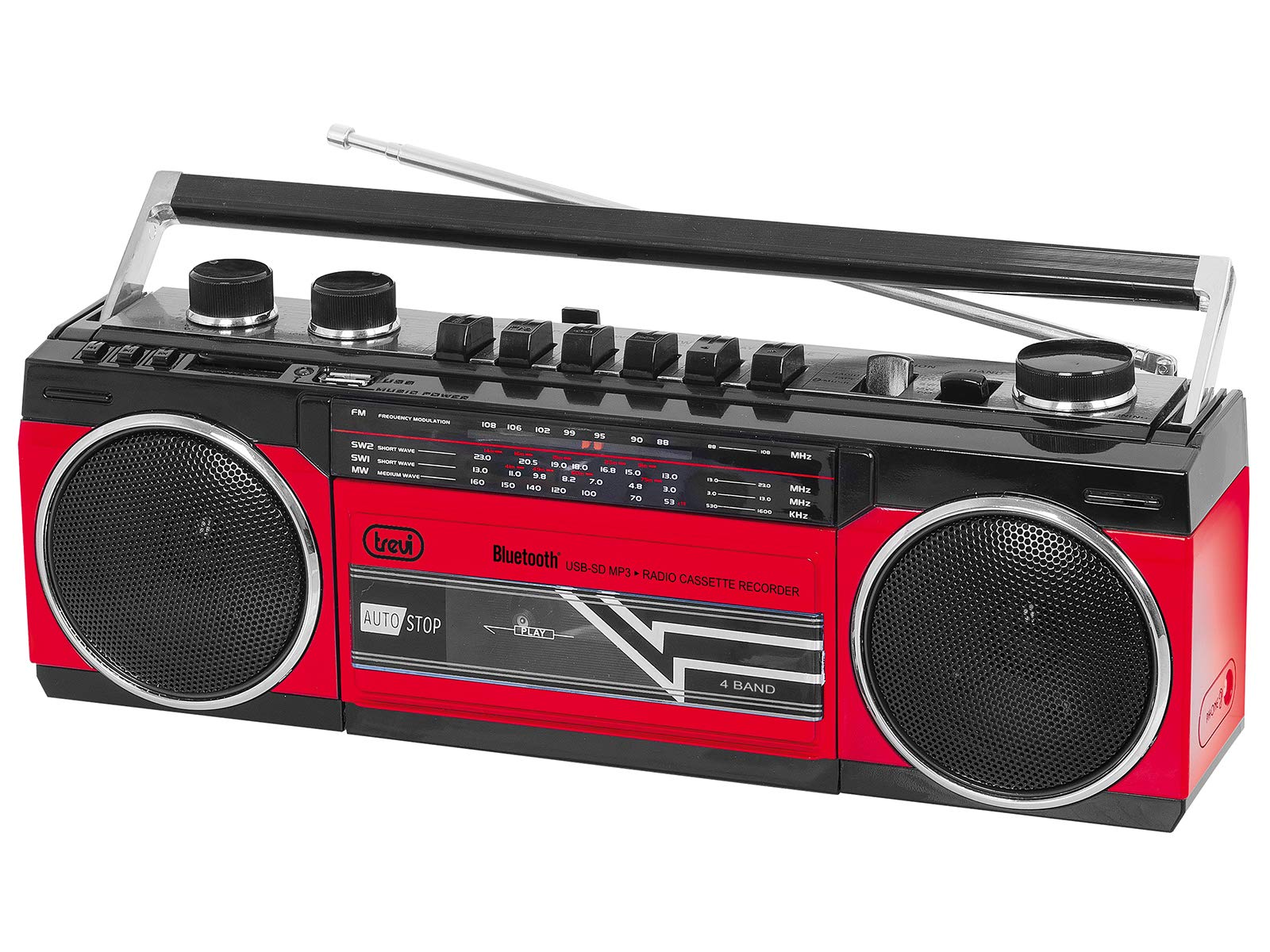
ຮູບທີ 1: ດ້ານໜ້າ view of the Trevi RR 501 BT Boombox, showing the dual speakers, control panel, and cassette deck.

ຮູບທີ 2: ມຸມ view of the Trevi RR 501 BT Boombox, highlighting the side profile ແລະຈັດການ.
ອົງປະກອບທີ່ສໍາຄັນ:
- ລໍາໂພງ: Two integrated stereo speakers.
- ກະດານຄວບຄຸມ: Buttons for playback, mode selection, and tuning.
- ປຸ່ມລະດັບສຽງ: ປັບລະດັບສຽງອອກ.
- ປຸ່ມປັບ: For radio frequency selection.
- ຕົວເລືອກໂModeດ: Switches between Radio, Bluetooth, USB, SD, and Cassette modes.
- ດາດຄາສເຊັດ (Casset Deck): For playing and recording audio cassettes.
- ພອດ USB: ສໍາລັບການຫຼິ້ນ USB flash drive.
- ຊ່ອງໃສ່ບັດ SD: For SD card playback.
- ເສົາອາກາດ: ເສົາອາກາດ Telescopic ສໍາລັບຮັບວິທະຍຸ FM.
- ການປ້ອນຂໍ້ມູນພະລັງງານ: ສຳລັບການເຊື່ອມຕໍ່ສາຍໄຟ AC.
- ຊ່ອງໃສ່ຫມໍ້ໄຟ: (Located on the bottom/rear) For optional battery operation.
ຕັ້ງຄ່າ
ການເຊື່ອມຕໍ່ພະລັງງານ:
- ໄຟຟ້າ AC: Insert the AC power cable into the AC input jack on the back of the unit, then plug the other end into a standard wall outlet.
- ພະລັງງານຫມໍ້ໄຟ (ທາງເລືອກ): Open the battery compartment cover (usually on the bottom or rear). Insert the required number of D-size batteries (not included), ensuring correct polarity (+/-). Close the compartment cover securely.
Note: When using AC power, batteries are automatically disconnected. Remove batteries if the unit will not be used for an extended period.
ຄໍາແນະນໍາການດໍາເນີນງານ
ເປີດ/ປິດ:
To turn the unit on, rotate the ປະລິມານດັງ clockwise until you hear a click. To turn off, rotate the ປະລິມານດັງ counter-clockwise until it clicks off.
Radio Operation (FM):
- ເປີດເຄື່ອງ.
- ກໍານົດ ຕົວເລືອກແບບໂມດ to "RADIO".
- ຂະຫຍາຍເສົາອາກາດແບບຍືດຫົດເພື່ອໃຫ້ຮັບສັນຍານໄດ້ດີທີ່ສຸດ.
- ໝຸນ ປຸ່ມປັບ to select your desired FM station.
- ປັບ ປະລິມານດັງ ໃນລະດັບການຟັງທີ່ທ່ານຕ້ອງການ.
ການເຊື່ອມຕໍ່ບູທູດ:
- ເປີດເຄື່ອງ.
- ກໍານົດ ຕົວເລືອກແບບໂມດ to "BT" (Bluetooth). The unit will enter pairing mode, indicated by a flashing LED.
- ໃນອຸປະກອນທີ່ເປີດໃຊ້ Bluetooth ຂອງທ່ານ (ເຊັ່ນ: ໂທລະສັບສະຫຼາດ, ແທັບເລັດ), ເປີດໃຊ້ Bluetooth ແລະຄົ້ນຫາອຸປະກອນທີ່ມີຢູ່.
- Select "Trevi RR 501 BT" from the list of devices.
- Once paired, the LED indicator will stop flashing and remain solid. You can now play audio from your device through the boombox.
ການຫຼິ້ນ USB/SD:
- ເປີດເຄື່ອງ.
- ໃສ່ USB flash drive ເຂົ້າໄປໃນ ພອດ USB or an SD card into the ຊ່ອງໃສ່ບັດ SD. Ensure the media contains MP3 audio files.
- ກໍານົດ ຕົວເລືອກແບບໂມດ to "USB/SD". The unit will automatically begin playing the first compatible audio file.
- Use the playback control buttons (e.g., Play/Pause, Next, Previous) on the unit to manage your audio.
ການຫຼິ້ນ Cassette:
- ເປີດເຄື່ອງ.
- ກົດ STOP/EJECT button on the cassette deck to open the cassette compartment.
- Insert an audio cassette with the open edge facing upwards and the tape side facing you. Close the compartment door.
- ກໍານົດ ຕົວເລືອກແບບໂມດ to "TAPE".
- ກົດ ຫຼິ້ນ ປຸ່ມເພື່ອເລີ່ມຕົ້ນການຫຼິ້ນ
- ໃຊ້ ກັບຄືນ ແລະ ເດີນໜ້າໄວ ປຸ່ມເພື່ອນໍາທາງ tape ໄດ້.
- ກົດ STOP/EJECT to stop playback and open the compartment.
ການບັນທຶກສຽງແບບເທບ:
- Insert a blank cassette into the cassette deck.
- Select the desired audio source (Radio, Bluetooth, USB, SD) using the ຕົວເລືອກແບບໂມດ.
- ເລີ່ມການຫຼິ້ນສຽງຕົ້ນສະບັບ.
- ກົດ ບັນທຶກ button (usually red) on the cassette deck. The ຫຼິ້ນ ປຸ່ມກໍ່ຈະເຮັດວຽກ. ການບັນທຶກຈະເລີ່ມຕົ້ນ.
- ເພື່ອຢຸດການບັນທຶກ, ກົດປຸ່ມ STOP/EJECT ປຸ່ມ.
ບໍາລຸງຮັກສາ
- ທໍາຄວາມສະອາດ: ໃຊ້ຜ້າປຽກແຫ້ງເພື່ອເຮັດຄວາມສະອາດດ້ານນອກຂອງເຄື່ອງ. ຢ່າໃຊ້ເຄື່ອງເຮັດຄວາມສະອາດຂັດຫຼືສານລະລາຍ.
- Cassette Deck Care: ອະນາໄມຫົວເທບເປັນໄລຍະໆ ແລະຕີລູກກິ້ງດ້ວຍຜ້າຝ້າຍເບົາໆ dampປະກອບດ້ວຍເຫຼົ້າ isopropyl.
- ການເກັບຮັກສາ: When not in use for extended periods, store the unit in a cool, dry place, away from direct sunlight and extreme temperatures. Remove batteries if applicable.
ການແກ້ໄຂບັນຫາ
| ບັນຫາ | ສາເຫດທີ່ເປັນໄປໄດ້ | ການແກ້ໄຂ |
|---|---|---|
| ບໍ່ມີພະລັງງານ | ສາຍໄຟບໍ່ໄດ້ເຊື່ອມຕໍ່; ແບັດເຕີຣີໝົດ ຫຼືໃສ່ບໍ່ຖືກຕ້ອງ. | Check AC power connection; Replace batteries or ensure correct polarity. |
| ການຮັບວິທະຍຸທີ່ບໍ່ດີ | ເສົາອາກາດບໍ່ໄດ້ຂະຫຍາຍ; ສັນຍານອ່ອນ. | ຂະຫຍາຍເສົາອາກາດ telescopic ຢ່າງເຕັມສ່ວນ; ປັບຕຳແໜ່ງໜ່ວຍຄືນໃໝ່ເພື່ອໃຫ້ສັນຍານທີ່ດີຂຶ້ນ. |
| Bluetooth ບໍ່ໄດ້ຈັບຄູ່ | ໜ່ວຍບໍ່ໄດ້ຢູ່ໃນໂໝດ BT; ອຸປະກອນຢູ່ໄກເກີນໄປ; ຈັບຄູ່ກັບອຸປະກອນອື່ນແລ້ວ. | Ensure mode is set to BT; Move device closer; Disconnect from other devices. |
| USB/SD ບໍ່ຫຼິ້ນ | ຮູບແບບບໍ່ຖືກຕ້ອງ; ບໍ່ເຂົ້າກັນໄດ້ file ຮູບແບບ; ສື່ທີ່ເສຍຫາຍ. | Set mode to USB/SD; Ensure files are MP3; Try different USB/SD media. |
| ບັນຫາການຫຼິ້ນເທບ | Cassette inserted incorrectly; Tape heads dirty. | Re-insert cassette correctly; Clean tape heads and pinch rollers. |
ຂໍ້ມູນຈໍາເພາະ
| ຍີ່ຫໍ້ | Trevi |
| ໝາຍເລກຕົວແບບ | 0RR50102 |
| ເຕັກໂນໂລຊີການເຊື່ອມຕໍ່ | Bluetooth, USB |
| ປະເພດລຳໂພງ | ສະເຕຣິໂອ |
| ຂະໜາດ (L x W x H) | 50 x 50 x 28 ຊັງຕີແມັດ |
| ແຫຼ່ງພະລັງງານ | AC |
| ນ້ໍາຫນັກລາຍການ | 1.25 ກິໂລກຣາມ |
| ພະລັງງານຜົນຜະລິດ | 6 ວັດ |
| ສີ | ສີແດງ |
| ແບບ | Retro |
ການຮັບປະກັນແລະການສະຫນັບສະຫນູນ
For warranty information and technical support, please refer to the warranty card included with your product or visit the official Trevi website. Information regarding spare parts availability and software updates is not provided in the product specifications.
ກະລຸນາຮັກສາຫຼັກຖານການຊື້ຂອງທ່ານສໍາລັບການຮຽກຮ້ອງການຮັບປະກັນໃດໆ.


