1. ບົດແນະນຳ
Thank you for choosing the ERAYAK M1500 Modified Sine Wave Power Inverter. This device converts 12V DC battery power to 230V AC household power, enabling you to operate various electronic devices and appliances from your vehicle or off-grid power source. This manual provides essential information for the safe and efficient use of your inverter.

Figure 1: ERAYAK M1500 Power Inverter with various protection indicators.
2. ຄໍາແນະນໍາຄວາມປອດໄພ
Please read and understand all safety instructions before operating the inverter. Failure to follow these instructions may result in electric shock, fire, or serious injury.
- ການລະບາຍອາກາດ: Ensure the inverter is placed in a well-ventilated area. Do not block the ventilation openings.
- ສະພາບແວດລ້ອມແຫ້ງ: Do not expose the inverter to water, rain, or spray. Operate only in dry conditions.
- ອຸນຫະພູມ: Avoid operating the inverter in direct sunlight or near heat sources.
- ວັດສະດຸທີ່ຕິດໄຟໄດ້: Do not operate the inverter near flammable liquids or gases.
- ການເຊື່ອມຕໍ່ທີ່ຖືກຕ້ອງ: Connect the inverter only to a 12V DC power source. Ensure correct polarity (+ to + and - to -). Reverse polarity will damage the inverter.
- ການຕໍ່ດິນ: Always connect the inverter's ground terminal to a proper earth ground.
- ຄວາມອາດສາມາດໂຫຼດ: Do not exceed the inverter's rated continuous power output (1500W). Overloading can cause damage and trigger protection features.
- Modified Sine Wave: This inverter produces a modified sine wave output. Some sensitive electronic devices, medical equipment, or appliances with AC motors may not operate correctly or may be damaged. Consult your appliance manual or contact the manufacturer if unsure.
- ອົງປະກອບພາຍໃນ: Do not attempt to open or modify the inverter. There are no user-serviceable parts inside.
- ເດັກນ້ອຍ: ເກັບຮັກສາອິນເວີເຕີໃຫ້ໄກຈາກເດັກນ້ອຍ.
The ERAYAK M1500 inverter is equipped with multiple protection features:
- ເກີນ-voltage ການປົກປ້ອງ
- ລະດັບສຽງຕໍ່າtage ການປົກປ້ອງ
- ການປ້ອງກັນການໂຫຼດເກີນ
- ການປົກປ້ອງວົງຈອນສັ້ນ
- ການປົກປ້ອງອຸນຫະພູມເກີນ
- ການປົກປ້ອງ polarity ປີ້ນ
3. ຄຸນລັກສະນະຂອງຜະລິດຕະພັນ
The ERAYAK M1500 inverter offers robust performance and intelligent design:
- ຜົນຜະລິດພະລັງງານສູງ: Provides 1500W continuous power, up to 1800W maximum continuous power, and 3000W peak power for demanding applications.
- ລະບົບເຮັດຄວາມເຢັນທີ່ມີປະສິດທິພາບ: Features two intelligent temperature-controlled fans and expanded cooling modules for effective heat dissipation, ensuring stable operation and longevity.
- ການປະຫຍັດພະລັງງານ: Designed for low standby power consumption, typically less than 3W.
- ການກໍ່ສ້າງຄຸນນະພາບ: Manufactured with high-quality electronic materials under strict ISO9001 quality control standards, ensuring a conversion efficiency of over 90%.
- ການເຊື່ອມຕໍ່ອະເນກປະສົງ: Equipped with two 230V AC outlets and one 5V/2.1A USB port for charging various devices.
- ຄໍາຮ້ອງສະຫມັກກ້ວາງ: Suitable for powering a range of 230V appliances from 12V battery systems in cars, RVs, boats, and solar installations. Examples include small power tools, heaters, coffee makers, fans, and refrigerators.
- ການປົກປ້ອງທີ່ສົມບູນແບບ: Includes built-in safeguards against over-voltage, under-voltage, overload, short-circuit, over-temperature, and reverse polarity.
- ການອອກແບບທົນທານ: ບັນຈຸຢູ່ໃນໂລຫະປະສົມອາລູມິນຽມທີ່ແຂງແຮງ casing with solid fixing holes for secure installation.
- ການຢັ້ງຢືນ: CE, EMC, and CE-LVD certified for safety and electromagnetic compatibility.

Figure 2: The inverter's efficient cooling system with two temperature-controlled fans.
4. ຕັ້ງຄ່າ
Follow these steps to set up your ERAYAK M1500 power inverter:
- ເລືອກສະຖານທີ່: Select a dry, cool, and well-ventilated area for the inverter. Ensure there is sufficient space around the unit for airflow, especially around the fan vents. Avoid areas exposed to direct sunlight, heat, moisture, or flammable materials.
- ການຕິດຕັ້ງ (ທາງເລືອກ): The inverter features solid fixing holes on its casing. If desired, securely mount the inverter to a stable surface using appropriate hardware.
- ເຊື່ອມຕໍ່ຫາແບັດເຕີຣີ:
- ໃຫ້ແນ່ໃຈວ່າສະວິດໄຟຂອງ inverter ຢູ່ໃນຕໍາແຫນ່ງ OFF.
- Connect the red battery cable (positive) to the inverter's red (+) terminal and then to the positive (+) terminal of your 12V battery.
- Connect the black battery cable (negative) to the inverter's black (-) terminal and then to the negative (-) terminal of your 12V battery.
- Ensure all connections are tight and secure to prevent loose connections, which can cause overheating and damage. The included battery cables are approximately 60 cm long and 8 mm² in cross-section.
- ການຕໍ່ດິນ: Connect the inverter's ground terminal (usually a screw terminal marked with a ground symbol) to a reliable earth ground. In a vehicle, this can be the chassis.

ຮູບ 3: ດ້ານຫລັງແລະດ້ານຫນ້າ view of the inverter, highlighting DC input, ground, AC outlets, and USB port.
5. ຄໍາແນະນໍາການດໍາເນີນງານ
Once the inverter is properly installed and connected:
- ເປີດ: Flip the inverter's power switch to the ON position. The power indicator light should illuminate, indicating the inverter is operational.
- ເຊື່ອມຕໍ່ອຸປະກອນ AC: Plug your 230V AC appliances into the inverter's AC outlets. Ensure the total power consumption of all connected devices does not exceed the inverter's continuous power rating (1500W). For devices with high startup surges (e.g., motors, compressors), ensure their surge power is within the inverter's peak power rating (3000W).
- ເຊື່ອມຕໍ່ອຸປະກອນ USB: Plug your USB-powered devices into the 5V/2.1A USB port for charging.
- ປິດພະລັງງານ: When you are finished using the inverter, first turn off all connected appliances, then switch the inverter's power switch to the OFF position.
ການພິຈາລະນາທີ່ສໍາຄັນ:
- ຄວາມອາດສາມາດຫມໍ້ໄຟ: Ensure your 12V battery system has sufficient capacity (Ah) to power your devices for the desired duration. Refer to the battery compatibility chart in the specifications section for guidance.
- Modified Sine Wave: This inverter produces a modified sine wave. While suitable for most resistive loads (e.g., lights, heaters, simple chargers), it may not be ideal for sensitive electronics, medical devices, or appliances with induction motors (e.g., some refrigerators, power tools, laser printers). These devices may operate inefficiently, generate heat, or be damaged.

Figure 4: The inverter powering various devices in a portable setup.
ວິດີໂອ 1: ຜະລິດຕະພັນເກີນview and demonstration of the ERAYAK M1500 Power Inverter.
6. ບໍາລຸງຮັກສາ
Regular maintenance ensures optimal performance and extends the lifespan of your inverter:
- ທໍາຄວາມສະອາດ: Periodically clean the exterior of the inverter with a dry, soft cloth. Do not use liquid cleaners or solvents. Ensure the ventilation openings are free from dust and debris.
- ກວດສອບການເຊື່ອມຕໍ່: Regularly inspect battery cable connections to ensure they are tight and free from corrosion. Loose connections can lead to voltage ຫຼຸດລົງ ແລະ ຮ້ອນເກີນໄປ.
- ປະຕິບັດການພັດລົມ: Ensure the cooling fans are operating correctly and are not obstructed. If the fans are excessively noisy or not spinning, check for obstructions or contact support.
- ການເກັບຮັກສາ: ຖ້າເກັບຮັກສາ inverter ສໍາລັບໄລຍະເວລາຂະຫຍາຍ, ຕັດອອກຈາກຫມໍ້ໄຟແລະເກັບຮັກສາໄວ້ໃນບ່ອນທີ່ເຢັນ, ແຫ້ງ.
7. ການແກ້ໄຂບັນຫາ
If you encounter issues with your ERAYAK M1500 inverter, refer to the following common problems and solutions:
| ບັນຫາ | ສາເຫດທີ່ເປັນໄປໄດ້ | ການແກ້ໄຂ |
|---|---|---|
| Inverter does not turn on / No power indicator | Loose battery connections; Low battery voltage; Blown fuse (internal); Faulty power switch. | Check battery connections and ensure they are tight. Charge or replace the battery. Contact support if the issue persists after checking connections and battery voltage. |
| No AC output / Fault indicator on | Overload; Short circuit in connected appliance; Over-temperature; Low/High input voltage. | Reduce the load by disconnecting some appliances. Check appliances for short circuits. Allow the inverter to cool down. Check battery voltage. Restart the inverter after resolving the issue. |
| Connected appliance not working correctly | Appliance incompatible with modified sine wave; Appliance requires more power than available. | Verify if your appliance is compatible with modified sine wave inverters. Check the appliance's power requirements against the inverter's output. |
| Fans are constantly running or very loud | High internal temperature; Obstructed vents. | Ensure the inverter is in a well-ventilated area. Clear any obstructions from the fan vents. Reduce the load if the inverter is running hot. |
If troubleshooting steps do not resolve the issue, please contact ERAYAK customer support for assistance.
8. ຂໍ້ມູນຈໍາເພາະ
Detailed technical specifications for the ERAYAK M1500 Power Inverter:
| ຄຸນສົມບັດ | ຂໍ້ມູນຈໍາເພາະ |
|---|---|
| ຕົວແບບ | M1500 (8102U1) |
| ການປ້ອນຂໍ້ມູນ Voltage | 12 volts DC |
| ຜົນໄດ້ຮັບ Voltage | 230 វ៉ុល AC |
| ພະລັງງານຢ່າງຕໍ່ເນື່ອງ | 1500 ວັດ |
| ພະລັງງານຢ່າງຕໍ່ເນື່ອງສູງສຸດ | 1800 ວັດ |
| ພະລັງງານສູງສຸດ | 3000 ວັດ |
| Output Waveform | ການປ່ຽນແປງ Sine Wave |
| USB Output | 5V / 2.1A |
| ເຕົ້າສຽບໄຟຟ້າ AC | 2 |
| ປະສິດທິພາບການແປງ | > 90% |
| ການບໍລິໂພກພະລັງງານ Standby | <3 ວັດ |
| ຂະໜາດ (L x W x H) | 15 x 16.5 x 6.8 cm |
| ນ້ຳໜັກ | 2.7 ກິໂລກຣາມ |
| ການຢັ້ງຢືນ | CE, EMC, CE-LVD |
| ການນໍາໃຊ້ທີ່ແນະນໍາ | Car, RV, Boat, Solar Systems |
Battery Compatibility Chart (Minimum 12V Battery Capacity for Inverter Power)
| ພະລັງງານ Inverter | ແບັດເຕີຣີ 50Ah | ແບັດເຕີຣີ 100Ah | ແບັດເຕີຣີ 150Ah |
|---|---|---|---|
| 1500W | ໝໍ້ໄຟ 2 ອັນ | ຫມໍ້ໄຟ 1 | ຫມໍ້ໄຟ 1 |
| 2000W | ໝໍ້ໄຟ 4 ອັນ | ໝໍ້ໄຟ 2 ອັນ | ຫມໍ້ໄຟ 1 |
| 3000W | ໝໍ້ໄຟ 6 ອັນ | ໝໍ້ໄຟ 3 ອັນ | ໝໍ້ໄຟ 2 ອັນ |
Note: This table indicates the minimum number of 12V batteries required for optimal inverter performance. Actual requirements may vary based on discharge rate and battery type (e.g., Lithium, AGM, FLD, SLD, Gel, LiFePO4).
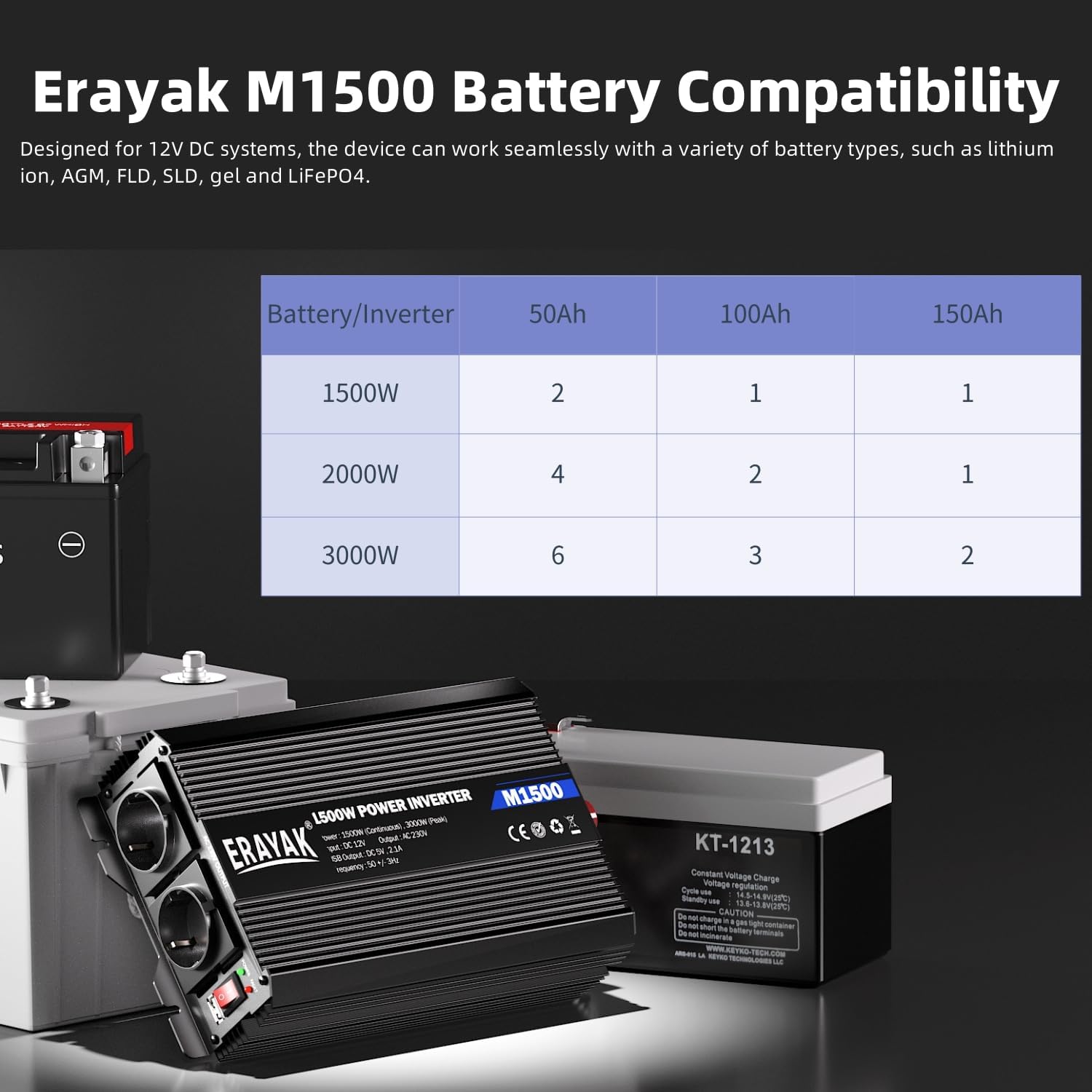
Figure 5: Battery compatibility information for the ERAYAK M1500 inverter.
9. ການຮັບປະກັນແລະການສະຫນັບສະຫນູນ
ERAYAK products are manufactured under strict quality standards. While specific warranty details may vary by region, ERAYAK is committed to providing reliable products and customer support.
If you experience any issues with your ERAYAK M1500 Power Inverter or require technical assistance, please contact ERAYAK customer support through your purchase platform or the official ERAYAK website. Please have your model number (M1500) and purchase details ready when contacting support.


