ແນະນຳ
The American Lifetime 8-inch Digital Day Clock is designed to provide clear and easy-to-read time, day, and date information. Its large display and customizable features make it a valuable tool for maintaining daily routines and orientation. This manual will guide you through the setup, operation, and maintenance of your new clock.
ຄຸນນະສົມບັດທີ່ສໍາຄັນ:
- ການກໍ່ສ້າງທົນທານ: Built with robust materials for long-lasting use.
- ຈໍສະແດງຜົນທີ່ອ່ານງ່າຍ: Features a large, clear, high-contrast 8-inch display for optimal visibility, even in low light.
- ການຕັ້ງຄ່າງ່າຍດາຍ: User-friendly interface with an easy-to-follow manual for quick operation.
- ໂມງປຸກທີ່ສາມາດປັບແຕ່ງໄດ້: Set up to 5 daily alarms for reminders such as medication times or appointments.
- ຫຼຸດແສງອັດຕະໂນມັດ: Adjusts display brightness automatically based on ambient room light.
- ຮອງຮັບຫຼາຍພາສາ: Offers various language and time format options.
- ແບັດ ສຳ ຮອງ: Internal battery ensures time and date are maintained during power outages, automatically resetting when power returns.
- ຈໍສະແດງຜົນທີ່ຈະແຈ້ງ: Spells out the time, period of the day, full day of the week, month, and date without confusing abbreviations.
ຕັ້ງຄ່າ
Setting up your American Lifetime Digital Day Clock is straightforward. Follow these steps to get started:
- Unpack the ໂມງ: Carefully remove the clock and all accessories from the packaging.
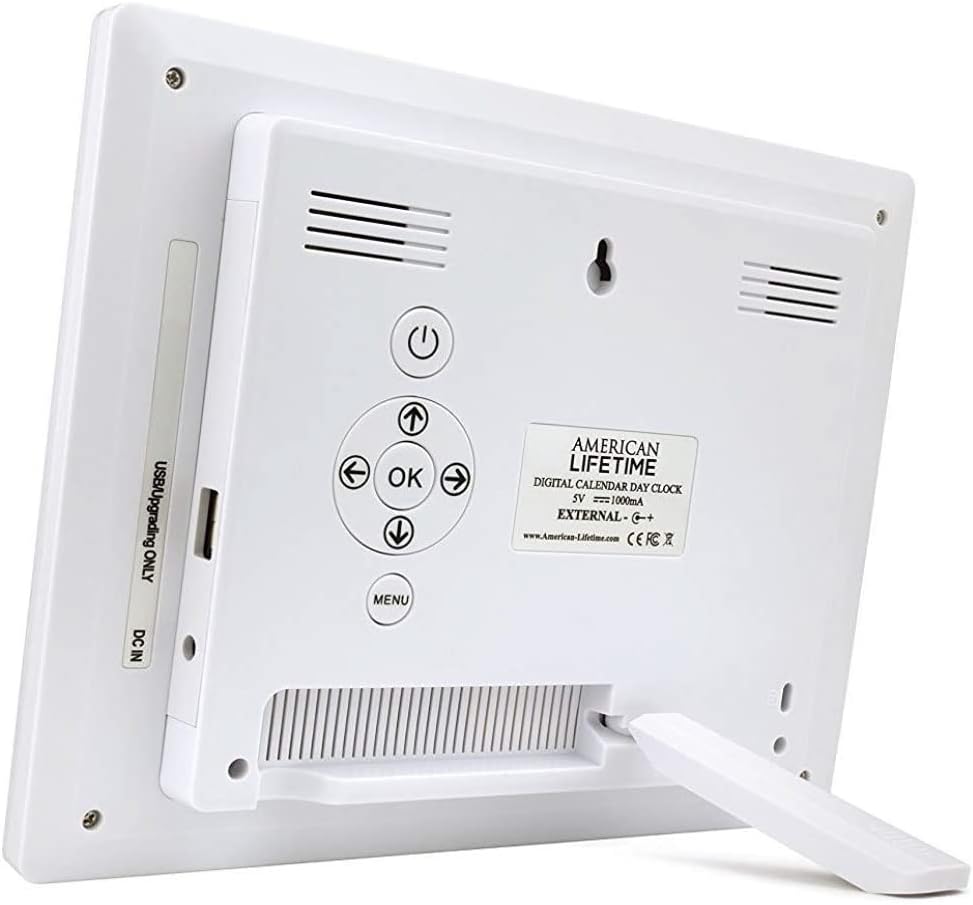
- ຄັດຕິດຂາຕັ້ງ: The clock includes a removable stand that can be inserted into the back for tabletop display. It supports both horizontal and vertical orientations.
- ເຊື່ອມຕໍ່ພະລັງງານ: Plug the provided power adapter into the DC IN port on the back of the clock and then into a standard electrical outlet. The clock will automatically power on and display the current time and date.
- ການຕັ້ງຄ່າເບື້ອງຕົ້ນ: Use the control buttons on the back of the clock to navigate the menu and set the correct time, date, time mode (12/24 hour), date mode (Month-Day-Year, Day-Month-Year), and language.

ຄໍາແນະນໍາການດໍາເນີນງານ
Your Digital Day Clock offers several customizable settings to enhance its utility. All adjustments are made using the buttons located on the back of the unit.
ປຸ່ມຄວບຄຸມ:
- ປຸ່ມເປີດປິດ: ເປີດຫລືປິດການສະແດງຜົນ.
- ປຸ່ມຕົກລົງ: ຢືນຢັນການເລືອກໃນເມນູ.
- ປຸ່ມລູກສອນ (ຂຶ້ນ/ລົງ/ຊ້າຍ/ຂວາ): ທ່ອງໄປຫາຕົວເລືອກເມນູແລະປັບຄ່າ.
- ປຸ່ມເມນູ: ເຂົ້າເຖິງເມນູການຕັ້ງຄ່າຕົ້ນຕໍ.
ການຕັ້ງເວລາແລະວັນທີ:
- ກົດ ເມນູ ປຸ່ມເພື່ອເຂົ້າໄປໃນການຕັ້ງຄ່າ.
- ໃຊ້ ຂຶ້ນ/ລົງ arrows to select "Set Time" or "Set Date".
- ກົດ OK to enter the setting. Use ຊ້າຍ/ຂວາ arrows to move between digits/fields and ຂຶ້ນ/ລົງ arrows to change values.
- ກົດ OK to confirm each change.
Customizing Alarms:
The clock supports up to 5 customizable alarms with messages.
- From the main menu, navigate to "Alarm Time 1" through "Alarm Time 5".
- ກົດ OK ເພື່ອເລືອກໂມງປຸກ.
- Set the alarm time and frequency (e.g., daily, weekdays).
- Choose a pre-set message (e.g., "Time to take medication", "Appointment Reminder") or set a custom message if available.
- Ensure the alarm is set to "On" and press OK ເພື່ອຊ່ວຍປະຢັດ.
ການຕັ້ງຄ່າອື່ນ:
- ໂໝດເວລາ: Switch between 12-hour and 24-hour formats.
- ໂໝດວັນທີ: Select your preferred date display format (e.g., Month-Day-Year).
- ພາສາ: Choose from multiple language options.
- Show Period Of The Day: Enable or disable the display of "Morning," "Afternoon," "Evening," or "Night."
- ການຫຼຸດແສງອັດຕະໂນມັດ: Turn this feature on to allow the clock to automatically adjust its brightness.
ບໍາລຸງຮັກສາ
To ensure the longevity and optimal performance of your Digital Day Clock, follow these simple maintenance guidelines:
- ທໍາຄວາມສະອາດ: Use a soft, dry cloth to gently wipe the screen and frame. Avoid abrasive cleaners or sprays that could damage the display or finish.
- ການຈັດວາງ: Place the clock on a stable, flat surface or mount it securely on a wall. Avoid direct sunlight or extreme temperatures, which can affect performance and display life.
- ພະລັງງານ: Always use the original power adapter provided with the clock.
ການແກ້ໄຂບັນຫາ
If you encounter any issues with your American Lifetime Digital Day Clock, refer to the following common problems and solutions:
| ບັນຫາ | ການແກ້ໄຂ |
|---|---|
| ໂມງບໍ່ເປີດ. | Ensure the power adapter is securely plugged into both the clock and a working electrical outlet. Try a different outlet. |
| ຈໍສະແດງຜົນມືດເກີນໄປ ຫຼື ສະຫວ່າງເກີນໄປ. | Check the "Auto Dimming" setting in the menu. You can turn it off to manually adjust brightness if needed. |
| ເວລາ ຫຼືວັນທີບໍ່ຖືກຕ້ອງ. | Access the "Set Time" and "Set Date" options in the menu to manually correct the settings. |
| Alarms are not sounding. | Verify that the alarm time is correctly set, the alarm is enabled ("On"), and the volume is not muted. |
ຂໍ້ມູນຈໍາເພາະ
- ຍີ່ຫໍ້: ຊີວິດອາເມລິກາ
- ໝາຍເລກຕົວແບບ: H1-HO1A--JB6HDWLAO4
- ສີ: ສີນ້ຳຕານ
- ປະເພດການສະແດງ: ດິຈິຕອລ
- ຂະໜາດຜະລິດຕະພັນ: 8.5"W x 6.75"H
- ແຫຼ່ງພະລັງງານ: ໄຟຟ້າສາຍ
- ວັດສະດຸ: ພາດສະຕິກ
- ປະເພດການຕິດຕັ້ງ: ຕິດຝາ, ໂຕະ
- ຄຸນນະສົມບັດພິເສດ: Alarm, Calendar Display, Auto-Dimming, Multi-Language Support, Battery Backup
- ນ້ໍາຫນັກລາຍການ: 15.8 ອອນ
- UPC: 728044490976
ການຮັບປະກັນແລະການສະຫນັບສະຫນູນ
American Lifetime stands behind its products. Your Digital Day Clock comes with a ການຮັບປະກັນຂອງຜູ້ຜະລິດ 1 ປີຈໍາກັດ. Additionally, you can return the product for free within the first 30 days of purchase, no questions asked.
For any questions, troubleshooting assistance, or warranty claims, please contact American Lifetime customer service. Our team is dedicated to providing support and ensuring your satisfaction.
ຢ້ຽມຢາມ American Lifetime Store ສໍາລັບຂໍ້ມູນເພີ່ມເຕີມແລະຊັບພະຍາກອນສະຫນັບສະຫນູນ.


