ສິນຄ້າເກີນview
The KLH Bassbite-V is a compact yet powerful subwoofer designed to enhance the low-frequency response of your audio system. It features a robust 40-watt amplifier and a wired connection for reliable performance. This manual provides detailed instructions for setup, operation, and maintenance to ensure optimal sound quality and longevity of your device.

ຮູບ 1: ດ້ານຫນ້າ view of the KLH Bassbite-V Subwoofer next to its packaging box.
ການຕັ້ງຄ່າແລະການເຊື່ອມຕໍ່
Before connecting your subwoofer, ensure all audio equipment is powered off. Carefully unpack the subwoofer and place it in your desired location, typically near your main speakers or in a corner for enhanced bass.
ການເຊື່ອມຕໍ່ກັບລະບົບສຽງຂອງທ່ານ
The Bassbite-V offers both high-level (speaker wire) and low-level (RCA) input options.

Figure 2: Rear panel of the KLH Bassbite-V Subwoofer showing input terminals and controls.
- High-Level Input (Speaker Wire): ເຊື່ອມຕໍ່ສາຍລຳໂພງຈາກເຈົ້າ amplifier's speaker outputs to the "FROM AMPLIFIER" terminals on the subwoofer. Ensure correct polarity (+ to + and - to -). Then, connect speaker wires from the "TO SPEAKERS" terminals on the subwoofer to your main speakers. This method allows the subwoofer to receive the full audio signal and filter out low frequencies for your main speakers.
- ອິນພຸດລະດັບຕ່ຳ (RCA): ຖ້າຜູ້ຮັບຂອງທ່ານຫຼື amplifier has a dedicated subwoofer output (LFE or Sub Out), connect an RCA cable from that output to the "LOW LEVEL INPUT" (L/R or Mono) on the subwoofer. If your source has stereo RCA outputs, you can connect both L and R channels to the subwoofer's L and R low-level inputs.
- ການເຊື່ອມຕໍ່ພະລັງງານ: Once audio connections are made, plug the subwoofer's power cord into a standard 115V AC, 60Hz electrical outlet.
ຂໍ້ຄວນລະວັງ: To reduce the risk of electric shock, do not remove the cover. Refer servicing to qualified service personnel. Not suitable for in-wall mounting.
ຄໍາແນະນໍາການດໍາເນີນງານ
After connecting the subwoofer, you can power it on and adjust its settings for optimal performance.
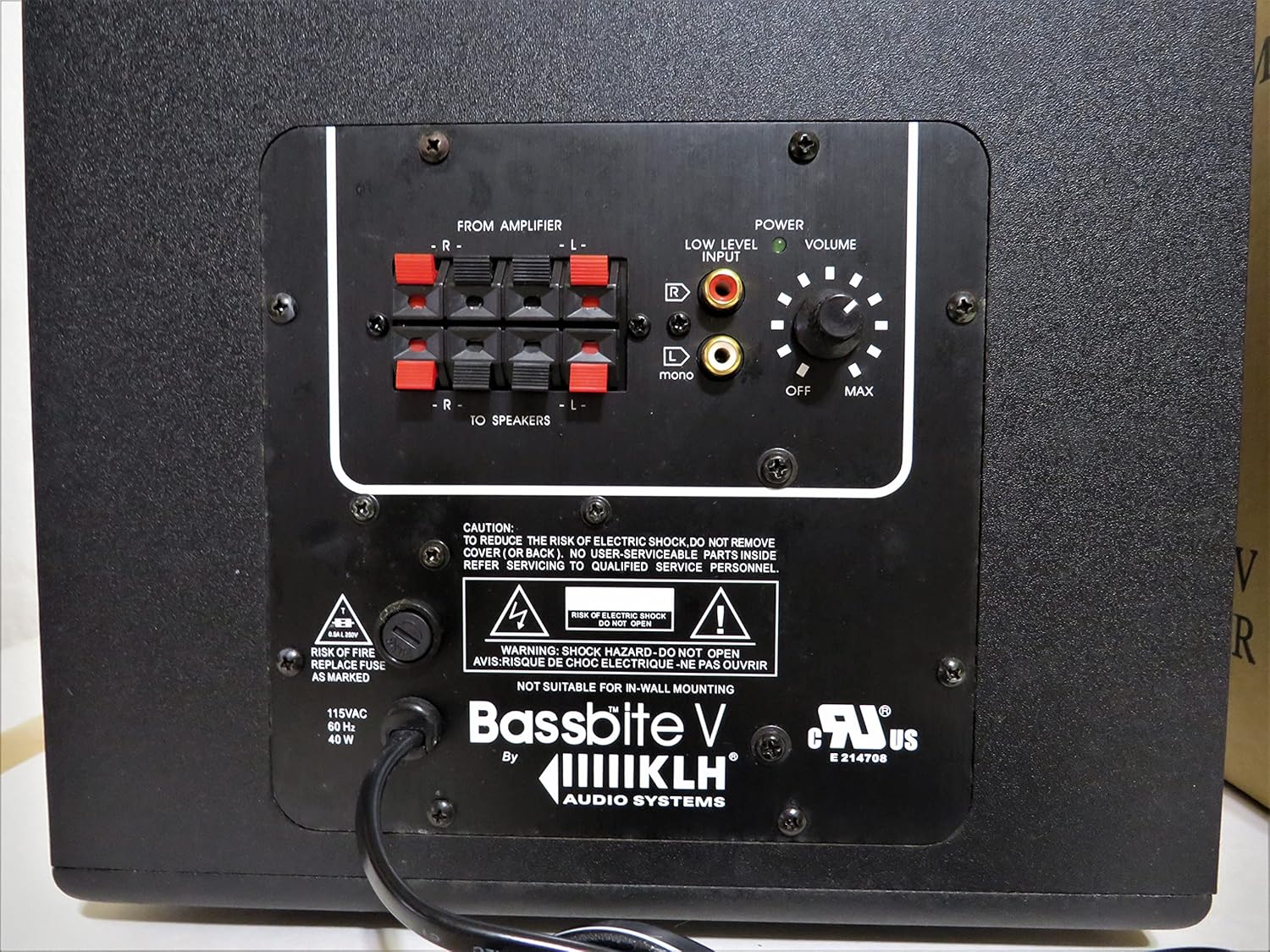
ຮູບທີ 3: ລາຍລະອຽດ view of the Bassbite-V Subwoofer's control panel.
- ສັບປ່ຽນພະລັງງານ: Located on the rear panel, this switch turns the subwoofer on or off.
- ການຄວບຄຸມລະດັບສຽງ: ປັບລະດັບສຽງອອກໂດຍລວມຂອງຊັບວູບເຟີ. ເລີ່ມຕົ້ນດ້ວຍການຕັ້ງຄ່າຕ່ຳ ແລະ ຄ່ອຍໆເພີ່ມຂຶ້ນຈົນກວ່າສຽງເບດຈະກົມກືນກັບລຳໂພງຫຼັກຂອງທ່ານ.
- ການປ້ອນຂໍ້ມູນລະດັບຕໍ່າ: RCA inputs for connecting to a receiver's LFE or subwoofer output.
Initial Setup Tips:
- Start with the volume control at its minimum setting.
- Play some music or a movie with good bass content.
- Slowly increase the subwoofer's volume until the bass output is balanced with your main speakers. The goal is to enhance the low end without making the subwoofer sound like a separate speaker.
ບໍາລຸງຮັກສາ
Proper maintenance ensures the longevity and performance of your KLH Bassbite-V Subwoofer.
- ທໍາຄວາມສະອາດ: Use a soft, dry cloth to wipe down the exterior of the subwoofer. Avoid using liquid cleaners, aerosols, or abrasive chemicals, as they may damage the finish or internal components.
- ການຈັດວາງ: Keep the subwoofer away from direct sunlight, heat sources, and excessive moisture. Ensure adequate ventilation around the unit.
- ພະລັງງານ: If the subwoofer will not be used for an extended period, it is advisable to unplug it from the power outlet.
ການແກ້ໄຂບັນຫາ
ຖ້າທ່ານພົບບັນຫາກັບ subwoofer ຂອງທ່ານ, ອ້າງອີງເຖິງບັນຫາທົ່ວໄປຕໍ່ໄປນີ້ແລະວິທີແກ້ໄຂ:
| ບັນຫາ | ສາເຫດທີ່ເປັນໄປໄດ້ | ການແກ້ໄຂ |
|---|---|---|
| ບໍ່ມີສຽງຈາກ subwoofer |
|
|
| ເບດບິດເບືອນ ຫຼື ບໍ່ຊັດເຈນ |
|
|
| Subwoofer hums or buzzes |
|
|
If the problem persists after trying these solutions, please contact KLH customer support for further assistance.
ຂໍ້ມູນຈໍາເພາະ
| ຊື່ຕົວແບບ | KLH Bassbite-V |
| ປະເພດລຳໂພງ | Subwoofer |
| ການນໍາໃຊ້ທີ່ແນະນໍາ | Home audio systems, Music systems, Gaming systems |
| ເສັ້ນຜ່າສູນກາງຂອງ Subwoofer | 31.8 ຊັງຕີແມັດ (ປະມານ 12.5 ນິ້ວ) |
| ປະເພດການຄວບຄຸມ | ໄຟຟ້າມີສາຍ |
| ສີ | ດຳ |
| ນ້ຳໜັກສິນຄ້າ | 7.26 kg (ປະມານ 16 lbs) |
| ຂະໜາດ (L x W x H) | 31.75 x 26.67 x 26.67 cm (ປະມານ 12.5 x 10.5 x 10.5 ນິ້ວ) |
| ພະລັງງານອອກຂອງລໍາໂພງສູງສຸດ | 40 ວັດ |
| ເຕັກໂນໂລຊີການເຊື່ອມຕໍ່ | ມີສາຍ |
| ການປ້ອນຂໍ້ມູນ Voltage | 115 ໂວນ (AC) |
| ປະເພດການຕິດຕັ້ງ | ພູຕັ້ງໂຕະ |
ການຮັບປະກັນແລະການສະຫນັບສະຫນູນ
The KLH Bassbite-V Subwoofer comes with a limited warranty. For specific details regarding the warranty period and coverage, please refer to the documentation provided with your purchase or contact KLH customer support.
For technical assistance, troubleshooting beyond this manual, or warranty claims, please contact KLH customer service through their official website or contact information provided with your product.


