1. ບົດແນະນຳ
This manual provides essential information for the proper use and maintenance of your Angrox Universal Remote Control. Designed for seamless compatibility with a wide range of Sony Bravia TVs, this remote offers a reliable and straightforward replacement for your original or damaged remote.
The Angrox remote control is engineered for ease of use, requiring no complex programming or setup. Simply insert batteries, and it's ready to operate your Sony TV.
2. ຜະລິດຕະພັນເກີນview
The Angrox Universal Remote Control is a high-quality, compact, and non-slip device designed for comfortable handling and stable performance. It features a larger transmission range compared to many standard remotes, ensuring reliable operation from a distance.

ຮູບພາບ 2.1: ດ້ານໜ້າ ແລະ ດ້ານຫຼັງ view of the Angrox Universal Remote Control, showcasing ການອອກແບບ ergonomic ແລະຮູບແບບປຸ່ມຂອງມັນ.

ຮູບພາບ 2.2: ຫຼາຍ views of the remote control, highlighting its slim profile and textured back for a secure grip.
ຄຸນນະສົມບັດທີ່ສໍາຄັນ:
- ຄວາມເຂົ້າກັນໄດ້ທົ່ວໂລກ: 100% compatible with all Sony TV and Sony Bravia remotes.
- ບໍ່ມີໂຄງການທີ່ຕ້ອງການ: Ready to use right out of the box after battery insertion.
- ການອອກແບບ Ergonomic: Small size and compact, with a non-slip surface for practical handling.
- ປະສິດທິພາບຄົງທີ່: Offers a larger transmission range for reliable control.
- ການກໍ່ສ້າງທົນທານ: Made from ABS material for enhanced safety and durability.

ຮູບພາບທີ 2.3: ໄລຍະໃກ້ view emphasizing the remote's safety features, durable construction, and use of ABS material.
Compatible Sony TV Models:
ຣີໂໝດນີ້ແມ່ນເຂົ້າກັນໄດ້ກັບຫຼາຍລຸ້ນຂອງ Sony TV, ລວມທັງແຕ່ບໍ່ຈຳກັດ:
- KDL-40BX420, KDL-40BX421, KDL-22BX320, KDL-22BX321, KDL-32R300B, KDL-32BX320, KDL-32BX321, KDL-32BX420, KDL-32BX421, KDL-40BX421, KDL-40BXB, KDL-421, KDL-46BX420, KDL-46BX421, KDL-55BX520
- KDL-65X830B, KDL-70W830B, KDL-70W840B, KDL-70W850B, KDL-70XX70XX, XBR-40B, 9X850B, XBR-55X850B, XBR-55X900B, XBR-65X850B, XBR-65X900B, XBR-65X950B, XBR-70X850B, XBR-79X900B, XBR-800B, 5X950B
- KDL-19MB4000, KDL-19M4000, KDL-22L4000, KDL-32L4000, KDL-37L4000, KDL-40S4100

Image 2.4: The remote control positioned next to a modern Sony TV, visually confirming its compatibility with Sony LED and LCD televisions.
3. ຕັ້ງຄ່າ
The Angrox Universal Remote Control is designed for immediate use with compatible Sony TVs. No complex programming or pairing procedures are required.
ການໃສ່ແບັດເຕີລີ:
- ຊອກຫາຊ່ອງໃສ່ຫມໍ້ໄຟຢູ່ດ້ານຫຼັງຂອງການຄວບຄຸມໄລຍະໄກ.
- ເລື່ອນຝາປິດແບັດເຕີຣີລົງລຸ່ມ ຫຼື ໄປໃນທິດທາງທີ່ລູກສອນຊີ້ບອກເພື່ອເປີດມັນ.
- ໃສ່ແບັດເຕີຣີ AAA ສອງ (2) ກ້ອນ (ບໍ່ລວມ), ຮັບປະກັນວ່າຂົ້ວບວກ (+) ແລະຂົ້ວລົບ (-) ສອດຄ່ອງກັບເຄື່ອງໝາຍພາຍໃນຊ່ອງຢ່າງຖືກຕ້ອງ.
- ປິດຝາປິດແບັດເຕີຣີໂດຍການເລື່ອນມັນກັບຄືນຈົນກວ່າມັນຈະຄລິກແໜ້ນ.
Once batteries are inserted, the remote control is ready to operate your Sony TV. It is recommended to use new, high-quality alkaline batteries for optimal performance and longevity.

ຮູບພາບ 3.1: ລາຍລະອຽດ view of the remote's battery compartment, illustrating the correct orientation for inserting two AAA batteries.
4. ຄໍາແນະນໍາການດໍາເນີນງານ
The Angrox Universal Remote Control functions identically to the original Sony TV remote. All buttons are pre-programmed to perform their standard functions.
ການດໍາເນີນງານພື້ນຖານ:
- ປຸ່ມເປີດປິດ: Press to turn your TV on or off.
- ປຸ່ມຕົວເລກ (0-9): Use to directly enter channel numbers.
- ຊ່ອງຂຶ້ນ/ລົງ (CH +/-): Navigate through channels sequentially.
- ລະດັບສຽງຂຶ້ນ/ລົງ (VOL +/-): ປັບລະດັບສຽງຂອງໂທລະພາບ.
- ປິດສຽງ: Mute or unmute the TV's audio.
- Navigation Pad (Arrow Buttons & Enter): ໃຊ້ເພື່ອນໍາທາງເມນູແລະເລືອກທາງເລືອກ.
- ປຸ່ມຫນ້າທໍາອິດ: Access the TV's main menu or smart TV interface.
- ປຸ່ມປ້ອນ/ແຫຼ່ງ: ສະຫຼັບລະຫວ່າງແຫຼ່ງປ້ອນຂໍ້ມູນທີ່ແຕກຕ່າງກັນ (HDMI, AV, ແລະອື່ນໆ).
- ການຄວບຄຸມການຫຼິ້ນ: Buttons for Play, Pause, Stop, Fast Forward, Rewind, etc., for media playback.
Ensure there is a clear line of sight between the remote control and your TV's infrared receiver for optimal signal transmission. The remote offers a stable signal and sensitive buttons for a responsive user experience.

Image 4.1: A hand demonstrating the use of the remote control, highlighting its long-distance capability, fine workmanship, signal stabilization, and sensitive buttons.
5. ບໍາລຸງຮັກສາ
Proper maintenance will ensure the longevity and optimal performance of your Angrox Universal Remote Control.
ທໍາຄວາມສະອາດ:
- Wipe the remote control regularly with a soft, dry cloth.
- ສໍາລັບຝຸ່ນ stubborn, ເລັກນ້ອຍ dampໃສ່ຜ້າດ້ວຍນ້ໍາຫຼືຢາເຮັດຄວາມສະອາດອ່ອນໆ, ບໍ່ມີສານຂັດ. ຢ່າສີດນໍ້າສະອາດໃສ່ຣີໂມດໂດຍກົງ.
- ຫຼີກລ່ຽງການໃຊ້ສານເຄມີທີ່ຮຸນແຮງ, ຕົວລະລາຍ ຫຼື ຜ້າເຊັດທຳຄວາມສະອາດທີ່ມີສານຂັດ, ເພາະວ່າສິ່ງເຫຼົ່ານີ້ສາມາດທຳລາຍພື້ນຜິວ ຫຼື ອົງປະກອບພາຍໃນຂອງຣີໂໝດໄດ້.
ການປ່ຽນແບັດເຕີຣີ:
Replace batteries when the remote's responsiveness decreases or it stops functioning. Always replace both batteries at the same time with new ones of the same type (AAA). Refer to Section 3 for battery insertion instructions.
ການເກັບຮັກສາ:
ເກັບຮັກສາຣີໂໝດຄວບຄຸມໄວ້ໃນບ່ອນທີ່ເຢັນ, ແຫ້ງ ແລະ ຫ່າງຈາກແສງແດດໂດຍກົງ, ອຸນຫະພູມສູງສຸດ ແລະ ຄວາມຊຸ່ມຊື່ນສູງ. ຖ້າບໍ່ໄດ້ໃຊ້ຣີໂໝດເປັນເວລາດົນ, ຄວນຖອດແບັດເຕີຣີອອກເພື່ອປ້ອງກັນການຮົ່ວໄຫຼ.
6. ການແກ້ໄຂບັນຫາ
If you encounter issues with your Angrox Universal Remote Control, please refer to the following common problems and solutions:
| ບັນຫາ | ສາເຫດທີ່ເປັນໄປໄດ້ | ການແກ້ໄຂ |
|---|---|---|
| ໄລຍະໄກບໍ່ຕອບສະໜອງ. | ຫມໍ້ໄຟທີ່ຕາຍແລ້ວ ຫຼືໃສ່ບໍ່ຖືກຕ້ອງ. | Check battery orientation. Replace with new AAA batteries. |
| ຣີໂໝດມີຂອບເຂດຈຳກັດ ຫຼື ການຕອບສະໜອງບໍ່ຕໍ່ເນື່ອງ. | Weak batteries, obstruction, or remote too far from TV. | Replace batteries. Ensure clear line of sight to TV's IR receiver. Move closer to the TV. |
| ປຸ່ມບາງຢ່າງບໍ່ເຮັດວຽກ. | ຝຸ່ນ ຫຼື ເສດເຫຼືອຢູ່ໃຕ້ປຸ່ມ, ຫຼື ພາຍໃນເຮັດວຽກຜິດປົກກະຕິ. | Clean the remote surface. If problem persists, contact support. |
| Remote does not control TV. | ຮູບແບບໂທລະພາບທີ່ບໍ່ເຂົ້າກັນໄດ້. | Verify your TV model is listed in the compatible models section (Section 2). |
7. ຂໍ້ມູນຈໍາເພາະ
| ຄຸນສົມບັດ | ລາຍລະອຽດ |
|---|---|
| ຊື່ຕົວແບບ | RM-ED047 |
| ຍີ່ຫໍ້ | Angrox |
| ອຸປະກອນທີ່ເຂົ້າກັນໄດ້ | Sony Televisions (various models, see Section 2) |
| ເຕັກໂນໂລຊີການເຊື່ອມຕໍ່ | ອິນຟາເລດ (IR) |
| ຂອບເຂດສູງສຸດ | 10 ແມັດ |
| ຈໍານວນປຸ່ມ | 50 |
| ປະເພດການຄວບຄຸມ | ການຄວບຄຸມໄລຍະໄກ |
| ຕ້ອງໃຊ້ແບັດເຕີຣີ | 2 x AAA (ບໍ່ລວມ) |
| ຂະໜາດສິນຄ້າ (L x W x H) | 19.99 x 4.78 x 1.98 cm |
| ນ້ໍາຫນັກລາຍການ | 82 g |
| ຄຸນນະສົມບັດພິເສດ | Universal, Non-slip design |
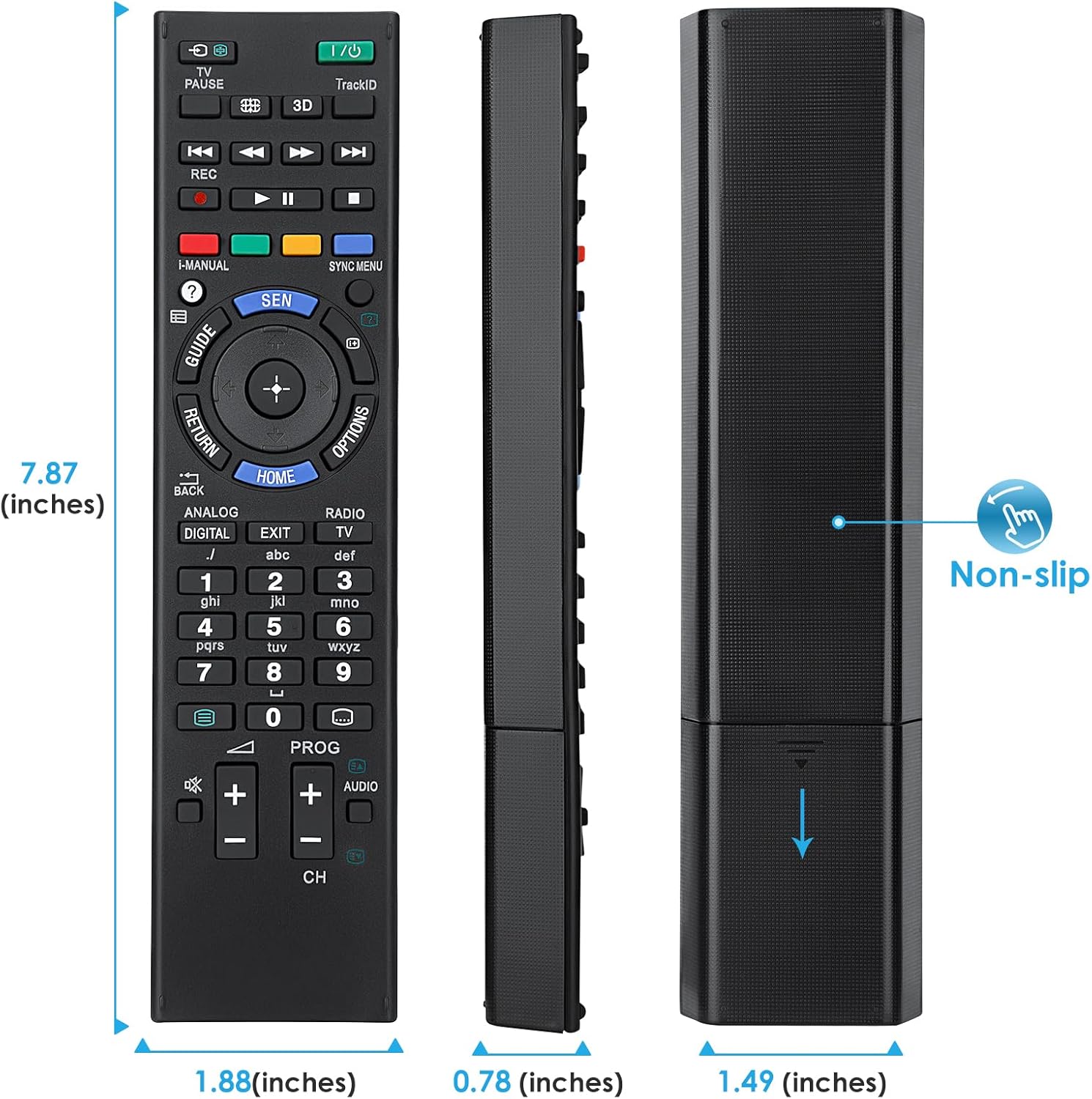
Image 7.1: Visual representation of the remote control's dimensions (length, width, thickness), providing precise measurements for reference.
8. ການຮັບປະກັນແລະການສະຫນັບສະຫນູນ
ຂໍ້ມູນການຮັບປະກັນ:
This Angrox Universal Remote Control comes with a ຮັບປະກັນ 60 ວັນ from the date of purchase. This warranty covers manufacturing defects and ensures the product functions as described under normal use. Please retain your proof of purchase for warranty claims.
ການຊ່ວຍເຫຼືອລູກຄ້າ:
For any questions, concerns, or technical assistance not covered in this manual, please contact the retailer or the manufacturer's customer support. Provide your product model number (RM-ED047) and a detailed description of the issue to facilitate faster service.


