ແນະນຳ
This manual provides detailed instructions for the operation and maintenance of the LAUNCH Creader 8021 ABS SRS Scan Tool. Please read this manual thoroughly before operating the device to ensure proper use and to prevent damage.
ສິນຄ້າເກີນview
The LAUNCH Creader 8021 is a professional diagnostic tool designed for automotive technicians and enthusiasts. It offers comprehensive OBD2 functions, along with advanced diagnostic capabilities for ABS (Anti-lock Braking System) and SRS (Supplemental Restraint System). Additionally, it supports various reset functions including Oil Service Light, Electronic Parking Brake (EPB), Steering Angle Sensor (SAS), and Battery Management System (BMS).
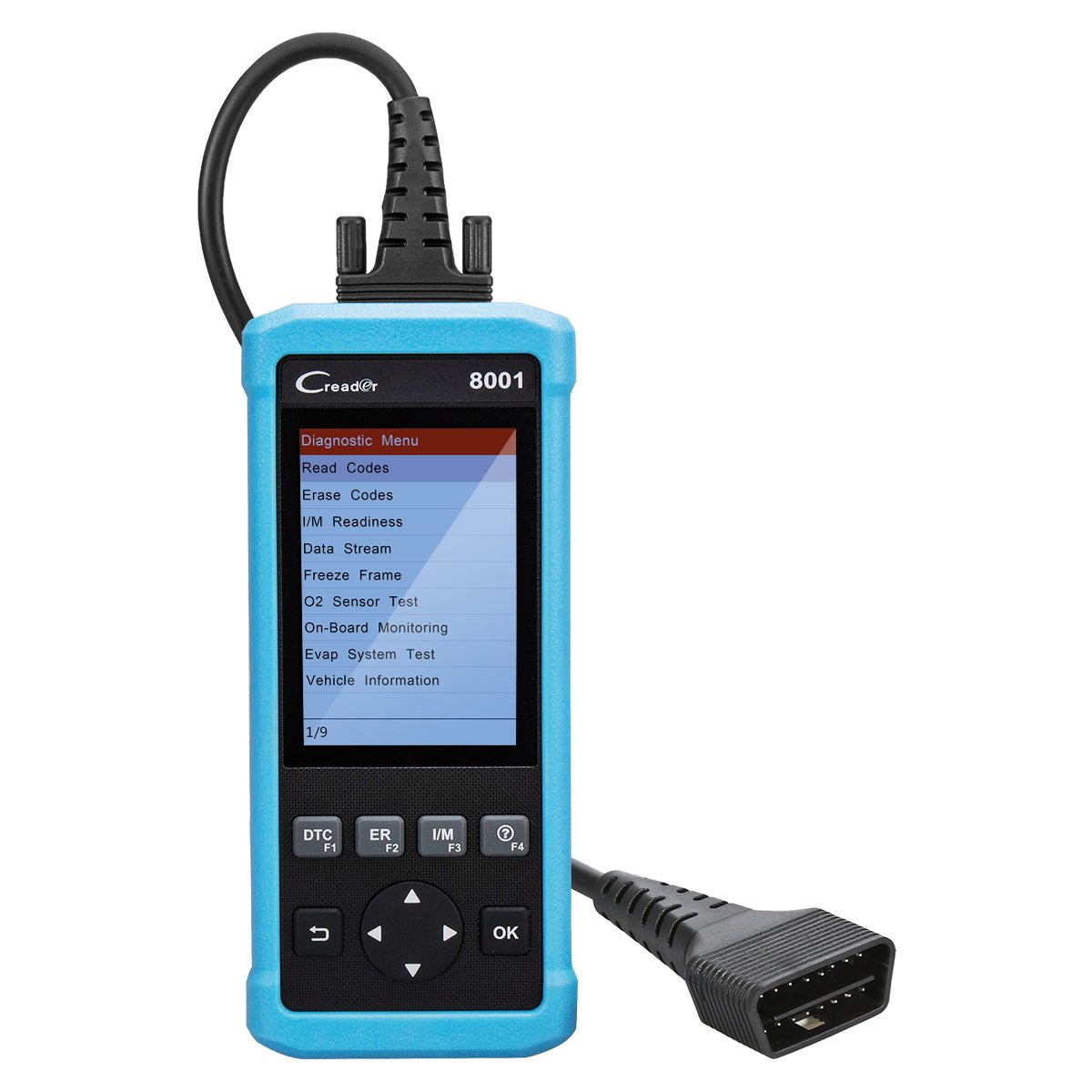
ຮູບທີ 1: LAUNCH Creader 8021 Device Diagram. This image illustrates the main components of the Creader 8021, including the LCD screen, diagnostic cable, DB15 connector, and various control buttons such as I/M, Erase, DTC, ESC, Help, OK, and Selection buttons.
ຄຸນນະສົມບັດທີ່ສໍາຄັນ:
- ການວິນິດໄສ ABS ແລະ SRS: Reads and clears DTCs, and reads data streams for Anti-lock Braking System and Supplemental Restraint System.
- ຣີເຊັດນ້ຳມັນ: ຕັ້ງຄ່າໄຟບໍລິການນ້ຳມັນເຄື່ອງຄືນໃໝ່ຫຼັງຈາກປ່ຽນນ້ຳມັນເຄື່ອງ.
- ຣີເຊັດ EPB: ຕັ້ງຄ່າລະບົບເບກຈອດລົດແບບອີເລັກໂທຣນິກຄືນໃໝ່ຫຼັງຈາກປ່ຽນຜ້າເບກ.
- ຕັ້ງຄ່າ SAS ຄືນໃໝ່: Clears faulty steering angle sensor memories and calibrates the steering angle sensor.
- ການຕັ້ງຄ່າ BMS ຄືນໃໝ່: Performs a reset on the vehicle battery to clear fault information and re-match the battery.
- ໜ້າທີ່ OBD2 ເຕັມຮູບແບບ: Supports all 10 OBD2 test modes for comprehensive vehicle diagnostics.
- Data Recording & Review: Allows recording of real-time DTCs and data streams for later review.
- ການຄຸ້ມຄອງຍານພາຫະນະຢ່າງກວ້າງຂວາງ: Compatible with 46 vehicle brands for ABS/SRS diagnostics (2006-2016 models) and 40 car brands for Oil/EPB resets. Full OBD2 functions cover most 1996 US-Based, 2001 EU-Based, and newer vehicles.
- ສະຫນັບສະຫນູນຫຼາຍພາສາ: English, Spanish, French, Russian, German, Portuguese, Japanese.
ເນື້ອໃນຊຸດ
Upon opening the package, verify that all items are present and in good condition. If any items are missing or damaged, contact your vendor immediately.

ຮູບທີ 2: Package Contents. The image displays the LAUNCH Creader 8021 diagnostic tool, a diagnostic cable, a USB cable for updates, a quick start guide, and a protective carrying case.
- LAUNCH Creader 8021 Main Unit
- Diagnostic Cable (DB15 to OBD2)
- ສາຍ USB (ສຳລັບການອັບເດດ)
- ຄູ່ມືເລີ່ມຕົ້ນດ່ວນ
- ກະເປົ໋າພົກພາປ້ອງກັນ
ການຕິດຕັ້ງແລະການນໍາໃຊ້ເບື້ອງຕົ້ນ
- ເປີດ: The Creader 8021 is powered directly from the vehicle's OBD2 port. No external power source is typically required during operation.
- Locate OBD2 Port: Identify the 16-pin Data Link Connector (DLC) in your vehicle. This port is usually located under the dashboard on the driver's side.
- ເຊື່ອມຕໍ່ກັບຍານພາຫະນະ: Plug the diagnostic cable's DB15 connector into the Creader 8021 and the OBD2 connector into the vehicle's DLC. Ensure a secure connection.
- ການເລີ່ມຕົ້ນອຸປະກອນ: Once connected, the Creader 8021 will automatically power on and initiate communication with the vehicle. The main menu will appear on the LCD screen.
- ການເລືອກພາສາ: If prompted, select your preferred language from the available options (English, Spanish, French, Russian, German, Portuguese, Japanese).

ຮູບທີ 3: ດ້ານໜ້າ ແລະ ດ້ານຫຼັງ Views of the Device. This image shows the front display and control buttons, along with the rear label containing serial number and input specifications.
ຄໍາແນະນໍາການດໍາເນີນງານ
Navigate through the menus using the directional buttons and confirm selections with the "OK" button. Use the "ESC" button to return to the previous screen.
1. OBD2 Diagnostics:
This function allows access to all 10 modes of OBD2 diagnostics for engine-related issues.
- ອ່ານລະຫັດ: Displays Diagnostic Trouble Codes (DTCs) stored in the vehicle's ECU.
- ລຶບລະຫັດ: ລຶບລ້າງ DTC ອອກຈາກ ECU ຂອງລົດ ແລະ ປິດໄຟສະແດງການເຮັດວຽກຜິດປົກກະຕິ Lamp (MIL).
- ຄວາມພ້ອມ I/M: ກວດສອບຄວາມພ້ອມຂອງລະບົບຕິດຕາມກວດກາການປ່ອຍອາຍພິດ.
- ກະແສຂໍ້ມູນ: Displays real-time data from the vehicle's sensors in text or graph format.
- ຂອບ Freeze: Shows a snapshot of vehicle operating conditions at the time an emission-related fault occurred.
- ການທົດສອບເຊັນເຊີ O2: ດຶງເອົາຜົນການທົດສອບຂອງຈໍສະແດງຜົນເຊັນເຊີ O2.
- On-Board Monitoring: Retrieves results for on-board diagnostic monitoring tests of specific components/systems.
- Evap System Test: Initiates a test of the evaporative emission system.
- ຂໍ້ມູນພາຫະນະ: ດຶງເອົາເລກໝາຍລະບຸຕົວຍານພາຫະນະ (VIN), ລະຫັດການປັບທຽບ (CALID), ແລະ ເລກໝາຍຢືນຢັນການປັບທຽບ (CVN).
2. ABS & SRS System Diagnostics:
Access specific diagnostic functions for the Anti-lock Braking System and Supplemental Restraint System.
- Select "ABS System" or "SRS System" from the main menu.
- Choose "Read Codes" to view system-specific DTCs.
- Choose "Erase Codes" to clear system-specific DTCs.
- ເລືອກ "ກະແສຂໍ້ມູນ" ເພື່ອ view real-time data from ABS/SRS sensors.
3. Reset Functions:
The Creader 8021 supports several maintenance reset functions.
- ຣີເຊັດນ້ຳມັນ: Follow on-screen prompts to reset the oil service light after an oil change.
- ຣີເຊັດ EPB: Follow on-screen prompts to reset the Electronic Parking Brake system. This is crucial after replacing brake pads or performing maintenance on the EPB system.
- ຕັ້ງຄ່າ SAS ຄືນໃໝ່: Follow on-screen prompts to calibrate the Steering Angle Sensor. This is often required after steering system repairs or alignment.
- ການຕັ້ງຄ່າ BMS ຄືນໃໝ່: Follow on-screen prompts to reset the Battery Management System. This is necessary when replacing the vehicle battery to ensure proper charging and monitoring.
ການບໍາລຸງຮັກສາແລະການປັບປຸງ
ການດູແລອຸປະກອນ:
- Keep the device clean and dry. Avoid exposure to extreme temperatures, moisture, or direct sunlight.
- Do not use abrasive cleaners or solvents. Wipe with a soft, damp ຜ້າ.
- Store the device in its protective carrying case when not in use.
ອັບເດດຊອບແວ:
The LAUNCH Creader 8021 offers free lifetime software updates via the internet. Regular updates ensure compatibility with newer vehicle models and provide enhanced features.
- Download Update Tool: Visit the official LAUNCH website and download the update tool software to your computer.
- ຕິດຕັ້ງຊອບແວ: Install the update tool on a computer running Windows 7, 8, 10, or XP.
- ເຊື່ອມຕໍ່ອຸປະກອນ: Connect the Creader 8021 to your computer using the provided USB cable.
- Run Update Tool: Launch the update tool and follow the on-screen instructions to register your device and download the latest software.
- Transfer Updates: The update tool will guide you through transferring the updates to the device's TF card.
ໝາຍເຫດ: You may also remove the TF card from the device and use a card reader to update it directly on your computer, then reinsert the card into the device.
ການແກ້ໄຂບັນຫາ
| ບັນຫາ | ສາເຫດທີ່ເປັນໄປໄດ້ | ການແກ້ໄຂ |
|---|---|---|
| ອຸປະກອນບໍ່ເປີດ. |
|
|
| ການສື່ສານຜິດພາດກັບຍານພາຫະນະ. |
|
|
| ປຸ່ມບໍ່ຕອບສະໜອງ. |
|
|
| Update process fails. |
|
|
ຂໍ້ມູນຈໍາເພາະ
| ຄຸນສົມບັດ | ລາຍລະອຽດ |
|---|---|
| ຕົວແບບ | Creader 8021 |
| ຈໍສະແດງຜົນ | ຈໍ LCD ສີ 4 ນິ້ວ |
| ການປ້ອນຂໍ້ມູນ Voltage | 9-18V DC (via OBD2) |
| ອຸນຫະພູມປະຕິບັດການ | 0°C ຫາ 50°C (32°F ຫາ 122°F) |
| ອຸນຫະພູມການເກັບຮັກສາ | -20°C ຫາ 70°C (-4°F ຫາ 158°F) |
| ຂະໜາດ (L x W x H) | 26.16 x 19.3 x 8.38 ຊມ (10.3 x 7.6 x 3.3 ນິ້ວ) |
| ນ້ຳໜັກ | 458 ກຣາມ (1.01 ປອນ) |
| ການເຊື່ອມຕໍ່ | OBD2, Mini USB |
| ອະນຸສັນຍາທີ່ຮອງຮັບ | ISO9141-2, ISO14230-4, SAEJ1850, ISO15765-4 |
| ວິທີການປັບປຸງ | Free internet update via USB |
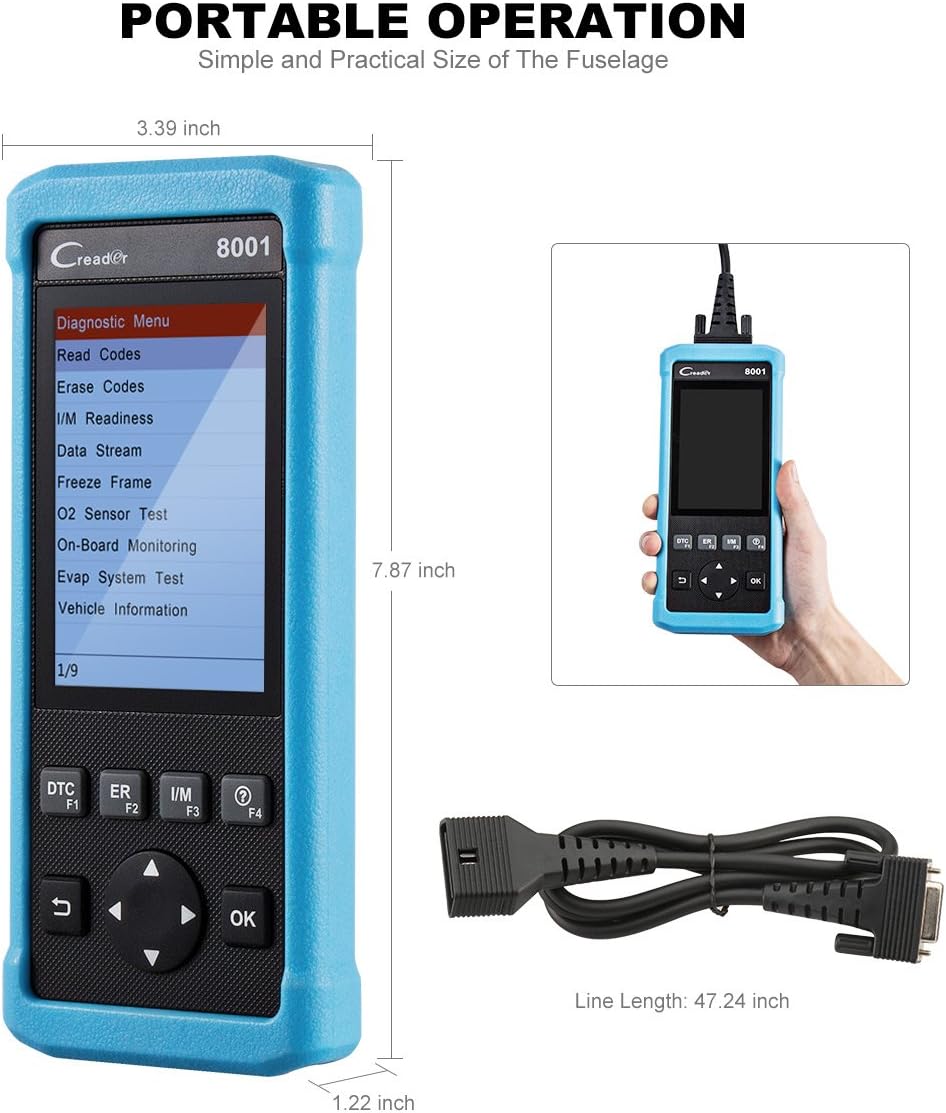
ຮູບທີ 4: Product Dimensions. This image provides a visual representation of the Creader 8021's physical dimensions, including its length, width, and thickness, along with the length of the diagnostic cable.
ການຮັບປະກັນແລະການສະຫນັບສະຫນູນ
ຂໍ້ມູນການຮັບປະກັນ:
The LAUNCH Creader 8021 comes with a ຮັບປະກັນ 12 ເດືອນ ຈາກວັນທີ່ຊື້. ການຮັບປະກັນນີ້ກວມເອົາຄວາມບົກຜ່ອງດ້ານການຜະລິດແລະການເຮັດວຽກຜິດປົກກະຕິພາຍໃຕ້ການນໍາໃຊ້ປົກກະຕິ. ກະລຸນາຮັກສາຫຼັກຖານການຊື້ຂອງທ່ານສໍາລັບການຮຽກຮ້ອງການຮັບປະກັນ.
The warranty does not cover damage caused by misuse, accidents, unauthorized modifications, or improper maintenance.
ສະຫນັບສະຫນູນດ້ານວິຊາການ:
For technical assistance, troubleshooting, or warranty inquiries, please contact LAUNCH customer support. Refer to the official LAUNCH webເວັບໄຊສໍາລັບຂໍ້ມູນຕິດຕໍ່ໃນປະຈຸບັນຫຼາຍທີ່ສຸດ.
When contacting support, please have your device's serial number and proof of purchase readily available.


