Keithley 2303-PJ Power Supply Instruction Manual
Model: 2303-PJ
1. ຜະລິດຕະພັນເກີນview
The Keithley 2303-PJ is a specialized power supply designed for testing portable, battery-operated devices. It offers advanced capabilities to simulate a battery's performance across a wide range of conditions, including output resistance and voltage response. This instrument is crucial for accurately testing device charge control circuitry and overall battery simulation.
ຄຸນນະສົມບັດທີ່ສໍາຄັນປະກອບມີ:
- Ultra-fast response to transient load currents
- Variable output resistance
- 100nA DC current sensitivity
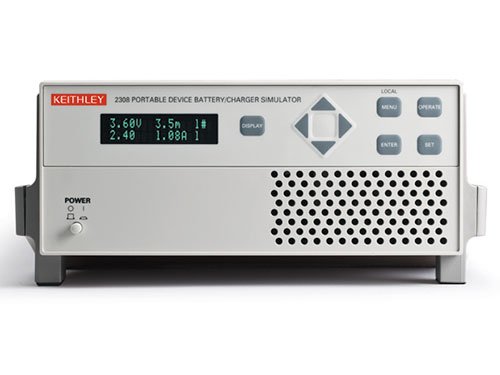
Figure 1: Front panel of the Keithley 2303-PJ Power Supply. The display shows voltage and current readings (e.g., 3.60V, 1.08A). Controls include a navigation pad, 'DISPLAY', 'MENU', 'OPERATE', 'ENTER', 'SET' buttons, and a 'POWER' button with indicator lights.
2. ຕັ້ງຄ່າ
- ການຫຸ້ມຫໍ່ແລະການກວດກາ: Carefully remove the instrument from its packaging. Inspect for any signs of damage during transit. Report any damage to the shipping carrier and Keithley immediately.
- ການເຊື່ອມຕໍ່ພະລັງງານ: Connect the supplied AC power cord to the instrument's rear panel power inlet and then to a grounded AC power outlet. Ensure the power source matches the instrument's voltage ຂໍ້ກໍານົດ.
- ການເປີດເຄື່ອງເບື້ອງຕົ້ນ: ກົດ ພະລັງງານ button located on the front panel. The display should illuminate, indicating the unit is operational.
- Connecting to Device Under Test (DUT): Use appropriate test leads to connect the output terminals of the 2303-PJ to the device you intend to test. Observe correct polarity.
- ການລະບາຍອາກາດ: Ensure adequate ventilation around the instrument. Do not block the ventilation grilles on the sides or rear of the unit.
3. ຄໍາແນະນໍາການດໍາເນີນງານ
3.1 ແຜງຄວບຄຸມດ້ານໜ້າ
- ຈໍສະແດງຜົນ: Shows output voltage, current, and other operational parameters.
- ປຸ່ມນຳທາງ (ຂຶ້ນ, ລົງ, ຊ້າຍ, ຂວາ): Used to navigate through menus and adjust parameter values.
- ປຸ່ມ ENTER: Confirms selections or entered values.
- ປຸ່ມ SET: ເຂົ້າສູ່ໂໝດການຕັ້ງຄ່າພາລາມິເຕີ.
- ປຸ່ມເມນູ: ເຂົ້າເຖິງເມນູຫຼັກສໍາລັບການຕັ້ງຄ່າ ແລະການຕັ້ງຄ່າຂັ້ນສູງ.
- OPERATE Button: Toggles the output on or off.
- ປຸ່ມ DISPLAY: Cycles through different display modes or views.
3.2 ການດໍາເນີນງານພື້ນຖານ
- ການຕັ້ງຄ່າ Voltage ແລະປັດຈຸບັນ:
- ກົດ SET ປຸ່ມ.
- Use the navigation buttons to select the voltage or current parameter you wish to adjust.
- Use the navigation buttons (typically Up/Down) to change the value.
- ກົດ ປ້ອນ ເພື່ອຢືນຢັນການຕັ້ງຄ່າ.
- ເປີດໃຊ້ Output:
- Once parameters are set, press the ດໍາເນີນການ button to enable the power output. The output indicator should illuminate.
- To disable the output, press ດໍາເນີນການ ອີກເທື່ອຫນຶ່ງ.
- ຕິດຕາມການອ່ານ:
The display continuously shows the actual output voltage and current. Use the ຈໍສະແດງຜົນ button to cycle through different measurement views ຖ້າມີ.
4. ບໍາລຸງຮັກສາ
- ທໍາຄວາມສະອາດ: Keep the instrument clean by wiping the exterior with a soft, damp cloth. Do not use abrasive cleaners or solvents. Ensure the unit is powered off and disconnected from the AC supply before cleaning.
- ການລະບາຍອາກາດ: Periodically check that the ventilation grilles are free from dust and debris to ensure proper airflow and prevent overheating.
- ການເກັບຮັກສາ: When not in use for extended periods, store the instrument in a clean, dry environment within its specified operating temperature and humidity ranges.
- ການປັບທຽບ: For optimal performance and accuracy, periodic calibration by qualified personnel is recommended. Refer to the Keithley service manual or contact Keithley support for calibration procedures and intervals.
5. ການແກ້ໄຂບັນຫາ
| ບັນຫາ | ສາເຫດທີ່ເປັນໄປໄດ້ | ການແກ້ໄຂ |
|---|---|---|
| ເຄື່ອງມືບໍ່ເປີດ. | No AC power; faulty power cord; internal fuse blown. | Check AC power connection and outlet. Try a different power cord. If fuse is suspected, contact qualified service personnel. |
| ບໍ່ມີຜົນຜະລິດ voltage/ປັດຈຸບັນ. | Output disabled; incorrect settings; overload protection active; faulty connections. | ກົດ ດໍາເນີນການ to enable output. Verify voltage/current settings. Check for short circuits or overloads on the DUT. Ensure test leads are securely connected. |
| Unstable or inaccurate readings. | Poor connections; external interference; instrument needs calibration. | Check all connections for looseness or corrosion. Ensure the instrument is away from strong electromagnetic fields. Consider professional calibration. |
| ຮ້ອນເກີນໄປ. | Blocked ventilation; excessive ambient temperature; continuous operation at maximum load. | Ensure ventilation grilles are clear. Operate in a cooler environment. Reduce load or allow for cool-down periods. |
For issues not listed here or if troubleshooting steps do not resolve the problem, please contact Keithley technical support.
6. ຂໍ້ມູນຈໍາເພາະ
| ພາລາມິເຕີ | ມູນຄ່າ |
|---|---|
| ຜູ້ຜະລິດ | Keithley |
| ເລກສ່ວນ | 2303-PJ |
| ໝາຍເລກຕົວແບບ | 2303-PJ |
| ນ້ໍາຫນັກລາຍການ | 5.44 ກິໂລ |
| ຂະໜາດແພັກເກັດ | 48.26 x 33.02 x 22.86 cm |
| ຈໍານວນຊຸດລາຍການ | 1 |
| ຕ້ອງໃຊ້ແບັດເຕີຣີ? | ບໍ່ |
| ວັນທີທໍາອິດທີ່ມີ | ວັນທີ 4 ພະຈິກ 2016 |
7. ການຮັບປະກັນແລະການສະຫນັບສະຫນູນ
Warranty information for the Keithley 2303-PJ Power Supply is typically provided with the product at the time of purchase or can be found on the official Keithley webເວັບໄຊ. ກະລຸນາຮັກສາຫຼັກຖານການຊື້ຂອງທ່ານສໍາລັບການຮຽກຮ້ອງການຮັບປະກັນ.
For technical support, service, or calibration inquiries, please contact Keithley customer service directly. Refer to the contact information provided in your product documentation or on the official Keithley webເວັບໄຊ (www.tek.com/keithley).


