ແນະນຳ
ຂອບໃຈສໍາລັບການຊື້asing the Havit HV-MS991GT Wireless Mouse. This manual provides essential information for setting up, operating, maintaining, and troubleshooting your device. Please read it carefully before use to ensure optimal performance and longevity of your mouse.
ຄໍາແນະນໍາການຕິດຕັ້ງ
- Unpack ຫນູ: Carefully remove the mouse and the USB receiver from the packaging.
- ຕິດຕັ້ງ ໝໍ້ ໄຟ:
Locate the battery compartment on the underside of the mouse. Open the cover and insert one AA battery (not included), ensuring correct polarity (+/-). Close the battery compartment cover.
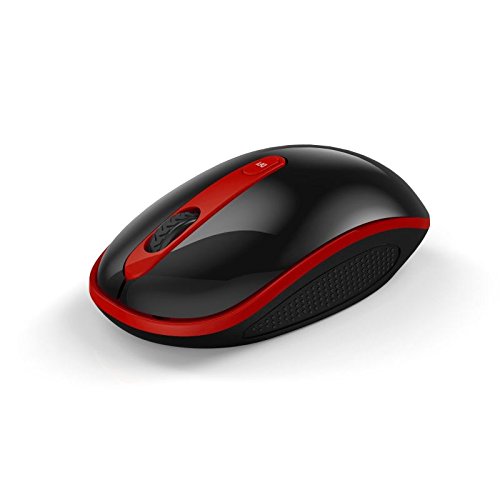
Image: The Havit HV-MS991GT Wireless Mouse, featuring a black body with red accents and a scroll wheel. This image illustrates the overall design of the mouse.
- ເຊື່ອມຕໍ່ຕົວຮັບ USB: Plug the mini USB receiver into an available USB port on your computer. The system will automatically detect and install the necessary drivers.
- ພະລັງງານກ່ຽວກັບຫນູ: Locate the power switch on the underside of the mouse and slide it to the "ON" position. The mouse is now ready for use.
ຄໍາແນະນໍາການດໍາເນີນງານ
The Havit HV-MS991GT Wireless Mouse is designed for intuitive use with standard mouse functions.
- ຟັງຊັນພື້ນຖານ:
- ຄລິກຊ້າຍ: ການຄັດເລືອກຂັ້ນຕົ້ນແລະການເປີດໃຊ້ງານ.
- ກົດຂວາ: ເຂົ້າເຖິງເມນູບໍລິບົດ.
- ລໍ້ເລື່ອນ: ເລື່ອນເອກະສານ ແລະ web pages vertically. The scroll wheel also functions as a middle click button.
- ການປັບ DPI: This mouse features adjustable DPI settings (1000-1600 DPI) for varying cursor speeds and precision. A dedicated DPI button, usually located near the scroll wheel, allows you to cycle through these settings. Press the button to switch between DPI levels.
- ຊ່ວງໄຮ້ສາຍ: The advanced 2.4GHz wireless technology provides an effective working distance of up to 15 meters (approximately 49 feet) from the USB receiver.
- ຄວາມເຂົ້າກັນໄດ້ຂອງລະບົບ: This mouse is compatible with Windows 2000, Windows XP, Windows Vista, Windows 7, and Windows 8 operating systems.
ບໍາລຸງຮັກສາ
- ທໍາຄວາມສະອາດ: ເພື່ອເຮັດຄວາມສະອາດໜູ, ໃຫ້ເຊັດໜ້າຜິວຂອງມັນດ້ວຍຜ້າອ່ອນໆແລະແຫ້ງ. ສຳລັບຝຸ່ນທີ່ຝັງແໜ້ນ, ໃຫ້ເຊັດອອກເລັກນ້ອຍampen the cloth with water. Avoid using harsh chemicals or abrasive cleaners, as these can damage the mouse's finish.
- ການປ່ຽນແບັດເຕີຣີ: When the mouse performance degrades or it stops responding, it is likely time to replace the battery. Follow the battery installation steps in the "Setup Instructions" section.
- ຟັງຊັນນອນອັດຕະໂນມັດ: The mouse features a built-in auto sleep function to conserve battery life. If the mouse is inactive for a period, it will enter a low-power sleep mode. To wake it up, simply move the mouse or click any button.
- ການເກັບຮັກສາຜູ້ຮັບ: The mini USB receiver can be stored inside the mouse's battery compartment when not in use, making it convenient for travel and preventing loss.
ການແກ້ໄຂບັນຫາ
| ບັນຫາ | ການແກ້ໄຂ |
|---|---|
| ເມົາສ໌ບໍ່ຕອບສະໜອງ. |
|
| ການເຄື່ອນໄຫວຂອງເຄີເຊີບໍ່ສະໝໍ່າສະເໝີ ຫຼື ຊ້າ. |
|
| Wireless connection is unstable. |
|
ຂໍ້ມູນຈໍາເພາະ
| ຄຸນສົມບັດ | ລາຍລະອຽດ |
|---|---|
| ຍີ່ຫໍ້ | ຮາວິດ |
| ໝາຍເລກຕົວແບບ | HV-MS991GT |
| ເຕັກໂນໂລຊີການເຊື່ອມຕໍ່ | 2.4GHz ໄຮ້ສາຍ |
| ການຕັ້ງຄ່າ DPI | 1000-1600 DPI |
| ຈໍານວນປຸ່ມ | 4 |
| ຊີວິດທີ່ສໍາຄັນ | 1,000,000 ເທື່ອ |
| Range ໄຮ້ສາຍ | ເຖິງ 15 ແມັດ |
| ສະຫນັບສະຫນູນລະບົບປະຕິບັດງານ | Windows 2000/XP/Vista/7/8 |
| ອາຍຸຫມໍ້ໄຟສະເລ່ຍ | 12 ເດືອນ |
| ແບດເຕີລີ່ລວມ | No (Requires 1x AA battery) |
| ນ້ໍາຫນັກລາຍການ | 120 g |
| ຂະໜາດແພັກເກັດ | 16.2 x 10.8 x 6 cm |
ການຮັບປະກັນແລະການສະຫນັບສະຫນູນ
Specific warranty information for the Havit HV-MS991GT Wireless Mouse is not provided in this manual. Please refer to the product packaging or the manufacturer's official website for details regarding warranty coverage and customer support contact information.