ແນະນຳ
This user manual provides comprehensive instructions for the operation, setup, maintenance, and troubleshooting of your PeakTech P 9020 Digital DVB Measurement Device. Please read this manual carefully before using the device to ensure proper functionality and safety.
The PeakTech P 9020 is a versatile digital DVB measurement device designed for signal searches in cable, satellite, and terrestrial television systems. It features a TFT color display, a graphical user interface for easy navigation, and supports various DVB standards including DVB-C, DVB-S, S2, DVB-T, and T2 with H.265 codec support.
ເນື້ອໃນຊຸດ
ພາຍຫຼັງການຫຸ້ມຫໍ່, ກະລຸນາກວດສອບວ່າລາຍການທັງໝົດທີ່ລະບຸໄວ້ຂ້າງລຸ່ມນີ້ແມ່ນມີຢູ່ ແລະຢູ່ໃນສະພາບດີ:
- PeakTech P 9020 Digital DVB Measurement Device
- Metal Carrying Case
- ເຄື່ອງປັບໄຟຟ້າ AC
- Integrated Lithium-Ion Battery (pre-installed)
- ອະແດບເຕີລົດ 12V
- Windows Software CD/Download Link (if applicable)
- ການຄວບຄຸມໄລຍະໄກ
- Video Cable
- ສາຍບ່າ

Figure 1: PeakTech P 9020 device shown with its complete set of accessories, including the carrying case, power adapters, remote control, and cables.
ອຸປະກອນເກີນview
The PeakTech P 9020 features a robust design with a clear TFT color display and intuitive controls. Familiarize yourself with the main components:

ຮູບ 2: ດ້ານຫນ້າ view of the PeakTech P 9020, highlighting the TFT color display, control buttons, and input ports.
ອົງປະກອບທີ່ສໍາຄັນ:
- TFT Color Display: 12.5 cm (approx. 5 inches) screen for live TV, audio, and menu navigation.
- ກະດານຄວບຄຸມ: Buttons for menu navigation, function selection (F1, F2), signal search (FIND), exit (EXIT), and OK.
- Ports ການປ້ອນຂໍ້ມູນ: Connectors for DVB-S/S2, DVB-C, DVB-T/T2 signals.
- HDMI Output: ສໍາລັບການເຊື່ອມຕໍ່ກັບຈໍສະແດງຜົນພາຍນອກ.
- ພອດ USB: For software updates and data transfer.
- ການປ້ອນຂໍ້ມູນພະລັງງານ: For AC adapter or 12V car adapter.
ຕັ້ງຄ່າ
1. ການສາກແບັດເຕີຣີ:
Before first use, fully charge the integrated lithium-ion battery. Connect the AC power adapter to the device's power input and plug it into a wall outlet. The charging indicator will illuminate. A full charge typically takes several hours.
2. ການເປີດເຄື່ອງເບື້ອງຕົ້ນ:
Press and hold the power button (usually red) on the device until the screen illuminates. The device will boot up and display the main menu.
3. Language and Region Settings:
Navigate to the "Settings" menu using the directional buttons and OK button. Select "Language" to choose your preferred language. Then, configure region-specific settings for DVB-T/T2 or DVB-C if prompted.
ຄໍາແນະນໍາການດໍາເນີນງານ
1. Selecting DVB Mode:
From the main menu, select the desired DVB mode (DVB-S/S2 for satellite, DVB-C for cable, or DVB-T/T2 for terrestrial) using the navigation buttons. Press OK to confirm.
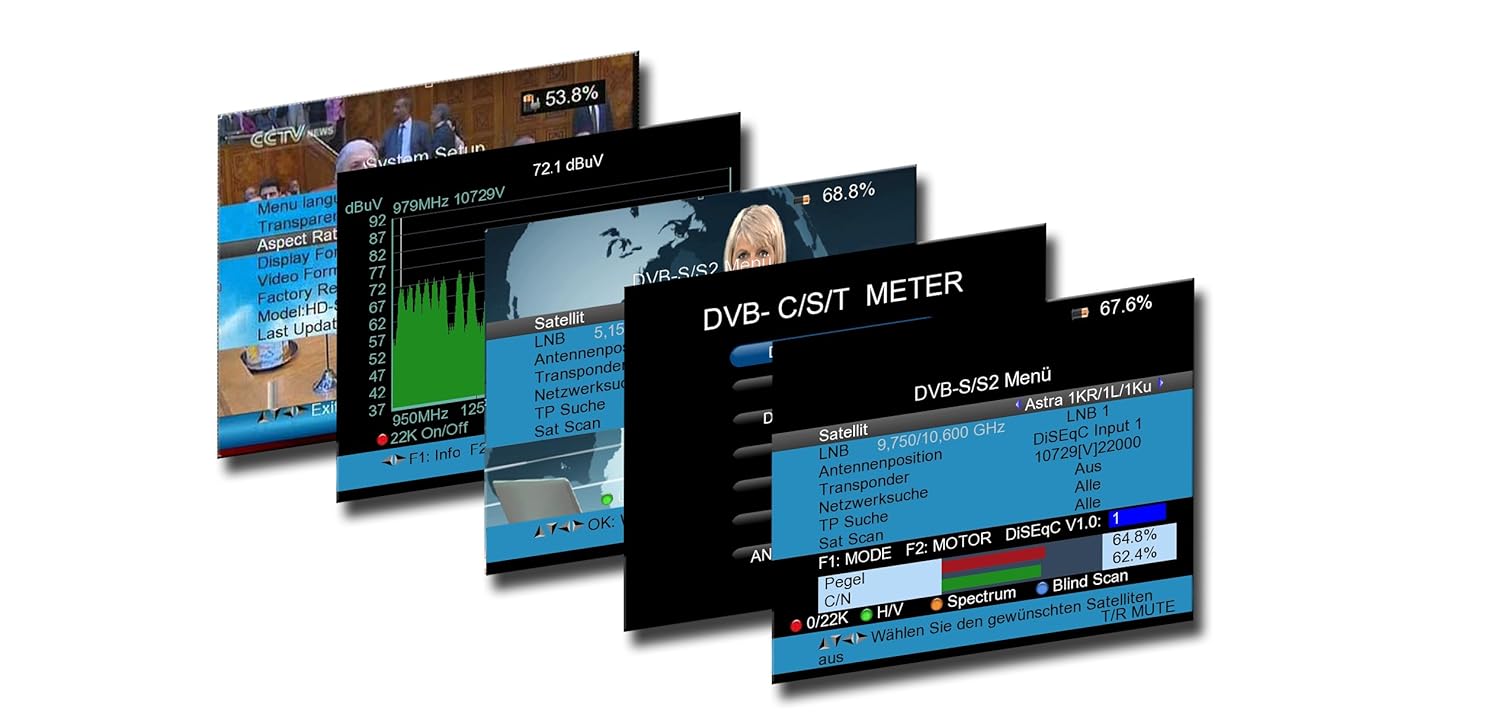
ຮູບທີ 3: ຕົວຢ່າງamples of the graphical user interface on the PeakTech P 9020, displaying menu options and signal measurement data.
2. Signal Search (DVB-S/S2):
- Connect the satellite dish LNB cable to the device's satellite input.
- In the DVB-S/S2 menu, configure LNB settings (e.g., LNB type, frequency).
- Select a satellite from the predefined list or manually enter transponder details.
- Press the "FIND" button to initiate a signal search. The device will display signal strength and quality. Adjust the dish alignment until optimal signal levels are achieved.
- Use the spectrum analyzer function to visualize signal characteristics.
3. Signal Search (DVB-T/T2 and DVB-C):
- Connect the terrestrial antenna or cable TV line to the appropriate input.
- In the DVB-T/T2 or DVB-C menu, select the desired channel or frequency range.
- Press "FIND" to scan for available signals. The device will display signal strength, quality, and identify channels.
4. Live TV and Audio:
Once a signal is locked, the device can display live TV channels and play audio directly on its screen, allowing for real-time verification of signal quality and content.
5. ການນໍາໃຊ້ການຄວບຄຸມໄລຍະໄກ:
The included remote control provides convenient access to most functions, including menu navigation, volume control, and channel selection. Ensure the remote's batteries are installed correctly.
ບໍາລຸງຮັກສາ
ທໍາຄວາມສະອາດ:
Wipe the device with a soft, dry cloth. For stubborn dirt, a slightly damp cloth can be used. Do not use abrasive cleaners or solvents. Keep the screen clean to ensure clear visibility.
ການດູແລຫມໍ້ໄຟ:
To prolong battery life, avoid fully discharging the lithium-ion battery frequently. Store the device in a cool, dry place when not in use for extended periods. Recharge the battery periodically if stored for a long time.
ອັບເດດຊອບແວ:
Periodically check the PeakTech website for firmware updates. Updates can improve performance, add new features, or fix bugs. Use the provided Windows software and USB cable to perform updates as per the instructions on the PeakTech webເວັບໄຊ.
ການແກ້ໄຂບັນຫາ
| ບັນຫາ | ສາເຫດທີ່ເປັນໄປໄດ້ | ການແກ້ໄຂ |
|---|---|---|
| ອຸປະກອນບໍ່ເປີດ. | Battery is discharged or power adapter is not connected. | Charge the battery using the AC adapter. Ensure the power button is pressed firmly. |
| ບໍ່ພົບສັນຍານ. | Incorrect DVB mode selected, cable not connected properly, or antenna/dish misalignment. | Verify DVB mode. Check all cable connections. Adjust antenna/dish alignment. Check LNB settings for satellite. |
| Poor signal quality. | Weak signal, interference, or incorrect settings. | Fine-tune antenna/dish position. Check for obstructions. Ensure correct transponder/channel settings. |
| ການຄວບຄຸມໄລຍະໄກບໍ່ເຮັດວຽກ. | Dead batteries or line of sight obstruction. | Replace remote control batteries. Ensure no objects are blocking the infrared signal path. |
ຂໍ້ມູນຈໍາເພາະ
- ຕົວແບບ: ປ 9020
- ຈໍສະແດງຜົນ: 12.5 cm (5 inch) TFT Color Display
- Supported DVB Standards: DVB-S/S2, DVB-C, DVB-T/T2
- ການຖອດລະຫັດວິດີໂອ: H.265 (HEVC) compatible
- ໜ່ວຍປະມວນຜົນ: 450 MHz
- SDRAM: 256 MByte
- Demodulation: 16QAM - 256 QAM, QPSK / 8PSK
- ການເຊື່ອມຕໍ່: HDMI, USB
- ແບັດເຕີຣີ: ແບັດເຕີຣີລິທຽມໄອອອນປະສົມປະສານ
- ການປ້ອນຂໍ້ມູນພະລັງງານ: AC Adapter, 12V Car Adapter
- ຂະໜາດ: 13 x 20 x 5 cm (ປະມານ 5.1 x 7.9 x 2 ນິ້ວ)
- ນ້ຳໜັກ: 800 g (ປະມານ 1.76 lbs)
ການຮັບປະກັນແລະການສະຫນັບສະຫນູນ
PeakTech products are manufactured with high quality standards. For information regarding warranty coverage, technical support, or service, please refer to the official PeakTech webເວັບໄຊ ຫຼືຕິດຕໍ່ບໍລິການລູກຄ້າຂອງເຂົາເຈົ້າໂດຍກົງ. ຮັກສາໃບຮັບເງິນການຊື້ຂອງທ່ານໄວ້ເປັນຫຼັກຖານການຊື້ສໍາລັບການຮ້ອງຂໍການຮັບປະກັນ.
ທາງການ Webເວັບໄຊ: www.peaktech.de
For further assistance, please contact your local distributor or the PeakTech support team.


