ແນະນຳ
This manual provides essential information for the safe and efficient operation of your 1byone Bluetooth Record Player. Please read it thoroughly before use and retain it for future reference.
ຄຸນນະສົມບັດທີ່ສໍາຄັນ:
- Selectable 33, 45, and 78 RPM speed settings, including a 45-RPM adapter.
- Bluetooth connectivity for wireless music playback from smartphones, tablets, and other devices through the turntable's built-in speakers.
- Dynamic, balanced tone arm with soft damping control for gentle record playback.
- RCA output for connecting to external speakers and a headphone jack for private listening.
- Line-in port for connecting external audio sources like MP3 players.
- Portable briefcase-style design with a wooden cabinet and PU leather wrapping for easy storage and transport.
ຂໍ້ມູນຄວາມປອດໄພ
ຄໍາແນະນໍາຄວາມປອດໄພທີ່ສໍາຄັນ:
- This appliance is not intended for use by dependents and children. All use by dependents should be supervised by a responsible, capable adult.
- This product must be used only for the purpose for which it has been developed, and in the manner described in these instructions for use. Any improper use can be dangerous.
- ຫ້າມບໍ່ໃຫ້ອຸປະກອນຖືກຝົນ ຫຼື ຄວາມຊຸ່ມຊື່ນ.
- ຫ້າມປິດຊ່ອງລະບາຍອາກາດໃດໆ.
- ປົກປ້ອງສາຍໄຟຈາກການຖືກເປີດ ຫຼື ສຽບ.
- ຖອດປລັກເຄື່ອງໃນເວລາມີພາຍຸຟ້າຜ່າ ຫຼືເມື່ອບໍ່ໄດ້ໃຊ້ເປັນເວລາດົນນານ.
ເນື້ອໃນຊຸດ
ກະລຸນາກວດສອບວ່າລາຍການທັງຫມົດທີ່ລະບຸໄວ້ຂ້າງລຸ່ມນີ້ແມ່ນລວມຢູ່ໃນຊຸດຂອງທ່ານ:
- 1byone Bluetooth Record Player
- ອະແດັບເຕີ 45 RPM
- Power Adapter
- ຄູ່ມືຜູ້ໃຊ້ (ເອກະສານນີ້)
ສິນຄ້າເກີນview
ຄຸ້ນເຄີຍກັບອົງປະກອບຕ່າງໆຂອງເຄື່ອງຫຼິ້ນແຜ່ນສຽງຂອງທ່ານ.

Figure 1: The 1byone Bluetooth Record Player in its open position, showcasing the platter, tone arm, and built-in speakers. A vinyl record is placed on the platter, ready for playback.
ດ້ານໜ້າ View (ປິດ):

Figure 2: The record player in its closed, portable briefcase form, showing the front latches, handle, and speaker grilles.
ຫລັງ View (ປິດ):

Figure 3: The rear of the record player, displaying the hinges and a product information label with model and power specifications.
Side Panel Controls and Ports:

ຮູບທີ 4: A ລາຍລະອຽດ view of the right side panel, featuring the power/volume knob, DC input, headphone jack, RCA output (L/R), and Line-in port.

Figure 5: Visual representation of the connectivity options: headphone jack for private listening, RCA output for external speakers, and 3.5mm line-in for connecting other audio devices.
ອົງປະກອບພາຍໃນ:
- ຈານ: The rotating surface where records are placed.
- ແຂນໂທນ: Holds the cartridge and stylus, which reads the grooves of the record.
- ປາກກາ (ເຂັມ): The tip of the cartridge that makes contact with the record. (Protected by a cap).
- ສະວິດຕົວເລືອກຄວາມໄວ: Allows selection of 33, 45, or 78 RPM playback speeds.
- ສະວິດເປີດ/ປິດ ຢຸດອັດຕະໂນມັດ: Controls whether the platter stops automatically at the end of a record.
- 45 RPM ຜູ້ດັດແປງ: A dedicated slot for storing the 45 RPM adapter.
- ລຳໂພງໃນຕົວ: Located on the front panel for direct audio output.
ຕັ້ງຄ່າ
- ແກະແຜ່ນສຽງອອກ: ເອົາເຄື່ອງຫຼິ້ນບັນທຶກ ແລະອຸປະກອນເສີມທັງໝົດອອກຈາກເຄື່ອງຫຸ້ມຫໍ່ຢ່າງລະມັດລະວັງ.
- ວາງແຜ່ນໝຸນ: Position the unit on a stable, level surface away from direct sunlight, heat sources, or excessive dust.
- ເຊື່ອມຕໍ່ພະລັງງານ: Insert the DC plug of the power adapter into the DC IN port on the side of the turntable. Plug the other end of the adapter into a suitable wall outlet.
- ເອົາຕົວປ້ອງກັນສະໄຕລັສອອກ: Before playing a record, gently remove the clear plastic protective cap from the stylus (needle).
- Release Tone Arm: Unlock the tone arm clip to release the tone arm.
ຄໍາແນະນໍາການດໍາເນີນງານ
1. Playing Vinyl Records:
- ເປີດ: Rotate the ON/OFF/VOLUME knob clockwise until it clicks to turn on the unit. Adjust the volume to a low level.
- ເລືອກຄວາມໄວ: Set the speed selector switch (33/45/78 RPM) to match the record you are playing. For 45 RPM records, place the included 45 RPM adapter onto the center spindle.
- ບັນທຶກສະຖານທີ່: ຄ່ອຍໆວາງແຜ່ນສຽງໄວນິລລົງໃນຖາດແຜ່ນສຽງ.
- ຟັງຊັນຢຸດອັດຕະໂນມັດ: The AUTO STOP ON/OFF switch controls whether the record stops automatically when finished.
- ຖ້າຕັ້ງເປັນ ON, the record will stop automatically when it reaches the end. (Note: For some records, it may stop prematurely or not stop at all).
- ຖ້າຕັ້ງເປັນ ປິດ, the record will continue to spin even after the music has ended.
- ເລີ່ມການຫຼິ້ນ: Gently lift the tone arm using the cueing lever. Position the tone arm over the desired track on the record. Slowly lower the tone arm onto the record using the cueing lever. The music will begin to play.
- ປັບລະດັບສຽງ: Rotate the ON/OFF/VOLUME knob to adjust the sound level.
- ສິ້ນສຸດການຫຼິ້ນ: When the record finishes (or you wish to stop), lift the tone arm using the cueing lever and return it to the tone arm rest. Secure it with the tone arm clip. Rotate the ON/OFF/VOLUME knob counter-clockwise until it clicks to turn off the unit.
2. ການຫຼິ້ນ Bluetooth:
You can stream music wirelessly from your Bluetooth-enabled devices to the record player's built-in speakers.
- ເປີດ: Turn on the record player using the ON/OFF/VOLUME knob.
- ເປີດໃຊ້ Bluetooth: The unit will automatically enter Bluetooth pairing mode. An indicator light may flash to show it's ready to pair.
- ຈັບຄູ່ອຸປະກອນ: On your smartphone, tablet, or other Bluetooth device, enable Bluetooth and search for "1byone Turntable" (or similar name). Select it to pair.
- ຫຼິ້ນດົນຕີ: Once paired, you can play music from your device, and it will sound through the record player's speakers. Adjust volume using both your device and the turntable's volume knob.
3. Using the Line-In Port:
Connect external audio devices via the 3.5mm Line-in port.
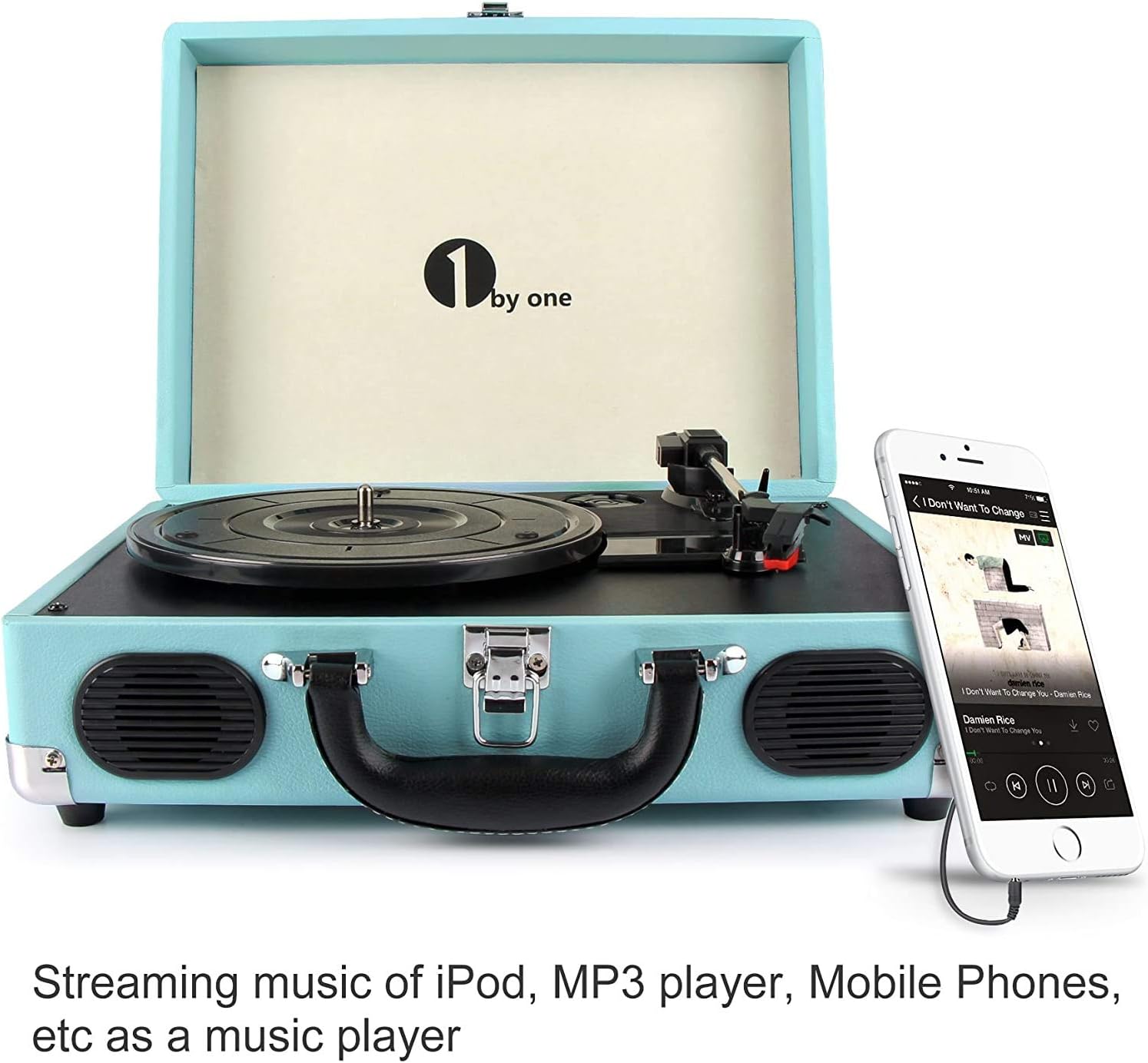
Figure 6: The record player demonstrating a smartphone connected to its 3.5mm Line-in port, allowing external audio playback through the turntable's speakers.
- ເຊື່ອມຕໍ່ສາຍ: Use a 3.5mm audio cable (not included) to connect your external audio device (e.g., MP3 player, phone) to the LINE IN port on the side of the record player.
- ເປີດ: Turn on the record player and your external audio device.
- ຫຼິ້ນດົນຕີ: Start playback on your external device. The audio will be routed through the record player's speakers. Adjust volume using both devices.
4. Using RCA Output:
Connect the record player to an external amplifier or powered speakers for enhanced sound.
- ເຊື່ອມຕໍ່ສາຍ RCA: Use RCA cables (not included) to connect the L (left) and R (right) RCA OUT ports on the record player to the corresponding audio input ports on your amplifier ຫຼືລໍາໂພງພະລັງງານ.
- ເປີດ: Turn on the record player and your external audio system.
- ຫຼິ້ນດົນຕີ: Play a record on the turntable. The audio will be output through your connected external system. Adjust volume on your external system.
5. Using Headphone Jack:
For private listening, connect headphones to the dedicated jack.
- ເຊື່ອມຕໍ່ຫູຟັງ: Plug your headphones (not included) into the HEADPHONE jack on the side of the record player.
- ຫຼິ້ນດົນຕີ: Play a record or stream via Bluetooth/Line-in. The sound will be directed to your headphones, and the built-in speakers will be muted.
- ປັບລະດັບສຽງ: Adjust the volume using the ON/OFF/VOLUME knob.
ບໍາລຸງຮັກສາ
- ທໍາຄວາມສະອາດຫນ່ວຍບໍລິການ: Wipe the exterior of the record player with a soft, dry cloth. Do not use abrasive cleaners or solvents.
- ການທໍາຄວາມສະອາດ Stylus: Use a soft brush (not included) to gently clean the stylus, brushing from back to front. Avoid touching the stylus with your fingers.
- ບັນທຶກການທໍາຄວາມສະອາດ: Keep your vinyl records clean to ensure optimal sound quality and prolong stylus life. Use a record cleaning brush and solution (not included) as recommended by record care professionals.
- ການປ່ຽນປາກກາປາກກາ: The stylus has a limited lifespan. If sound quality deteriorates, the stylus may need replacement. Contact 1byone customer support for replacement options.
- ການເກັບຮັກສາ: When not in use, ensure the tone arm is secured with its clip and the stylus cap is in place. Close the lid to protect the platter and tone arm from dust. Store the unit in a cool, dry place.
ການແກ້ໄຂບັນຫາ
| ບັນຫາ | ສາເຫດທີ່ເປັນໄປໄດ້ | ການແກ້ໄຂ |
|---|---|---|
| ບໍ່ມີພະລັງງານ | ອະແດບເຕີໄຟບໍ່ໄດ້ເຊື່ອມຕໍ່ ຫຼືປລັກສຽບບໍ່ເຮັດວຽກ. | Ensure the power adapter is securely plugged into the unit and a working wall outlet. Check if the ON/OFF/VOLUME knob is turned on. |
| ບໍ່ມີສຽງຈາກ ລຳ ໂພງ | Volume too low; headphones connected; RCA output connected to external system. | Increase volume. Disconnect headphones. If using RCA output, ensure external system is powered on and correctly configured. |
| ບັນທຶກການຂ້າມ | Dirty or scratched record; stylus worn or dirty; turntable not level. | Clean the record. Clean or replace the stylus. Place the turntable on a stable, level surface. |
| ການບັນທຶກຫຼິ້ນໄວ/ຊ້າເກີນໄປ | ການຕັ້ງຄ່າຄວາມໄວບໍ່ຖືກຕ້ອງ. | ປັບສະວິດເລືອກຄວາມໄວໃຫ້ກົງກັບ RPM ຂອງສະຖິຕິ (33, 45, ຫຼື 78). |
| Auto stop not working correctly | Record type; AUTO STOP switch setting. | Some records may not trigger the auto-stop function reliably. Try setting the AUTO STOP switch to OFF if it stops prematurely. |
| ບັນຫາການຈັບຄູ່ Bluetooth | Device not in pairing mode; device too far; interference. | Ensure the turntable is in Bluetooth mode. Move your device closer. Turn off other Bluetooth devices to reduce interference. |
ຂໍ້ມູນຈໍາເພາະ
| ຊື່ຕົວແບບ | ໂຕະຕູ້ເສື້ອຜ້າ |
| ໝາຍເລກຕົວແບບ | OEU00-0750 |
| ຍີ່ຫໍ້ | 1 ໂດຍ |
| ຂະໜາດສິນຄ້າ | 13.8 x 10 x 5.1 ນິ້ວ |
| ນ້ໍາຫນັກລາຍການ | 5.7 ປອນ |
| ຄວາມໄວການຫມຸນສູງສຸດ | 78 RPM |
| ວັດສະດຸ | ພາດສະຕິກ |
| ສີ | Turquoise |
| ອຸປະກອນທີ່ເຂົ້າກັນໄດ້ | ຫູຟັງ, ເຄື່ອງຫຼິ້ນ MP3, ລຳໂພງ, ແທັບເລັດ |
Note: While the primary material is listed as Plastic, the product features a wooden cabinet with PU leather wrapping for its exterior finish.
ການຮັບປະກັນແລະການສະຫນັບສະຫນູນ
ຂໍ້ມູນການຮັບປະກັນ:
1byone stands by its products. This turntable comes with a 12-month guarantee. If any issues arise, a replacement will be provided. Customer satisfaction is a priority.
ການຊ່ວຍເຫຼືອລູກຄ້າ:
For technical assistance, warranty claims, or general inquiries, please contact 1byone customer support. Refer to the official 1byone webສະຖານທີ່ຫຼືການຫຸ້ມຫໍ່ຜະລິດຕະພັນສໍາລັບຂໍ້ມູນຕິດຕໍ່ໃນປະຈຸບັນຫຼາຍທີ່ສຸດ.


