ແນະນຳ
The JAM Voice is a versatile portable speaker designed for audio playback via Wi-Fi and Bluetooth connectivity. It integrates with Amazon Alexa Voice Service, allowing for voice commands and interaction. The speaker is rechargeable and can be paired with other JAM Wi-Fi speakers for a multi-room audio experience. Control is managed through the free JAM app.
ເນື້ອໃນຊຸດ
- JAM Voice Alexa Voice Service Enabled Speaker
- ສາຍສາກ USB
ລຳ ໂພງເກີນview

ຮູບທີ 1: ດ້ານໜ້າມຸມ view of the JAM Voice speaker. This image shows the speaker from a slight angle, highlighting the top grille with the 'jam' logo and the accessible control buttons on the front for volume and playback.

ຮູບທີ 2: ທາງຫນ້າໂດຍກົງ view of the JAM Voice speaker. This image provides a straight-on perspective of the speaker, clearly showing the top grille and the control panel with its buttons.
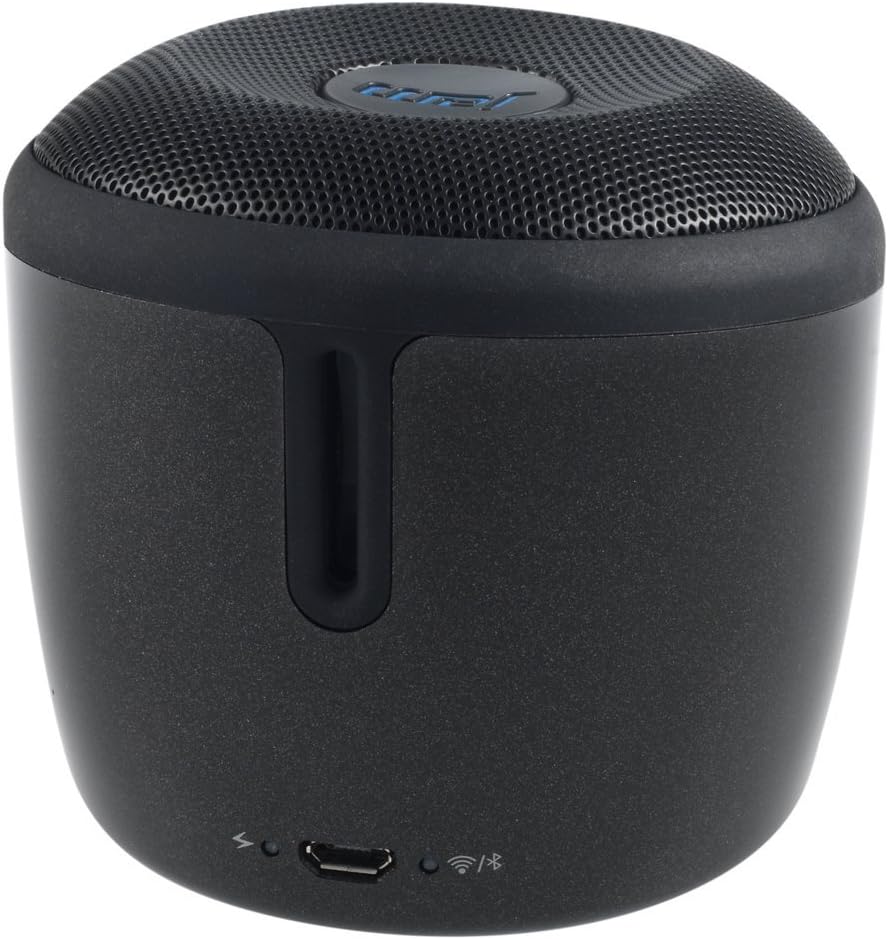
ຮູບທີ 3: ຫລັງ view of the JAM Voice speaker. This image highlights the back of the speaker, including the micro USB charging port, a power indicator light, a Wi-Fi status indicator, and a Bluetooth status indicator.
ຕັ້ງຄ່າ
1. ການສາກໄຟ ລຳ ໂພງ
Before initial use, fully charge the JAM Voice speaker. Connect the supplied USB charging cord to the micro USB port on the back of the speaker and to a USB power source (e.g., computer USB port or USB wall adapter). The charging indicator light will show the charging status. A full charge provides up to 4 hours of playtime.
2. Installing the JAM App
The JAM app is required for Wi-Fi setup and advanced control features. Download the free JAM app from your device's app store (e.g., Apple App Store for iOS or Google Play Store for Android).
3. ການເຊື່ອມຕໍ່ເຄືອຂ່າຍ Wi-Fi
- Ensure your JAM Voice speaker is powered on.
- Open the JAM app on your smartphone or tablet.
- Follow the in-app instructions to connect your speaker to your home Wi-Fi network. This process typically involves selecting your Wi-Fi network and entering the password.
- Once connected, the Wi-Fi indicator light on the speaker will illuminate steadily.
4. ການຈັບຄູ່ Bluetooth
To use the speaker via Bluetooth:
- Press and hold the Bluetooth button on the speaker until the Bluetooth indicator light begins to flash, indicating pairing mode.
- On your device (smartphone, tablet, etc.), go to the Bluetooth settings and select "JAM Voice" from the list of available devices.
- Once paired, the Bluetooth indicator light on the speaker will illuminate steadily.
ຄໍາແນະນໍາການດໍາເນີນງານ
1. ເປີດ/ປິດ
Press and hold the power button (location not specified in data, assuming standard placement) for a few seconds to turn the speaker on or off.
2. Amazon Alexa Voice Service
To activate Alexa, tap the designated Alexa button on the speaker. Once activated, you can ask questions or issue commands, such as "What's the weather?" or "Play music." Ensure the speaker is connected to Wi-Fi for Alexa functionality.
3. ການຖ່າຍທອດເພງ
- ຜ່ານ Wi-Fi: Use the JAM app to connect to streaming services like TuneIn, iHeartRadio, Spotify, and Tidal. You can also ask Alexa to stream music from supported services.
- ຜ່ານ Bluetooth: Once paired with a device, play audio directly from your device's music library or streaming apps.
4. Multi-Speaker Pairing
The JAM Voice speaker can be paired with other JAM Voice speakers or any speaker in the JAM Wi-Fi lineup for a synchronized audio experience. Use the JAM app to group speakers, adjust individual volumes, or set up stereo sound (left/right channels).
Note: When grouped for multi-room or stereo playback, Alexa voice service may only be active on the designated master speaker.
5. ການຄວບຄຸມ
- ປະລິມານ: Use the volume buttons on the speaker or control via the JAM app/connected device.
- ຫຼິ້ນຄືນ: Use the play/pause and skip track buttons on the speaker or control via the JAM app/connected device.
ບໍາລຸງຮັກສາ
1. ທໍາຄວາມສະອາດ
Wipe the speaker with a soft, dry cloth. Do not use liquid cleaners or abrasive materials, as they may damage the finish or internal components. Ensure no moisture enters the ports.
2. ການດູແລຫມໍ້ໄຟ
To prolong battery life, avoid fully discharging the speaker frequently. Recharge the speaker when the battery is low. If storing the speaker for an extended period, charge it to approximately 50% every few months.
ການແກ້ໄຂບັນຫາ
| ບັນຫາ | ການແກ້ໄຂ |
|---|---|
| ລຳໂພງບໍ່ເປີດ. | Ensure the speaker is charged. Connect it to a power source using the USB charging cord. |
| ບໍ່ສາມາດເຊື່ອມຕໍ່ກັບ Wi-Fi ໄດ້. |
|
| ບໍ່ສາມາດຈັບຄູ່ຜ່ານ Bluetooth ໄດ້. |
|
| Alexa ບໍ່ຕອບສະໜອງ. |
|
| ລຳໂພງປິດໂດຍບໍ່ຄາດຄິດ. | The speaker may have an auto-off feature to conserve battery. Ensure it is sufficiently charged. If connected to power, check the power source. |
ຂໍ້ມູນຈໍາເພາະ
| ໝາຍເລກຕົວແບບ | HX-P590BK |
| ເຕັກໂນໂລຊີການເຊື່ອມຕໍ່ | Bluetooth, WiFi |
| ຮູບແບບການອອກສຽງ | ສະເຕຣິໂອ |
| ແຫຼ່ງພະລັງງານ | ພະລັງງານຫມໍ້ໄຟ |
| ເວລາຫຼິ້ນ | ສູງສຸດ 4 ຊົ່ວໂມງ |
| ວິທີການຄວບຄຸມ | ສຽງ, ແອັບ |
| ຂະໜາດ | 3 x 3 x 3 ນິ້ວ |
| ນ້ໍາຫນັກລາຍການ | 9.8 ອອນສ໌ (0.61 ປອນ) |
| ອົງປະກອບລວມ | Jam Voice Alexa Voice Service Enabled Speaker, USB Charging Cord |
| ອຸປະກອນທີ່ເຂົ້າກັນໄດ້ | ແລັບທັອບ, ໂທລະສັບສະຫຼາດ, ແທັບເລັດ, ໂທລະພາບ |
| ປະເພດລຳໂພງ | ແບບພົກພາ |
ຂໍ້ມູນການຮັບປະກັນ
ຜະລິດຕະພັນນີ້ມາພ້ອມກັບ a ການຮັບປະກັນຈໍາກັດ. For detailed information regarding the terms, conditions, and duration of your warranty, please refer to the documentation included with your purchase or visit the official Jam Audio webເວັບໄຊ. ຮັກສາຫຼັກຖານການຊື້ຂອງທ່ານສໍາລັບການຮ້ອງຂໍການຮັບປະກັນ.
ສະຫນັບສະຫນູນ
For further assistance, technical support, or frequently asked questions, please visit the official Jam Audio support website. You may also find helpful resources within the JAM app.
Jam Audio Official Webເວັບໄຊ: www.jamaudio.com


