ແນະນຳ
ຂອບໃຈສໍາລັບການຊື້asing the QUMOX L165U 2.4GHz Wireless Gamepad. This high-quality game controller is designed for use with PC and Android devices, offering a reliable 2.4GHz wireless connection for an enhanced gaming experience. Please read this manual carefully to ensure proper setup and operation of your new gamepad.

Figure 1: QUMOX L165U Gamepad with included USB adapter and OTG connection kit.
ເນື້ອໃນຊຸດ
ໃຫ້ແນ່ໃຈວ່າທຸກລາຍການຢູ່ໃນຊຸດຂອງທ່ານ:
- 1x QUMOX L165U Gamepad
- 1x 2.4GHz USB Wireless Adapter
- 1x OTG Connection Kit (Micro USB to USB-A adapter)
ຕັ້ງຄ່າ
1. ການຕິດຕັ້ງຫມໍ້ໄຟ
The QUMOX L165U Gamepad is powered by 2 AAA batteries (not included). To install the batteries:
- ຊອກຫາຊ່ອງໃສ່ແບັດເຕີຣີຢູ່ດ້ານຫຼັງຂອງແຜ່ນເກມ.
- ເລື່ອນເປີດຝາປິດຫມໍ້ໄຟ.
- ໃສ່ໝໍ້ໄຟ AAA 2 ອັນ, ຮັບປະກັນການຂົ້ວທີ່ຖືກຕ້ອງ (+/-).
- ປິດຝາປິດຫມໍ້ໄຟຢ່າງປອດໄພ.

Figure 2: Open battery compartment for AAA battery installation.
2. ກຳລັງເຊື່ອມຕໍ່ກັບ PC
- Plug the 2.4GHz USB Wireless Adapter into an available USB port on your PC.
- Turn on the gamepad by pressing the 'START' button. The gamepad will automatically attempt to connect.
- The PC should recognize the gamepad and install necessary drivers automatically.
- If the gamepad does not connect, press the 'MODE' button on the gamepad to cycle through connection modes until it is recognized by your PC.
3. Connecting to an Android Device (with OTG support)
- Connect the OTG Connection Kit to your Android device's Micro USB port.
- Plug the 2.4GHz USB Wireless Adapter into the USB-A end of the OTG Connection Kit.
- Turn on the gamepad by pressing the 'START' button. The gamepad will automatically attempt to connect.
- Your Android device should recognize the gamepad.
- If the gamepad does not connect, press the 'MODE' button on the gamepad to cycle through connection modes until it is recognized by your Android device.
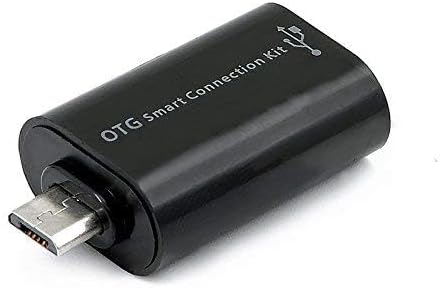
Figure 3: OTG Connection Kit for Android device connectivity.
ຄໍາແນະນໍາການດໍາເນີນງານ
Once connected, your QUMOX L165U Gamepad is ready for use. The layout is standard for most game controllers.
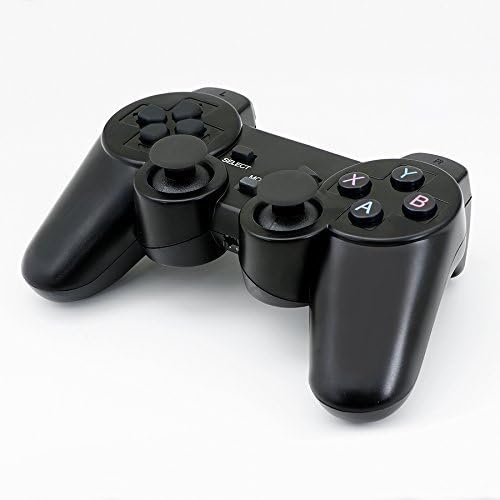
ຮູບທີ 4: ທາງເທິງ view of the QUMOX L165U Gamepad, highlighting button layout.
- Directional Pad (D-Pad): ສໍາລັບການປ້ອນຂໍ້ມູນທິດທາງທີ່ຊັດເຈນ.
- Analog Joysticks: Two analog sticks for 360-degree movement and camera control.
- ປຸ່ມປະຕິບັດ (A, B, X, Y): ປຸ່ມຄຳສັ່ງມາດຕະຖານສຳລັບຄຳສັ່ງໃນເກມ.
- ປຸ່ມບ່າ (L1, R1) & Triggers (L2, R2): Located on the top of the gamepad for additional actions.
- SELECT/BACK Button: Typically used for menu navigation or specific in-game functions.
- ປຸ່ມເລີ່ມຕົ້ນ: ໃຊ້ເພື່ອຢຸດເກມຊົ່ວຄາວ ຫຼື ຢືນຢັນການເລືອກ.
- ປຸ່ມ MODE: Cycles through different operating modes (e.g., Android, PC) if automatic detection fails.
ວິດີໂອສາທິດ
ວິດີໂອທີ 1: ຜູ້ຂາຍສະໜອງໃຫ້view of a 2-pack wireless controller, demonstrating its features and compatibility. While showing a similar product, it illustrates general wireless controller usage and setup.
ບໍາລຸງຮັກສາ
- ທໍາຄວາມສະອາດ: ໃຊ້ຜ້າປຽກແຫ້ງເພື່ອອະນາໄມແຜ່ນເກມ. ຫຼີກເວັ້ນການນໍາໃຊ້ສານເຄມີທີ່ຮຸນແຮງຫຼືວັດສະດຸຂັດ.
- ການເກັບຮັກສາ: ເກັບຮັກສາແຜ່ນເກມໄວ້ໃນບ່ອນທີ່ເຢັນ, ແຫ້ງແລ້ງຫ່າງຈາກແສງແດດໂດຍກົງ ແລະອຸນຫະພູມທີ່ຮຸນແຮງ.
- ການດູແລຫມໍ້ໄຟ: ຖອດແບັດເຕີຣີອອກຖ້າບໍ່ໄດ້ໃຊ້ gamepad ເປັນເວລາດົນນານເພື່ອປ້ອງກັນການຮົ່ວໄຫຼ.
ການແກ້ໄຂບັນຫາ
| ບັນຫາ | ສາເຫດທີ່ເປັນໄປໄດ້ | ການແກ້ໄຂ |
|---|---|---|
| Gamepad does not connect. | Low batteries, incorrect mode, adapter not properly inserted. | Replace batteries. Press the 'MODE' button to cycle through modes. Ensure USB adapter is fully inserted into PC or OTG adapter. |
| ປຸ່ມ ຫຼື joysticks ບໍ່ຕອບສະໜອງ. | Connection issue, game incompatibility, physical damage. | Reconnect the gamepad. Check game settings for controller support. If issue persists, contact support. |
| Android device does not recognize gamepad. | Android device lacks OTG support, OTG adapter issue. | Verify your Android device supports OTG. Ensure OTG adapter is functioning correctly. |
ຂໍ້ມູນຈໍາເພາະ
| ຄຸນສົມບັດ | ລາຍລະອຽດ |
|---|---|
| ໝາຍເລກຕົວແບບ | L165U |
| ເຕັກໂນໂລຊີການເຊື່ອມຕໍ່ | 2.4GHz Wireless (via USB Adapter) |
| ອຸປະກອນທີ່ເຂົ້າກັນໄດ້ | PC, Android (with OTG support) |
| ແຫຼ່ງພະລັງງານ | ແບັດເຕີຣີ 2x AAA |
| ນ້ໍາຫນັກລາຍການ | 5.3 ອອນ |
| ຂະໜາດແພັກເກັດ | 8.07 x 5.63 x 2.95 ນິ້ວ |
| ສີ | ດຳ |
ການຮັບປະກັນແລະການສະຫນັບສະຫນູນ
For warranty information or technical support, please refer to the contact details provided with your purchase or visit the official QUMOX webເວັບໄຊ. ຮັກສາຫຼັກຖານການຊື້ຂອງທ່ານສໍາລັບການຮຽກຮ້ອງການຮັບປະກັນໃດໆ.