ແນະນຳ
The Korg Volca Kick is an analog kick generator featuring an MS-20 resonator and a 16-step sequencer. It is designed to produce a wide range of kick drum and bass sounds, from tight, punchy kicks to deep, resonant bass, suitable for various electronic music genres. This manual provides essential information for setting up, operating, and maintaining your Volca Kick.

ຮູບ 1: ດ້ານຫນ້າ view of the Korg Volca Kick, showcasing its controls and 16-step sequencer.
ຕັ້ງຄ່າ
ການສະຫນອງພະລັງງານ
- ແບັດເຕີຣີ: The Volca Kick requires 6 AA batteries for portable operation. Ensure batteries are inserted with correct polarity.
- ຜູ້ດັດແປງ AC: For extended use, connect a compatible 9V DC center-negative AC adapter (sold separately) to the DC 9V jack.
ການເຊື່ອມຕໍ່ສຽງ
- ຜົນຜະລິດ: Connect headphones or an audio cable from the AUDIO OUT jack to a mixer or ampມີຊີວິດຊີວາ.
- ລຳໂພງໃນຕົວ: The unit features a built-in speaker for immediate sound output without external ampການຈົດທະບຽນ.
Synchronization and MIDI
- Sync I/O: Use the SYNC IN and SYNC OUT jacks to synchronize with other Korg Volca series devices or compatible equipment.
- MIDI Input: Connect a MIDI cable to the MIDI IN port to control the Volca Kick from an external MIDI device or DAW.
ຄໍາແນະນໍາການດໍາເນີນງານ
Basic Controls and Sound Generation
The Volca Kick utilizes an analog kick generator based on the MS-20 filter, allowing for powerful and resonant sounds. The interface provides direct control over various parameters to shape your kick and bass sounds.
- ລະດັບສຽງ: Adjusts the fundamental frequency of the kick sound.
- ງໍ: Controls the pitch envelope, creating a 'bending' effect typical of kick drums.
- ເວລາ: Sets the duration of the pitch bend.
- Pulse Color: Modifies the timbre of the pulse oscillator.
- ລະດັບ: Adjusts the output level of the pulse oscillator.
- ການໂຈມຕີ: Controls the attack time of the ampຊອງຈົດໝາຍ.
- ການເສື່ອມສະພາບ: Controls the decay time of the ampຊອງຈົດໝາຍ.
- ຂັບ: Adds distortion and saturation for aggressive sound shaping.
- ໂຕນ: Adjusts the overall tonal character of the sound.

ຮູບທີ 2: ມຸມ view of the Korg Volca Kick, highlighting the various knobs and buttons for sound manipulation.
ລໍາດັບ 16 ຂັ້ນຕອນ
The integrated 16-step sequencer allows for intuitive pattern creation and real-time performance.
- Step Buttons: Use the 16 step buttons to program your rhythm patterns. Press a button to activate a step, press again to deactivate.
- ຮູບແບບການບັນທຶກ: Enter record mode to capture real-time knob movements (motion sequencing) and note inputs.
- ຫຼິ້ນ/ຢຸດ: Starts and stops the sequencer playback.
- Tempo: ປັບຄວາມໄວໃນການຫຼິ້ນຄືນຂອງຕົວຈັດການສຽງ.
- ແກວ່ງ: Adds a rhythmic swing feel to your patterns.
- ສຳນຽງ: Adds emphasis to specific steps.
- Touch FX: Provides real-time effects for dynamic performance.
- Active Step: Allows you to skip steps in a pattern, creating variations.
- ໜ່ວຍຄວາມຈຳ: Save and recall your created patterns.
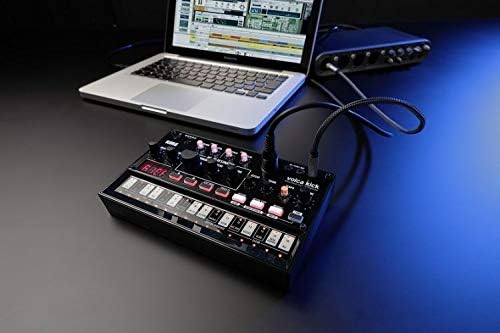
Figure 3: The Korg Volca Kick connected to a laptop, demonstrating its integration capabilities with external devices.
ບໍາລຸງຮັກສາ
To ensure the longevity and optimal performance of your Korg Volca Kick, follow these maintenance guidelines:
- ທໍາຄວາມສະອາດ: ໃຊ້ຜ້າປຽກແຫ້ງເພື່ອເຮັດຄວາມສະອາດເຄື່ອງ. ຫຼີກລ້ຽງການເຮັດຄວາມສະອາດຂັດຫຼືສານລະລາຍ.
- ການເກັບຮັກສາ: ເກັບຮັກສາເຄື່ອງໄວ້ໃນບ່ອນທີ່ເຢັນ, ແຫ້ງແລ້ງຫ່າງຈາກແສງແດດໂດຍກົງ, ອຸນຫະພູມທີ່ຮຸນແຮງ, ແລະຄວາມຊຸ່ມຊື່ນສູງ.
- ການດູແລຫມໍ້ໄຟ: ຖອດແບດເຕີຣີອອກຖ້າຫນ່ວຍງານຈະບໍ່ຖືກໃຊ້ເປັນໄລຍະເວລາທີ່ຍາວນານເພື່ອປ້ອງກັນການຮົ່ວໄຫຼ.
ການແກ້ໄຂບັນຫາ
If you encounter issues with your Volca Kick, refer to the following common troubleshooting steps:
- ບໍ່ມີພະລັງງານ: Check battery installation and charge level. If using an AC adapter, ensure it is correctly connected and the correct voltage/polarity.
- ບໍ່ມີສຽງ: Verify that the volume knob is turned up. Check audio cable connections and ensure external speakers/headphones are working.
- ບໍ່ໄດ້ຫຼິ້ນລໍາດັບ: Ensure the sequencer is in play mode and not paused or stopped. Check tempo settings.
- ບັນຫາ MIDI: Confirm MIDI cable connection and correct MIDI channel settings on both the Volca Kick and your external device.
ຂໍ້ມູນຈໍາເພາະ
| ຄຸນສົມບັດ | ຂໍ້ມູນຈໍາເພາະ |
|---|---|
| ວັດສະດຸຮ່າງກາຍ | ພາດສະຕິກ |
| ນ້ໍາຫນັກລາຍການ | 13.3 ອອນສ໌ (377 ກຣາມ) |
| ຂະໜາດສິນຄ້າ | 10.35 x 6.02 x 2.79 ນິ້ວ |
| ໝາຍເລກຕົວແບບ | VOLCAKICK |
| ໝໍ້ໄຟ | ຕ້ອງການແບັດເຕີຣີ AA 6 ກ້ອນ (ອາລຄາໄລນ໌) |
| ປະເພດຕົວເຊື່ອມຕໍ່ | 9V DC Centre-Negative |
| ຈໍານວນຄີບອດ | 16 |
| ຜູ້ຜະລິດ | Korg USA Inc. |
ການຮັບປະກັນແລະການສະຫນັບສະຫນູນ
ສໍາລັບຂໍ້ມູນການຮັບປະກັນ ແລະການຊ່ວຍເຫຼືອດ້ານວິຊາການ, ກະລຸນາອ້າງອີງເຖິງ Korg ຢ່າງເປັນທາງການ webເວັບໄຊ ຫຼືຕິດຕໍ່ຜູ້ຈັດຈໍາໜ່າຍ Korg ທ້ອງຖິ່ນຂອງທ່ານ. ຮັກສາຫຼັກຖານການຊື້ຂອງທ່ານສໍາລັບການຮ້ອງຂໍການຮັບປະກັນ.


