1. ບົດແນະນຳ
This manual provides essential information for setting up, operating, maintaining, and troubleshooting your new CYBERPOWERPC Luxe Gaming PC. Please read this guide thoroughly before using your system to ensure optimal performance and longevity.
The CYBERPOWERPC Luxe Gaming PC is a high-performance desktop computer designed for gaming and demanding applications. It features an Intel Core i7-12700KF processor, Nvidia GeForce RTX 4060 Ti graphics, 32GB DDR5 RAM, and a 1TB NVMe SSD, all housed in a CyberpowerPC Prism Mid Tower case with advanced cooling.
2. ການຕິດຕັ້ງລະບົບ
2.1 Unboxing
Carefully remove the PC from its packaging. Retain all packaging materials for future transport or warranty claims. Ensure all accessories, such as power cables, documentation, and any included peripherals, are present.
2.2 ການເຊື່ອມຕໍ່ອຸປະກອນຕໍ່
ກ່ອນທີ່ຈະເປີດເຄື່ອງ, ໃຫ້ເຊື່ອມຕໍ່ອຸປະກອນເສີມທີ່ສຳຄັນຂອງທ່ານ:
- ຈໍພາບ: Connect your monitor to the graphics card's DisplayPort or HDMI output. Ensure the cable is securely fastened.
- ແປ້ນພິມແລະຫນູ: Connect your keyboard and mouse to the available USB ports on the rear or top of the PC.
- ສຽງ: Connect speakers or headphones to the audio output jacks on the rear or front panel.
- ເຄືອຂ່າຍ: For a wired connection, connect an Ethernet cable to the RJ45 port. For wireless, ensure the Wi-Fi antenna (if included) is attached.

ຮູບພາບ 2.2.1: ດ້ານຫນ້າ view of the CYBERPOWERPC Luxe Gaming PC. This image displays the tempered glass side panel, internal components with RGB lighting, and the overall design of the PC tower.
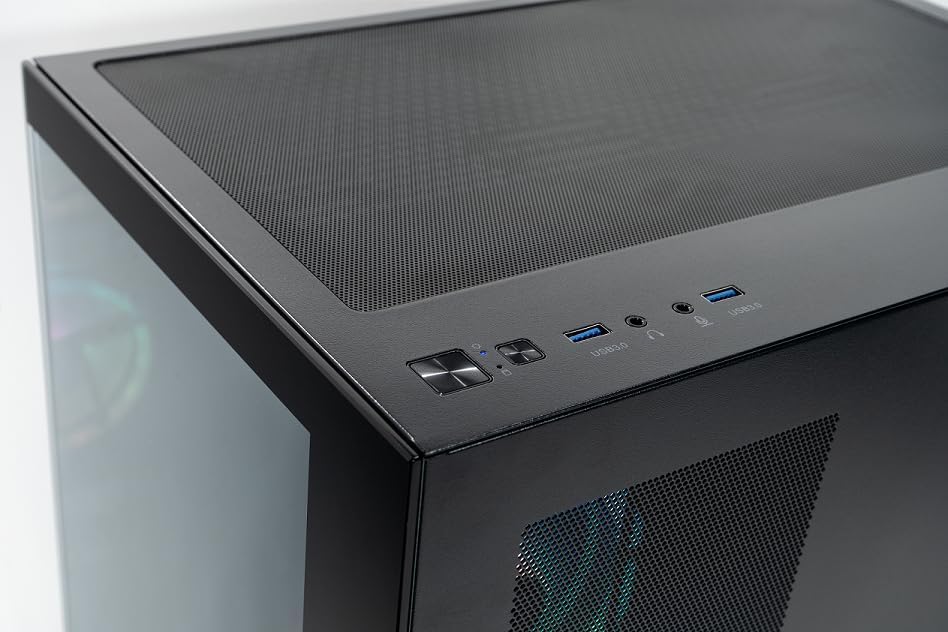
Image 2.2.2: Top panel of the CYBERPOWERPC Luxe Gaming PC. This image highlights the power button, reset button, two USB 3.0 ports, and audio input/output jacks located on the top of the PC case for easy access.
2.3 ການເຊື່ອມຕໍ່ພະລັງງານ
Connect the provided power cable to the power supply unit (PSU) input on the rear of the PC, then plug the other end into a grounded electrical outlet.
3. ຄໍາແນະນໍາການດໍາເນີນງານ
3.1 ການເປີດ/ປິດ
- ເພື່ອເປີດເຄື່ອງ: ກົດປຸ່ມເປີດປິດທີ່ຕັ້ງຢູ່ດ້ານເທິງຂອງ PC.
- ປິດເຄື່ອງ: From the Windows 11 desktop, click the Start button, then select Power > Shut down. Avoid direct power-off unless necessary to prevent data loss.
3.2 ການ Boot ເບື້ອງຕົ້ນ ແລະການຕິດຕັ້ງ Windows 11
Upon first power-on, the system will guide you through the Windows 11 Home setup process. Follow the on-screen instructions to configure your region, language, network, and user account.
3.3 ການເຊື່ອມຕໍ່ເຄືອຂ່າຍ
- ມີສາຍ (ອີເທີເນັດ): Once the Ethernet cable is connected, Windows 11 should automatically detect and connect to the network.
- ໄຮ້ສາຍ (Wi-Fi): After Windows 11 setup, click the Wi-Fi icon in the taskbar, select your network, and enter the password. The system supports 1200Mbps 802.11ac Wi-Fi.
4. ອົງປະກອບແລະຄຸນສົມບັດທີ່ສໍາຄັນ
Your CYBERPOWERPC Luxe Gaming PC is equipped with the following core components:
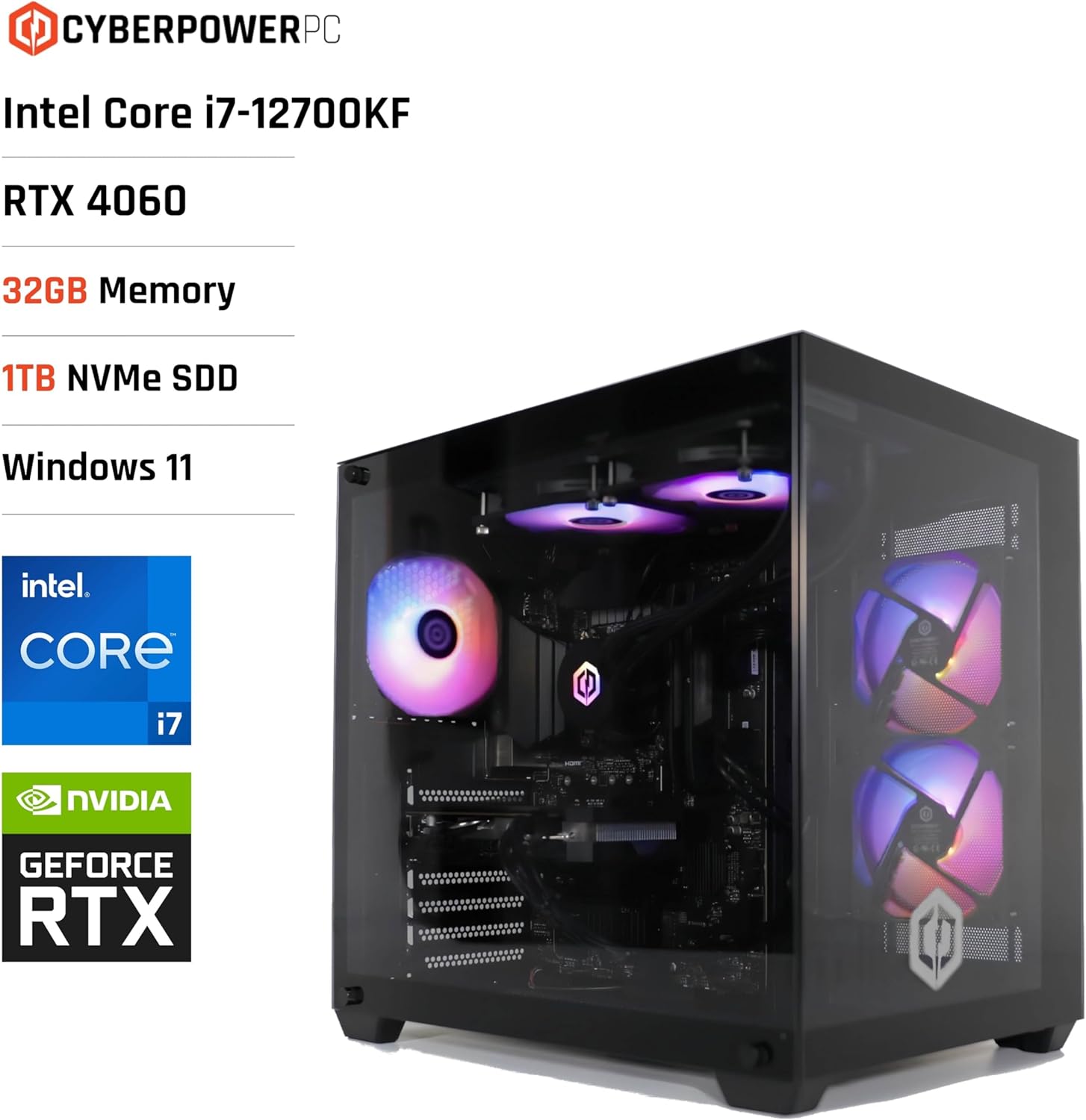
Image 4.1: CYBERPOWERPC Luxe Gaming PC with specifications. This image visually presents the PC alongside text overlays indicating its Intel Core i7-12700KF processor, RTX 4060 graphics, 32GB Memory, 1TB NVMe SSD, and Windows 11 operating system.
- ໜ່ວຍປະມວນຜົນ: Intel Core i7-12700KF (12 cores, 20 threads, up to 5.00GHz boost, 25MB cache).
- ບັດກາຟິກ: Nvidia GeForce RTX 4060 Ti with 8GB GDDR6X memory. Supports DisplayPort v1.4a and HDMI 2.1.
- RAM: 32GB 5200MHz DDR5 RAM.
- ການເກັບຮັກສາ: 1TB M.2 NVMe Solid State Drive for fast boot times and application loading.
- ເມນບອດ: Intel Z790 chipset motherboard.
- ການສະຫນອງພະລັງງານ: 650W 80+ certified gaming power supply.
- ຄວາມເຢັນ: 240mm all-in-one CPU water cooler and 6x RGB LED fans for efficient thermal management.
- ລະບົບປະຕິບັດການ: Windows 11 Home (64-bit) pre-installed.
- ການເຊື່ອມຕໍ່:
- 4x ພອດ USB 3.1
- 2x ພອດ USB 2.0
- 1x PS/2 KB or mouse port
- 1x RJ45 Ethernet LAN (10/100/1000)
- 1200Mbps 802.11ac Wi-Fi / WLAN
- 7.1-ຊ່ອງສຽງຄວາມລະອຽດສູງ

ຮູບພາບ 4.2: ດ້ານຫລັງ view of the CYBERPOWERPC Luxe Gaming PC. This image details the various input/output ports available on the back panel, including USB ports, Ethernet, audio jacks, and video outputs from the graphics card.

Image 4.3: Nvidia GeForce RTX logo. This image represents the powerful graphics processing unit integrated into the system.
5. ບໍາລຸງຮັກສາ
ການບຳລຸງຮັກສາເປັນປະຈຳຊ່ວຍຮັບປະກັນອາຍຸການໃຊ້ງານ ແລະ ປະສິດທິພາບຂອງຄອມພິວເຕີຂອງທ່ານໄດ້ດົນນານ.
- ທໍາຄວາມສະອາດຂີ້ຝຸ່ນ: Periodically clean dust from the case fans, CPU cooler, and graphics card heatsink using compressed air. Ensure the PC is powered off and unplugged before cleaning.
- ອັບເດດຊອບແວ: Keep your Windows operating system, drivers (especially graphics drivers), and applications updated to the latest versions for security and performance improvements.
- ການລະບາຍອາກາດ: Ensure the PC is placed in a well-ventilated area, free from obstructions that could block airflow to the intake and exhaust vents.
- ການຄຸ້ມຄອງສາຍໄຟ: Organize internal and external cables to improve airflow and prevent accidental disconnections.
6. ການແກ້ໄຂບັນຫາ
ພາກສ່ວນນີ້ແກ້ໄຂບັນຫາທົ່ວໄປທີ່ທ່ານອາດຈະພົບ.
6.1 ບໍ່ມີພະລັງງານ
- ກວດເບິ່ງວ່າສາຍໄຟຖືກເຊື່ອມຕໍ່ຢ່າງປອດໄພກັບທັງ PC ແລະເຕົ້າສຽບຝາ.
- Verify the power switch on the PSU (located at the rear of the PC) is in the 'ON' position.
- ທົດສອບປລັກສຽບດ້ວຍອຸປະກອນອື່ນເພື່ອຮັບປະກັນວ່າມັນໃຊ້ງານໄດ້.
6.2 ບໍ່ມີຈໍສະແດງຜົນໃນຈໍສະແດງຜົນ
- Ensure the monitor is powered on and the video cable (HDMI/DisplayPort) is securely connected to the graphics card outputs, not the motherboard's integrated video ports.
- ລອງສາຍວິດີໂອອື່ນ ຫຼືຈໍພາບຖ້າມີ.
- Confirm the correct input source is selected on your monitor.
6.3 ບັນຫາການເຊື່ອມຕໍ່ເຄືອຂ່າຍ
- ສໍາລັບການເຊື່ອມຕໍ່ແບບມີສາຍ, ໃຫ້ກວດເບິ່ງສະຖານະສາຍອີເທີເນັດ ແລະເຣົາເຕີ.
- For Wi-Fi, ensure the Wi-Fi adapter is enabled in Windows settings and you are connected to the correct network with the correct password.
- Restart your router/modem and the PC.
6.4 ບັນຫາການປະຕິບັດລະບົບ
- Ensure all drivers, especially graphics drivers, are up to date.
- ກວດເບິ່ງແອັບພລິເຄຊັນພື້ນຫຼັງທີ່ບໍລິໂພກຊັບພະຍາກອນຫຼາຍເກີນໄປໂດຍໃຊ້ Task Manager (Ctrl+Shift+Esc).
- Verify that the system is not overheating. Monitor CPU and GPU temperatures using appropriate software.
7. ຂໍ້ກໍານົດດ້ານວິຊາການ
| ອົງປະກອບ | ຂໍ້ມູນຈໍາເພາະ |
|---|---|
| ຍີ່ຫໍ້ | CyberpowerPC |
| ລະບົບປະຕິບັດການ | Windows 11 Home (64-bit) |
| ຕົວແບບ CPU | ອິນເທວ ຄໍ i7-12700KF |
| ຄວາມໄວ CPU | 3.6 GHz (Base), up to 5.0 GHz (Boost) |
| ແກນ/ກະທູ້ CPU | 12 Cores (8 Performance, 4 Efficient) / 20 Threads |
| ຂະໜາດແຄດ | 25 MB |
| ບັດກາຟິກ | Nvidia GeForce RTX 4060 Ti 8GB GDDR6X |
| RAM | 32GB 5200MHz DDR5 |
| ການເກັບຮັກສາ | SSD M.2 NVMe ຂະໜາດ 1TB |
| Motherboard Chipset | Intel Z790 |
| ການສະຫນອງພະລັງງານ | 650W 80+ Gaming PSU |
| ຄວາມເຢັນ | 240mm All-in-One CPU Water Cooler, 6x RGB LED Fans |
| Wi-Fi | 1200Mbps 802.11ac WLAN |
| ອີເທີເນັດ | 10/100/1000 Gigabit LAN |
| ສຽງ | 7.1-ຊ່ອງສຽງຄວາມລະອຽດສູງ |
| ພອດ USB | 4x USB 3.1, 2x USB 2.0 |
| ປະເພດກໍລະນີ | CyberpowerPC Prism Mid Tower |
| ການນໍາໃຊ້ສະເພາະ | ເກມ |
8. ການຮັບປະກັນແລະການສະຫນັບສະຫນູນ
Your CYBERPOWERPC Luxe Gaming PC comes with the following warranty and support:
- ການຮັບປະກັນອົງປະກອບ: 2 years for components.
- Manufacturing Warranty: 3 years for manufacturing defects.
- ສະຫນັບສະຫນູນດ້ານວິຊາການ: ສະຫນັບສະຫນູນດ້ານວິຊາການຕະຫຼອດຊີວິດ.
- ຊອບແວ: Includes 1 Year Norton 360 VPN & Security for Gamers.
For technical assistance or warranty claims, please contact CyberpowerPC customer support through their official webເວັບໄຊ ຫຼືຂໍ້ມູນຕິດຕໍ່ທີ່ສະໜອງໃຫ້ຢູ່ໃນເອກະສານຜະລິດຕະພັນຂອງທ່ານ.


