ສິນຄ້າເກີນview
The Altec Lansing True Wireless Bluetooth Earbuds offer a cable-free listening experience with rechargeable lithium-ion batteries integrated directly into the earbuds. Designed for comfort and discretion, these earbuds are also built to withstand the elements with an IPX7 waterproof rating, making them suitable for active use. Key features include a long battery life and Bluetooth-based GPS tracking for easy recovery of misplaced earbuds.
- ຮຸ່ນ: MZX657
- Battery Life: Up to 6 hours for earbuds, with an additional 3 hours from the charging case.
- Waterproof Rating: IPX7 (submersible up to 1 meter for 30 minutes).
- Compatibility: Works with Apple, Android, Blackberry devices, tablets, and laptops.
- GPS Tracking: Locate misplaced earbuds using the dedicated app.

ແມ່ນຫຍັງຢູ່ໃນກ່ອງ
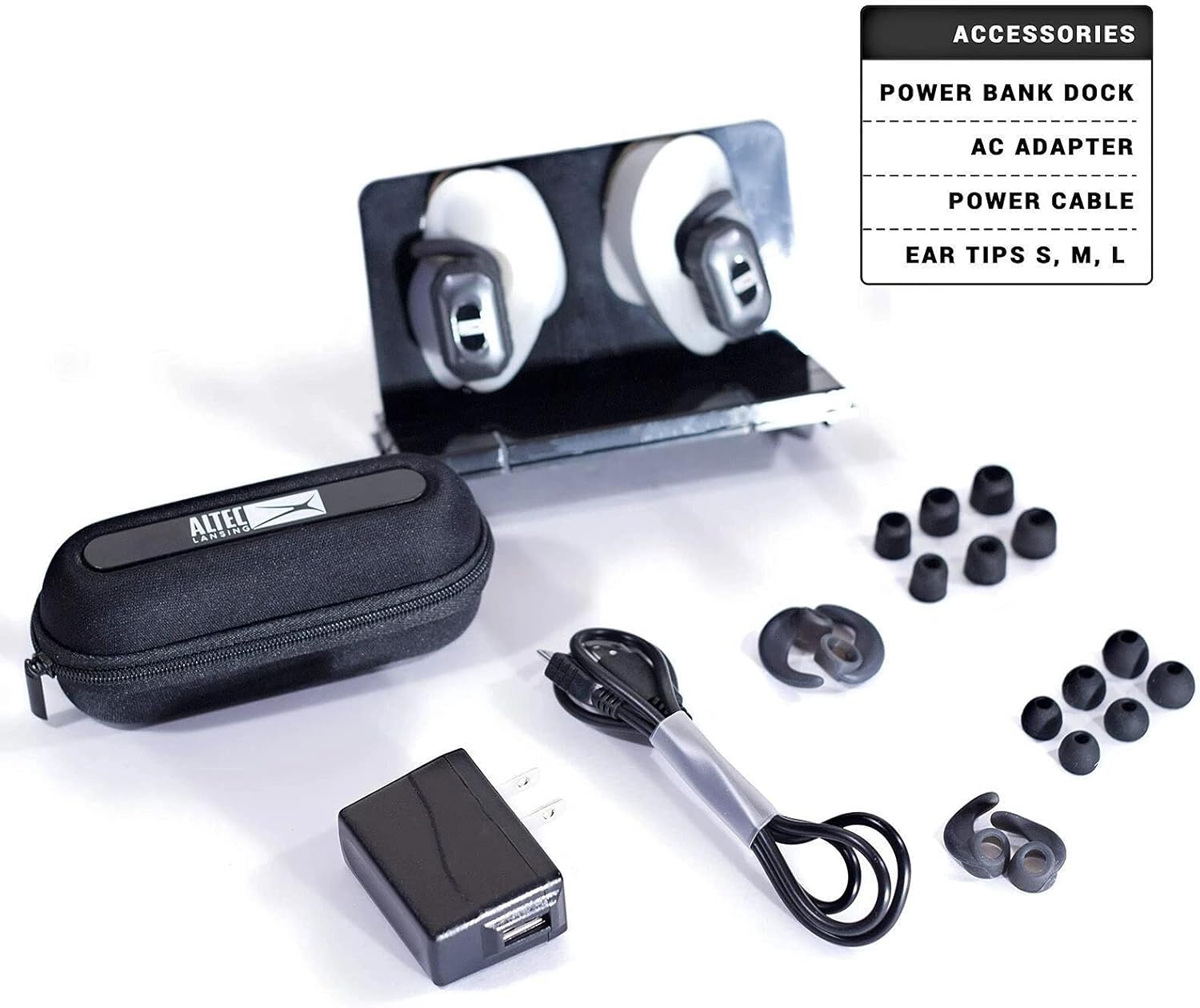
Upon unboxing your Altec Lansing True Wireless Earbuds, you should find the following components:
- Altec Lansing True Wireless Earbuds (Left and Right)
- ກ່ອງສາກ
- Power Bank Dock
- ອະແດບເຕີ AC
- ສາຍໄຟ
- Ear Tips (Sizes S, M, L)
ຕັ້ງຄ່າ
ກຳລັງສາກຫູຟັງ ແລະ ເຄສ
- Connect the provided power cable to the charging case and a suitable power source using the AC adapter.
- Ensure the earbuds are properly seated in their respective slots within the charging case.
- Allow the case and earbuds to charge fully before first use. A full charge provides up to 6 hours of listening time for the earbuds and an additional 3 hours from the charging case.
ການຈັບຄູ່ Bluetooth
- ໃຫ້ແນ່ໃຈວ່າຫູຟັງໄດ້ຖືກສາກໄຟແລ້ວ ແລະ ຖອດອອກຈາກກ່ອງສາກໄຟ. ພວກມັນຄວນຈະເຂົ້າສູ່ໂໝດຈັບຄູ່ໂດຍອັດຕະໂນມັດ.
- ໃນອຸປະກອນຂອງທ່ານ (ໂທລະສັບສະຫຼາດ, ແທັບເລັດ, ແລັບທັອບ), ໄປຫາການຕັ້ງຄ່າ Bluetooth.
- ຊອກຫາ available devices and select "Altec Lansing MZX657" (or similar name) from the list.
- Once connected, a confirmation sound or indicator light will signify successful pairing.
ພໍດີກັບຫູຟັງ
Select the ear tips that provide the most comfortable and secure fit. A proper seal is crucial for optimal sound quality and bass response. Experiment with the different sizes (S, M, L) included in the package.
ຄໍາແນະນໍາການດໍາເນີນງານ
ເປີດ/ປິດ
- The earbuds typically power on automatically when removed from the charging case.
- ເພື່ອປິດເຄື່ອງ, ໃຫ້ໃສ່ຫູຟັງຫູຟັງໃສ່ໃນກ່ອງສາກ.
ການຫຼິ້ນສຽງ ແລະການໂທ
Specific controls for playback (play/pause, skip track) and call management (answer/end call) are typically managed via the connected device or through the Altec Lansing app, as the earbuds are designed for app control.
Waterproof Functionality (IPX7)
The earbuds are IPX7 rated, meaning they are protected against immersion in water up to 1 meter for up to 30 minutes. This makes them suitable for workouts and use in light rain. Ensure the charging port is dry before charging.
ການຕິດຕາມ GPS
To utilize the GPS tracking feature for locating misplaced earbuds, download the "Find My Earphone" app from your device's app store (Apple App Store or Google Play Store). Follow the in-app instructions to connect and track your earbuds.
ບໍາລຸງຮັກສາ
ທໍາຄວາມສະອາດ
- ເຮັດຄວາມສະອາດປາຍຫູເປັນປະຈໍາດ້ວຍຜ້າອ່ອນໆ, ງamp ຜ້າ.
- Gently wipe the earbuds and charging case with a dry, lint-free cloth to remove dust and debris.
- ຫຼີກເວັ້ນການນໍາໃຊ້ສານເຄມີທີ່ຮຸນແຮງຫຼືວັດສະດຸຂັດ.
ການເກັບຮັກສາ
When not in use, store the earbuds in their charging case to protect them from damage and to keep them charged. Store in a cool, dry place away from extreme temperatures.
ການແກ້ໄຂບັນຫາ
| ບັນຫາ | ສາເຫດທີ່ເປັນໄປໄດ້ | ການແກ້ໄຂ |
|---|---|---|
| ຫູຟັງບໍ່ເປີດ | Low battery; not properly seated in case. | Ensure earbuds are charged. Place them firmly in the charging case. |
| ບໍ່ສາມາດຈັບຄູ່ກັບອຸປະກອນໄດ້ | ຫູຟັງບໍ່ໄດ້ຢູ່ໃນໂໝດຈັບຄູ່; Bluetooth ຂອງອຸປະກອນປິດຢູ່; ມີການລົບກວນ. | Ensure earbuds are out of case and in pairing mode. Turn device Bluetooth off and on. Move closer to device. |
| ບໍ່ມີສຽງ | ລະດັບສຽງຕໍ່າເກີນໄປ; ບໍ່ໄດ້ເຊື່ອມຕໍ່; ເລືອກຜົນຜະລິດສຽງບໍ່ຖືກຕ້ອງ. | Increase volume on device. Re-pair earbuds. Check device audio settings. |
| Lost an earbud | Earbud misplaced. | Use the "Find My Earphone" app to track the last known location of the earbud. |
ຂໍ້ມູນຈໍາເພາະ
| ຄຸນສົມບັດ | ລາຍລະອຽດ |
|---|---|
| ໝາຍເລກຕົວແບບ | MZX657 |
| ເຕັກໂນໂລຊີການເຊື່ອມຕໍ່ | ໄຮ້ສາຍ (Bluetooth) |
| ເຕັກໂນໂລຊີການສື່ສານໄຮ້ສາຍ | Bluetooth |
| ຊີວິດຫມໍ້ໄຟ | 6 Hours (earbuds), 3 Hours (charging case additional) |
| ເວລາສາກໄຟ | 6 Hours (for full charge of case and earbuds) |
| ລະດັບຄວາມຕ້ານທານນ້ໍາ | ກັນນໍ້າ IPX7 |
| ວິທີການຄວບຄຸມ | ແອັບ |
| ວັດສະດຸ | ພາດສະຕິກ, ຊິລິໂຄນ |
| ຂະໜາດສິນຄ້າ | 2.25 x 7.25 x 5.3 ນິ້ວ |
| ນ້ໍາຫນັກລາຍການ | 8 ອອນ |
| ຜູ້ຜະລິດ | ເທັກໂນໂລຢີ Altec Lansing |
| UPC | 021331912282 |
ການຮັບປະກັນແລະການສະຫນັບສະຫນູນ
ສຳລັບຂໍ້ມູນການຮັບປະກັນ, ການຊ່ວຍເຫຼືອດ້ານເຕັກນິກ, ຫຼື ການສອບຖາມກ່ຽວກັບການບໍລິການ, ກະລຸນາອ້າງອີງເຖິງ Altec Lansing ຢ່າງເປັນທາງການ. website ຫຼືຕິດຕໍ່ສະຫນັບສະຫນູນລູກຄ້າຂອງເຂົາເຈົ້າໂດຍກົງ. ຮັກສາຫຼັກຖານການຊື້ຂອງທ່ານສໍາລັບການຮ້ອງຂໍການຮັບປະກັນ.
Altec Lansing ຢ່າງເປັນທາງການ Webເວັບໄຊ: www.alteclansing.com


