ຄູ່ມືການໃຊ້ໂປເຈັກເຕີຂະໜາດນ້ອຍ UNIC UC46
Model: UC46 IDSP-011
1. ບົດແນະນຳ
This user manual provides detailed instructions for the operation, setup, and maintenance of your UNIC UC46 Mini Projector. Please read this manual thoroughly before using the product to ensure proper and safe operation. Keep this manual for future reference.
ຂໍ້ມູນຄວາມປອດໄພ
- ຢ່າເບິ່ງໂດຍກົງໃນເລນໂປເຈັກເຕີເມື່ອ lamp ແມ່ນຢູ່.
- Ensure proper ventilation around the projector to prevent overheating. It is recommended to rest the projector after 4-5 hours of continuous operation.
- ຮັກສາໂປເຈັກເຕີໃຫ້ຫ່າງຈາກນໍ້າ ຫຼື ຂອງແຫຼວຕ່າງໆ.
- ໃຊ້ພຽງແຕ່ອະແດັບເຕີໄຟທີ່ສະໜອງໃຫ້ກັບໂປເຈັກເຕີເທົ່ານັ້ນ.
- ຢ່າພະຍາຍາມຖອດປະກອບ ຫຼື ສ້ອມແປງໂປເຈັກເຕີດ້ວຍຕົວທ່ານເອງ. ຕິດຕໍ່ພະນັກງານບໍລິການທີ່ມີຄຸນວຸດທິເພື່ອຂໍຄວາມຊ່ວຍເຫຼືອ.
- This projector is designed for home entertainment and is not suitable for professional teaching, meetings, or business presentations.
2. ຄຸນລັກສະນະຂອງຜະລິດຕະພັນ
- ການອອກແບບແບບພົກພາ: Compact and lightweight, ideal for home use, camping, and outdoor parties.
- ຄວາມສະຫວ່າງສູງ: 1200 lumens LED lamp for clear and vibrant images.
- ຄວາມລະອຽດເດີມ: 800x480 pixels, supporting up to 1920x1080 (Full HD) via input.
- ຂະຫນາດການຄາດຄະເນຂະຫນາດໃຫຍ່: Projects images from 34 to 130 inches.
- ຕົວເລືອກການເຊື່ອມຕໍ່ຫຼາຍອັນ: HDMI, VGA, USB, AV, SD Card, and IR.
- ການເຊື່ອມຕໍ່ແບບໄຮ້ສາຍ: Supports WiFi, Miracast, and DLNA for seamless smartphone integration (iOS, Android, Windows).
- ຊີວິດ LED ຍາວ: Lamp life of approximately 20,000 hours.
3. ເນື້ອໃນຊຸດ
ກະລຸນາກວດເບິ່ງກ່ອງສໍາລັບລາຍການຕໍ່ໄປນີ້:
- UNIC UC46 Mini Projector
- ສາຍໄຟ
- ສາຍ AV 3-in-1
- ການຄວບຄຸມໄລຍະໄກ
- ຄູ່ມືຜູ້ໃຊ້ (ເອກະສານນີ້)
4. ຜະລິດຕະພັນເກີນview
Familiarize yourself with the different parts and controls of your UNIC UC46 Mini Projector.
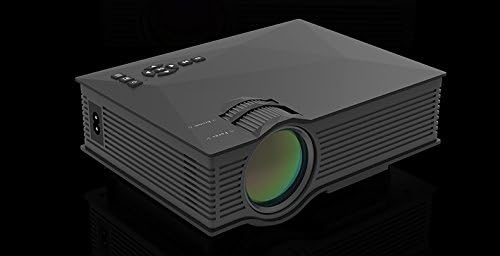
ຮູບທີ 4.1: ດ້ານໜ້າ ແລະ ດ້ານຂ້າງ View of the UNIC UC46 Mini Projector. Shows the main lens, focus wheel, and ventilation grilles.

ຮູບ 4.2: ດ້ານຫລັງ View of the Projector. Displays various input ports including HDMI, USB, AV, SD card slot, and audio output.

ຮູບທີ 4.3: ທາງເທິງ View of the Projector. Shows the control panel buttons for navigation, power, and input selection.

Figure 4.4: Lens Focus and Keystone Adjustment Diagram. Illustrates the location of the lens focus and keystone correction wheels, along with a diagram of the remote control functions.
5. ຕັ້ງຄ່າ
5.1 ການຈັດວາງ
Place the projector on a stable, flat surface. Ensure there is adequate space around the projector for ventilation. The projection distance will determine the screen size. Refer to the specifications for recommended distances.
5.2 ການເຊື່ອມຕໍ່ພະລັງງານ
- Connect the power cable to the projector's AC power input port.
- Plug the other end of the power cable into a standard electrical outlet (100-240V, 50/60Hz).
- ໄຟສະແດງພະລັງງານເທິງໂປເຈັກເຕີຈະສະຫວ່າງຂຶ້ນ.
5.3 ການເປີດເຄື່ອງເບື້ອງຕົ້ນ
- ກົດປຸ່ມເປີດປິດຢູ່ໂປເຈັກເຕີ ຫຼືຣີໂໝດຄວບຄຸມເພື່ອເປີດອຸປະກອນ.
- The projector will display the startup screen.
5.4 ການປັບຮູບ
- ຈຸດສຸມ: Rotate the focus wheel (located near the lens) until the projected image is clear and sharp.
- ການແກ້ໄຂ Keystone: If the image appears trapezoidal, adjust the keystone correction wheel (usually next to the focus wheel) to square the image.
6. ຄໍາແນະນໍາການດໍາເນີນງານ
6.1 ອຸປະກອນເຊື່ອມຕໍ່
The UNIC UC46 projector supports various input sources:
- HDMI: Connect a PC, laptop, DVD player, game console (PS3, PS4), or Smart TV box using an HDMI cable. Select "HDMI" as the input source.
- VGA: Connect a PC or laptop using a VGA cable. Select "VGA" as the input source.
- USB: ໃສ່ແຟລດໄດຣຟ໌ USB ເພື່ອຫຼິ້ນສື່ files (videos, photos, music, text). Select "USB" as the input source and navigate through the files.
- ຂອງ: Use the included 3-in-1 AV cable to connect devices with AV output (e.g., older DVD players, VCRs). Select "AV" as the input source.
- SD ກາດ: Insert an SD card into the slot to play media files. Select "SD" as the input source.
6.2 Wireless Connectivity (WiFi)
The projector supports WiFi connectivity for screen mirroring from smartphones (iOS, Android, Windows) and DLNA.
- Go to the "WiFi" or "Wireless" menu on the projector.
- Select your WiFi network and enter the password to connect the projector to your home network.
- For screen mirroring (Miracast/AirPlay):
- Ensure your smartphone and the projector are connected to the same WiFi network.
- On your smartphone, enable screen mirroring (e.g., "Screen Mirroring," "Smart View," "AirPlay," "Wireless Display").
- ເລືອກໂປເຈັກເຕີຈາກລາຍການອຸປະກອນທີ່ມີຢູ່.
- For DLNA:
- Ensure your smartphone and the projector are connected to the same WiFi network.
- Use a DLNA-compatible app on your smartphone to stream media to the projector.
6.3 ສຽງອອກ
The projector has a built-in speaker. For enhanced audio, you can connect external speakers or a sound system via the 3.5mm audio output port.
7. ບໍາລຸງຮັກສາ
7.1 ການເຮັດຄວາມສະອາດເລນ
Use a soft, lint-free cloth specifically designed for optical lenses to gently wipe the projector lens. Do not use abrasive cleaners or solvents.
7.2 ການທໍາຄວາມສະອາດຕົວເຄື່ອງ Projector
ເຊັດດ້ານນອກຂອງໂປເຈັກເຕີດ້ວຍຜ້າອ່ອນໆແລະແຫ້ງ. ສຳລັບຝຸ່ນທີ່ຝັງແໜ້ນ, ໃຫ້ເຊັດອອກເລັກນ້ອຍamp ຜ້າສາມາດນໍາໃຊ້ໄດ້, ປະຕິບັດຕາມດ້ວຍຜ້າແຫ້ງ.
7.3 ລະບາຍອາກາດ
Regularly check that the ventilation grilles are not blocked by dust or debris. Use a soft brush or compressed air to clean them if necessary. Proper airflow is crucial for preventing overheating and extending the projector's lifespan.
7.4 ລamp ຊີວິດ
ໄຟ LED lamp has an estimated life of 20,000 hours. To maximize lamp life, avoid frequent on/off cycles and allow the projector to cool down properly after use.
8. ການແກ້ໄຂບັນຫາ
| ບັນຫາ | ສາເຫດທີ່ເປັນໄປໄດ້ | ການແກ້ໄຂ |
|---|---|---|
| ບໍ່ມີຮູບທີ່ຄາດໄວ້ | Power cable not connected; Projector not turned on; Incorrect input source selected; Input device not connected or powered on. | Check power connection; Press power button; Select correct input source (HDMI, VGA, USB, AV, SD); Ensure input device is connected and powered on. |
| ຮູບພາບມົວ | Lens out of focus; Incorrect projection distance. | Adjust the focus wheel; Adjust the projection distance. |
| ຮູບພາບແມ່ນ trapezoidal | ໂປເຈັກເຕີບໍ່ຕັ້ງສາກກັບໜ້າຈໍ. | ປັບລໍ້ແກ້ໄຂ keystone. |
| ບໍ່ມີສຽງ | Volume too low; Muted; External audio device not connected or powered on; Audio format not supported. | Increase volume; Unmute; Check external audio connection; Ensure audio format is supported. |
| ການຄວບຄຸມໄລຍະໄກບໍ່ເຮັດວຽກ | Batteries dead or incorrectly inserted; Obstruction between remote and IR receiver. | ປ່ຽນແບັດ; ຮັບປະກັນສາຍສາຍຕາທີ່ຊັດເຈນຕໍ່ກັບເຄື່ອງຮັບ IR ຂອງໂປເຈັກເຕີ. |
| Overheating / Shuts down automatically | ລະບາຍອາກາດອຸດຕັນ; ການນຳໃຊ້ເປັນເວລາດົນ. | Ensure ventilation grilles are clear; Allow projector to rest after 4-5 hours of use. |
9. ຂໍ້ມູນຈໍາເພາະ

Figure 9.1: Detailed Specifications of the UNIC UC46 Mini Projector.
| ຄຸນສົມບັດ | ລາຍລະອຽດ |
|---|---|
| ລະບົບຮູບພາບ | ຈໍ LCD |
| Lamp | LED |
| ຄວາມລະອຽດເດີມ | 800 x 480 ພິກເຊລ |
| ຮອງຮັບຄວາມລະອຽດສູງສຸດ | - ຄວາມລະອຽດ 1920 x 1080 ພິກເຊວ (Full HD) |
| ຄວາມສະຫວ່າງ | 1200 Lumens |
| ອັດຕາສ່ວນກົງກັນຂ້າມ | 800:1 |
| ການບໍລິໂພກພະລັງງານ | 50-55 ວັດ |
| ການສະຫນອງພະລັງງານ | 100-240V, 50/60Hz |
| ລະດັບສຽງ | <25dB |
| ຂະໜາດການຄາດຄະເນ | 34 - 130 ນິ້ວ |
| ໄລຍະຫ່າງຖິ້ມ | 1.07 ຫາ 3.8 ແມັດ (3.51 ຫາ 12.47 ຟຸດ) |
| ອັດຕາສ່ວນ | 4:3 / 16:9 |
| ນ້ຳໜັກສຸດທິ | 1 ກິໂລ |
| ເລນ | Multi-layer coated glass lens |
| ຂາເຂົ້າ | USB, SD, HDMI, AV, VGA, IR |
| ປາຍທາງອອກ | ຫູຟັງ, ລຳ ໂພງ |
| ໄຮ້ສາຍ | WiFi 2.4G |
| ຂະໜາດສິນຄ້າ | 201mm x 153mm x 67.5mm |
10. ການຮັບປະກັນແລະການສະຫນັບສະຫນູນ
ສໍາລັບຂໍ້ມູນການຮັບປະກັນແລະການສະຫນັບສະຫນູນດ້ານວິຊາການ, ກະລຸນາເບິ່ງການຫຸ້ມຫໍ່ຜະລິດຕະພັນຫຼືຕິດຕໍ່ຮ້ານຂາຍຍ່ອຍຂອງທ່ານ. ຮັກສາໃບຮັບເງິນການຊື້ຂອງທ່ານໄວ້ເປັນຫຼັກຖານການຊື້.


