1. ບົດແນະນຳ
Thank you for choosing the UNIC UC18 Mini Projector. This compact and portable projector is designed to provide a versatile viewing experience for home entertainment, presentations, and more. Featuring an LED lighting system, built-in speaker, and multiple input options, the UC18 offers convenience and functionality. Please read this manual thoroughly to ensure proper setup, operation, and maintenance of your device.
2. ຂໍ້ມູນຄວາມປອດໄພ
- ການສະຫນອງພະລັງງານ: ໃຊ້ພຽງແຕ່ອະແດັບເຕີພະລັງງານທີ່ລະບຸໄວ້. ຮັບປະກັນ voltage ກົງກັບຄວາມຕ້ອງການຂອງໂປເຈັກເຕີ.
- ການລະບາຍອາກາດ: ຫ້າມປິດຊ່ອງລະບາຍອາກາດ. ຮັບປະກັນພື້ນທີ່ພຽງພໍຮອບໆໂປເຈັກເຕີສໍາລັບການໄຫຼວຽນຂອງອາກາດທີ່ເຫມາະສົມເພື່ອປ້ອງກັນຄວາມຮ້ອນເກີນ.
- ຄວາມຊຸ່ມ: ເກັບຮັກສາໂປເຈັກເຕີໃຫ້ຫ່າງຈາກນໍ້າ, ຝົນ, ແລະ ຄວາມຊຸ່ມຊື່ນຫຼາຍເກີນໄປ. ຢ່າໃຊ້ມືປຽກ.
- ທໍາຄວາມສະອາດ: ຕັດການເຊື່ອມຕໍ່ໄຟກ່ອນທຳຄວາມສະອາດ. ໃຊ້ຜ້າອ່ອນແລະແຫ້ງ. ຫຼີກລ່ຽງນໍ້າຢາທຳຄວາມສະອາດທີ່ເປັນຂອງແຫຼວ ຫຼື ນໍ້າຢາສີດ.
- ການຈັດການ: ຈັບໂປເຈັກເຕີດ້ວຍຄວາມລະມັດລະວັງ. ຫຼີກລ້ຽງການຫຼຸດລົງຫຼືຮັບມັນກັບຜົນກະທົບທີ່ເຂັ້ມແຂງ.
- ການປົກປ້ອງຕາ: ຢ່າເບິ່ງໂດຍກົງໃນເລນໂປເຈັກເຕີເມື່ອ lamp is on, as the bright light can cause eye strain or damage.
- ການຖອດອອກໄດ້: ຢ່າພະຍາຍາມຖອດປະກອບ ຫຼືສ້ອມແປງໂປເຈັກເຕີດ້ວຍຕົວເອງ. ອ້າງອີງການບໍລິການທັງໝົດໃຫ້ກັບບຸກຄະລາກອນທີ່ມີຄຸນວຸດທິ.
3. ເນື້ອໃນຊຸດ
ກະລຸນາກວດເບິ່ງເນື້ອໃນຂອງແພັກເກັດເມື່ອ unboxing. ຖ້າລາຍການໃດຂາດຫາຍໄປ ຫຼືເສຍຫາຍ, ໃຫ້ຕິດຕໍ່ຮ້ານຂາຍຍ່ອຍຂອງເຈົ້າ.
- UNIC UC18 Mini Projector
- ສາຍໄຟ
- ສາຍ AV 3-in-1
- Remote Control (requires lithium battery, not included)
- ຄູ່ມືຜູ້ໃຊ້
4. ຜະລິດຕະພັນເກີນview
ຮູບແບບໂປເຈັກເຕີ
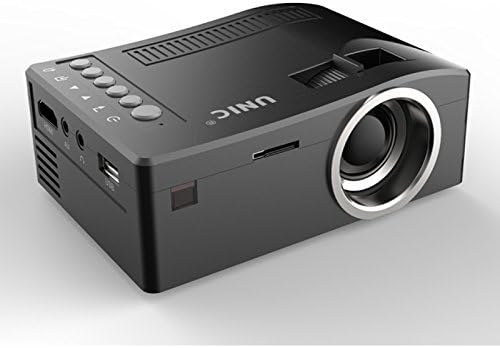
ດ້ານໜ້າ ແລະ ຂ້າງ view of the UNIC UC18 Mini Projector, showing the lens, ventilation, and various ports.
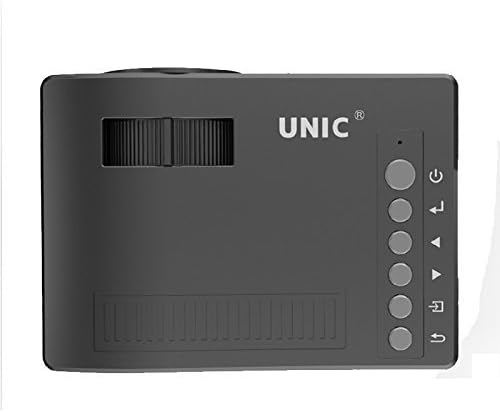
ເທິງ view of the UNIC UC18 Mini Projector, highlighting the control buttons and focus wheel.
ພອດ ແລະການຄວບຄຸມ
The UNIC UC18 Mini Projector features a range of ports and controls for easy connectivity and operation:
- ເລນ: ໂປຣເຈັກຮູບພາບໃສ່ໜ້າຈໍ.
- Focus Wheel: ການປັບດ້ວຍມືເພື່ອຄວາມຊັດເຈນຂອງຮູບພາບ.
- ປຸ່ມເປີດປິດ: ເປີດ ຫຼືປິດໂປຣເຈັກເຕີ.
- ປຸ່ມເມນູ: ເຂົ້າເຖິງເມນູການຕັ້ງຄ່າຂອງໂປເຈັກເຕີ.
- ປຸ່ມນຳທາງ (ຂຶ້ນ/ລົງ/ຊ້າຍ/ຂວາ): ໃຊ້ເພື່ອນຳທາງເມນູ ແລະປັບການຕັ້ງຄ່າ.
- ປຸ່ມຕົກລົງ: ຢືນຢັນການເລືອກໃນເມນູ.
- ປຸ່ມທີ່ມາ: Selects the input source (HDMI, USB, AV, TF).
- ພອດ USB: ເຊື່ອມຕໍ່ອຸປະກອນບ່ອນຈັດເກັບຂໍ້ມູນ USB ສຳລັບການຫຼິ້ນສື່.
- HDMI Port: Connects to HDMI-enabled devices like laptops, gaming consoles, or media players.
- ພອດ AV: Connects to devices using the included 3-in-1 AV cable.
- ສະລັອດຕິງບັດ TF: Inserts a TF (Micro SD) card for media playback.
- Jack ຫູຟັງ 3.5 ມມ: Connects external headphones or speakers.
- ຕົວຮັບ IR: ໄດ້ຮັບສັນຍານຈາກການຄວບຄຸມຫ່າງໄກສອກຫຼີກ.
5. ຕັ້ງຄ່າ
5.1 ການເຊື່ອມຕໍ່ພະລັງງານ
- ເຊື່ອມຕໍ່ສາຍໄຟເຂົ້າກັບພອດປ້ອນຂໍ້ມູນພະລັງງານຂອງໂປເຈັກເຕີ.
- ສຽບປາຍອື່ນໆຂອງສາຍໄຟເຂົ້າໄປໃນປລັກສຽບໄຟທີ່ເຫມາະສົມ.
- ໄຟສະແດງພະລັງງານເທິງໂປເຈັກເຕີຈະສະຫວ່າງຂຶ້ນ.
5.2 ການເຊື່ອມຕໍ່ອຸປະກອນປ້ອນຂໍ້ມູນ
- HDMI: Connect an HDMI cable from your source device (e.g., laptop, DVD player) to the projector's HDMI port.
- USB: ໃສ່ USB flash drive ເຂົ້າໄປໃນພອດ USB.
- ຂອງ: Use the provided 3-in-1 AV cable to connect to devices with AV output. Match the yellow, white, and red connectors.
- ບັດ TF: Insert a TF (Micro SD) card into the TF card slot.
5.3 ຕຳແໜ່ງໂປເຈັກເຕີ
Place the projector on a stable, flat surface. For optimal image quality, position the projector perpendicular to the projection surface (wall or screen). The throw distance can range from 0.48 to 2.43 meters, producing a picture size from 12 to 66 inches.
6. ຄໍາແນະນໍາການດໍາເນີນງານ
6.1 ການເປີດ/ປິດ
Press the Power button on the projector or the remote control to turn the device on or off.
6.2 ການປັບຈຸດສຸມ
After powering on, if the image appears blurry, rotate the manual focus wheel located near the lens until the image becomes clear and sharp.

Close-up of the manual focus wheel on the UNIC UC18 Mini Projector, located near the lens.
6.3 ການເລືອກແຫຼ່ງປ້ອນຂໍ້ມູນ
Press the 'Source' button on the projector or remote control. Use the navigation buttons to select your desired input source (HDMI, USB, AV, TF) and press 'OK' to confirm.
6.4 ການ ນຳ ທາງເມນູ
Press the 'Menu' button to access the projector's settings. Use the navigation buttons to browse options and 'OK' to select. Press 'Menu' again to exit.
6.5 ສຽງອອກ
The projector has a built-in speaker. For private listening or connecting to external audio systems, plug headphones or external speakers into the 3.5mm headphone jack.
7. ບໍາລຸງຮັກສາ
7.1 ການເຮັດຄວາມສະອາດເລນ
Use a soft, lint-free cloth specifically designed for optical lenses. Gently wipe the lens to remove dust or smudges. Avoid using abrasive materials or harsh chemicals.
7.2 ການທໍາຄວາມສະອາດຕົວເຄື່ອງ Projector
ເຊັດດ້ານນອກຂອງໂປເຈັກເຕີດ້ວຍຜ້າອ່ອນ, ແຫ້ງ. ຢ່າໃຊ້ນໍ້າສະອາດ ຫຼືສານລະລາຍ.
7.3 ການເກັບຮັກສາ
ເມື່ອບໍ່ໄດ້ໃຊ້ງານເປັນເວລາດົນ, ໃຫ້ເກັບຮັກສາໂປເຈັກເຕີໄວ້ໃນບ່ອນທີ່ເຢັນ, ແຫ້ງ, ຫ່າງຈາກແສງແດດໂດຍກົງ ແລະ ອຸນຫະພູມທີ່ຮຸນແຮງ. ປິດເລນເພື່ອປົກປ້ອງມັນຈາກຝຸ່ນ.
8. ການແກ້ໄຂບັນຫາ
| ບັນຫາ | ສາເຫດທີ່ເປັນໄປໄດ້ | ການແກ້ໄຂ |
|---|---|---|
| ບໍ່ມີຮູບພາບສະແດງ | Power not connected; Incorrect input source; Loose cable connection | Check power cable; Select correct input source; Reconnect cables securely |
| ຮູບພາບມົວ | Focus not adjusted; Projector too close/far | Adjust the focus wheel; Reposition the projector within recommended throw distance |
| ບໍ່ມີສຽງ | Volume too low; Muted; Audio cable not connected; Source device audio issue | Increase volume; Unmute; Check audio cable connection; Verify audio output on source device |
| ການຄວບຄຸມໄລຍະໄກບໍ່ເຮັດວຽກ | Batteries low/incorrectly inserted; Obstruction between remote and projector | Replace batteries (lithium battery required); Ensure clear line of sight to IR receiver |
| ໂປຣເຈັກເຕີເກີນຄວາມຮ້ອນ | Blocked ventilation; Prolonged use in hot environment | Ensure ventilation openings are clear; Operate in a well-ventilated area; Allow to cool down |
9. ຂໍ້ມູນຈໍາເພາະ
ຂໍ້ມູນຈໍາເພາະ
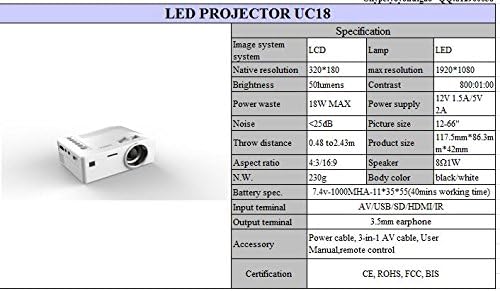
Detailed technical specifications for the UNIC UC18 Mini Projector, including resolution, contrast, and dimensions.
| ຄຸນສົມບັດ | ຂໍ້ມູນຈໍາເພາະ |
|---|---|
| ຍີ່ຫໍ້ | UNIC |
| ຊື່ຕົວແບບ | UC18 |
| ເຕັກໂນໂລຊີການສະແດງ | QVGA (LCD) |
| ຄວາມລະອຽດເດີມ | 320 x 240 ພິກເຊລ |
| ຄວາມລະອຽດສູງສຸດທີ່ຮອງຮັບ | 1920 x 1080 pixels (1080P) |
| ຄວາມສະຫວ່າງ | 50 Lumens |
| ອັດຕາສ່ວນກົງກັນຂ້າມ | 500:1 |
| ອັດຕາສ່ວນ | 16:9 (also supports 4:3) |
| ໄລຍະຫ່າງຖິ້ມ | 0.48m - 2.43m (1.57ft - 7.97ft) |
| ຂະໜາດຮູບ | 12 - 66 ນິ້ວ |
| ຂາເຂົ້າ | AV, USB, SD (TF), HDMI, IR |
| ປາຍທາງອອກ | ຫູຟັງຂະ ໜາດ 3.5mm |
| ຄຸນນະສົມບັດພິເສດ | ລຳໂພງໃນຕົວ, ແບບພົກພາ |
| ການບໍລິໂພກພະລັງງານ | 24 ວັດ (ສູງສຸດ 18W) |
| ການສະຫນອງພະລັງງານ | 12V 1.5A / 5V 2A |
| ລະດັບສຽງ | <25dB |
| ຂະໜາດສິນຄ້າ (L x W x H) | 117.5mm x 86.3mm x 42mm |
| ນ້ຳໜັກສຸດທິ | 230g |
| ປະເພດການຕິດຕັ້ງ | ຕິດຝາ |
| ການຄວບຄຸມໄລຍະໄກ | Yes (battery not included) |
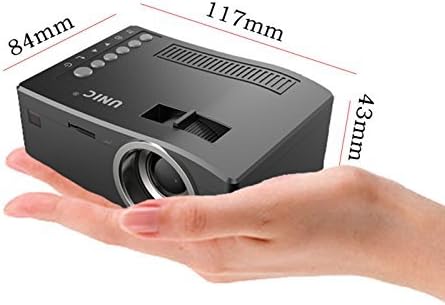
The UNIC UC18 Mini Projector held in a hand, illustrating its compact size and dimensions (117mm x 84mm x 43mm).
10. ການຮັບປະກັນແລະການສະຫນັບສະຫນູນ
ສໍາລັບຂໍ້ມູນການຮັບປະກັນຫຼືການສະຫນັບສະຫນູນດ້ານວິຊາການ, ກະລຸນາເບິ່ງເອກະສານທີ່ສະຫນອງໃຫ້ໃນເວລາຊື້ຫຼືຕິດຕໍ່ຮ້ານຂາຍຍ່ອຍຂອງທ່ານ. ຮັກສາຫຼັກຖານການຊື້ຂອງທ່ານສໍາລັບການຮຽກຮ້ອງການຮັບປະກັນໃດໆ.


