1. ບົດແນະນຳ
The UNIC UC30 LED Mini Projector is a compact and versatile multimedia device designed for home theater projection. It supports a wide range of input sources and file formats, making it suitable for various entertainment and presentation needs.
ຄຸນນະສົມບັດທີ່ສໍາຄັນປະກອບມີ:
- Multiple Input Interfaces: AV, VGA, HDMI, USB, SD, and TV input.
- ກວ້າງຂວາງ File Format Support: Compatible with various video, audio, image, and e-book formats.
- Keystone Correction: Adjusts image distortion for optimal viewing.
- Integrated Speaker: Built-in 2.0W *2 stereo speakers for audio output.
- Flexible Projection: Supports front and rear projection models.

ຮູບ 1: ດ້ານຫນ້າ view of the UNIC UC30 LED Mini Projector, showcasing ການອອກແບບແລະທັດສະນະທີ່ຫນາແຫນ້ນຂອງມັນ.
2. ຕັ້ງຄ່າ
2.1 ການຫຸ້ມຫໍ່ແລະການຈັດວາງ
Carefully remove the projector and all accessories from the packaging. Place the projector on a stable, flat surface. Ensure adequate ventilation around the unit to prevent overheating.
2.2 ການເຊື່ອມຕໍ່ພະລັງງານ
- ເຊື່ອມຕໍ່ອະແດບເຕີໄຟກັບຜອດປ້ອນຂໍ້ມູນພະລັງງານຂອງໂປເຈັກເຕີ.
- ສຽບອະແດບເຕີໄຟເຂົ້າໄປໃນບ່ອນສຽບໄຟຟ້າທີ່ເຫມາະສົມ.
2.3 ການເຊື່ອມຕໍ່ອຸປະກອນປ້ອນຂໍ້ມູນ
The UC30 projector offers multiple input options. Connect your desired source device (e.g., laptop, DVD player, game console, USB drive) to the corresponding port on the projector.

ຮູບ 2: ດ້ານຫລັງ view of the white UNIC UC30 projector, showing various input ports including AV, VGA, HDMI, and USB.
- HDMI: ສຳລັບວິດີໂອ ແລະ ສຽງດິຈິຕອນຄວາມລະອຽດສູງ.
- VGA: ສໍາລັບການເຊື່ອມຕໍ່ຄອມພິວເຕີຫຼື laptops.
- ຂອງ: For standard definition video and stereo audio (using the included 3-in-1 AV cable).
- USB: ສໍາລັບການຫຼິ້ນສື່ມວນຊົນ files ໂດຍກົງຈາກ USB flash drive.
- SD ກາດ: ສໍາລັບການຫຼິ້ນສື່ມວນຊົນ fileໂດຍກົງຈາກບັດຄວາມຈຳ SD.
- ໂທລະພາບ: For connecting to a TV signal source (if applicable to your region/model).
2.4 ຈຸດສຸມແລະການແກ້ໄຂ Keystone
After powering on the projector, adjust the focus ring around the lens until the projected image is clear. Use the keystone correction feature (usually a dial or button on the projector) to correct any trapezoidal distortion in the image, ensuring a rectangular projection.
3. ຄໍາແນະນໍາການດໍາເນີນງານ
3.1 ເປີດ/ປິດ
ກົດປຸ່ມເປີດ/ປິດເຄື່ອງໂປເຈັກເຕີ ຫຼື ຣີໂມດຄອນໂທຣລເພື່ອເປີດ ຫຼື ປິດເຄື່ອງ. ລໍຖ້າສອງສາມວິນາທີເພື່ອໃຫ້ໂປເຈັກເຕີອຸ່ນຂຶ້ນ ຫຼື ເຢັນລົງ.
3.2 ການເລືອກແຫຼ່ງປ້ອນຂໍ້ມູນ
Use the "Source" button on the projector or remote control to cycle through the available input options (HDMI, VGA, AV, USB, SD, TV) until your desired source is displayed.
3.3 ການຫຼິ້ນສື່ (USB/SD)
When a USB drive or SD card is inserted, the projector's media player interface will typically appear. Navigate through the menus using the directional buttons on the projector or remote to select and play your desired files.
- ຮູບແບບວິດີໂອສະຫນັບສະຫນູນ: AVI, MOV, VOB, DAT, MPEG, MPG, RM, RMVB (encoding: MPEG1/MPEG2/MPEG4/DivX/Xvid).
- ຮູບແບບສຽງທີ່ຮອງຮັບ: MP3, WMA, WAV.
- ຮູບແບບຮູບພາບສະຫນັບສະຫນູນ: JPEG, BMP, GIF, PNG.
- Supported E-book Format: TXT.

Figure 3: The UNIC UC30 projector displaying a video of a man in a soccer jersey, demonstrating its video playback capability.
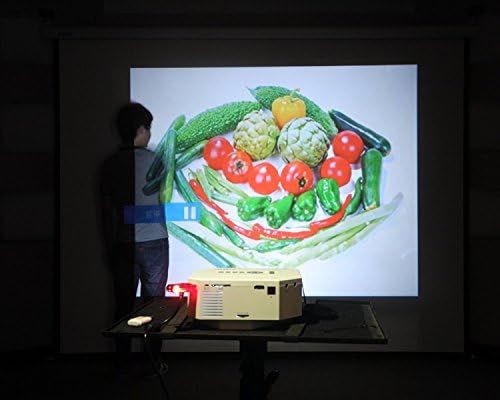
Figure 4: The UNIC UC30 projector displaying a vibrant image of vegetables, showcasing its image display quality.
3.4 ສຽງອອກ
The projector has built-in stereo speakers. For private listening or connecting to external audio systems, use the stereo earphone output terminal.
3.5 Projection Model
The projector supports both front and rear projection. This setting can typically be adjusted in the projector's menu to suit your setup (e.g., projecting from behind a translucent screen).
4. ບໍາລຸງຮັກສາ
4.1 ການເຮັດຄວາມສະອາດເລນ
ໃຊ້ຜ້າແພທີ່ອ່ອນນຸ່ມ, ບໍ່ມີສານດ່າງທີ່ອອກແບບມາສະເພາະສຳລັບແວ່ນຕາເພື່ອເຊັດເລນໂປເຈັກເຕີ້ຄ່ອຍໆ. ຫຼີກເວັ້ນການໃຊ້ເຄື່ອງເຮັດຄວາມສະອາດຂັດຫຼືແຮງຫຼາຍເກີນໄປ, ເຊິ່ງສາມາດຂັດເລນໄດ້.
4.2 ການທໍາຄວາມສະອາດຕົວເຄື່ອງ Projector
ເຊັດດ້ານນອກຂອງໂປເຈັກເຕີດ້ວຍຜ້າອ່ອນ, ແຫ້ງ. ສໍາລັບຮອຍແຂງ, ເລັກນ້ອຍ damp cloth can be used, but ensure no liquid enters the ventilation openings.
4.3 ລະບາຍອາກາດ
Ensure the projector's ventilation ports are clear of dust and obstructions. Proper airflow is crucial for maintaining optimal operating temperature and extending the lifespan of the LED lamp.
5. ການແກ້ໄຂບັນຫາ
5.1 ບໍ່ມີຮູບພາບຫຼືຂໍ້ຄວາມ "ບໍ່ມີສັນຍານ".
- Check if the projector is powered on and the power indicator light is active.
- Verify that the input cable (HDMI, VGA, AV) is securely connected to both the projector and the source device.
- Ensure the correct input source is selected on the projector (use the "Source" button).
- If using a computer, ensure its display output is enabled (e.g., press Fn + F8 or similar key combination).
5.2 ຮູບມົວ
- Adjust the focus ring around the projector lens until the image is sharp.
- Ensure the projection distance is within the recommended range (1-3.5 meters).
- ເຮັດຄວາມສະອາດເລນໂປເຈັກເຕີຖ້າມັນເປື້ອນ.
5.3 ບໍ່ມີສຽງ
- ກວດເບິ່ງລະດັບສຽງໃນທັງໂປເຈັກເຕີແລະອຸປະກອນແຫຼ່ງ.
- If using HDMI, ensure the source device is sending audio through HDMI.
- If using AV, ensure the red and white audio cables are correctly connected.
- If external speakers are connected, ensure they are powered on and functioning correctly.
5.4 Image Distortion (Trapezoid Shape)
- Adjust the keystone correction feature on the projector to square the image.
- Ensure the projector is placed on a level surface and is as perpendicular to the screen as possible.
6. ຂໍ້ມູນຈໍາເພາະ
Below are the detailed technical specifications for the UNIC UC30 LED Mini Projector:
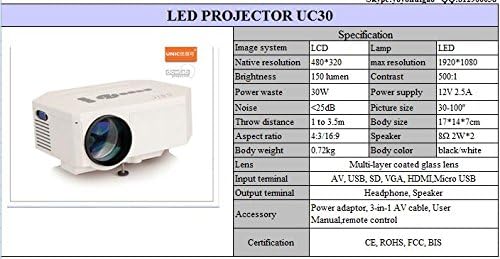
Figure 5: Official specification table for the UNIC UC30 LED Mini Projector, detailing its technical characteristics.
| ຄຸນສົມບັດ | ລາຍລະອຽດ |
|---|---|
| ລະບົບຮູບພາບ | ຈໍ LCD |
| ຄວາມລະອຽດເດີມ | 480 x 320 ພິກເຊລ |
| ຮອງຮັບຄວາມລະອຽດສູງສຸດ | 1920 x 1080 (Full HD) |
| ຄວາມສະຫວ່າງ | 150 LUX (150 lumen) |
| ອັດຕາສ່ວນກົງກັນຂ້າມ | 500:1 |
| ການບໍລິໂພກພະລັງງານ | 30W |
| ການສະຫນອງພະລັງງານ | 12V 2.5A |
| ລະດັບສຽງ | <25dB |
| ໄລຍະຫ່າງຖິ້ມ | 1 ຫາ 3.5 ແມັດ |
| ຂະໜາດຮູບ | 30-120 ນິ້ວ |
| ອັດຕາສ່ວນ | 4:3 / 16:9 |
| ນ້ຳໜັກຕົວ | 0.72 ກິໂລ |
| ຂະໜາດຮ່າງກາຍ | 17 x 14 x 7 cm |
| ລໍາໂພງ | 2.0W *2 Stereo |
| ເລນ | Multi-layer coated glass lens |
| ຂາເຂົ້າ | AV, USB, SD, VGA, HDMI, Micro USB |
| Output Terminals | Stereo Earphone, Speaker |
| ລວມອຸປະກອນເສີມ | Power adapter, 3-in-1 AV cable, User Manual, Remote control |
| ການຢັ້ງຢືນ | CE, ROHS, FCC, BIS |
7. ການຮັບປະກັນແລະການສະຫນັບສະຫນູນ
For information regarding warranty coverage, technical support, or service, please refer to the warranty card included with your product or contact the retailer or manufacturer directly. Keep your purchase receipt as proof of purchase.


