1. ຜະລິດຕະພັນເກີນview
The Spy Spot GL 320MG is a compact 4G LTE GPS tracking device designed for real-time location monitoring. It features a magnetic and weatherproof case, a large 2600 mAh internal battery, and is suitable for tracking vehicles, individuals, or assets. The device operates with a subscription service, providing location updates, speed information, satellite and street views, and a six-month history log accessible via iOS/Android applications or web ຕົວທ່ອງເວັບ.

Image 1: Spy Spot GL 320MG GPS Tracker with its magnetic weatherproof case and a mobile app interface showing live tracking.
2. ຕັ້ງຄ່າ ແລະເປີດໃຊ້ງານ
2.1 Unboxing ແລະຄ່າເລີ່ມຕົ້ນ
Upon unboxing, ensure all components are present: the GL 320MG tracker, magnetic weatherproof case, and charging cable. Fully charge the device before first use. The device uses a Micro USB port for charging.

Image 2: Components of the Spy Spot GL 320MG package, including the tracker, case, and accessories.
2.2 Subscription Activation
A subscription is required for the GL 320MG tracker to function. Choose a suitable plan (monthly or annual) through the Spy Spot website or mobile application. Follow the on-screen instructions to activate your device and link it to your account. No activation fee is required.

ຮູບພາບ 3: ຫຼາຍກວ່າview of flexible subscription plans for the Spy Spot GL 320MG tracker.
2.3 ການວາງອຸປະກອນ
The magnetic weatherproof case allows for discreet attachment to any flat metal surface, such as the underside of a vehicle. Ensure the device is placed in a location with good cellular signal for optimal performance. The case is designed to withstand harsh weather conditions.
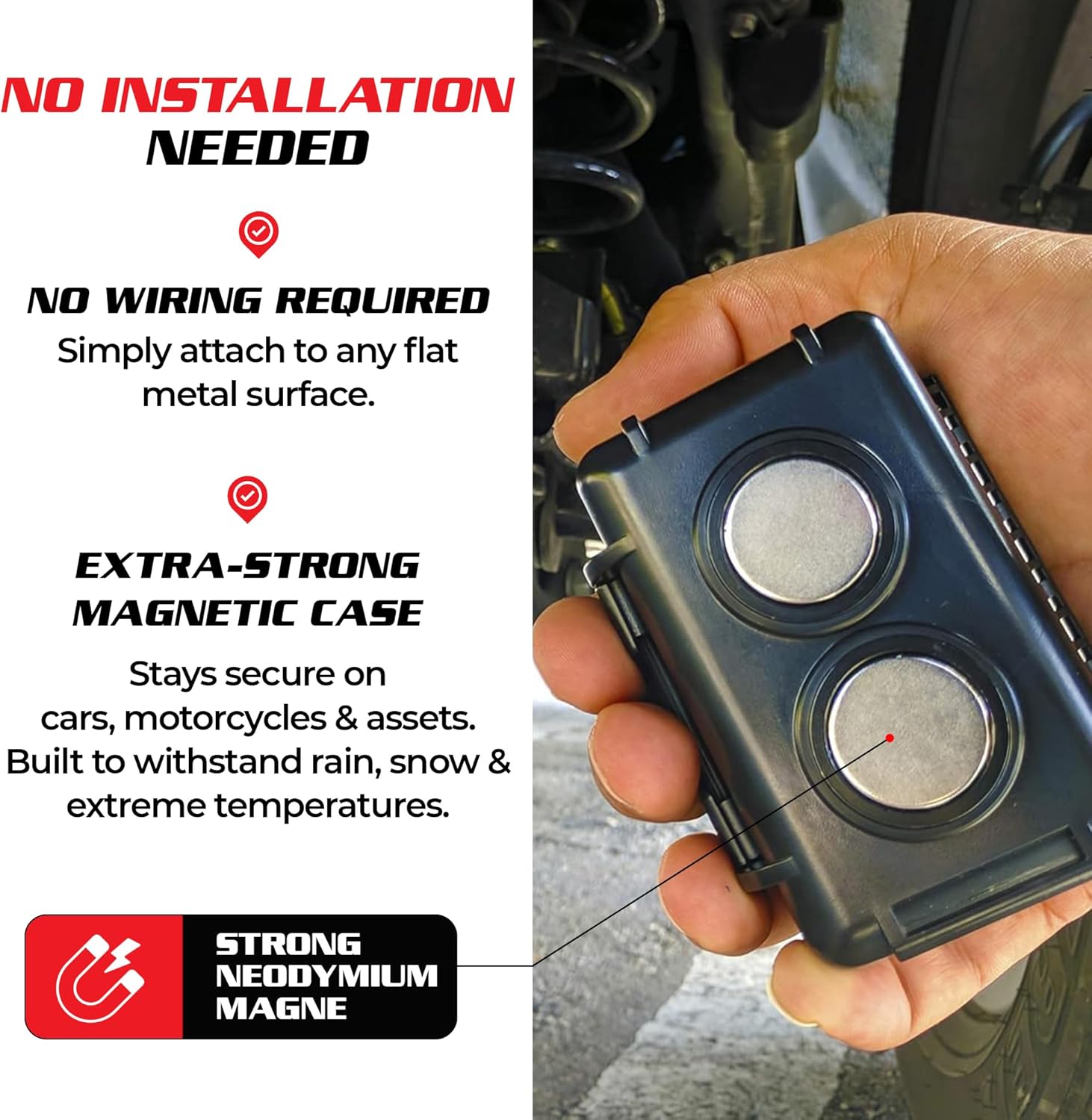
Image 4: Close-up of the Spy Spot GL 320MG magnetic case attaching to a metal surface.
3. ຄໍາແນະນໍາການດໍາເນີນງານ
3.1 Accessing the Tracking Software
The tracking software can be accessed via the dedicated iOS/Android application or through any web browser on a phone, tablet, or computer. Download the "Spy Spot" app from the App Store or Google Play.

Image 5: The Spy Spot GL 320MG tracking application accessible on smartphones, tablets, and computers.
3.2 Real-Time Tracking and Alerts
The device provides 24/7 real-time location updates. The application displays location information, miles per hour, satellite view, ຖະຫນົນ view, and a breadcrumb trail of past movements. Users can receive app and email alerts for various events, including speed violations, movement detection, and entry/exit of defined perimeters.

Image 6: Visual representation of real-time GPS tracking and instant alerts provided by the Spy Spot GL 320MG.
3.3 Geo-Fencing (Smart Boundary Alerts)
Set custom perimeters (geo-fences) within the tracking application. You will receive instant alerts when the tracker enters or leaves these predefined areas. This feature is useful for monitoring vehicles or ensuring the safety of loved ones.

Image 7: Illustration of the geo-fencing feature, allowing users to set boundaries and receive alerts.
3.4 History Reports
The tracking software maintains a six-month history log of all movements. This allows users to review past routes, stops, and addresses. This data can be accessed and analyzed through the application or web ປະຕູ.
4. ບໍາລຸງຮັກສາ
4.1 ອາຍຸ ແລະ ການສາກແບັດເຕີຣີ
The GL 320MG is equipped with a 2600 mAh internal battery, providing approximately 2-3 weeks of battery life depending on usage and update frequency. To maximize battery life, adjust the update frequency settings in the application (e.g., update every 1 hour instead of every minute). Recharge the device using the provided Micro USB cable.
For extended battery life, an optional larger battery pack and waterproof case are available for purchase. This accessory can significantly increase the operational time of the device.
Video 1: This video demonstrates the features of the Spy Spot 4G LTE Micro GPS Tracker, including its real-time tracking capabilities and battery life considerations. It highlights the device's compact size and various accessories for different use cases.
5. ການແກ້ໄຂບັນຫາ
5.1 Location Accuracy Issues
If location data appears inaccurate or freezes, try restarting the tracker. The device primarily uses cellular towers for location updates. In areas with strong public Wi-Fi signals, the device might prioritize Wi-Fi-based location, which can sometimes be less precise than satellite GPS. Ensure the device has a clear line of sight to the sky for optimal satellite reception.
5.2 Signal Loss
The GL 320MG operates on 4G LTE networks. If you experience signal loss, verify that you are within the coverage area of supported carriers (e.g., AT&T, T-Mobile in the US). The device is designed for international coverage in the United States, Canada, and Mexico.
5.3 Device Not Updating
Check the battery level of the device. If the battery is low, it may not be able to send updates. Also, verify the update frequency settings in the application; less frequent updates conserve battery but provide fewer real-time data points.
6. ຂໍ້ມູນຈໍາເພາະ
- ຂະໜາດແພັກເກດ: 6 x 5.5 x 4 ນິ້ວ
- ນ້ໍາຫນັກລາຍການ: 16 ອອນ
- ໝາຍເລກຕົວແບບ: ABCD
- ແບັດເຕີຣີ: 1 ແບດເຕີຣີ Lithium Polymer ທີ່ຕ້ອງການ (ລວມ)
- ເຕັກໂນໂລຊີການເຊື່ອມຕໍ່: ໂທລະສັບມືຖື
- ຄຸນນະສົມບັດພິເສດ: Magnetic, Waterproof, Portable
- ແອັບພລິເຄຊັນທີ່ຮອງຮັບ: ປຸກ
- ການນໍາໃຊ້ສະເພາະສໍາລັບຜະລິດຕະພັນ: Vehicle, Person & Asset tracking. Monitoring teens, spouses & kids. Locating elderly, children, and adults with Alzheimer's or dementia. Track cars, bikes, boats & more.
- ຜູ້ຜະລິດ: ຈຸດສອດແນມ
- ວັນທີທໍາອິດທີ່ມີ: ວັນທີ 10 ສິງຫາ 2016
7. ການຮັບປະກັນແລະການສະຫນັບສະຫນູນ
7.1 ແຜນການປົກປ້ອງ
Extended protection plans are available for purchase to cover your Spy Spot GL 320MG tracker:
- ແຜນການປົກປ້ອງ 2 ປີ: ມີໃຫ້ຊື້ໃນລາຄາ $4.99.
- ແຜນການປົກປ້ອງ 3 ປີ: ມີໃຫ້ຊື້ໃນລາຄາ $6.99.
- ປົກປ້ອງສົມບູນ: ແຜນການລາຍເດືອນກວມເອົາການຊື້ໃນອະດີດ ແລະອະນາຄົດທີ່ມີສິດທັງໝົດໃນລາຄາ $16.99/ເດືອນ.
These plans offer additional coverage beyond the standard manufacturer's warranty. For detailed terms and conditions, please refer to the specific plan documentation.
7.2 ສະຫນັບສະຫນູນລູກຄ້າ
For any inquiries, technical assistance, or support regarding your Spy Spot GL 320MG tracker, please visit the Spy Spot Store on Amazon or contact Spy Spot Investigations directly.


