ແນະນຳ
The C2G 40914 Compact Amplifier ໄດ້ຖືກອອກແບບເພື່ອ amplify dynamic microphone or stereo audio signals, providing 15 Watts of power per channel to a sound reinforcement system. This amplifier features a discreet installation and remote control capability via an included wall plate. It is suitable for various audio setups requiring compact amplification and external volume management.
ແມ່ນຫຍັງຢູ່ໃນກ່ອງ
ກະລຸນາກວດສອບວ່າອົງປະກອບທັງຫມົດແມ່ນມີກ່ອນທີ່ຈະສືບຕໍ່ການຕິດຕັ້ງ:
- ກະທັດຮັດ Ampມີຊີວິດຊີວາ
- Decorator Volume Control Wall Plate
- ການປົກຫຸ້ມຂອງແຜ່ນໃບຫນ້າ
- Power Adapter
- Bracket Mounting Screws 6-32 (25mm) qty. 2
- Wall Plate Mounting Screw M3.5 (8mm) qty. 3
- ຄູ່ມືຜູ້ໃຊ້
ສິນຄ້າເກີນview
ຄຸ້ນເຄີຍກັບຕົວທ່ານເອງ amplifier and wall plate components.

ຮູບທີ 1: ດ້ານໜ້າ view of the C2G 40914 Compact Amplifier. This image displays the local volume control knob, power indicator LED, 1/4 inch microphone input, 3.5mm auxiliary input, and input select switch.

ຮູບທີ 2: ຫລັງ view of the C2G 40914 Compact Amplifier. ນີ້ view shows the speaker output terminals (L+, L-, R+, R-), the remote volume control port (RJ45), and the DC 12V power input.

ຮູບທີ 3: Decorator Volume Control Wall Plate and face plate cover. The wall plate features a rotary volume knob and a power indicator LED.
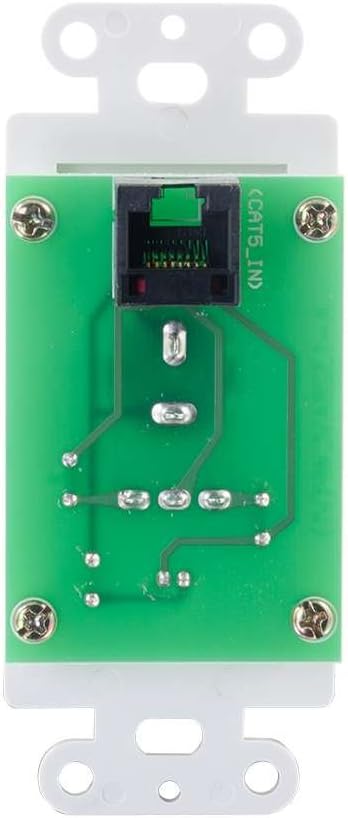
ຮູບທີ 4: ຫລັງ view of the Decorator Volume Control Wall Plate, showing the RJ45 connector for remote communication with the ampມີຊີວິດຊີວາ.
ຕັ້ງຄ່າ
-
ການຕິດຕັ້ງ Ampມີຊີວິດຊີວາ:
ໄດ້ amplifier includes a built-in mounting bracket. Secure the amplifier to a suitable surface using the provided 6-32 (25mm) mounting screws. Ensure adequate ventilation around the unit.
-
ລຳໂພງເຊື່ອມຕໍ່:
Connect your passive speakers to the speaker output terminals on the rear of the amplifier (L+, L-, R+, R-). Ensure correct polarity (+ to + and - to -) for each speaker channel. The ampເຄື່ອງສົ່ງໄຟຟ້າໃຫ້ 15 ວັດຕໍ່ຊ່ອງ.
-
ເຊື່ອມຕໍ່ແຫຼ່ງສຽງ:
- ການປ້ອນຂໍ້ມູນໄມໂຄຣໂຟນ: Connect a dynamic microphone to the 1/4 inch MIC IN jack on the front panel.
- ການປ້ອນຂໍ້ມູນຊ່ວຍ: Connect an audio source (e.g., smartphone, media player) to the 3.5mm AUX IN jack on the front panel.
-
Connecting the Remote Wall Plate:
Install the Decorator Volume Control Wall Plate in a standard wall box. Connect a Cat5e/Cat6 cable (not included) from the RJ45 port on the rear of the wall plate to the REMOTE port (RJ45) on the rear of the amplifier. Secure the wall plate with the provided M3.5 (8mm) screws and attach the face plate cover.
-
ພະລັງງານ Ampມີຊີວິດຊີວາ:
Connect the included power adapter to the DC 12V input on the rear of the amplifier, then plug the adapter into a standard AC power outlet. The power indicator LED on the amplifier and wall plate will illuminate.
ຄໍາແນະນໍາການດໍາເນີນງານ
-
ເປີດ/ປິດ:
ໄດ້ amplifier powers on automatically when connected to power. The power indicator LED on both the amplifier and the wall plate will light up.
-
ການຄັດເລືອກການປ້ອນຂໍ້ມູນ:
ໃຊ້ ການເລືອກເຂົ້າ switch on the front panel of the amplifier to choose between the MIC IN and AUX IN audio sources.
-
ການຄວບຄຸມລະດັບສຽງ:
ໄດ້ amplifier offers both local and remote volume control options:
- Local Volume: Adjust the rotary knob labeled ປະລິມານ ຢູ່ເທິງກະດານດ້ານຫນ້າຂອງ ampມີຊີວິດຊີວາ.
- Remote Volume: Adjust the rotary knob labeled ປະລິມານ on the Decorator Volume Control Wall Plate.
ໃຊ້ ການເລືອກປະລິມານ ເປີດ amplifier to determine whether the local or remote volume control is active. Set to 'LOCAL' to use the amplifier's knob, or 'REMOTE' to use the wall plate's knob.
-
ການນຳໃຊ້ໄມໂຄຣໂຟນ:
When MIC IN is selected, speak into the connected dynamic microphone. Adjust the volume using the selected volume control (local or remote) to achieve the desired output level.
ບໍາລຸງຮັກສາ
- ຮັກສາ amplifier and wall plate clean by wiping with a soft, dry cloth.
- Avoid using liquid cleaners or aerosol sprays, which may damage the unit.
- ຮັບປະກັນການລະບາຍອາກາດທີ່ເຫມາະສົມ amplifier ເພື່ອປ້ອງກັນ overheating.
- ຢ່າໃຫ້ເຄື່ອງຖືກຄວາມຊຸ່ມຊື່ນ ຫຼື ອຸນຫະພູມສູງເກີນໄປ.
ການແກ້ໄຂບັນຫາ
If you encounter issues with your C2G 40914 Compact Amplifier, please refer to the following common solutions:
-
ບໍ່ມີສຽງອອກ:
- Ensure the power adapter is securely connected and the power indicator LEDs are lit.
- Verify that speakers are correctly wired to the amplifier's output terminals with correct polarity.
- ກວດເບິ່ງວ່າ ການເລືອກເຂົ້າ switch is set to the correct source (MIC or AUX).
- ຢືນຢັນວ່າ ການເລືອກປະລິມານ switch is set to the active volume control (LOCAL or REMOTE) and that the volume knob is turned up.
- Test with a different audio source or microphone to rule out source device issues.
-
Remote Volume Control Not Working:
- Ensure the Cat5e/Cat6 cable connecting the wall plate to the amplifier is securely plugged into both RJ45 ports.
- ກວດສອບວ່າ ການເລືອກປະລິມານ ເປີດ amplifier is set to 'REMOTE'.
- Check the wall plate's power indicator LED to ensure it is receiving power.
-
ສຽງບິດເບືອນ:
- ຫຼຸດລະດັບສຽງລົງທັງສອງລຸ້ນ amplifier/wall plate and the audio source device.
- ໃຫ້ແນ່ໃຈວ່າ impedance ລໍາໂພງກົງກັບ amplifier's requirements (typically 4-8 ohms).
- ກວດເບິ່ງການເຊື່ອມຕໍ່ສາຍເຄເບີ້ນທັງໝົດສໍາລັບການວ່າງ ຫຼືຄວາມເສຍຫາຍ.
ຂໍ້ມູນຈໍາເພາະ
| ຄຸນສົມບັດ | ລາຍລະອຽດ |
|---|---|
| ຂະໜາດສິນຄ້າ | 1.95 x 1.3 x 4.05 ນິ້ວ (L x W x H) |
| ນ້ໍາຫນັກລາຍການ | 1 ປອນ |
| ໝາຍເລກຕົວແບບ | 40914 |
| ພະລັງງານຜົນຜະລິດ | 15 Watts per channel (30W total) |
| ຕົວເຊື່ອມຕໍ່ເຂົ້າ | 1/4 inch Dynamic Microphone, 3.5mm Stereo Audio Line Level |
| ຕົວເຊື່ອມຕໍ່ຜົນໄດ້ຮັບ | Speaker Terminals (L+, L-, R+, R-) |
| ການຄວບຄຸມໄລຍະໄກ | RJ45 for external volume control wall plate |
| ການສະຫນອງພະລັງງານ | DC 12V (Power Adapter included) |
| ອຸປະກອນທີ່ເຂົ້າກັນໄດ້ | ລໍາໂພງ |
| ສີ | ດຳ |
ການຮັບປະກັນແລະການສະຫນັບສະຫນູນ
The C2G 40914 Compact Amplifier is thoroughly inspected and tested to ensure quality and comes with a warranty for your complete satisfaction. For specific warranty terms and conditions, please refer to the documentation included with your purchase or visit the official C2G webເວັບໄຊ.
ສຳລັບການຊ່ວຍເຫຼືອດ້ານເຕັກນິກ, ການຊ່ວຍເຫຼືອໃນການແກ້ໄຂບັນຫາ ຫຼື ສອບຖາມຂໍ້ມູນເພີ່ມເຕີມ, ກະລຸນາເຂົ້າໄປທີ່ C2G Store ຫຼືຊ່ອງທາງການສະຫນັບສະຫນູນຢ່າງເປັນທາງການຂອງພວກເຂົາ.


