ແນະນຳ
This manual provides comprehensive instructions for the setup, operation, and maintenance of your DIGITNOW Ezcap USB 2.0 Audio/Video Converter, Model BR116. This device allows you to digitize analog video and audio from sources such as VCRs, VHS tapes, and DVD players, preserving your media in a digital format on your computer.
ສິນຄ້າເກີນview
The DIGITNOW Ezcap USB 2.0 Audio/Video Converter is a compact device designed to bridge analog video equipment with your computer. It features a USB 2.0 interface for connection to your PC and includes S-Video and composite (RCA) inputs for various analog sources. The converter captures video and audio, enabling you to save it digitally.
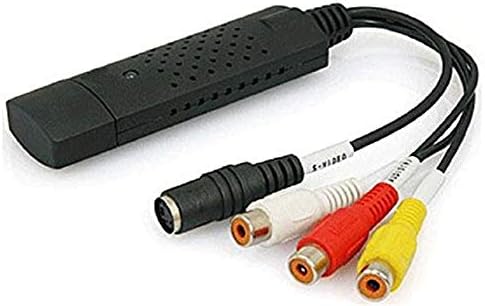
Image: The DIGITNOW Ezcap USB 2.0 Audio/Video Converter. This image displays the black USB dongle with integrated cables for S-Video (black round connector) and composite video (yellow RCA) and stereo audio (red and white RCA) inputs.
ເນື້ອໃນຊຸດ
ກະລຸນາກວດສອບວ່າລາຍການທັງໝົດມີຢູ່ໃນຊຸດຂອງທ່ານ:
- DIGITNOW Ezcap USB 2.0 Audio/Video Converter (Model BR116)
- Installation CD (containing drivers and capture software)
- ຄູ່ມືເລີ່ມຕົ້ນດ່ວນ (ຫຼືເອກະສານທີ່ຄ້າຍຄືກັນ)
ຄວາມຕ້ອງການລະບົບ
ເພື່ອຮັບປະກັນການເຮັດວຽກທີ່ເໝາະສົມ, ຄອມພິວເຕີຂອງທ່ານຕ້ອງຕອບສະໜອງຄວາມຕ້ອງການຂັ້ນຕ່ຳຕໍ່ໄປນີ້:
- ລະບົບປະຕິບັດການ: Windows XP SP2, Windows Vista, Windows 7, Windows 8, Windows 10
- ການໂຕ້ຕອບ: ມີພອດ USB 2.0
- ໜ່ວຍປະມວນຜົນ: Pentium III 800 MHz or higher (recommended)
- RAM: 256 MB of RAM or higher (recommended)
- ຈໍສະແດງຜົນ: 1024x768 or higher screen resolution
- ບັດສຽງ: ເຂົ້າກັນໄດ້ກັບ Windows
- ການເກັບຮັກສາ: 600 MB of available hard drive space for software installation, plus 4 GB for video capture and editing (recommended)
ຄູ່ມືການຕິດຕັ້ງ
Follow these steps to set up your DIGITNOW Ezcap USB 2.0 Audio/Video Converter:
- Install Software and Drivers: Insert the provided installation CD into your computer's CD/DVD drive. Follow the on-screen instructions to install the necessary drivers and video capture software (e.g., Honestech VHS to DVD 2.0 or similar). If your computer lacks a CD drive, you may need to download drivers and software from the manufacturer's support webເວັບໄຊ.
- ເຊື່ອມຕໍ່ກັບ PC: Plug the USB connector of the Ezcap converter into an available USB 2.0 port on your computer. The operating system should detect the new hardware and complete the driver installation.
- ເຊື່ອມຕໍ່ແຫຼ່ງອະນາລັອກ:
- For Composite Video (RCA): Connect the yellow RCA cable from your analog source (VCR, DVD player, camcorder) to the yellow video input on the Ezcap converter. Connect the red and white RCA cables from your analog source to the corresponding red (right audio) and white (left audio) audio inputs on the converter.
- For S-Video: Connect the S-Video cable from your analog source to the S-Video input on the Ezcap converter. For audio, you will still need to connect the red and white RCA audio cables from your analog source to the converter.
- ເປີດໃຊ້ອຸປະກອນ: Ensure your analog video source (VCR, DVD player) and your computer are powered on.
ຄໍາແນະນໍາການດໍາເນີນງານ
Once the setup is complete, follow these steps to capture video:
- ເປີດຊອບແວບັນທຶກ: Open the video capture software installed on your computer (e.g., Honestech VHS to DVD).
- Select Device and Input: Within the software, navigate to the settings or preferences to select the Ezcap USB 2.0 device as your video and audio input source. Choose the correct input type (Composite or S-Video) based on your connection.
- ກ່ອນview ວິດີໂອ: Start playback on your analog source (e.g., play a VHS tape). You should see the video preview in the capture software window. Adjust video settings like brightness, contrast, and saturation within the software if necessary.
- ເລີ່ມການບັນທຶກ: Click the "Record" button in the software to begin capturing the video and audio.
- Monitor Recording: Monitor the recording process. Note that some software may automatically split large video files.
- ຢຸດການບັນທຶກ: Once your desired content has been captured, click the "Stop" button in the software. Stop playback on your analog source.
- Save and Edit: Save the captured video file to your computer. The software may offer basic editing features, or you can use third-party video editing software for further refinement.
ບໍາລຸງຮັກສາ
To ensure the longevity and optimal performance of your Ezcap USB 2.0 Audio/Video Converter, follow these maintenance guidelines:
- ທໍາຄວາມສະອາດ: ໃຊ້ຜ້າອ່ອນແລະແຫ້ງເພື່ອທຳຄວາມສະອາດດ້ານນອກຂອງອຸປະກອນ. ຫຼີກລ່ຽງການໃຊ້ນ້ຳຢາທຳຄວາມສະອາດ ຫຼື ຕົວລະລາຍ.
- ການເກັບຮັກສາ: Store the converter in a cool, dry place away from direct sunlight and extreme temperatures when not in use.
- ການຈັດການ: Handle the device and its cables with care to prevent damage to connectors or internal components.
- ອັບເດດຊອບແວ: ກວດສອບຜູ້ຜະລິດເປັນໄລຍະ website for updated drivers or software versions to improve compatibility and performance.
ການແກ້ໄຂບັນຫາ
If you encounter issues with your Ezcap USB 2.0 Audio/Video Converter, refer to the following common problems and solutions:
- ບໍ່ມີສັນຍານວິດີໂອ:
- Ensure all cables (USB, video, audio) are securely connected.
- Verify that the analog source (VCR, DVD player) is powered on and playing content.
- Check that the correct input source (Composite or S-Video) is selected in the capture software.
- Confirm that the Ezcap device is selected as the video input device in your software settings.
- ບໍ່ມີສຽງ ຫຼືຄຸນນະພາບສຽງບໍ່ດີ:
- Ensure the red and white RCA audio cables are correctly connected to both the source and the converter.
- Check audio settings in the capture software to ensure the Ezcap device is selected as the audio input.
- Adjust volume levels on both the analog source and within the capture software.
- If audio is choppy or clips, try reducing the input volume from the source or checking for updated drivers.
- Software Issues (e.g., activation codes, outdated software):
- If prompted for an activation code, refer to the software packaging or contact the software developer's support.
- The included software may be basic or outdated. Consider searching for alternative, compatible video capture software online if you experience significant limitations or compatibility issues with newer Windows versions.
- ໃຫ້ແນ່ໃຈວ່າລະບົບປະຕິບັດການຂອງທ່ານຖືກປັບປຸງຢ່າງສົມບູນ.
- Video Aspect Ratio Incorrect:
- Some older capture software may not fully support widescreen (16:9) aspect ratios. Check software settings for aspect ratio options. If unavailable, post-capture editing may be required.
- ອຸປະກອນບໍ່ໄດ້ຮັບການຮັບຮູ້ໂດຍ PC:
- Try plugging the converter into a different USB port.
- Reinstall the drivers from the installation CD or the manufacturer's webເວັບໄຊ.
- ໃຫ້ແນ່ໃຈວ່າລະບົບປະຕິບັດການຂອງທ່ານຕອບສະຫນອງຄວາມຕ້ອງການຂັ້ນຕ່ໍາ.
ຂໍ້ມູນຈໍາເພາະ
| ຄຸນສົມບັດ | ລາຍລະອຽດ |
|---|---|
| ຊື່ຕົວແບບ | BR116 |
| ການໂຕ້ຕອບຮາດແວ | USB 2.0 |
| ວິດີໂອປ້ອນຂໍ້ມູນ | S-Video, Composite Video (RCA) |
| ການປ້ອນຂໍ້ມູນສຽງ | Stereo RCA (Left/Right) |
| ຄວາມລະອຽດການຖ່າຍວິດີໂອ | NTSC: 720x480; PAL: 720x576 (Standard definition for analog sources) |
| ສະຫນັບສະຫນູນລະບົບປະຕິບັດງານ | Windows XP SP2 / Vista / 7 / 8 / 10 |
| ຂະໜາດສິນຄ້າ | 7 x 6 x 1 ນິ້ວ |
| ນ້ໍາຫນັກລາຍການ | 3.84 ອອນ |
| ຜູ້ຜະລິດ | DigitNow |
ການຮັບປະກັນແລະການສະຫນັບສະຫນູນ
For warranty information and technical support, please refer to the documentation included with your product or visit the official DIGITNOW webເວັບໄຊ. ຮັກສາໃບຮັບເງິນການຊື້ຂອງທ່ານໄວ້ເປັນຫຼັກຖານການຊື້ສໍາລັບການຮຽກຮ້ອງການຮັບປະກັນໃດໆ.
ສຳລັບການຊ່ວຍເຫຼືອເພີ່ມເຕີມ, ທ່ານຍັງສາມາດຕິດຕໍ່ຮ້ານຄ້າປີກທີ່ທ່ານຊື້ຜະລິດຕະພັນນຳໄດ້.