1. ຜະລິດຕະພັນເກີນview
The Xiaomi Mi Bluetooth Speaker Mini (Model: XMYX02YM) is a compact and portable wireless speaker designed for high-quality audio playback. It features Bluetooth connectivity for seamless pairing with various devices and a durable, waterproof design for versatile use.
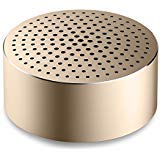
Image: The Xiaomi Mi Bluetooth Speaker Mini, a small, cylindrical black speaker with a mesh grille, showcasing ການອອກແບບຫນາແຫນ້ນຂອງມັນ.
2. ຕັ້ງຄ່າ
2.1 Unboxing
Carefully remove all components from the packaging. The box should contain the Mi Bluetooth Speaker Mini.
2.2 ກຳລັງສາກລຳໂພງ
The speaker is powered by an internal battery. Before first use, ensure the speaker is fully charged. Connect the appropriate charging cable (not included) to the speaker's charging port and to a compatible USB power source. The charging indicator light will provide status updates.
2.3 ການຈັບຄູ່ Bluetooth
- ເປີດ: Press and hold the power button on the speaker until you hear an audible prompt or see the indicator light flash, indicating it is in pairing mode.
- ເປີດໃຊ້ Bluetooth: On your device (smartphone, tablet, laptop, MP3 player), enable Bluetooth.
- ເລືອກລຳໂພງ: In your device's Bluetooth settings, search for available devices. Select "Mi Bluetooth Speaker Mini" from the list.
- ຢືນຢັນການເຊື່ອມຕໍ່: Once paired, the speaker will provide an audible confirmation, and the indicator light will change to a steady state.
The speaker is now ready for audio playback.
3. ຄໍາແນະນໍາການດໍາເນີນງານ
3.1 ເປີດ/ປິດ
- ເພື່ອເປີດເຄື່ອງ: ກົດປຸ່ມເປີດປິດຄ້າງໄວ້ປະມານ 2-3 ວິນາທີ.
- ປິດເຄື່ອງ: Press and hold the power button for approximately 3-4 seconds until the speaker powers down.
3.2 ການຫຼິ້ນສຽງ
After successful Bluetooth pairing, play audio from your connected device. The sound will be transmitted wirelessly to the Mi Bluetooth Speaker Mini. The speaker supports stereo audio output.
3.3 ແຕະການຄວບຄຸມ
The speaker features touch controls for basic functions. Refer to the specific touch areas on your speaker for volume adjustment, play/pause, and track navigation. (Specific touch control details may vary; consult product packaging or quick start guide for exact touch gestures).
3.4 ການປ້ອນຂໍ້ມູນຊ່ວຍ
While primarily a Bluetooth speaker, the device may support an auxiliary audio input. If available, connect an audio cable (not included) from your device's audio output to the speaker's auxiliary input port for wired audio playback.
4. ບໍາລຸງຮັກສາ
4.1 ການທໍາຄວາມສະອາດ
To clean the speaker, use a soft, dry, lint-free cloth. Do not use abrasive cleaners, solvents, or strong chemicals, as these can damage the speaker's surface or internal components.
4.2 ການຕໍ່ຕ້ານນ້ໍາ
The Xiaomi Mi Bluetooth Speaker Mini is waterproof. While it can withstand splashes and light exposure to water, it is not designed for prolonged submersion. Ensure all ports are securely closed before exposure to water. After exposure, dry the speaker thoroughly before charging or using it again.
4.3 ການເກັບຮັກສາ
When not in use for extended periods, store the speaker in a cool, dry place away from direct sunlight and extreme temperatures. It is recommended to charge the speaker periodically to maintain battery health.
5. ການແກ້ໄຂບັນຫາ
- ລຳໂພງບໍ່ເປີດ: ໃຫ້ແນ່ໃຈວ່າໄດ້ສາກໄຟແລ້ວ. ເຊື່ອມຕໍ່ລຳໂພງກັບແຫຼ່ງພະລັງງານແລ້ວລອງໃໝ່ອີກຄັ້ງ.
- ບໍ່ສາມາດຈັບຄູ່ກັບອຸປະກອນ:
- ກວດໃຫ້ແນ່ໃຈວ່າລຳໂພງຢູ່ໃນໂໝດຈັບຄູ່ (ຕົວຊີ້ບອກແສງກະພິບ).
- ປິດ ແລະເປີດ Bluetooth ໃນອຸປະກອນຂອງທ່ານ.
- ຍ້າຍລຳໂພງເຂົ້າໃກ້ອຸປະກອນຂອງທ່ານ.
- ລຶບລ້າງການເຊື່ອມຕໍ່ Bluetooth ທີ່ຜ່ານມາຢູ່ໃນອຸປະກອນຂອງທ່ານ ແລະລອງຈັບຄູ່ອີກຄັ້ງ.
- ບໍ່ມີສຽງໃນລະຫວ່າງການຫຼິ້ນ:
- ກວດເບິ່ງລະດັບສຽງໃນທັງລຳໂພງ ແລະອຸປະກອນທີ່ເຊື່ອມຕໍ່ຂອງທ່ານ.
- ໃຫ້ແນ່ໃຈວ່າລຳໂພງໄດ້ຖືກຈັບຄູ່ ແລະ ເຊື່ອມຕໍ່ກັບອຸປະກອນຂອງທ່ານສຳເລັດແລ້ວ.
- ລອງຫຼິ້ນສຽງຈາກແອັບພລິເຄຊັນ ຫຼືອຸປະກອນອື່ນ.
- ຄຸນະພາບສຽງບໍ່ດີ:
- ໃຫ້ແນ່ໃຈວ່າບໍ່ມີສິ່ງກີດຂວາງລະຫວ່າງລໍາໂພງແລະອຸປະກອນຂອງທ່ານ.
- ຍ້າຍອອກໄປຈາກແຫຼ່ງລົບກວນ (ເຊັ່ນ: ເຣົາເຕີ Wi-Fi, ອຸປະກອນ Bluetooth ອື່ນໆ).
- ກວດເບິ່ງຄຸນນະພາບແຫຼ່ງສຽງ.
6. ຂໍ້ມູນຈໍາເພາະ
| ຄຸນສົມບັດ | ລາຍລະອຽດ |
|---|---|
| ຕົວແບບ | XMYX02YM |
| ຍີ່ຫໍ້ | Xiaomi |
| ປະເພດລຳໂພງ | ຊັ້ນວາງປຶ້ມ (ພົກພາໄດ້) |
| ເຕັກໂນໂລຊີການເຊື່ອມຕໍ່ | Bluetooth, Wireless |
| ເຕັກໂນໂລຊີການສື່ສານໄຮ້ສາຍ | Bluetooth |
| ອຸປະກອນທີ່ເຂົ້າກັນໄດ້ | ແລັບທັອບ, ເຄື່ອງຫຼິ້ນ MP3, ໂທລະສັບສະຫຼາດ, ແທັບເລັດ |
| ແຫຼ່ງພະລັງງານ | ພະລັງງານຫມໍ້ໄຟ |
| ວິທີການຄວບຄຸມ | ແຕະ |
| ຮູບແບບການອອກສຽງ | ສະເຕຣິໂອ |
| ປະເພດໄດເວີສຽງ | ໄດນາມິກໄດເວີ |
| ການຕັ້ງຄ່າຊ່ອງສຽງອ້ອມຮອບ | 2.1 |
| ນ້ໍາຫນັກລາຍການ | 59 g |
| ຂະໜາດສິນຄ້າ (LxWxH) | 0.43 x 0.43 x 0.2 cm (4 x 4 x 2 Millimeters) |
| ສີ | ດຳ |
| ກັນນ້ຳ | ແມ່ນແລ້ວ |
| ຕ້ອງໃຊ້ແບັດເຕີຣີ | Yes (Internal, rechargeable) |
| ອົງປະກອບລວມ | Mi Bluetooth Speaker Mini |
| ຜູ້ຜະລິດ | Xiaomi Technology Inc. |
7. ການຮັບປະກັນແລະການສະຫນັບສະຫນູນ
ສໍາລັບຂໍ້ມູນການຮັບປະກັນ, ກະລຸນາເບິ່ງເອກະສານທີ່ມາພ້ອມກັບການຊື້ຂອງທ່ານຫຼືໄປຢ້ຽມຢາມ Xiaomi ຢ່າງເປັນທາງການ website. For technical support or service inquiries, please contact Xiaomi customer service through their official channels.


