1. ບົດແນະນຳ
This manual provides detailed instructions for the Plugable USB-C to DisplayPort Bi-Directional Cable (Model USBC-DP). This cable is designed to connect USB-C enabled devices to DisplayPort monitors or DisplayPort enabled devices to USB-C displays, supporting high-resolution video and audio transmission.

Image: The Plugable USB-C to DisplayPort Bi-Directional Cable, showcasing both the USB-C and DisplayPort connectors.
2. ຄຸນນະສົມບັດທີ່ສໍາຄັນ
- ການເຊື່ອມຕໍ່ສອງທິດທາງ: Supports both USB-C to DisplayPort and DisplayPort to USB-C video output, offering flexible connection options.
- ສະຫນັບສະຫນູນຄວາມລະອຽດສູງ: Enables resolutions up to 4K at 60Hz (3840x2160).
- Plug-and-Play: No drivers or software installation required for operation.
- ການອອກແບບທົນທານ: Features an aluminum shell on both connectors and a nylon braided cable for enhanced durability.
- ຄວາມເຂົ້າກັນໄດ້ຢ່າງກວ້າງຂວາງ: Compatible with systems supporting DisplayPort Alt Mode over USB-C, USB4, or Thunderbolt 3/4, including various MacBooks, iPads, HP, Dell, Lenovo, Microsoft Surface, and LG Gram models.
3. ຄໍາແນະນໍາການຕິດຕັ້ງ
Follow these steps to connect your device using the Plugable USB-C to DisplayPort Bi-Directional Cable:
- ກໍານົດພອດ: Ensure your source device (e.g., laptop, tablet) has a USB-C port that supports DisplayPort Alt Mode, USB4, or Thunderbolt 3/4. Ensure your display device (e.g., monitor, TV) has a DisplayPort input.
- ເຊື່ອມຕໍ່ປາຍ USB-C: Insert the USB-C connector of the cable into the compatible USB-C port on your source device.
- ເຊື່ອມຕໍ່ DisplayPort ປາຍທາງ: Insert the DisplayPort connector of the cable into the DisplayPort input on your display device.
- ເປີດໃຊ້ອຸປະກອນ: ໃຫ້ແນ່ໃຈວ່າທັງອຸປະກອນແຫຼ່ງທີ່ມາ ແລະ ອຸປະກອນສະແດງຜົນຂອງທ່ານໄດ້ເປີດຢູ່.
- ຕັ້ງຄ່າການຕັ້ງຄ່າການສະແດງຜົນ: Your display should automatically detect the connection. If not, you may need to manually select the DisplayPort input on your monitor or adjust display settings on your source device (e.g., extend, mirror, or primary display mode).

ຮູບພາບ: ໃກ້ຊິດ view of the USB-C and DisplayPort connectors, illustrating the connection process.
4. ຄໍາແນະນໍາການດໍາເນີນງານ
Once connected, the cable facilitates video and audio transmission between your devices. Here are common operating modes:
- MirrorMode: ສຳເນົາໜ້າຈໍຂອງອຸປະກອນແຫຼ່ງທີ່ມາຂອງທ່ານໃສ່ຈໍສະແດງຜົນພາຍນອກ. ນີ້ເປັນປະໂຫຍດສຳລັບການນຳສະເໜີ ຫຼື ການແບ່ງປັນເນື້ອຫາ.
- ຂະຫຍາຍໂໝດ: Extends your desktop across multiple screens, allowing for increased workspace and multitasking.
- ໂໝດສະແດງຜົນຫຼັກ: Uses the external display as the sole output, with the source device's screen turned off.
To switch between these modes, access your operating system's display settings:
- Windows: Right-click on the desktop, select "Display settings," and choose your preferred display option.
- macOS: Go to "System Settings" (or "System Preferences"), then "Displays," and adjust the arrangement or mirroring options.

Image: A laptop connected to an external monitor, demonstrating both extend and mirror display modes for enhanced productivity.
5. ຄວາມເຂົ້າກັນໄດ້
The Plugable USB-C to DisplayPort Bi-Directional Cable is compatible with a wide range of devices and operating systems:
ອຸປະກອນທີ່ຮອງຮັບ:
- M1–M4 MacBooks (base and Pro/Max models)
- Intel Thunderbolt Macs (late 2016 and newer)
- iPhone 15/16 and Pro models
- iPad Pro/Air/mini
- HP ProBook/EliteBook/Spectre x360
- Dell XPS/Latitude/Inspiron
- Lenovo ThinkPad/IdeaPad/Yoga
- Microsoft Surface Pro/Go/Book/Laptop
- LG Gram
- Thousands of other standards-compliant USB-C laptops.
ລະບົບປະຕິບັດການທີ່ຮອງຮັບ:
- Windows 10/11
- macOS 11+
- ChromeOS 100+
- Linux
ໝາຍເຫດ:
- Requires a system with DisplayPort Alt Mode over USB-C, USB4, or Thunderbolt 3/4.
- Fully compatible with DisplayPort source devices and full-featured USB-C displays.
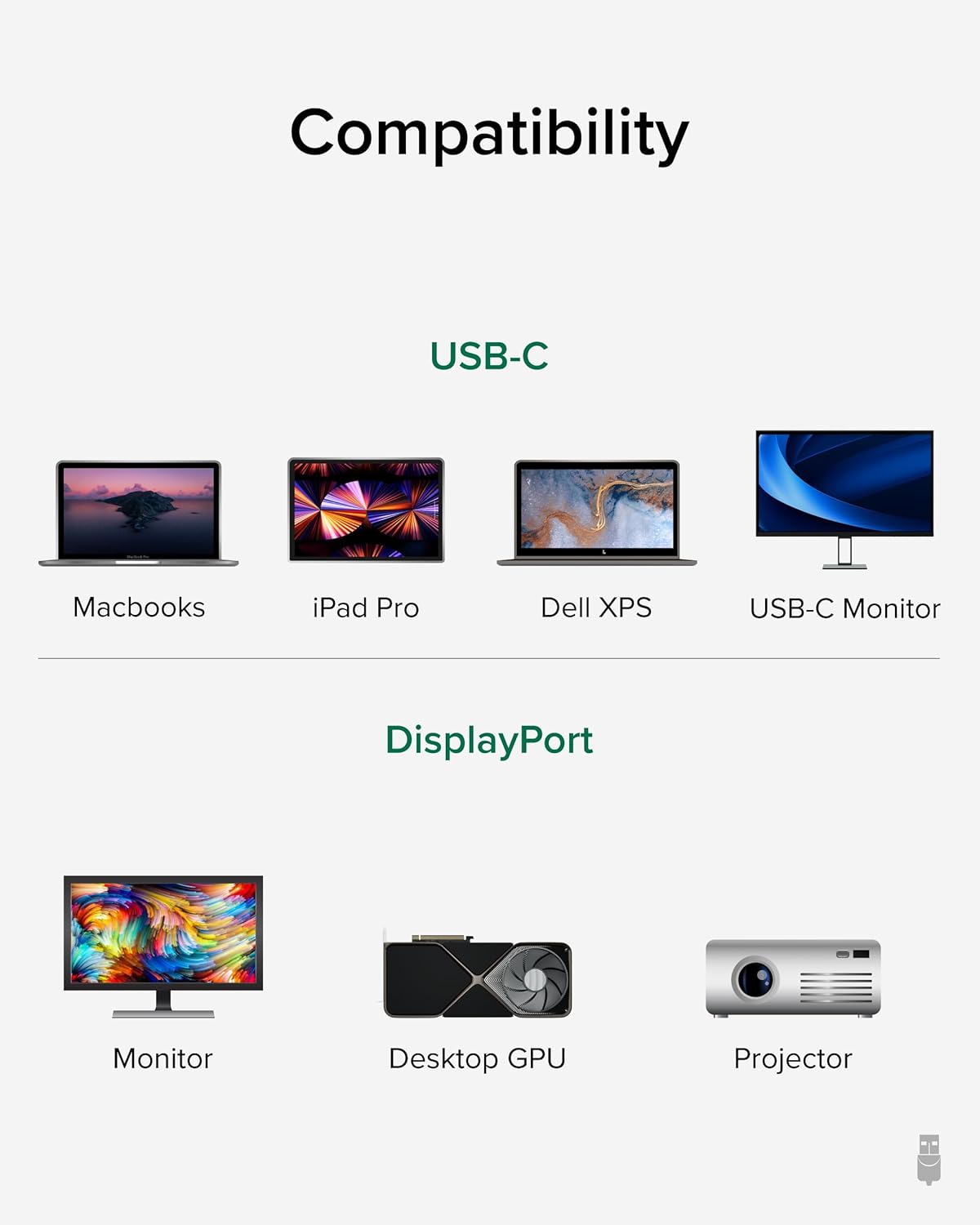
Image: A visual guide illustrating compatibility with various USB-C devices (MacBooks, iPad Pro, Dell XPS, USB-C Monitor) and DisplayPort devices (Monitor, Desktop GPU, Projector).
6. ບໍາລຸງຮັກສາ
To ensure the longevity and optimal performance of your Plugable USB-C to DisplayPort Bi-Directional Cable, follow these maintenance guidelines:
- ຈັດການດ້ວຍຄວາມລະມັດລະວັງ: ຫຼີກເວັ້ນການງໍ, ບິດ, ຫຼືດຶງສາຍເກີນໄປ, ໂດຍສະເພາະຢູ່ໃກ້ກັບຕົວເຊື່ອມຕໍ່.
- ເກັບຮັກສາຢ່າງຖືກຕ້ອງ: When not in use, coil the cable loosely and secure it with the included cable tie or a similar fastener. Avoid tight coiling that can stress the internal wires.
- ຮັກສາຄວາມສະອາດ: ເຊັດສາຍເຄເບີນ ແລະ ຕົວເຊື່ອມຕໍ່ເປັນໄລຍະໆດ້ວຍຜ້າອ່ອນ, ແຫ້ງເພື່ອເອົາຂີ້ຝຸ່ນ ແລະ ສິ່ງເສດເຫຼືອອອກ. ຫຼີກເວັ້ນການນໍາໃຊ້ສານເຄມີທີ່ຮຸນແຮງຫຼືວັດສະດຸຂັດ.
- ປົກປ້ອງຕົວເຊື່ອມຕໍ່: Ensure connectors are not exposed to liquids or extreme temperatures.
7. ການແກ້ໄຂບັນຫາ
If you encounter issues with your Plugable USB-C to DisplayPort Bi-Directional Cable, consider the following troubleshooting steps:
- ບໍ່ມີການສະແດງຜົນ/ສັນຍານ:
- Ensure both devices are powered on and the cable is securely connected at both ends.
- Verify that your source device's USB-C port supports DisplayPort Alt Mode, USB4, or Thunderbolt 3/4. Not all USB-C ports support video output.
- Check your display's input source settings and ensure the correct DisplayPort input is selected.
- ທົດສອບດ້ວຍສາຍ ຫຼື ອຸປະກອນອື່ນທີ່ເຂົ້າກັນໄດ້ເພື່ອແຍກບັນຫາ.
- Flickering or Intermittent Display:
- ໃຫ້ແນ່ໃຈວ່າສາຍບໍ່ໄດ້ເສຍຫາຍຫຼື kinked.
- Reduce the display resolution or refresh rate in your device's display settings to see if stability improves.
- Update your graphics drivers on your source device.
- ບໍ່ມີສຽງ:
- Check your computer's sound settings and ensure the DisplayPort output is selected as the audio device.
- Ensure your monitor has built-in speakers or is connected to external audio.
- Resolution/Refresh Rate Not as Expected:
- Verify that both your source device and display support the desired resolution and refresh rate.
- Ensure your device's display settings are configured for the desired output.
8. ຂໍ້ມູນຈໍາເພາະ
| ຄຸນສົມບັດ | ລາຍລະອຽດ |
|---|---|
| ຍີ່ຫໍ້ | ສຽບໄດ້ |
| ໝາຍເລກຕົວແບບ | USBC-DP |
| ຄວາມຍາວສາຍ | 6 ຟຸດ (1.8 ແມັດ) |
| ຄວາມລະອຽດສູງສຸດ | 4K (3840x2160) ທີ່ 60Hz |
| ຕົວເຊື່ອມຕໍ່ 1 | USB-C ຊາຍ |
| ຕົວເຊື່ອມຕໍ່ 2 | DisplayPort ຊາຍ |
| ຄວາມເຂົ້າກັນໄດ້ | DisplayPort Alt Mode over USB-C, USB4, Thunderbolt 3/4 |
| ວັດສະດຸ | Aluminum connector shells, Nylon braided cable |
| ນ້ໍາຫນັກລາຍການ | 1.6 ອອນ |
| ຂະໜາດສິນຄ້າ | 0.39 x 6 x 6.5 ນິ້ວ |
9. ວິດີໂອຜະລິດຕະພັນຢ່າງເປັນທາງການ
Video: Product Summary: Plugable USB-C to DisplayPort Adapter Cable. This video provides a comprehensive overview of the cable's features, functionality, and benefits.
10. ການຮັບປະກັນແລະການສະຫນັບສະຫນູນ
Plugable products are designed for reliability and ease of use. This device includes lifetime support from our North American team of connectivity experts.
For further assistance, please visit the Plugable support webເວັບໄຊ ຫຼືຕິດຕໍ່ບໍລິການລູກຄ້າຂອງເຂົາເຈົ້າ.