1. ຜະລິດຕະພັນເກີນview
The Guest U-3606 Control Panel is designed for marine applications, providing intuitive control over spotlight and floodlight functions, including direction. This panel is a robust solution for managing your vessel's lighting needs.
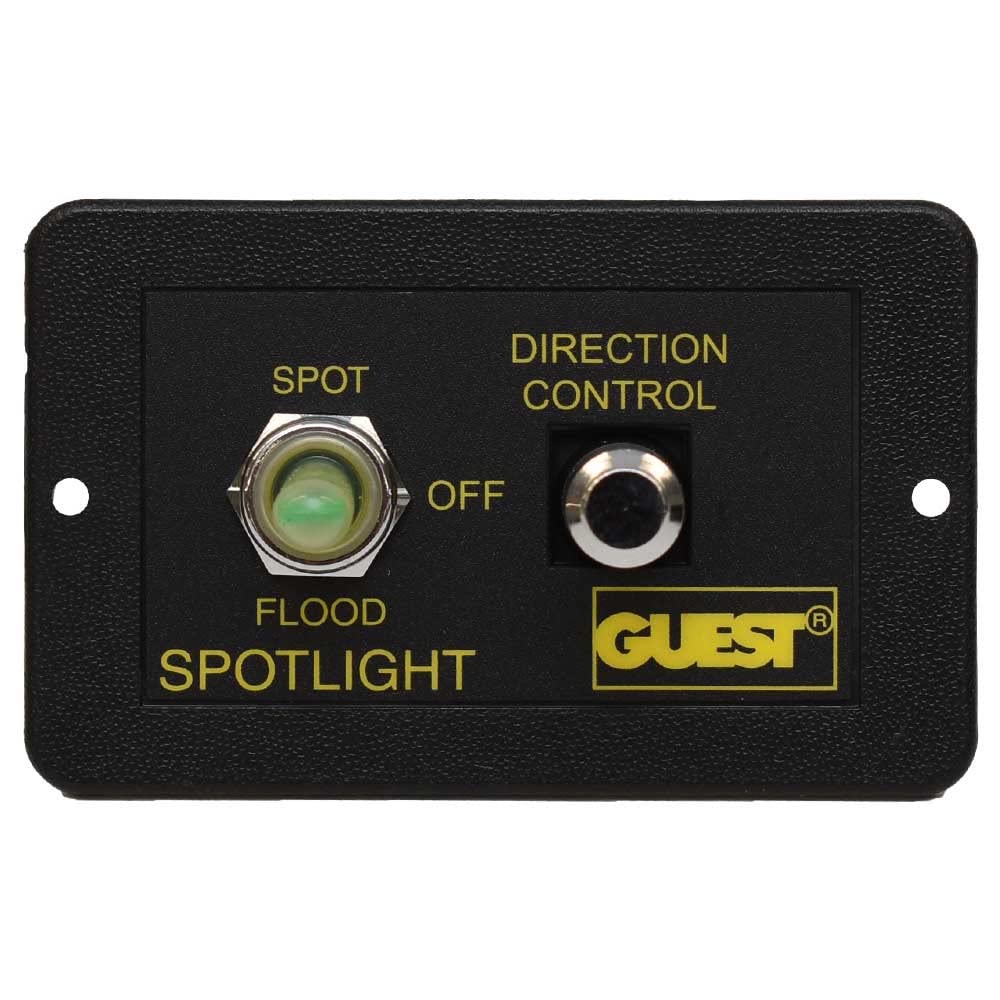
The panel features a three-position toggle switch for selecting between SPOT, OFF, and FLOOD lighting modes, and a separate button for directional control of compatible lights. It comes pre-wired for ease of installation.
2. ການຕິດຕັ້ງແລະການຕິດຕັ້ງ
2.1 ການຕິດຕັ້ງແຜງຄວບຄຸມ
- ເລືອກສະຖານທີ່: Choose a flat, secure surface on your vessel for mounting the control panel. Ensure the location allows for easy access and visibility during operation.
- ກະກຽມເປີດ: Based on the panel dimensions (refer to Figure 3), cut an appropriate opening for flush mounting.
- ແຜງຄວາມປອດໄພ: Use the provided mounting screws (refer to Figure 4) to secure the control panel firmly in place.


2.2 ການເຊື່ອມຕໍ່ສາຍໄຟ
The control panel comes with a pre-wired harness. Refer to the wiring diagram (if available in your product packaging) and the following general guidelines for connection:

- ການປ້ອນຂໍ້ມູນພະລັງງານ: Connect the main power wires (typically red for positive, black for negative) to a fused 12V DC power source. Ensure the fuse rating matches the requirements of your spotlight/floodlight system.
- ແສງອອກ: Connect the output wires from the panel to your spotlight and floodlight units. Specific wire colors will correspond to SPOT, FLOOD, and common ground connections.
- ການຄວບຄຸມທິດທາງ: Connect the directional control wires to the corresponding inputs on your compatible directional spotlight.
- ການເຊື່ອມຕໍ່ທີ່ປອດໄພ: Ensure all connections are tight, insulated, and protected from moisture to prevent corrosion and electrical shorts.
3. ຄໍາແນະນໍາການດໍາເນີນງານ
The Guest U-3606 Control Panel offers straightforward operation for your marine lighting.
3.1 Spotlight/Floodlight Selection
- ໂໝດຈຸດ: Flip the left toggle switch to the 'SPOT' position to activate the spotlight function.
- ໂModeດປິດ: Flip the left toggle switch to the 'OFF' (center) position to turn off all lighting.
- FLOOD Mode: Flip the left toggle switch to the 'FLOOD' position to activate the floodlight function.
3.2 ການຄວບຄຸມທິດທາງ
- Activate Directional Control: While in SPOT or FLOOD mode, use the 'DIRECTION CONTROL' button (right side of the panel) to adjust the direction of your compatible spotlight.
- ການເຄື່ອນໄຫວ: Press and hold the button to move the light. Release to stop. The specific movement (e.g., up/down, left/right) depends on the connected spotlight's capabilities and wiring.
4. ບໍາລຸງຮັກສາ
Regular maintenance ensures the longevity and reliable operation of your control panel.
- ທໍາຄວາມສະອາດ: Periodically wipe the control panel surface with a soft, damp cloth to remove salt spray, dirt, and grime. Avoid abrasive cleaners or solvents.
- ກວດສອບການເຊື່ອມຕໍ່: Annually inspect all wiring connections for corrosion, looseness, or damage. Tighten any loose connections and replace corroded terminals.
- ການປົກປ້ອງຄວາມຊຸ່ມ: Ensure the panel remains sealed and protected from excessive moisture ingress, especially in harsh marine environments.
5. ການແກ້ໄຂບັນຫາ
If you encounter issues with your Guest U-3606 Control Panel, refer to the following common problems and solutions:
- ບໍ່ມີພະລັງງານໃນກະດານ:
- Check the main power supply to the panel.
- Verify the fuse in the power circuit is intact and not blown.
- Inspect all power connections for looseness or corrosion.
- Lights Not Activating:
- Ensure the correct mode (SPOT or FLOOD) is selected on the toggle switch.
- Check the wiring connections from the panel to the light fixtures.
- Verify the light bulbs or LEDs themselves are functional.
- Direction Control Not Responding:
- Confirm the light is in an active mode (SPOT or FLOOD).
- Check the wiring connections for the directional control to the spotlight.
- Ensure your spotlight is compatible with external directional control and is functioning correctly.
If problems persist, consult a qualified marine electrician or contact Guest customer support.
6. ຂໍ້ມູນຈໍາເພາະ
| ຄຸນສົມບັດ | ຂໍ້ມູນຈໍາເພາະ |
|---|---|
| ຍີ່ຫໍ້ | ແຂກ |
| ໝາຍເລກຕົວແບບ | U-3606 |
| ຮູບແບບທີ່ເຂົ້າກັນໄດ້ | 298-57, 503-1 |
| ນ້ຳໜັກ | 0.44 ປອນ (ປະມານ 140.61 ກຣາມ) |
| ຈໍານວນຊິ້ນ | 1 (Control Panel) |
| ຂະໜາດແພັກເກັດ | 15.24 x 11.68 x 6.6 cm |
| ວັນທີທໍາອິດທີ່ມີ | ວັນທີ 24 ກຸມພາ 2021 |
7. ການຮັບປະກັນແລະການສະຫນັບສະຫນູນ
For warranty information and technical support, please refer to the documentation included with your original purchase or visit the official Guest Marine webເວັບໄຊ. ຮັກສາຫຼັກຖານການຊື້ຂອງທ່ານສໍາລັບການຮ້ອງຂໍການຮັບປະກັນ.
If you require further assistance, please contact Guest customer service directly. Contact details are typically available on the manufacturer's webສະຖານທີ່ຫຼືການຫຸ້ມຫໍ່ຜະລິດຕະພັນ.


