1. ບົດແນະນຳ
This manual provides detailed instructions for the safe and efficient operation of your Optoma EH416 Full HD 3D DLP Projector. Please read this manual thoroughly before using the projector and retain it for future reference. Proper use and maintenance will ensure optimal performance and longevity of your device.
ຂໍ້ມູນຄວາມປອດໄພ
- ຢ່າເບິ່ງໂດຍກົງໃນເລນໂປເຈັກເຕີເມື່ອ lamp ແມ່ນຢູ່. ແສງສະຫວ່າງທີ່ຮຸນແຮງສາມາດເຮັດໃຫ້ເກີດຄວາມເສຍຫາຍຕໍ່ຕາ.
- ຮັບປະກັນການລະບາຍອາກາດທີ່ພຽງພໍຢູ່ອ້ອມແອ້ມໂປເຈັກເຕີ. ຫ້າມປິດຊ່ອງລະບາຍອາກາດ.
- Use only the power cord supplied with the projector. Connect to a properly grounded outlet.
- ຢ່າໃຫ້ເຄື່ອງສາຍໄຟຖືກຝົນ, ຄວາມຊຸ່ມຊື່ນ ຫຼື ຄວາມຊື້ນຫຼາຍເກີນໄປ.
- Refer all servicing to qualified service personnel. Do not attempt to open or repair the projector yourself.
2. ສິ່ງທີ່ຢູ່ໃນກ່ອງ
Please verify that all items listed below are present in your package. If any items are missing or damaged, contact your dealer immediately.
- Optoma EH416 Projector
- ສາຍໄຟ
- ສາຍ VGA ຫາ VGA
- ການຄວບຄຸມໄລຍະໄກ
- ກະເປົາຖື
- ຫມໍ້ໄຟສໍາລັບການຄວບຄຸມໄລຍະໄກ
- Multilingual CD-ROM User’s Manual
- ບັດເລີ່ມຕົ້ນດ່ວນ
- ບັດຮັບປະກັນ
3. ຜະລິດຕະພັນເກີນview
ຄຸນນະສົມບັດທີ່ສໍາຄັນ
- ຄວາມສະຫວ່າງສູງ: 4200 lumens for clear images in various lighting conditions.
- ຄວາມຄົມຊັດສູງ: 20,000:1 contrast ratio for sharp, luminous images with deep blacks.
- ຄວາມລະອຽດ Full HD: Native 1080p (1920x1080) resolution, supporting up to WUXGA (1920x1200).
- Advanced Optical Lens: Features a 1.6x zoom and vertical lens shift for flexible installation.
- ການເຊື່ອມຕໍ່ຢ່າງກວ້າງຂວາງ: Dual HDMI (one with MHL support), dual audio-in, VGA, and more.
- sRGB Color Profile: Enables vibrant and highly accurate colors based on Rec. 709 HDTV specification.
- ການປັບສີຝາ: Compensates for brightness loss when projecting on non-white surfaces.
- Edge Mask: Eliminates soft edges and jaggedness on the projection border for a smooth image.
- ສຽງປະສົມປະສານ: ລຳໂພງ 10W ໃນຕົວ.
ສ່ວນປະກອບຂອງໂປເຈັກເຕີ
The image below illustrates the main components of the Optoma EH416 projector, including the lens, control panel, and various ports.
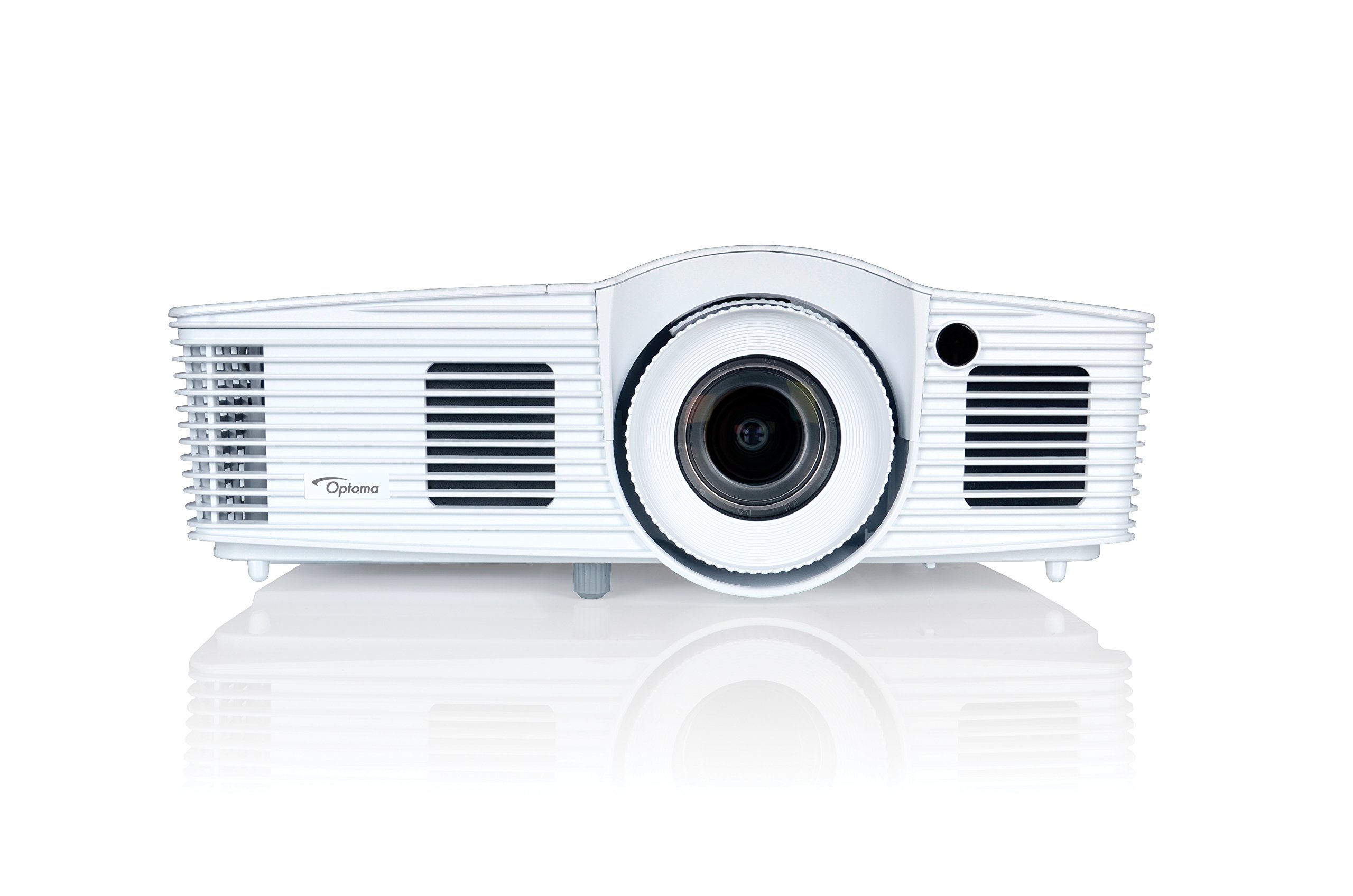
ຮູບ 1: ດ້ານຫນ້າ view of the Optoma EH416 Projector, showing the lens and primary controls.
ພອດເຊື່ອມຕໍ່
The Optoma EH416 projector offers a wide range of connectivity options located on the rear panel for versatile integration with various devices.
- HDMI (x2): Digital input for high-definition video and audio. One port supports MHL for mobile devices.
- VGA (x2): Analog input for computer connections.
- Audio In (x2): 3.5mm stereo jack for analog audio input.
- ອອກສຽງ: 3.5mm stereo jack for connecting external speakers.
- USB-A: For power output or service.
- RS232: For projector control via a computer or control system.
- RJ45 (ອີເທີເນັດ): ສໍາລັບການຄວບຄຸມແລະການຄຸ້ມຄອງເຄືອຂ່າຍ.
4. ຕັ້ງຄ່າ
ການຈັດວາງໂປຣເຈັກເຕີ
The Optoma EH416 offers flexibility in placement due to its 1.6x zoom and vertical lens shift capabilities. Position the projector on a stable surface or mount it securely. Adjust the distance from the screen to achieve the desired image size. The 1.6x zoom allows for a larger image from a shorter distance or a smaller image from a longer distance without moving the projector.
ການເຊື່ອມຕໍ່ອຸປະກອນ
- ການເຊື່ອມຕໍ່ພະລັງງານ: ເຊື່ອມຕໍ່ສາຍໄຟເຂົ້າກັບຊ່ອງສຽບໄຟຟ້າຂອງໂປເຈັກເຕີ ແລະ ຈາກນັ້ນເຂົ້າກັບປລັກໄຟຟ້າທີ່ມີສາຍດິນ.
- ແຫຼ່ງວິດີໂອ:
- For HDMI devices (e.g., Blu-ray player, laptop): Connect an HDMI cable from your device to one of the HDMI ports on the projector.
- For VGA devices (e.g., older laptops): Connect a VGA cable from your device to a VGA port on the projector. If audio is also required, connect a separate 3.5mm audio cable from your device to an Audio In port on the projector.
- For MHL compatible mobile devices: Connect an MHL cable to the designated HDMI/MHL port.
- ຜົນຜະລິດສຽງ (ທາງເລືອກ): If using external speakers, connect an audio cable from the projector's Audio Out port to your sound system.
ເປີດ/ປິດ
- ເພື່ອເປີດເຄື່ອງ: Press the power button on the projector's control panel or the remote control. The power indicator light will turn blue.
- ປິດເຄື່ອງ: Press the power button twice. The projector will enter a cooling down cycle before completely shutting off. Do not unplug the projector during the cooling cycle.
5. ການດໍາເນີນງານຂອງໂປເຈັກເຕີ
ການດໍາເນີນງານພື້ນຖານ
- ການຄັດເລືອກແຫຼ່ງ: Use the 'Source' button on the remote or control panel to cycle through available input sources (HDMI1, HDMI2/MHL, VGA1, VGA2).
- ເມນູນໍາທາງ: Press the 'Menu' button to access the On-Screen Display (OSD). Use the arrow keys to navigate and 'Enter' to select options.
- ການຄວບຄຸມລະດັບສຽງ: Use the volume buttons on the remote control to adjust the audio output from the built-in speaker or Audio Out port.
ການປັບຮູບພາບ
- ໂຟກັສ ແລະ ຊູມ: Rotate the focus and zoom rings on the projector lens to achieve a sharp and appropriately sized image.
- ການແກ້ໄຂ Keystone: If the image appears trapezoidal, use the 'Keystone' function in the OSD menu or the dedicated button on the remote to correct the image shape. The EH416 supports ±40° vertical keystone correction.
- ປ່ຽນເລນແນວຕັ້ງ: This feature allows you to physically move the image up or down without tilting the projector, minimizing keystone distortion. Adjust the lens shift dial located near the lens.
- ການປັບສີຝາ: Access this feature in the OSD menu to compensate for the color of your projection surface (e.g., blackboard, light yellow wall). This helps maintain accurate color reproduction even on non-white walls.
- sRGB Color Profile: For the most accurate and vibrant colors, especially when connecting to a PC, Mac, or sRGB compatible source, select the sRGB picture mode in the OSD. This profile adheres to the Rec. 709 HDTV specification.
- Edge Mask: This function, found in the OSD, helps to refine the edges of the projected image, eliminating any soft or jagged appearance on the border.
6. ບໍາລຸງຮັກສາ
ການເຮັດຄວາມສະອາດໂປເຈັກເຕີ
- ເລນ: ໃຊ້ຜ້າທີ່ອ່ອນນຸ່ມ, ບໍ່ມີເສັ້ນດ່າງທີ່ອອກແບບມາໂດຍສະເພາະສໍາລັບເລນ optical. ຢ່າໃຊ້ເຄື່ອງເຮັດຄວາມສະອາດຂັດ.
- Casing: ເຊັດໂປເຈັກເຕີ ຄasinໃຊ້ຜ້າອ່ອນໆແຫ້ງ. ສຳລັບຝຸ່ນທີ່ຝັງແໜ້ນ, ໃຫ້ໃຊ້ນ້ຳຢາຂັດເລັກນ້ອຍamp ຜ້າທີ່ມີສານຊັກອ່ອນໆ, ຫຼັງຈາກນັ້ນເຊັດໃຫ້ແຫ້ງ.
- ຊ່ອງລະບາຍອາກາດ: Regularly check and clean the air vents to prevent dust buildup, which can lead to overheating. Use a soft brush or compressed air.
Lamp ການດູແລ
ໂປເຈັກເຕີ lamp ມີກໍານົດຊີວິດ. ເມື່ອ lamp life is nearing its end, a warning message may appear on the screen. Refer to the full user manual on the included CD-ROM for detailed instructions on lamp replacement. Always use genuine Optoma replacement lamps to ensure optimal performance and safety.
7. ການແກ້ໄຂບັນຫາ
This section addresses common issues you might encounter. For more detailed troubleshooting, refer to the comprehensive user manual on the included CD-ROM.
- ບໍ່ມີຮູບພາບໃນຫນ້າຈໍ:
- Check if the projector is powered on and the lamp ແມ່ນໄຟ.
- Verify that the video source device is powered on and functioning correctly.
- Ensure the video cable (HDMI, VGA) is securely connected to both the projector and the source device.
- Select the correct input source using the 'Source' button on the remote or projector.
- ຮູບມົວ ຫຼື ບິດເບືອນ:
- ປັບວົງການໂຟກັສໃສ່ເລນໂປເຈັກເຕີ.
- If the image is trapezoidal, use the keystone correction function.
- Ensure the projector is perpendicular to the screen or use vertical lens shift.
- ບໍ່ມີສຽງ:
- ກວດເບິ່ງລະດັບສຽງໃນໂປເຈັກເຕີແລະອຸປະກອນແຫຼ່ງ.
- If using an analog VGA connection, ensure a separate audio cable is connected.
- Verify that the audio output is not muted.
- ການຄວບຄຸມໄລຍະໄກບໍ່ເຮັດວຽກ:
- ກວດເບິ່ງແລະປ່ຽນແບັດ.
- ໃຫ້ແນ່ໃຈວ່າບໍ່ມີສິ່ງກີດຂວາງລະຫວ່າງທາງໄກ ແລະເຄື່ອງຮັບ IR ຂອງໂປເຈັກເຕີ.
8. ຂໍ້ມູນຈໍາເພາະ
| ຄຸນສົມບັດ | ລາຍລະອຽດ |
|---|---|
| ໝາຍເລກຕົວແບບ | EH416 |
| ຄວາມລະອຽດການສະແດງ | 1920 x 1080 (Full HD) |
| ຄວາມສະຫວ່າງ | 4200 Lumens |
| ອັດຕາສ່ວນກົງກັນຂ້າມ | 20,000:1 |
| ເຕັກໂນໂລຊີການເຊື່ອມຕໍ່ | Wireless, HDMI, MHL, VGA |
| ຂະໜາດສິນຄ້າ | 8.81 x 12.36 x 4.48 ນິ້ວ |
| ນ້ໍາຫນັກລາຍການ | 6.6 ປອນ |
| ການນໍາໃຊ້ທີ່ແນະນໍາ | Business, Education |
| ຜູ້ຜະລິດ | OPTOMA TECHNOLOGY |
| ວັນທີທໍາອິດທີ່ມີ | ວັນທີ 5 ເມສາ 2016 |
9. ການຮັບປະກັນແລະການສະຫນັບສະຫນູນ
Your Optoma EH416 projector comes with a manufacturer's warranty. Please refer to the included warranty card for specific terms, conditions, and registration information. For technical support, product registration, or to download the latest drivers and firmware, please visit the official Optoma website or contact Optoma customer service.


