1. ບົດແນະນຳ
The GAMDIAS Hermes GKB3000 is a mechanical gaming keyboard designed for enhanced durability and performance. It features GAMDIAS Certified Blue Switches with a 50 million actuation lifecycle, a 7-color spectrum backlight with 14 lighting effects, and various functional keys for an optimized gaming and typing experience. This manual provides instructions for setting up, operating, and maintaining your keyboard.
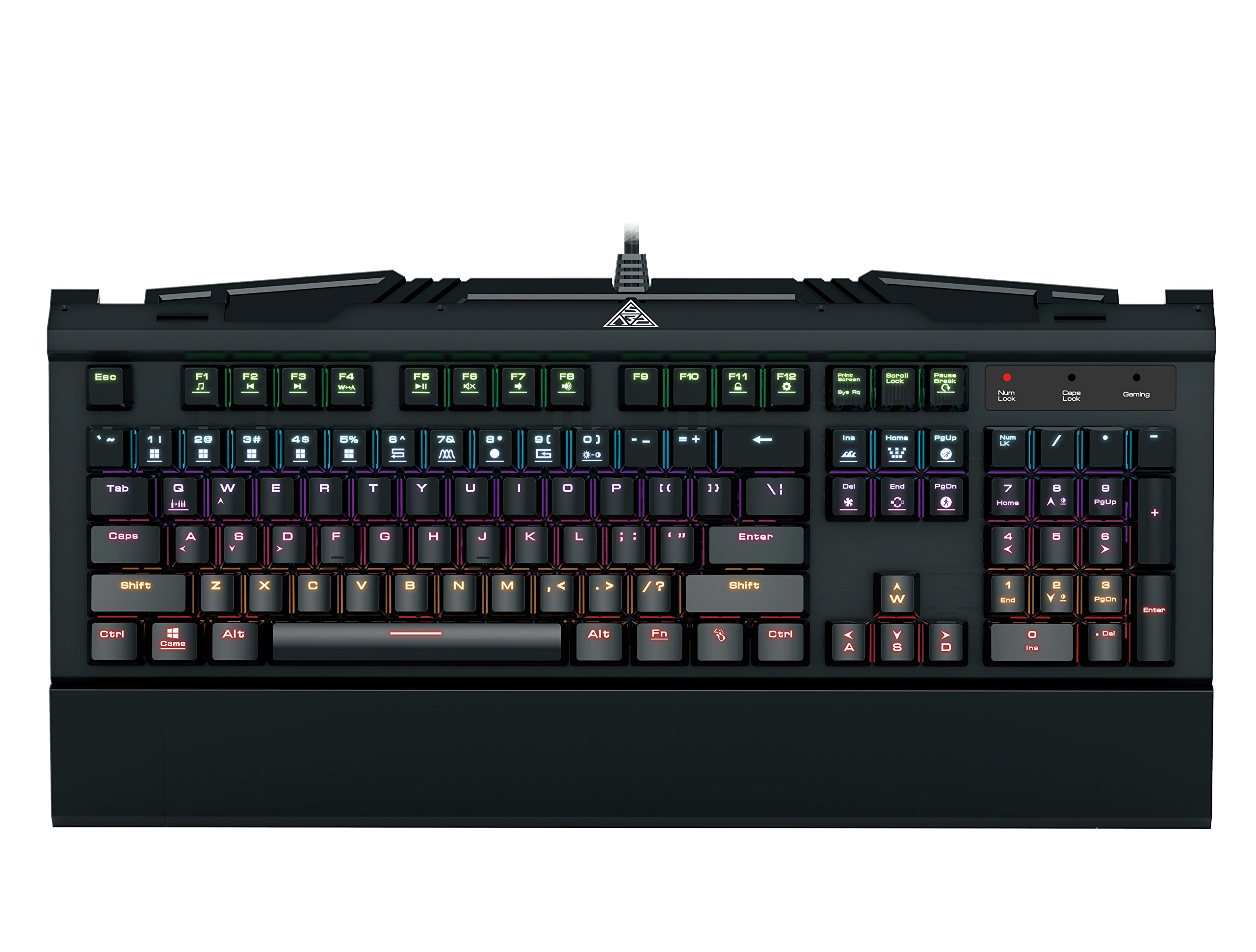
Image 1.1: The GAMDIAS Hermes GKB3000 Mechanical Gaming Keyboard. This image displays the full keyboard with its key layout and design, highlighting its compact yet robust build.
2. ເນື້ອໃນຊຸດ
ກະລຸນາກວດເບິ່ງເນື້ອໃນຂອງແພັກເກັດໃນເວລາທີ່ unboxing ເພື່ອຮັບປະກັນວ່າລາຍການທັງຫມົດແມ່ນມີຢູ່ແລະບໍ່ເສຍຫາຍ.
- GAMDIAS Hermes GKB3000 Mechanical Gaming Keyboard
- ຄູ່ມືຜູ້ໃຊ້ (ເອກະສານນີ້)
3. ຕັ້ງຄ່າ
Follow these steps to set up your GAMDIAS Hermes GKB3000 keyboard:
- ຖອດແປ້ນພິມ: ເອົາແປ້ນພິມອອກຈາກເຄື່ອງຫຸ້ມຫໍ່ຂອງມັນຢ່າງລະມັດລະວັງ.
- ເຊື່ອມຕໍ່ກັບຄອມພິວເຕີ: Plug the USB-A connector of the keyboard cable into an available USB port on your computer.
- ການຕິດຕັ້ງໄດເວີ: The keyboard is plug-and-play. Your operating system (e.g., Windows) will automatically detect and install the necessary drivers. No additional software installation is typically required for basic functionality.
- ການຈັດວາງ: Place the keyboard on a stable, flat surface for comfortable use.
4. ຄໍາແນະນໍາການດໍາເນີນງານ
4.1. ຜົນກະທົບແສງສະຫວ່າງ
The Hermes GKB3000 features a 7-color spectrum backlight with 14 sets of lighting effects. These include 9 preset effects and 5 customizable patterns.
- Switching Effects: Use the dedicated function keys (often combined with the Fn key) to cycle through the preset lighting effects. Refer to the keyboard's keycap legends for specific combinations.
- Customizing Effects: The keyboard supports 5 customizable lighting patterns. Instructions for programming these patterns are typically found in the full software suite available for download from the GAMDIAS website, if applicable.
- ການປັບຄວາມສະຫວ່າງ: Adjust backlight brightness using designated function key combinations.
4.2. Multimedia Control Keys
Access multimedia functions quickly using the dedicated multimedia control keys, often activated by holding the Fn ປຸ່ມຮ່ວມກັບປຸ່ມ F (F1-F12).
- ການຄວບຄຸມລະດັບສຽງ: Increase, decrease, or mute audio.
- ການຫຼິ້ນສື່: ຫຼິ້ນ/ຢຸດຊົ່ວຄາວ, ຢຸດ, ເພງກ່ອນໜ້ານີ້, ເພງຕໍ່ໄປ.
- ຟັງຊັນອື່ນໆ: May include opening default browser, email client, or calculator.
4.3. Special Gaming Functions
- WASD-Arrow Key Swap: This feature allows you to swap the functionality of the WASD keys with the arrow keys. This is useful for certain games or user preferences. Activate this function using a specific Fn key combination (e.g., Fn + W).
- Consecutive Attack Mode: This mode enhances rapid key input for gaming. Refer to the keyboard's specific documentation or GAMDIAS software for activation and configuration details.
- ລັອກແປ້ນພິມ: Temporarily disable the keyboard input to prevent accidental presses. Activate using a Fn ການປະສົມປະສານທີ່ສໍາຄັນ.
- Windows Key Disable: Prevent accidental presses of the Windows key during gaming, which can minimize your game. Activate using a Fn key combination (e.g., Fn + Win key).
- N-Key Rollover: The GKB3000 supports N-key rollover, meaning multiple keys can be pressed simultaneously without ghosting or missed inputs. This ensures accurate and responsive commands during intense gaming sessions.
5. ບໍາລຸງຮັກສາ
ການບໍາລຸງຮັກສາທີ່ເຫມາະສົມຮັບປະກັນຄວາມທົນທານແລະການປະຕິບັດທີ່ດີທີ່ສຸດຂອງແປ້ນພິມຂອງທ່ານ.
- ທໍາຄວາມສະອາດ:
- ຕັດການເຊື່ອມຕໍ່ແປ້ນພິມຈາກຄອມພິວເຕີຂອງທ່ານກ່ອນທີ່ຈະທໍາຄວາມສະອາດ.
- ໃຊ້ຜ້າແພທີ່ອ່ອນໆ ທີ່ບໍ່ມີເສັ້ນດ່າງ dampຖອກໃສ່ດ້ວຍນ້ໍາຫຼືການແກ້ໄຂການເຮັດຄວາມສະອາດອ່ອນໆເພື່ອເຊັດຫນ້າ.
- ສໍາລັບຂີ້ຝຸ່ນແລະສິ່ງເສດເຫຼືອລະຫວ່າງກະແຈ, ໃຊ້ອາກາດບີບອັດ.
- ຫຼີກລ້ຽງການໃຊ້ສານເຄມີທີ່ຮຸນແຮງ, ເຄື່ອງຂັດຂັດ, ຫຼືສານລະລາຍ.
- ການເກັບຮັກສາ: ເກັບຮັກສາແປ້ນພິມໄວ້ໃນບ່ອນທີ່ເຢັນ, ແຫ້ງ, ຫ່າງຈາກແສງແດດໂດຍກົງ ແລະອຸນຫະພູມທີ່ຮຸນແຮງເມື່ອບໍ່ໄດ້ໃຊ້ເປັນເວລາດົນ.
- ການຈັດການ: Avoid dropping the keyboard or exposing it to excessive force, as this can damage the mechanical switches or internal components.
6. ການແກ້ໄຂບັນຫາ
If you encounter issues with your GAMDIAS Hermes GKB3000 keyboard, refer to the following common solutions:
| ບັນຫາ | ການແກ້ໄຂທີ່ເປັນໄປໄດ້ |
|---|---|
| ແປ້ນພິມບໍ່ຕອບສະໜອງ. |
|
| ໄຟພື້ນຫຼັງບໍ່ເຮັດວຽກ ຫຼື ມືດມົວ. |
|
| ປຸ່ມບາງອັນບໍ່ເຮັດວຽກ. |
|
| WASD keys are acting as arrow keys. |
|
If the problem persists after trying these solutions, please contact GAMDIAS customer support for further assistance.
7. ຂໍ້ມູນຈໍາເພາະ
The following are the technical specifications for the GAMDIAS Hermes GKB3000 Mechanical Gaming Keyboard:
| ຄຸນສົມບັດ | ລາຍລະອຽດ |
|---|---|
| ຍີ່ຫໍ້ | GAMDIAS |
| ໝາຍເລກຕົວແບບ | GKB3000 |
| ປະເພດສະຫຼັບ | GAMDIAS Certified Mechanical Blue Switches |
| Actuation Lifecycle | 50 ລ້ານກະແຈ |
| Backlighting | 7-Color Spectrum, 14 Lighting Effects (9 preset, 5 customizable) |
| ຕ້ານຜີ | N-Key Rollover |
| ການເຊື່ອມຕໍ່ | USB-A |
| ລະບົບປະຕິບັດການ | Windows |
| ນ້ໍາຫນັກລາຍການ | 2.42 ປອນ (ປະມານ 1.1 ກິໂລ) |
| ຂະໜາດສິນຄ້າ (LxWxH) | 18.8 x 10.5 x 2 ນິ້ວ (ປະມານ 47.75 x 26.67 x 5.08 ຊມ) |
| ວັດສະດຸ | Plastic with Elegant Metal Plate Design |
8. ການຮັບປະກັນແລະການສະຫນັບສະຫນູນ
GAMDIAS products are manufactured to the highest quality standards. For information regarding warranty coverage, terms, and conditions, please refer to the warranty card included with your product or visit the official GAMDIAS webເວັບໄຊ.
For technical support, troubleshooting assistance, or any product-related inquiries, please contact GAMDIAS customer support through their official webເວັບໄຊ ຫຼືຂໍ້ມູນການຕິດຕໍ່ທີ່ສະໜອງໃຫ້ຢູ່ໃນການຫຸ້ມຫໍ່ຜະລິດຕະພັນຂອງທ່ານ.
GAMDIAS Official Webເວັບໄຊ: www.gamdias.com


