ແນະນຳ
The Intermec PB51 is a rugged, 4-inch direct thermal mobile receipt printer designed for demanding field service, route accounting, and point-of-service applications. It offers fast, reliable printing performance to enhance productivity for mobile workers.
This manual provides essential information for the proper setup, operation, maintenance, and troubleshooting of your PB51 printer.
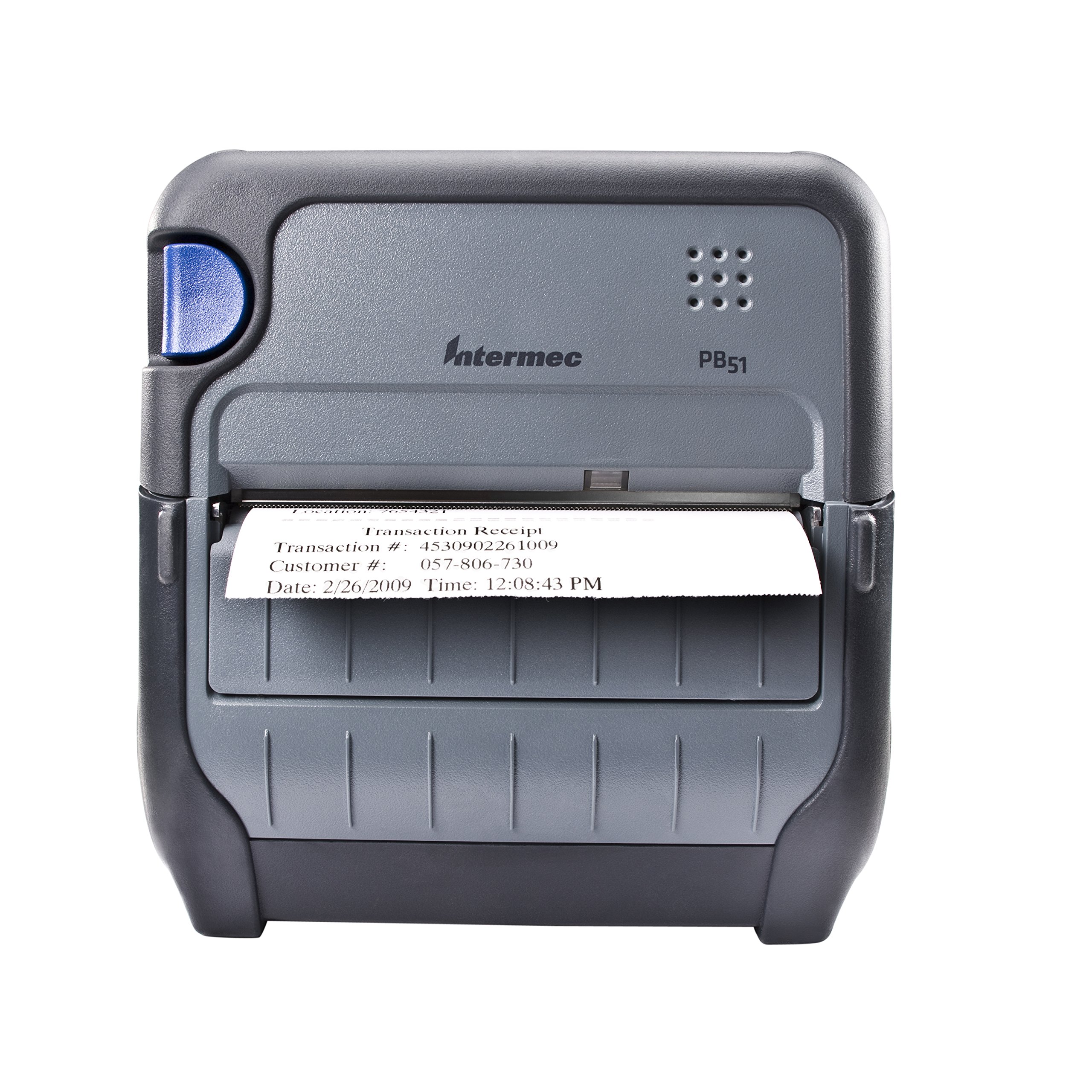
ຮູບ 1: ດ້ານຫນ້າ view of the Intermec PB51 mobile receipt printer. A receipt is partially ejected from the front slot, displaying "Transaction Receipt", "Transaction #: 4530902261009", "Customer #: 057-806-730", and "Date: 2/26/2009 Time: 12:08:43 PM". The printer features a dark gray casing with a blue button on the left side and the "Intermec PB51" logo on the top panel.
ຕັ້ງຄ່າ
1. ການຫຸ້ມຫໍ່ແລະການກວດກາ
- ເອົາເຄື່ອງພິມ ແລະອຸປະກອນເສີມທັງໝົດອອກຈາກເຄື່ອງຫຸ້ມຫໍ່ຢ່າງລະມັດລະວັງ.
- ກວດສອບວ່າອົງປະກອບທັງໝົດທີ່ລະບຸໄວ້ໃນໃບບັນຈຸມີຢູ່.
- Inspect the printer for any visible damage. If damage is found, contact your supplier immediately.
2. ການຕິດຕັ້ງ ແລະສາກແບັດເຕີຣີ
- ກວດໃຫ້ແນ່ໃຈວ່າເຄື່ອງພິມປິດຢູ່.
- ຊອກຫາຊ່ອງໃສ່ແບັດເຕີຣີຢູ່ເທິງເຄື່ອງພິມ.
- Insert the battery, ensuring proper alignment with the contacts.
- ປິດຊ່ອງໃສ່ຫມໍ້ໄຟຢ່າງປອດໄພ.
- Connect the AC adapter to the printer and a power outlet. The battery indicator light will show charging status. Allow the battery to fully charge before first use.
3. ການໂຫຼດເຈ້ຍຄວາມຮ້ອນ
- ເປີດຝາປິດຊ່ອງໃສ່ເຈ້ຍ.
- Insert the thermal paper roll with the print-side facing the print head.
- Pull a small amount of paper out past the print mechanism.
- Close the paper compartment cover firmly until it latches.
- The printer's paper sensors will detect the paper, minimizing lost transactions.
4. Connectivity Setup (Bluetooth / USB / Serial)
- Bluetooth: Turn on the printer and enable Bluetooth on your host device (e.g., smartphone, tablet, or computer). ຊອກຫາ available devices and select the PB51. Pair using the default PIN (refer to the printer's display or documentation for the specific PIN).
- USB: Connect the printer to your host device using a standard USB cable. Install the necessary printer drivers on your host device if prompted.
- ລໍາດັບ: Connect the printer to your host device using a serial cable. Configure the serial port settings (baud rate, data bits, parity, stop bits) on both the printer and the host device to match.
ຄໍາແນະນໍາການດໍາເນີນງານ
1. ເປີດ / ປິດພະລັງງານ
- ເພື່ອເປີດເຄື່ອງ, ໃຫ້ກົດປຸ່ມເປີດປິດຄ້າງໄວ້ຈົນກວ່າຈໍສະແດງຜົນຈະສະຫວ່າງ.
- To power off, press and hold the power button until the display indicates shutdown, then release.
2. ການພິມໃບຮັບເງິນ
- Ensure the printer is powered on and connected to your host device.
- Open the application on your host device that generates receipts or invoices.
- Initiate the print command from your application. The PB51 is designed for 20-30% faster time-to-receipt printing.
- The printer will automatically feed and print the receipt.
- Tear off the receipt along the serrated edge.
3. ການໃຊ້ຈໍສະແດງຜົນ LCD
The standard LCD display provides important information about the printer's status, battery level, connectivity, and error messages. Use the navigation buttons (if present) to scroll through menu options and settings.
ບໍາລຸງຮັກສາ
1. ການເຮັດຄວາມສະອາດຫົວພິມ
- Power off the printer and disconnect it from any power source.
- ເປີດຊ່ອງໃສ່ເຈ້ຍ.
- Gently wipe the print head surface with a lint-free cloth dampປະກອບດ້ວຍເຫຼົ້າ isopropyl.
- ປະໄວ້ໃຫ້ຫົວພິມແຫ້ງສະນິດກ່ອນທີ່ຈະປິດຝາປິດ ແລະ ເປີດເຄື່ອງພິມ.
- Perform this cleaning regularly, especially if print quality degrades.
2. ການດູແລຫມໍ້ໄຟ
- ເພື່ອເພີ່ມອາຍຸແບັດເຕີຣີໃຫ້ສູງສຸດ, ຫຼີກລ່ຽງການປົດສາກແບັດເຕີຣີໃຫ້ເຕັມທີ່ເລື້ອຍໆ.
- Store the printer and battery in a cool, dry place when not in use for extended periods.
- Use only genuine Intermec replacement batteries.
3. ທໍາຄວາມສະອາດທົ່ວໄປ
ເຊັດດ້ານນອກຂອງເຄື່ອງພິມດ້ວຍຄວາມອ່ອນ, ງamp cloth. Do not use harsh chemicals or abrasive cleaners. Ensure no liquid enters the printer's openings.
ການແກ້ໄຂບັນຫາ
| ບັນຫາ | ສາເຫດທີ່ເປັນໄປໄດ້ | ການແກ້ໄຂ |
|---|---|---|
| ເຄື່ອງພິມບໍ່ເປີດ | Low or dead battery; faulty power adapter; loose battery connection. | Charge the battery; check power adapter connection; re-seat the battery. |
| ບໍ່ມີຜົນຜະລິດພິມອອກ | No paper; paper loaded incorrectly; connectivity issue; print head dirty. | Load paper correctly; check Bluetooth/USB/Serial connection; clean print head. |
| ຄຸນນະພາບການພິມບໍ່ດີ | Dirty print head; incorrect paper type; low battery. | Clean print head; ensure thermal paper is used; charge battery. |
| ບັນຫາການເຊື່ອມຕໍ່ | Incorrect pairing; driver issues; out of range. | Re-pair Bluetooth; reinstall drivers; move closer to host device. |
If the problem persists after attempting these solutions, please contact Intermec customer support.
ຂໍ້ມູນຈໍາເພາະ
| ຄຸນສົມບັດ | ລາຍລະອຽດ |
|---|---|
| ຊື່ຕົວແບບ | PB51B33004100 |
| ເຕັກໂນໂລຊີການພິມ | ຄວາມຮ້ອນໂດຍກົງ |
| ຜົນຜະລິດເຄື່ອງພິມ | ໂມໂນໂຄມ |
| ຂະໜາດມີເດຍສູງສຸດ | 4 ນິ້ວ |
| ເຕັກໂນໂລຊີການເຊື່ອມຕໍ່ | USB, Serial, Bluetooth |
| ນ້ໍາຫນັກລາຍການ | 42 ອໍ (ປະມານ 2.63 ປອນ) |
| ຂະໜາດແພັກເກັດ | 10.2 x 10 x 5 ນິ້ວ |
| ປະເພດການຄວບຄຸມ | Android (ເຂົ້າກັນໄດ້) |
| ຜູ້ຜະລິດ | ອິນເມັກ |
ການຮັບປະກັນແລະການສະຫນັບສະຫນູນ
Specific warranty information for the Intermec PB51 printer is not available in this document. Please refer to the warranty card included with your product or visit the official Intermec (now Honeywell) webເວັບໄຊສໍາລັບເງື່ອນໄຂການຮັບປະກັນລາຍລະອຽດ.
For technical support, service, or to purchase accessories, please contact your authorized Intermec/Honeywell dealer or visit their official support portal.


