ແນະນຳ
This manual provides comprehensive instructions for the proper use and maintenance of your Puro Sense Cover for iPhone 6/6S. The Sense Cover is designed to protect your device while offering convenient access to essential functions without opening the front flap.
ຄຸນສົມບັດຜະລິດຕະພັນ
- ດ່ວນ View ຟັງຊັນ: Allows interaction with the smartphone screen without opening the front cover.
- Touch Screen Compatibility: The front flap is made of an ultra-sensitive material, enabling touch screen functionality through the cover.
- Call and Message Management: Answer calls and view messages directly through the closed front flap.
- ການອອກແບບກະທັດຮັດ: The semi-transparent back housing maintains the smartphone's original design.
- ການເຂົ້າເຖິງເຕັມ: Provides free access to all ports, buttons, and the camera.
ການຕິດຕັ້ງແລະການຕິດຕັ້ງ
Follow these steps to properly install your iPhone 6/6S into the Puro Sense Cover:
- ກະກຽມອຸປະກອນຂອງທ່ານ: Ensure your iPhone 6/6S is clean and free of dust or debris.
- ໃສ່ໂທລະສັບ: Gently align your iPhone 6/6S with the back housing of the Puro Sense Cover. Press the phone firmly into the case, ensuring all edges are securely seated. The case is designed for a snug fit.
- ຢືນຢັນ Fit: Check that all buttons (power, volume) and ports (charging, headphone jack) are accessible and functional. The camera opening should be unobstructed.

Image: The iPhone 6/6S being placed into the Puro Sense Cover. The phone's screen is visible, and the case's back features a subtle striped pattern.

Image: A blue Puro Sense Cover fully installed on an iPhone 6/6S. The front flap is closed, and the back of the case displays a subtle striped pattern.
ຄໍາແນະນໍາການດໍາເນີນງານ
The Puro Sense Cover features an innovative "quick view" function, allowing you to interact with your iPhone 6/6S without opening the front flap.
Using the Quick View ຟັງຊັນ:
- When your iPhone screen lights up (e.g., for an incoming call, message notification, or when you press the power button), the screen will be visible through the transparent front flap.
- The ultra-sensitive material of the front flap allows for direct touch interaction with the screen. You can swipe, tap, and perform basic functions as if the flap were open.

Image: An iPhone 6/6S encased in the Puro Sense Cover, displaying an incoming call screen through the transparent blue front flap. The "slide to answer" prompt is visible.
Answering Calls and Viewຂໍ້ຄວາມ:
- ສາຍໂທເຂົ້າ: When a call comes in, the "slide to answer" prompt will appear on your screen. Simply slide your finger across the transparent flap to answer the call without opening the cover.
- ຂໍ້ຄວາມ: New message notifications will be visible through the flap. You can often preview messages or dismiss notifications by interacting with the screen through the cover.

Image: A hand demonstrating how to interact with the iPhone 6/6S screen through the transparent front flap of the Puro Sense Cover. A finger is shown sliding to answer an incoming call.
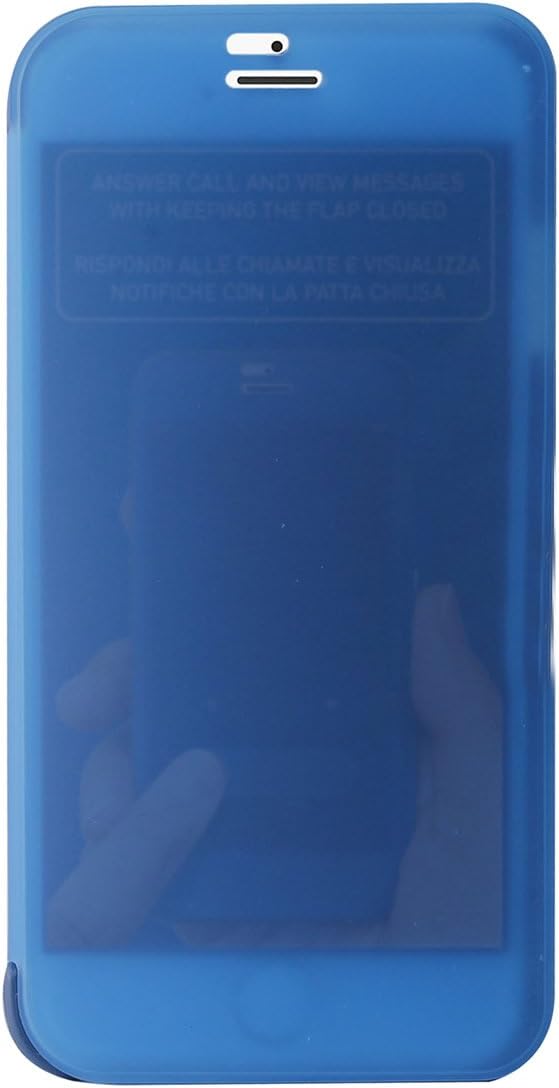
ຮູບພາບ: A close-up view of the transparent front flap of the Puro Sense Cover, with text visible through it stating "ANSWER CALL AND VIEW MESSAGES WITH KEEPING THE FLAP CLOSED".
ບໍາລຸງຮັກສາ
To ensure the longevity and appearance of your Puro Sense Cover, follow these simple maintenance guidelines:
- ທໍາຄວາມສະອາດ: ເຊັດກໍລະນີເປັນປົກກະຕິດ້ວຍຜ້າອ່ອນ, damp ຜ້າ. ສຳລັບຮອຍທີ່ຝັງແໜ້ນ, ສາມາດໃຊ້ນ້ຳສະບູອ່ອນໆໄດ້, ຕາມດ້ວຍການເຊັດດ້ວຍຜ້າສະອາດ, ເຊັດອອກດ້ວຍຜ້າເຊັດໂຕທີ່ສະອາດ.amp ຜ້າ.
- ຫຼີກເວັ້ນສານເຄມີທີ່ຮຸນແຮງ: Do not use abrasive cleaners, solvents, or strong chemicals, as these can damage the material and finish of the case.
- ການເກັບຮັກສາ: ເມື່ອບໍ່ໄດ້ໃຊ້, ໃຫ້ເກັບຮັກສາກໍລະນີດັ່ງກ່າວໄວ້ໃນບ່ອນທີ່ເຢັນ, ແຫ້ງແລ້ງຫ່າງຈາກແສງແດດໂດຍກົງ.
ການແກ້ໄຂບັນຫາ
Most issues with a phone case are minor. Here are some common concerns and solutions:
- ກໍລະນີບໍ່ພໍດີ:
- Ensure you have the correct model case for your iPhone 6/6S.
- Remove the phone and re-insert it, ensuring it snaps into place evenly on all sides.
- Screen Responsiveness Through Flap is Reduced:
- Clean the inside of the transparent flap and your iPhone screen to remove any dust or smudges that might interfere with touch sensitivity.
- Ensure your screen protector (if any) is properly installed and not interfering with touch.
ຂໍ້ມູນຈໍາເພາະ
| ຄຸນສົມບັດ | ລາຍລະອຽດ |
|---|---|
| ຍີ່ຫໍ້ | Puro |
| ໝາຍເລກຕົວແບບ | IIIPC647SENSESBLUE |
| ຮູບແບບໂທລະສັບທີ່ເຂົ້າກັນໄດ້ | iPhone 6/6S |
| ປັດໄຈແບບຟອມ | ກໍລະນີ |
| ສີ | ສີຟ້າ |
| ຂະໜາດສິນຄ້າ (L x W x H) | 5.5 x 2.75 x 0.25 ນິ້ວ |
| ນ້ໍາຫນັກລາຍການ | 0.96 ອອນ |
| ຜູ້ຜະລິດ | H.L. Dalis, Inc. |
| ວັນທີທໍາອິດທີ່ມີ | ວັນທີ 18 ກັນຍາ 2015 |
ການຮັບປະກັນແລະການສະຫນັບສະຫນູນ
For information regarding warranty coverage, please refer to the documentation provided at the time of purchase or contact the retailer. For product support, please reach out to the manufacturer, Puro, or your point of purchase.


