ແນະນຳ
This manual provides detailed instructions for the safe and efficient operation of your Telefunken RC1007BM Bluetooth Boombox. Please read this manual thoroughly before using the device and retain it for future reference.

ຮູບພາບ: ທາງຫນ້າ view of the Telefunken RC1007BM Bluetooth Boombox, showcasing its speakers, central control panel, and antenna.
ຄໍາແນະນໍາຄວາມປອດໄພ
- ຫ້າມບໍ່ໃຫ້ອຸປະກອນຖືກຝົນ ຫຼື ຄວາມຊຸ່ມຊື້ນ ເພື່ອປ້ອງກັນໄຟໄໝ້ ຫຼື ໄຟຟ້າຊອດ.
- ຫ້າມປິດຊ່ອງລະບາຍອາກາດໃດໆ. ຕິດຕັ້ງຕາມຄໍາແນະນໍາຂອງຜູ້ຜະລິດ.
- ຫ້າມຕິດຕັ້ງໃກ້ກັບແຫຼ່ງຄວາມຮ້ອນເຊັ່ນລັງສີ, ເຄື່ອງບັນທຶກຄວາມຮ້ອນ, ເຕົາຫຼືອຸປະກອນອື່ນໆ (ລວມທັງ. amplifiers) ທີ່ຜະລິດຄວາມຮ້ອນ.
- ປົກປ້ອງສາຍໄຟຈາກການຖືກສຽບ ຫຼື ສຽບ, ໂດຍສະເພາະຢູ່ປລັກສຽບ, ກ່ອງຮັບສະດວກ, ແລະຈຸດທີ່ພວກມັນອອກຈາກອຸປະກອນ.
- ໃຊ້ໄຟລ໌ແນບ/ອຸປະກອນເສີມທີ່ຜູ້ຜະລິດລະບຸໄວ້ເທົ່ານັ້ນ.
- ຖອດອຸປະກອນນີ້ອອກໃນລະຫວ່າງການມີພາຍຸຟ້າຜ່າ ຫຼືເມື່ອບໍ່ໄດ້ໃຊ້ເປັນເວລາດົນນານ.
- ອ້າງເຖິງການບໍລິການທັງtoົດໃຫ້ກັບພະນັກງານບໍລິການທີ່ມີຄຸນວຸດທິ. ຕ້ອງການການບໍລິການເມື່ອອຸປະກອນໄດ້ຮັບຄວາມເສຍຫາຍໃນທາງໃດທາງ ໜຶ່ງ.
ເນື້ອໃນຊຸດ
ກະລຸນາກວດເບິ່ງວ່າລາຍການທັງໝົດມີຢູ່:
- Telefunken RC1007BM Bluetooth Boombox
- Power Adapter
- ສາຍບ່າ
- ການຄວບຄຸມໄລຍະໄກ
- ຄູ່ມືຜູ້ໃຊ້ (ເອກະສານນີ້)
ສິນຄ້າເກີນview
ແຜງຄວບຄຸມດ້ານໜ້າ ແລະການເຊື່ອມຕໍ່
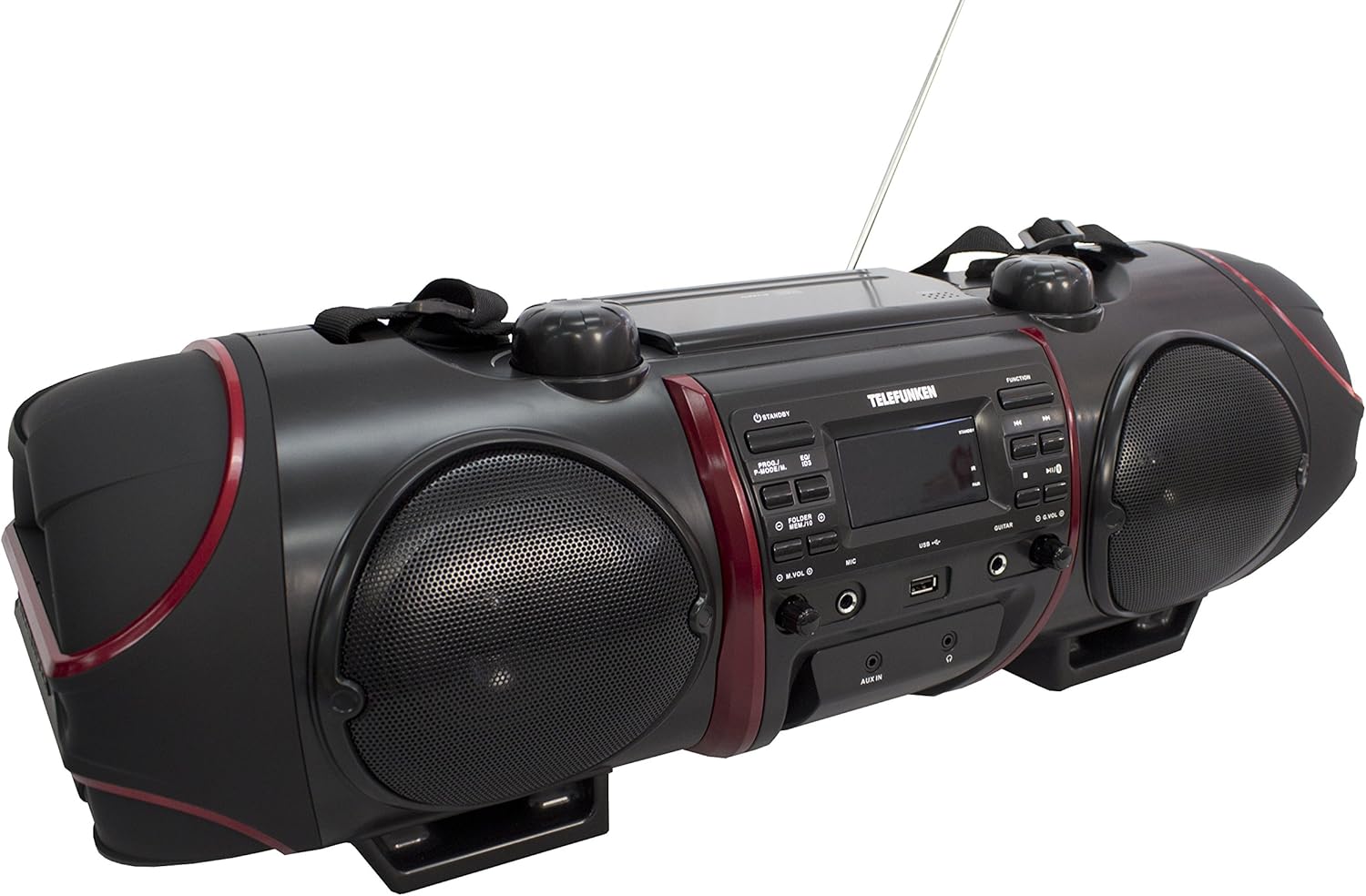
Image: Close-up of the central control panel, showing buttons, LCD display, USB port, and input jacks.
- ປຸ່ມສະແຕນບາຍ: ເປີດ ຫຼື ປິດເຄື່ອງ.
- PROG./P-MODE/M. Button: Program CD tracks, select playback mode, or store/recall radio presets.
- EQ/ID3 Button: Select equalizer presets or display ID3 tag information for MP3s.
- FOLDER/MENU/TS Button: Navigate folders on USB/CD or access menu options.
- M.VOL (Microphone Volume) Knob: ປັບປະລິມານການປ້ອນຂໍ້ມູນໄມໂຄຣໂຟນ.
- MIC (Microphone) Input: ຊ່ອງສຽບ 3.5 ມມ ສຳລັບເຊື່ອມຕໍ່ໄມໂຄຣໂຟນ.
- ພອດ USB: ສໍາລັບການເຊື່ອມຕໍ່ອຸປະກອນເກັບຮັກສາ USB.
- ການປ້ອນຂໍ້ມູນ GuITAR: 3.5mm jack for guitar connection.
- G.VOL (Guitar Volume) Knob: Adjusts guitar input volume.
- ປຸ່ມຟັງຊັນ: Selects input source (CD, FM, Bluetooth, AUX).
- ປຸ່ມ PLAY/PAUSE: ເລີ່ມຕົ້ນຫຼືຢຸດຊົ່ວຄາວການຫຼິ້ນ.
- ປຸ່ມຢຸດ: ຢຸດການຫຼິ້ນ.
- SKIP/TUNE Buttons (Previous/Next): Skips tracks or tunes radio frequencies.
- ປຸ່ມຄູ່: ເລີ່ມການຈັບຄູ່ Bluetooth.
- VOL (ປະລິມານ) Knob: ປັບລະດັບສຽງຕົ້ນສະບັບ.
- AUX ໃນ Jack: ສຽບ 3.5 ມມ ສຳລັບອຸປະກອນສຽງພາຍນອກ.
- ຊ່ອງສຽບຫູຟັງ: ຜົນຜະລິດ 3.5mm ສໍາລັບຫູຟັງ.
- ຈໍ LCD: ສະແດງສະຖານະປັດຈຸບັນ, ຂໍ້ມູນການຕິດຕາມ, ແລະ ຄວາມຖີ່ວິທະຍຸ.
Top Panel (CD Compartment)

ຮູບພາບ: ເທິງ view of the boombox, highlighting the CD compartment with 'PUSH TO OPEN' label.
The CD compartment is located on the top of the unit. Press the 'PUSH TO OPEN' area to open the lid and insert a CD.
Rear Panel (Power and Battery Compartment)

ຮູບພາບ: ດ້ານຫລັງ view of the boombox, displaying the AC power input and the battery compartment cover.
The AC power input and battery compartment are located on the rear of the unit. Ensure the correct power source is connected or batteries are inserted correctly.
ການຄວບຄຸມໄລຍະໄກ

Image: The remote control for the Telefunken RC1007BM, showing various function buttons.
The remote control provides convenient access to most functions of the boombox. Refer to the button labels on the remote for specific operations.
ຕັ້ງຄ່າ
ການເຊື່ອມຕໍ່ພະລັງງານ
- ໄຟຟ້າ AC: Connect the supplied power adapter to the AC input jack on the rear of the unit and then to a standard wall outlet.
- ພະລັງງານຫມໍ້ໄຟ: For portable use, open the battery compartment on the rear of the unit and insert the required batteries (not included), ensuring correct polarity.
ການປັບເສົາອາກາດ
Extend the telescopic antenna fully for optimal FM radio reception. Adjust its position for the best signal.
ແນບສາຍບ່າ
Attach the provided shoulder strap to the designated loops on the sides of the boombox for easy portability.
ຄໍາແນະນໍາການດໍາເນີນງານ
ເປີດ/ປິດ
ກົດ ມາດຕະຖານ ປຸ່ມເທິງແຜງດ້ານໜ້າ ຫຼືການຄວບຄຸມຣີໂໝດເພື່ອເປີດ ຫຼືປິດເຄື່ອງ.
ການຫຼິ້ນ CD/MP3-CD
- ກົດ ຟັງຊັນ ປຸ່ມເພື່ອເລືອກຮູບແບບຊີດີ.
- Open the CD compartment lid by pressing 'PUSH TO OPEN' on the top.
- Place a CD or MP3-CD with the label side facing up. Close the lid.
- ການຫຼິ້ນຈະເລີ່ມຕົ້ນໂດຍອັດຕະໂນມັດ. ຖ້າບໍ່, ໃຫ້ກົດປຸ່ມ ຫຼິ້ນ/ຢຸດຊົ່ວຄາວ ປຸ່ມ.
- ໃຊ້ SKIP/TUNE ປຸ່ມເພື່ອຂ້າມເພງ.
- ກົດ ຢຸດ ປຸ່ມເພື່ອຢຸດການຫລີ້ນການຫລີ້ນ.
- ການຫຼິ້ນໂຄງການ: While in stop mode, press PROG./P-MODE/M. to program tracks.
- ການຫຼິ້ນຊ້ຳ/ສຸ່ມ: ກົດ PROG./P-MODE/M. during playback to cycle through repeat modes (e.g., repeat one, repeat all) or random play.
ການດໍາເນີນງານວິທະຍຸ FM
- ກົດ ຟັງຊັນ ປຸ່ມເພື່ອເລືອກໂໝດວິທະຍຸ FM.
- Auto Scan and Store: ກົດຄ້າງໄວ້ PROG./P-MODE/M. ປຸ່ມເພື່ອສະແກນ ແລະເກັບຮັກສາສະຖານີ FM ທີ່ມີຢູ່ໂດຍອັດຕະໂນມັດ.
- ຄູ່ມືການປບັຄູ່ມື: ໃຊ້ SKIP/TUNE ເພື່ອປັບຄວາມຖີ່ທີ່ຕ້ອງການດ້ວຍຕົນເອງ.
- Recall presets: ກົດ PROG./P-MODE/M. repeatedly to cycle through stored preset stations.
ການຈັບຄູ່ Bluetooth
- ກົດ ຟັງຊັນ ເພື່ອເລືອກໂໝດ Bluetooth. ໜ້າຈໍຈະສະແດງ "BT" ແລະ ກະພິບ, ຊີ້ບອກວ່າມັນຢູ່ໃນໂໝດຈັບຄູ່.
- Activate Bluetooth on your smartphone or tablet and search for available devices.
- Select "RC1007BM" from the list of devices.
- Once paired, the display will stop flashing, and you can play music from your device.
- The effective transmission range is up to 10 meters.
ການປ້ອນຂໍ້ມູນ AUX
- ເຊື່ອມຕໍ່ອຸປະກອນສຽງພາຍນອກ (ເຊັ່ນ: ເຄື່ອງຫຼິ້ນ MP3) ກັບ AUX ໃນ ໂດຍໃຊ້ສາຍສຽງ 3.5 ມມ (ບໍ່ລວມ).
- ກົດ ຟັງຊັນ ປຸ່ມເພື່ອເລືອກໂໝດ AUX.
- ຫຼິ້ນສຽງຈາກອຸປະກອນທີ່ເຊື່ອມຕໍ່ຂອງທ່ານ.
ການປ້ອນຂໍ້ມູນໄມໂຄຣໂຟນ ແລະກີຕ້າ
- ເຊື່ອມຕໍ່ໄມໂຄຣໂຟນກັບ MIC input jack and/or a guitar to the ກີຕ້າ jack ປ້ອນຂໍ້ມູນ.
- ປັບລະດັບສຽງໄມໂຄຣໂຟນໂດຍໃຊ້ປຸ່ມ M.VOL knob and the guitar volume using the G.VOL ລູກບິດ.
ສຽງສະ ເໝີ ພາບ
ກົດ EQ/ID3 button repeatedly to cycle through the 6 preset equalizer levels: Flat, Classic, Pop, Jazz, Rock, and 3D. Select the one that best suits your audio preference.
ບໍາລຸງຮັກສາ
- ທໍາຄວາມສະອາດ: ໃຊ້ຜ້າປຽກແຫ້ງເພື່ອເຮັດຄວາມສະອາດດ້ານນອກຂອງເຄື່ອງ. ຢ່າໃຊ້ເຄື່ອງເຮັດຄວາມສະອາດຂັດຫຼືສານລະລາຍ.
- CD Care: ຈັດການແຜ່ນຊີດີໂດຍແຄມຂອງພວກມັນ. ເຮັດຄວາມສະອາດແຜ່ນຊີດີທີ່ເປື້ອນດ້ວຍຜ້າອ່ອນໆ, ບໍ່ມີເສັ້ນດ່າງ, ເຊັດຈາກກາງອອກໄປຂ້າງນອກ.
- ການດູແລຫມໍ້ໄຟ: If the unit will not be used for an extended period, remove the batteries to prevent leakage and damage.
ການແກ້ໄຂບັນຫາ
| ບັນຫາ | ສາເຫດທີ່ເປັນໄປໄດ້ | ການແກ້ໄຂ |
|---|---|---|
| ບໍ່ມີພະລັງງານ | ສາຍໄຟບໍ່ໄດ້ເຊື່ອມຕໍ່; ແບັດເຕີຣີໝົດ ຫຼືໃສ່ບໍ່ຖືກຕ້ອງ. | Ensure AC adapter is securely connected. Replace batteries or check polarity. |
| ບໍ່ມີສຽງ | ປະລິມານຕ່ໍາເກີນໄປ; ເລືອກແຫຼ່ງບໍ່ຖືກຕ້ອງ; ເຊື່ອມຕໍ່ຫູຟັງແລ້ວ. | Increase volume. Press FUNCTION to select correct source. Disconnect headphones. |
| CD ບໍ່ໄດ້ຫຼິ້ນ | CD inserted incorrectly; CD dirty or scratched; Disc format not supported. | Insert CD with label side up. Clean or replace CD. Ensure it's a CD-R/RW or MP3-CD. |
| Bluetooth ບໍ່ໄດ້ຈັບຄູ່ | Device too far; Bluetooth not enabled on external device; Unit not in pairing mode. | Move device closer. Enable Bluetooth on your device. Press FUNCTION to select BT mode and PAIR button. |
| ການຮັບວິທະຍຸທີ່ບໍ່ດີ | ແອນເຕນນາບໍ່ໄດ້ຍືດອອກ ຫຼື ບໍ່ໄດ້ວາງຕຳແໜ່ງຢ່າງຖືກຕ້ອງ; ສັນຍານອ່ອນ. | ຍືດ ແລະ ປັບເສົາອາກາດແບບຍືດໄດ້ໃຫ້ເຕັມທີ່. ລອງຍ້າຍເຄື່ອງໄປຕຳແໜ່ງອື່ນ. |
ຂໍ້ມູນຈໍາເພາະ
- ຕົວແບບ: RC1007BM
- ຍີ່ຫໍ້: TELEFUNKEN
- ແຫຼ່ງພະລັງງານ: AC 100-240V ~ 50/60Hz or Batteries (not included)
- ພະລັງງານຜົນຜະລິດທັງໝົດ (RMS): 52 W (2 x 8 W speakers, 2 x 18 W subwoofer)
- ລຸ້ນ Bluetooth: 3.0
- ລະດັບ Bluetooth: ເຖິງ 10 ແມັດ
- ຕົວຈູນເນີ: Digital PLL FM/FM-Stereo
- ການຕັ້ງຄ່າ FM: 30
- ການຫຼິ້ນ CD: CD, CD-R/-RW, MP3-CD
- ຮູບແບບສຽງທີ່ຮອງຮັບ: MP3, WMA, AAC, WAV
- ວັດສະດຸປ້ອນ: 3.5mm AUX-in, 3.5mm Microphone, 3.5mm Guitar, USB
- ຜົນໄດ້ຮັບ: ຫູຟັງຂະ ໜາດ 3.5 ມມ
- ປະເພດການສະແດງ: ຈໍ LCD
- ຄ່າລ່ວງໜ້າຂອງ Equalizer: 6 (Flat, Classic, Pop, Jazz, Rock, 3D)
- ຂະໜາດສິນຄ້າ (L x W x H): 68 x 23 x 22 cm
- ນ້ໍາຫນັກລາຍການ: 6 ກິໂລ
ການຮັບປະກັນແລະການສະຫນັບສະຫນູນ
For warranty information and technical support, please refer to the documentation provided at the time of purchase or contact your local Telefunken dealer or service center. Keep your proof of purchase for any warranty claims.