1. ບົດແນະນຳ
The Aduro Amplify LED Wireless Speaker, model BSP15, is a portable audio device designed for wireless music playback and hands-free calling. It features integrated LED lighting with multiple settings to enhance the audio experience. This manual provides instructions for the proper setup, operation, and maintenance of your speaker.
ມີຫຍັງຢູ່ໃນກ່ອງ:
- ອາດູໂຣ Amplify LED Wireless Speaker (BSP15)
- ສາຍສາກ
2. ຂໍ້ມູນຄວາມປອດໄພ
- Do not expose the speaker to water or moisture. This product is not water-resistant.
- Avoid extreme temperatures. Do not place near heat sources or in direct sunlight for extended periods.
- ຢ່າພະຍາຍາມຖອດປະກອບ ຫຼື ດັດແປງລຳໂພງ. ສິ່ງນີ້ອາດເຮັດໃຫ້ການຮັບປະກັນເປັນໂມຄະ ແລະ ເຮັດໃຫ້ເກີດຄວາມເສຍຫາຍ.
- ໃຊ້ພຽງແຕ່ສາຍສາກທີ່ສະໜອງໃຫ້ ຫຼືສາຍທຽບເທົ່າທີ່ໄດ້ຮັບການຮັບຮອງ.
- ຮັກສາໃຫ້ໄກຈາກເດັກນ້ອຍ.
3. ຄຸນລັກສະນະຂອງຜະລິດຕະພັນ
- ການເຊື່ອມຕໍ່ແບບໄຮ້ສາຍ: Connects to smartphones, tablets, and other Bluetooth-enabled devices.
- Easy-Touch Pairing: Simplifies the process of connecting to your device.
- ໄມໂຄຣໂຟນປະສົມປະສານ: Allows for hands-free phone calls.
- ຄຸນນະພາບສູງສຽງອອກ: Delivers clear and loud audio.
- Multiple LED Settings: Offers various light modes to complement your audio experience.
4. ຄວບຄຸມຫຼາຍກວ່າview
The Aduro Amplify speaker features intuitive controls located on the top panel for easy access to functions.
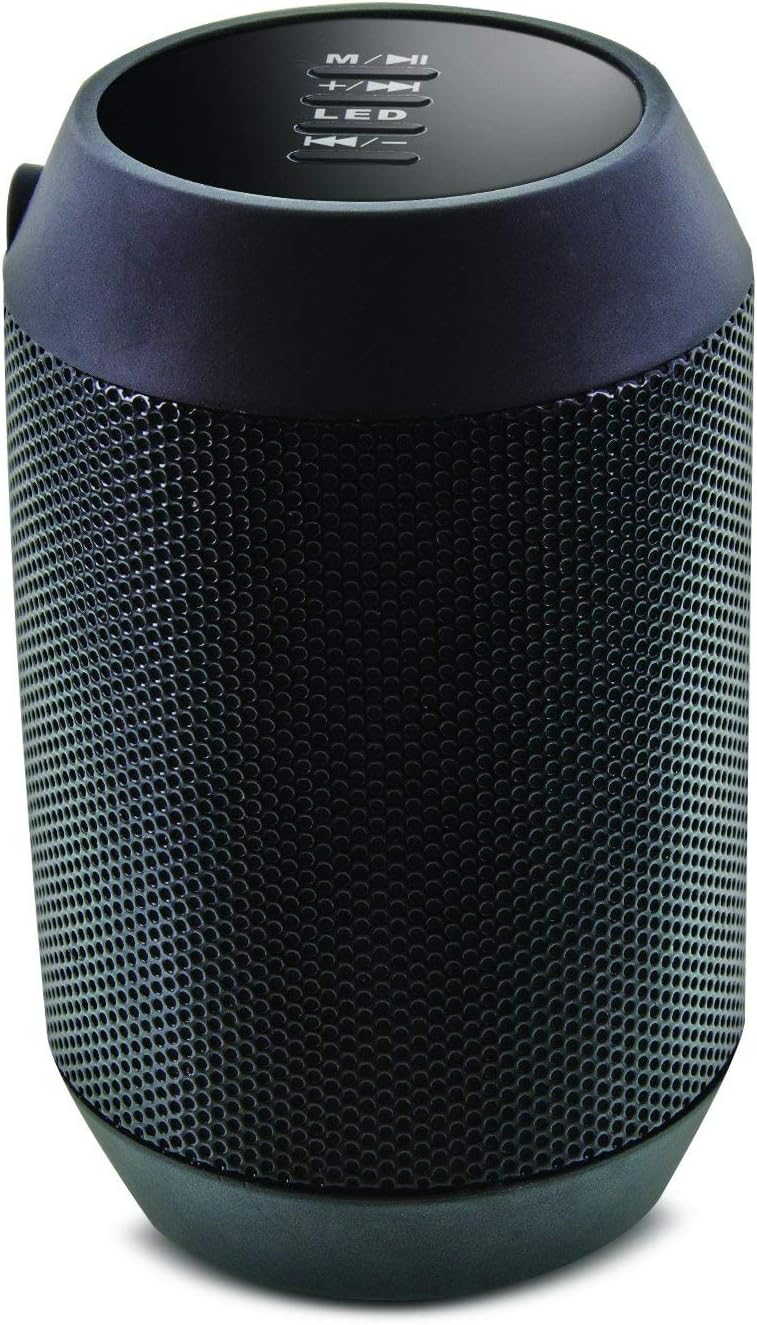
ຮູບພາບ: ເທິງ view of the Aduro Amplify speaker, highlighting the control panel. From top to bottom, buttons include: M/▶█ (Mode/Play/Pause), +/▶▶ (Volume Up/Next Track), LED (LED Mode Control), ◀◀/- (Volume Down/Previous Track).
- M/▶█ Button: Press to switch between modes (e.g., Bluetooth, AUX). Press and hold to power on/off. Short press to Play/Pause music.
- +/▶▶ Button: Short press to increase volume. Press and hold to skip to the next track.
- ປຸ່ມ LED: Press to cycle through different LED light modes.
- ◀◀/- Button: ກົດສັ້ນເພື່ອຫຼຸດລະດັບສຽງ. ກົດຄ້າງໄວ້ເພື່ອໄປທີ່ເພງກ່ອນໜ້າ.
5. ຄໍາແນະນໍາການຕິດຕັ້ງ
5.1 ກຳລັງສາກລຳໂພງ
Before first use, fully charge the speaker. Connect the provided charging cable to the speaker's charging port and the other end to a USB power source (e.g., computer USB port, USB wall adapter). The LED indicator will show charging status and turn off or change color when fully charged.
5.2 ການເປີດ/ປິດ
- ເພື່ອເປີດເຄື່ອງ: ກົດຄ້າງໄວ້ M/▶█ button for approximately 3 seconds until you hear an audible prompt or see the LED indicator light up.
- ປິດເຄື່ອງ: ກົດຄ້າງໄວ້ M/▶█ button for approximately 3 seconds until you hear an audible prompt or the LED indicator turns off.
5.3 ການຈັບຄູ່ Bluetooth
ເພື່ອເຊື່ອມຕໍ່ລຳໂພງຂອງທ່ານກັບອຸປະກອນທີ່ເປີດໃຊ້ Bluetooth:
- Ensure the speaker is powered on and in Bluetooth pairing mode. The LED indicator will typically flash rapidly, indicating it is ready to pair.
- On your smartphone, tablet, or other device, navigate to the Bluetooth settings.
- ເປີດໃຊ້ Bluetooth ແລະຊອກຫາອຸປະກອນທີ່ມີຢູ່.
- Select "Aduro BSP15" (or similar name) from the list of found devices.
- Once paired, the speaker will emit an audible confirmation, and the LED indicator will typically stop flashing and remain solid.
- ລຳໂພງຈະພະຍາຍາມເຊື່ອມຕໍ່ໃໝ່ກັບອຸປະກອນທີ່ຈັບຄູ່ສຸດທ້າຍໂດຍອັດຕະໂນມັດເມື່ອເປີດເຄື່ອງ.
5.4 ການເຊື່ອມຕໍ່ແບບມີສາຍ (AUX)
For devices without Bluetooth, you can use a 3.5mm audio cable (not included) to connect to the speaker's AUX input port. Once connected, the speaker should automatically switch to AUX mode. If not, press the M/▶█ button to cycle to AUX mode.
6. ຄໍາແນະນໍາການດໍາເນີນງານ
6.1 ການຫຼິ້ນສຽງ
- ຫຼິ້ນ/ຢຸດ: ກົດສັ້ນ M/▶█ ປຸ່ມ.
- ປະລິມານຂຶ້ນ: ກົດສັ້ນ +/▶▶ ປຸ່ມ.
- ປະລິມານລົງ: ກົດສັ້ນ ◀◀/- ປຸ່ມ.
- ເພງຕໍ່ໄປ: ກົດຄ້າງໄວ້ +/▶▶ ປຸ່ມ.
- ຕິດຕາມກ່ອນ ໜ້າ ນີ້: ກົດຄ້າງໄວ້ ◀◀/- ປຸ່ມ.
6.2 ການໂທແບບບໍ່ໃຊ້ມື
When connected via Bluetooth, the speaker's built-in microphone allows for hands-free calling.
- ຮັບສາຍ: ກົດສັ້ນ M/▶█ button when an incoming call rings.
- ສິ້ນສຸດການໂທ: ກົດສັ້ນ M/▶█ ປຸ່ມລະຫວ່າງການໂທ.
- ປະຕິເສດການໂທ: ກົດຄ້າງໄວ້ M/▶█ button when an incoming call rings.
6.3 LED Light Settings
ກົດ LED button to cycle through the available light modes. The speaker offers various visual effects, including pulsating lights that react to music.
7. ບໍາລຸງຮັກສາ
7.1 ການທໍາຄວາມສະອາດ
ເຊັດລຳໂພງດ້ວຍຜ້າອ່ອນໆແລະແຫ້ງ. ຢ່າໃຊ້ນໍ້າຢາເຮັດຄວາມສະອາດທີ່ມີສີຂັດ, ເຫຼົ້າ ຫຼື ຕົວລະລາຍສານເຄມີອື່ນໆ, ເພາະວ່າສິ່ງເຫຼົ່ານີ້ອາດຈະທໍາລາຍພື້ນຜິວໄດ້.
7.2 ການເກັບຮັກສາ
ເມື່ອບໍ່ໄດ້ໃຊ້ງານເປັນເວລາດົນ, ໃຫ້ເກັບຮັກສາລຳໂພງໄວ້ໃນບ່ອນທີ່ເຢັນ, ແຫ້ງ, ຫ່າງຈາກແສງແດດໂດຍກົງ ແລະ ອຸນຫະພູມທີ່ຮຸນແຮງ. ແນະນຳໃຫ້ສາກແບັດເຕີຣີເປັນໄລຍະເພື່ອຮັກສາອາຍຸການໃຊ້ງານຂອງມັນ.
8. ການແກ້ໄຂບັນຫາ
- ລຳໂພງຈະບໍ່ເປີດ:
Ensure the battery is charged. Connect the charging cable and try again after a few minutes. - ບໍ່ສາມາດຈັບຄູ່ກັບອຸປະກອນ Bluetooth:
Ensure the speaker is in pairing mode (LED flashing). Make sure Bluetooth is enabled on your device and it is within range (typically 10 meters/30 feet). Turn both devices off and on again, then try pairing. Ensure no other devices are currently connected to the speaker. - ບໍ່ມີສຽງ ຫຼືສຽງຕໍ່າ:
Check the volume levels on both the speaker and your connected device. Ensure the speaker is correctly paired or the AUX cable is fully inserted. If using AUX, ensure the correct mode is selected. - ໄຟ LED ບໍ່ເຮັດວຽກ:
Press the LED button to cycle through modes. If still unresponsive, power cycle the speaker.
9. ຂໍ້ມູນຈໍາເພາະ

ຮູບພາບ: ຂ້າງ view of the Aduro Amplify LED Wireless Speaker, showing its cylindrical design and speaker grille.
| ຊື່ຕົວແບບ | BSP15 |
| ໝາຍເລກຕົວແບບ | LU4-01-BSP15 |
| ຍີ່ຫໍ້ | ອາດູໂຣ |
| ວັດສະດຸ | ພາດສະຕິກ |
| ປະເພດລຳໂພງ | Subwoofer |
| ຄຸນນະສົມບັດພິເສດ | Built-in Microphone, Portable |
| ເຕັກໂນໂລຊີການເຊື່ອມຕໍ່ | ໄຮ້ສາຍ (Bluetooth) |
| ການສື່ສານໄຮ້ສາຍ | Bluetooth |
| ຮູບແບບການອອກສຽງ | ສະເຕຣິໂອ |
| ລຳໂພງກຳລັງຜົນຜະລິດສູງສຸດ | 5 ວັດ |
| ວິທີການຄວບຄຸມ | ແຕະ |
| ຂະໜາດສິນຄ້າ | 6"D x 3.8"W x 3.5"H |
| ນ້ໍາຫນັກລາຍການ | 6.7 ອອນ |
| ລະດັບຄວາມຕ້ານທານນ້ໍາ | ບໍ່ທົນທານຕໍ່ນ້ໍາ |
| ແຫຼ່ງພະລັງງານ | ໄຟຟ້າມີສາຍ (ເພື່ອສາກໄຟ) |
10. ການຮັບປະກັນແລະການສະຫນັບສະຫນູນ
10.1 ການຮັບປະກັນຈໍາກັດ
This Aduro product is covered by a limited warranty against defects in materials and workmanship under normal use. The duration and terms of the warranty may vary. Please refer to the warranty card included with your purchase or contact Aduro customer support for specific details.
10.2 ສະຫນັບສະຫນູນລູກຄ້າ
For technical assistance, warranty claims, or product inquiries, please contact Aduro customer support. Contact information can typically be found on the manufacturer's official webສະຖານທີ່ຫຼືຢູ່ໃນການຫຸ້ມຫໍ່ຜະລິດຕະພັນ.
Manufacturer: Aduro