1. ບົດແນະນຳ
This manual provides detailed instructions for the safe and efficient operation of your UNIC UC50 Mini Projector. Please read this manual thoroughly before using the device and retain it for future reference.
The UNIC UC50 is a compact DLP projector designed for various multimedia applications, offering portability and ease of use.
2. ເນື້ອໃນຊຸດ
ກວດສອບວ່າລາຍການທັງຫມົດທີ່ລະບຸໄວ້ຂ້າງລຸ່ມນີ້ແມ່ນລວມຢູ່ໃນຊຸດຂອງທ່ານ. ຖ້າລາຍການໃດຂາດຫາຍໄປຫຼືເສຍຫາຍ, ກະລຸນາຕິດຕໍ່ຮ້ານຂາຍຍ່ອຍຂອງທ່ານ.
- 1x UNIC UC50 Projector
- 1x ຄູ່ມືຜູ້ໃຊ້ (ເອກະສານນີ້)
- ຜູ້ດັດແປງພະລັງງານ 1 ເທົ່າ
- 1x Cable
- 1x ການຄວບຄຸມໄລຍະໄກ

ຮູບທີ 2.1: UNIC UC50 Mini Projector and included accessories. The image displays the compact projector unit along with its power adapter, remote control, and connecting cables, all neatly arranged.
3. ຜະລິດຕະພັນເກີນview
Familiarize yourself with the various components and ports of your UNIC UC50 Mini Projector.
3.1 ແນວ ໜ້າ View

ຮູບທີ 3.1.1: ດ້ານໜ້າ view of the UNIC UC50 Mini Projector with the lens cover open. This view highlights the projection lens and the sliding lens cover mechanism.

ຮູບທີ 3.1.2: ດ້ານໜ້າ view of the UNIC UC50 Mini Projector with the lens cover closed. The sliding cover protects the lens when the projector is not in use.
3.2 ຂ້າງ Views (Input/Output Ports)

ຮູບທີ 3.2.1: ຂ້າງ view of the UNIC UC50 Mini Projector, displaying the USB port and SD card slot for media input.

ຮູບທີ 3.2.2: ກົງກັນຂ້າມ view of the UNIC UC50 Mini Projector, featuring the HDMI input, AV input, and 3.5mm earphone output jack.
3.3 ດ້ານຫຼັງ View

ຮູບທີ 3.3.1: ຫລັງ view of the UNIC UC50 Mini Projector. This side includes the focus adjustment wheel and the DC 5V 2A power input port.
3.4 ເທິງ View
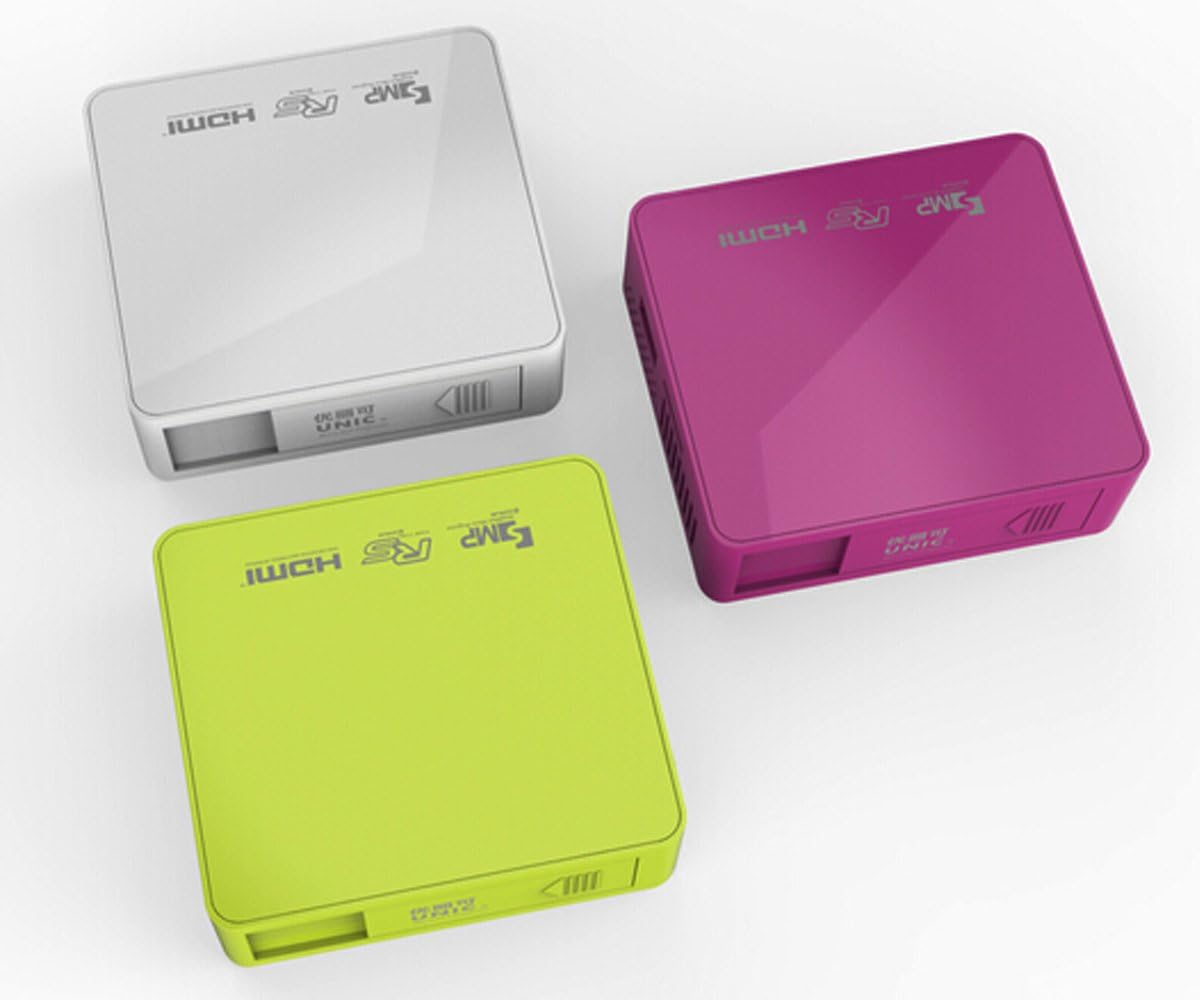
ຮູບທີ 3.4.1: ເທິງ view of the UNIC UC50 Mini Projector, showing the minimalist design and branding.
4. ຕັ້ງຄ່າ
4.1 ການເຊື່ອມຕໍ່ພະລັງງານ
- Connect the provided power adaptor to the DC 5V 2A input port on the rear of the projector.
- Plug the power adaptor into a standard electrical outlet (AC 100-240V, 50/60Hz).
- The projector will power on automatically or can be turned on using the remote control.
4.2 ການວາງຕຳແໜ່ງ ແລະ ການສາຍພາບ
- ວາງໂປເຈັກເຕີຢູ່ເທິງພື້ນທີ່ຮາບພຽງທີ່ຫມັ້ນຄົງ.
- Ensure the projection surface (screen or wall) is clean and smooth.
- Adjust the projection distance between 35.5 cm and 430 cm to achieve the desired image size (14-150 inches).
- ສໍາລັບທີ່ດີທີ່ສຸດ viewing, operate the projector in a dimly lit room.
5. ຄໍາແນະນໍາການດໍາເນີນງານ
5.1 ການປັບຈຸດສຸມ
Rotate the focus adjustment wheel located on the rear of the projector until the projected image appears clear and sharp.
5.2 ການເລືອກແຫຼ່ງປ້ອນຂໍ້ມູນ
The UNIC UC50 supports multiple input sources:
- USB: ໃສ່ USB flash drive ເຂົ້າໄປໃນພອດ USB.
- SD: Insert an SD card into the SD card slot.
- ຂອງ: Connect an AV cable to the AV input port.
- HDMI: Connect an HDMI cable to the HDMI input port.
Use the remote control to navigate the on-screen menu and select the desired input source.
5.3 ການຫຼິ້ນມັນຕິມີເດຍ
When a USB drive or SD card is inserted, the projector's UNIC Multimedia OS will allow you to browse and play supported file ຮູບແບບ:
- ຮູບແບບວິດີໂອ: MP4, AVI, MOV, VOB, DAT, MPEG, MPG, RM, RMVB (Video encoding: MPEG1/MPEG2/MPEG4/DivX/Xvid)
- ຮູບແບບສຽງ: MP3, WMA, WAV, AAC, OGG, ASF
- ຮູບແບບຮູບພາບ: JPG, BMP, PNG
- Document Format: TXT
ທ່ອງໄປຫາໂດຍຜ່ານ files using the remote control and select the desired content for playback.
5.4 ສຽງອອກ
The projector has built-in speakers (1.0W *2). For private listening or connecting external audio systems, use the 3.5mm earphone output jack.
6. ບໍາລຸງຮັກສາ
6.1 ການເຮັດຄວາມສະອາດເລນ
ໃຊ້ຜ້າອ່ອນໆທີ່ບໍ່ມີຂົນທີ່ອອກແບບມາສະເພາະສຳລັບເລນ optical ເພື່ອເຊັດເລນໂປເຈັກເຕີຢ່າງອ່ອນໂຍນ. ຫຼີກລ່ຽງການໃຊ້ນໍ້າຢາເຮັດຄວາມສະອາດທີ່ມີສີຂັດ ຫຼື ໃຊ້ແຮງເກີນໄປ ເພາະສິ່ງນີ້ສາມາດເຮັດໃຫ້ເລນຂູດໄດ້.
6.2 ການທໍາຄວາມສະອາດຕົວເຄື່ອງ Projector
ເຊັດດ້ານນອກຂອງໂປເຈັກເຕີດ້ວຍຜ້າອ່ອນ, ແຫ້ງ. ຢ່າໃຊ້ນໍ້າສະອາດ ຫຼືສານລະລາຍ.
6.3 ການເກັບຮັກສາ
When not in use, store the projector in a cool, dry place, away from direct sunlight and extreme temperatures. Ensure the lens cover is closed to protect the lens from dust.
7. ການແກ້ໄຂບັນຫາ
| ບັນຫາ | ສາເຫດທີ່ເປັນໄປໄດ້ | ການແກ້ໄຂ |
|---|---|---|
| ບໍ່ມີຮູບທີ່ຄາດໄວ້ |
|
|
| ຮູບພາບມົວ |
|
|
| ບໍ່ມີສຽງ |
|
|
| ການຄວບຄຸມໄລຍະໄກບໍ່ເຮັດວຽກ |
|
|
8. ຂໍ້ມູນຈໍາເພາະ
| ຄຸນສົມບັດ | ລາຍລະອຽດ |
|---|---|
| ລະບົບຮູບພາບ | DLP |
| Lamp ປະເພດ | LED |
| ຄວາມລະອຽດເດີມ | 854 x 480 ພິກເຊລ |
| ຄວາມລະອຽດທີ່ຮອງຮັບ | ສູງສຸດ 1920 x 1080 ພິກເຊວ (1080P) |
| ອັດຕາສ່ວນ | 4:3 / 16:9 |
| ລະບົບປະຕິບັດການ | UNIC Multimedia OS |
| ຄວາມສະຫວ່າງ | 800 Lumens |
| ອັດຕາສ່ວນກົງກັນຂ້າມ | 800:1 |
| ເລນ | F=125 |
| ສຸມໃສ່ | ຄູ່ມື |
| Lamp ຊົ່ວໂມງເຮັດວຽກ | 20,000 ຊົ່ວໂມງ |
| ຂະຫນາດຮູບພາບ | 14-150 ນິ້ວ |
| ໄລຍະການຄາດຄະເນ | 35.5ຊມ-430ຊມ |
| ໂໝດການສາຍ | ການຄາດຄະເນດ້ານຫນ້າ |
| ຮູບແບບການເຮັດວຽກ | ຄູ່ມື / ການຄວບຄຸມໄລຍະໄກ |
| ພອດຂາອອກ | ຫູຟັງ 3.5 ມມ |
| ຜອດປ້ອນຂໍ້ມູນ | USB, SD, AV, HDMI, IR |
| ການປ້ອນຂໍ້ມູນພະລັງງານ | AC 100-240V, 50/60Hz |
| ຜົນຜະລິດພະລັງງານ | DC 5V 2A |
| ການບໍລິໂພກພະລັງງານ | 10W |
| ລໍາໂພງ | ຂະ ໜາດ 1.0W x 2 |
| ນ້ຳໜັກ | 130g |
| ຂະໜາດ (L x W x H) | 78 x 71 x 24.5 ມມ |
| OS Language | English, Polski, Russian, Deutsch, Spanish, Czech, etc. (23 Languages) |
| ຄຸນນະສົມບັດພິເສດ | 3D-ພ້ອມ |
9. ການຮັບປະກັນແລະການສະຫນັບສະຫນູນ
The UNIC UC50 Mini Projector comes with a standard manufacturer's warranty. Please refer to the warranty card included in your package for specific terms and conditions, including warranty period and coverage details.
For technical support, troubleshooting assistance beyond this manual, or warranty claims, please contact your original point of purchase or visit the official UNIC support website (ຖ້າມີ).
Note: Specific warranty details and support contact information may vary by region and retailer.


