1. ຂໍ້ມູນຄວາມປອດໄພທີ່ສໍາຄັນ
- ການລະບາຍອາກາດ: Ensure adequate ventilation around the projector. Do not block ventilation openings. Overheating can cause damage.
- ການສະຫນອງພະລັງງານ: Use only the specified power adapter. Disconnect power during thunderstorms or when unused for long periods.
- ຄວາມຊຸ່ມ: Do not expose the projector to rain, moisture, or liquids.
- ທໍາຄວາມສະອາດ: Clean the projector with a soft, dry cloth. Avoid abrasive cleaners.
- ການດູແລເລນ: Handle the lens with care. Clean gently with a lens cleaning cloth.
- ການຈັດວາງ: Place the projector on a stable, level surface. Avoid direct sunlight or heat sources.
- ການປົກປ້ອງຕາ: ຢ່າເບິ່ງໂດຍກົງໃນເລນໂປເຈັກເຕີເມື່ອ lamp ແມ່ນຢູ່.
2. ຜະລິດຕະພັນເກີນview
2.1. Projector Dimensions
The Excelvan EHD02 projector has compact dimensions, making it portable. The approximate dimensions are 152mm (width) x 220mm (depth) x 76mm (height).
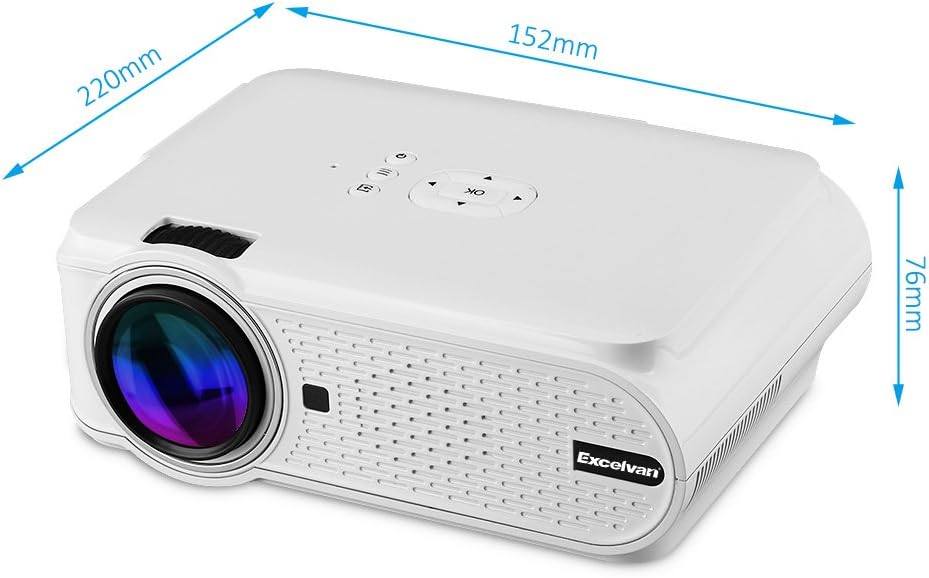
Figure 1: Excelvan EHD02 Mini Projector with labeled dimensions.
2.2. Projector Components and Interfaces
Familiarize yourself with the various ports and controls on your projector for proper setup and operation.

Figure 2: Top controls and rear panel interfaces of the Excelvan EHD02 Projector.
- ການຄວບຄຸມດ້ານເທິງ: OK button, Up/Down/Left/Right navigation, Back, Menu, Power.
- ອິນເຕີເຟດດ້ານຫຼັງ: VGA port, USB port, Power plug, AV input, 3.5mm Audio port, IR receiver, HDMI port, Keystone adjustment, SD Card slot, TV antenna input.
3. ຕັ້ງຄ່າ
3.1. ບັນຈຸເຂົ້າຮຽນ
Position the projector on a flat, stable surface. The projection distance determines the image size. For optimal viewing, ensure the projector is centered with the screen or projection surface.
- ໄລຍະການຄາດຄະເນ: 1.2 to 3.8 meters (approximately 3.9 to 12.5 feet).
- ຂະໜາດຮູບ: 37 to 130 inches (diagonal).
- ວິທີການຄາດຄະເນ: ຮອງຮັບການຄາດຄະເນດ້ານຫນ້າ, ຫລັງ, ແລະເພດານ.
3.2. ການເຊື່ອມຕໍ່ພະລັງງານ
- ເຊື່ອມຕໍ່ສາຍໄຟກັບອິນພຸດໄຟຂອງໂປເຈັກເຕີ.
- ສຽບປາຍສາຍໄຟອີກດ້ານໜຶ່ງໃສ່ບ່ອນສຽບໄຟຟ້າທີ່ເໝາະສົມ.
- ໄຟຕົວຊີ້ວັດພະລັງງານຈະສະຫວ່າງ.

Figure 3: Power cord and remote control for the projector.
3.3. ການເຊື່ອມຕໍ່ແຫຼ່ງທີ່ມາຂອງອິນພຸດ
ໂປເຈັກເຕີຮອງຮັບແຫຼ່ງປ້ອນຂໍ້ມູນຫຼາຍອັນ:
- HDMI: Connect to devices like laptops, Blu-ray players, or gaming consoles using an HDMI cable.
- USB: ໃສ່ແຟລດໄດຣຟ໌ USB ເພື່ອຫຼິ້ນສື່ files ໂດຍກົງ.
- SD ກາດ: Insert an SD card to play media files.
- ຂອງ: Use the provided AV cable to connect to older devices with composite video output.
- VGA: Connect to computers using a VGA cable.
- ໂທລະພາບ: Connect a TV antenna for analog TV reception.
- ສຽງ 3.5 ມມ: ເຊື່ອມຕໍ່ລຳໂພງ ຫຼືຫູຟັງພາຍນອກ.
3.4. ຈຸດສຸມແລະການແກ້ໄຂ Keystone
- ການປັບຈຸດສຸມ: ໝຸນວົງການໂຟກັສໃສ່ເລນໂປເຈັກເຕີ ຈົນກວ່າພາບຈະປາກົດຄົມຊັດ ແລະຊັດເຈນ.
- ການແກ້ໄຂ Keystone: If the projected image appears trapezoidal (wider at the top or bottom), use the keystone adjustment dial (typically on the side or rear) to correct the image shape. The projector supports ±12° vertical manual keystone correction.
4. ຄໍາແນະນໍາການດໍາເນີນງານ
4.1. ເປີດ / ປິດພະລັງງານ
- ເປີດ: Press the Power button on the projector or the remote control.
- ປິດພະລັງງານ: Press the Power button again. The projector will go into standby mode.
4.2. Menu Navigation and Input Selection
- Use the navigation buttons (Up, Down, Left, Right) and the OK button on the projector or remote to navigate through the on-screen menu.
- Press the "Input" or "Source" button (if available on remote, or navigate through menu) to select your desired input source (HDMI, USB, SD, AV, VGA, TV).
4.3. ການເຊື່ອມຕໍ່ໂທລະສັບສະຫຼາດ
Connecting smartphones requires specific cables:
- iPhone/iPad: Requires an original Apple composite AV cable.
- ໂທລະສັບ Android: Requires an MHL cable, and the phone must support MHL (Mobile High-Definition Link).
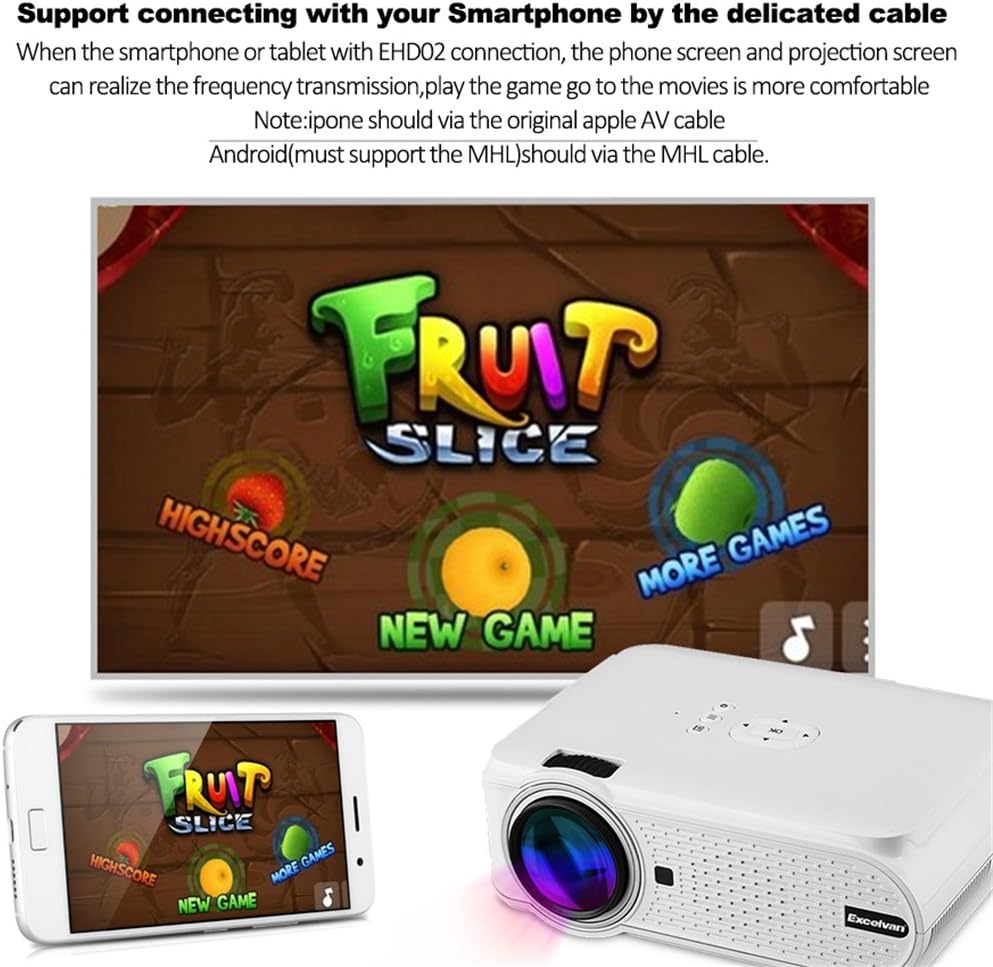
ຮູບທີ 4: ຕົວຢ່າງample of smartphone connection for content projection.
4.4. ການຫຼິ້ນແບບ 3D
The Excelvan EHD02 projector supports red-blue 3D content only. To view ເນື້ອໃນ 3D:
- Obtain red-blue 3D source content.
- Use red-blue 3D glasses for viewing.
5. ບໍາລຸງຮັກສາ
- ການອະນາໄມເລນ: Use a soft, lint-free cloth specifically designed for optical lenses to gently wipe the projector lens. Avoid touching the lens with bare hands.
- ການກຳຈັດຂີ້ຝຸ່ນ: Periodically clean the projector's exterior with a soft, dry cloth. Ensure ventilation openings are free from dust and obstructions to prevent overheating.
- ການເກັບຮັກສາ: ເມື່ອບໍ່ໄດ້ໃຊ້ເປັນເວລາດົນ, ໃຫ້ເກັບຮັກສາໂປເຈັກເຕີໄວ້ໃນບ່ອນທີ່ເຢັນ, ແຫ້ງ, ປ້ອງກັນຈາກຝຸ່ນ.
6. ການແກ້ໄຂບັນຫາ
| ບັນຫາ | ສາເຫດທີ່ເປັນໄປໄດ້ | ການແກ້ໄຂ |
|---|---|---|
| ບໍ່ມີຮູບທີ່ຄາດໄວ້ |
|
|
| ຮູບພາບມົວ |
|
|
| ຮູບພາບແມ່ນ trapezoidal |
|
|
| ບໍ່ມີສຽງ |
|
|
| ການຄວບຄຸມໄລຍະໄກບໍ່ເຮັດວຽກ |
|
|
| Projector is noisy or hot |
|
|
7. ຂໍ້ມູນຈໍາເພາະ
| ຄຸນສົມບັດ | ລາຍລະອຽດ |
|---|---|
| ຕົວແບບ | Excelvan EHD02 |
| ປະເພດການສະແດງ | TFT- Single LCD Panel + LED Technology |
| ຄວາມລະອຽດເດີມ | 800 x 480 ພິກເຊລ |
| ຄວາມລະອຽດທີ່ຮອງຮັບ | Up to 1080p (1920 x 1080) |
| ຄວາມສະຫວ່າງ | 1000 Lumens |
| ເລນສາຍແສງ | F=126mm, Manual Focus |
| ອັດຕາສ່ວນກົງກັນຂ້າມ | 1000:1 |
| ອັດຕາສ່ວນ | 4:3 / 16:9 |
| ລຳໂພງໃນຕົວ | 4Ω2W |
| ໄຟ LED Lamp ຊີວິດ | 20,000 ຊົ່ວໂມງ |
| ສີທີ່ສະແດງໄດ້ | 1.67 Million Colors (Full Color) |
| ພາສາເມນູ | English, Spanish, French, German, Portuguese, Italian, Chinese, etc. |
| ວິທີການຄາດຄະເນ | ດ້ານຫນ້າ, ຫລັງ, ເພດານ |
| ການໂຕ້ຕອບ | 1x VGA, 1x USB, 1x SD, 1x HDMI, 1x 3.5mm Audio, 1x AV, 1x TV |
| ຂະໜາດຮູບ (ເສັ້ນຂວາງ) | 37 - 130 ນິ້ວ |
| ໄລຍະການຄາດຄະເນ | 1.2 - 3.8 ແມັດ |
| ການປັບໜ້າຈໍ | Horizontal and Vertical Flip; Image Zoom |
| ການແກ້ໄຂ Keystone | ±12° Vertical (Manual) |
| ຂະໜາດ (L x W x H) | 220mm x 152mm x 76mm |
| ນ້ຳໜັກ | 1.44 ກິໂລ |
8. ການຮັບປະກັນແລະການສະຫນັບສະຫນູນ
The Excelvan EHD02 Mini Portable LED Projector comes with a ຮັບປະກັນ 2 ປີ ຈາກວັນທີ່ຊື້.
For technical support, warranty claims, or further assistance, please contact your retailer or the Excelvan customer service department. Please have your model number (EHD02) and purchase information ready when contacting support.


