ແນະນຳ
Thank you for choosing the Berdsen BR-68W Mini Dehumidifier. This manual provides essential information for the safe and efficient operation, maintenance, and troubleshooting of your new appliance. Please read this manual thoroughly before use and keep it for future reference.
The Berdsen BR-68W Mini Dehumidifier is designed to maintain optimal humidity levels in your home, ensuring healthy and clean indoor air. It effectively addresses humidity problems and reduces the risk of mold, bacteria, and dust mite growth. Featuring efficient Peltier technology, it operates quietly and includes an intelligent automatic circuit to prevent water tank overflow, ensuring safe and hassle-free use.
ຄໍາແນະນໍາຄວາມປອດໄພ
ເພື່ອຫຼຸດຜ່ອນຄວາມສ່ຽງທີ່ຈະເກີດໄຟຟ້າ, ຊ໊ອກໄຟຟ້າ, ຫຼືການບາດເຈັບ, ກະລຸນາສັງເກດການລະມັດລະວັງດ້ານຄວາມປອດໄພດັ່ງຕໍ່ໄປນີ້:
- Always use the dehumidifier on a stable, level surface.
- ຢ່າເອົາຫົວຫນ່ວຍ, ສາຍໄຟ, ຫຼືສຽບໃສ່ນ້ໍາຫຼືຂອງແຫຼວອື່ນໆ.
- ໃຫ້ແນ່ໃຈວ່າການສະຫນອງພະລັງງານກົງກັບ voltage ລະບຸໄວ້ໃນປ້າຍການຈັດອັນດັບ.
- ເກັບຮັກສາອຸປະກອນໃຫ້ຫ່າງຈາກແຫຼ່ງຄວາມຮ້ອນ, ແສງແດດໂດຍກົງ ແລະ ວັດສະດຸໄວໄຟ.
- ຫ້າມປິດຊ່ອງສຽບອາກາດ ຫຼືທາງອອກ. ຮັກສາຊ່ອງຫວ່າງຢ່າງຫນ້ອຍ 10 ຊຕມຮອບຫນ່ວຍ.
- Unplug the dehumidifier before cleaning, maintenance, or when not in use.
- Do not operate the unit with a damaged cord or plug. Contact qualified service personnel for repair.
- ເຄື່ອງໃຊ້ນີ້ແມ່ນໃຊ້ໃນຄົວເຮືອນເທົ່ານັ້ນ.
- ຮັກສາໃຫ້ໄກຈາກເດັກນ້ອຍ ແລະສັດລ້ຽງ.
- ຢ່າພະຍາຍາມສ້ອມແປງຫຼືຖອດອຸປະກອນດ້ວຍຕົນເອງ.
ເນື້ອໃນຊຸດ
ກະລຸນາກວດສອບເນື້ອໃນຂອງຊຸດຫຼັງຈາກແກະກ່ອງ. ຖ້າມີສິນຄ້າໃດຂາດຫາຍໄປ ຫຼື ເສຍຫາຍ, ໃຫ້ຕິດຕໍ່ຮ້ານຄ້າປີກຂອງທ່ານ.
- Berdsen BR-68W Mini Dehumidifier Unit
- Power Adapter
- ຄູ່ມືແນະ ນຳ (ເອກະສານນີ້)
ສິນຄ້າເກີນview
Familiarize yourself with the components of your Berdsen BR-68W Mini Dehumidifier.

ຮູບ 1: ດ້ານຫນ້າ view of the Berdsen BR-68W Mini Dehumidifier. The control panel is visible at the top, featuring an ON/OFF switch and indicator lights for power and full water tank. The transparent water tank is located at the bottom.
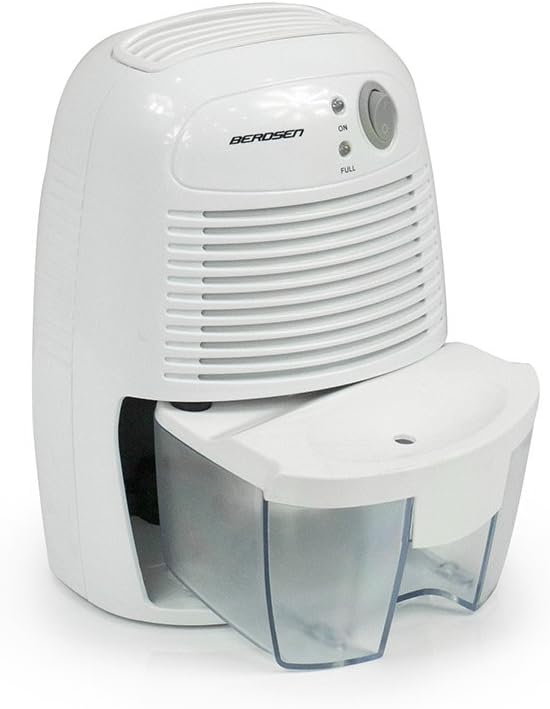
ຮູບ 2: ຂ້າງ view of the dehumidifier, illustrating the water tank partially slid out from its housing for removal or emptying.

Figure 3: The power adapter, which connects the dehumidifier to an electrical outlet.

Figure 4: A diagram explaining Peltier technology. Moist air passes over a cold surface (KALT), causing water to condense into the water tank (WASSERTANK). The now dry air (TROCKENE LUFT) is then expelled. The Peltier module has a warm (WARM) and cold side.
ຕັ້ງຄ່າ
- Unpack the Dehumidifier: Carefully remove the dehumidifier and all accessories from the packaging. Retain the packaging for future storage or transport.
- ເລືອກສະຖານທີ່: Place the dehumidifier on a firm, level surface in the desired room. Ensure there is at least 10 cm (4 inches) of clear space around the air inlet and outlet to allow for proper airflow. Avoid placing it near heat sources or in direct sunlight.
- ເຊື່ອມຕໍ່ພະລັງງານ: Insert the small end of the power adapter into the DC input port on the back of the dehumidifier. Plug the other end of the power adapter into a suitable electrical outlet.
- ກວດສອບເບື້ອງຕົ້ນ: Ensure the water tank is correctly seated in the unit.
ຄໍາແນະນໍາການດໍາເນີນງານ
- ເປີດ: Press the ON/OFF switch located on the control panel. The "ON" indicator light will illuminate, indicating the dehumidifier is operating.
- Dehumidification Process: The unit will begin to draw in moist air, condense the water vapor using Peltier technology, and collect the water in the transparent tank. Dry air will be expelled from the top vent.
- ຖັງນໍ້າເຕັມ: When the water tank is full, the "FULL" indicator light will illuminate, and the dehumidifier will automatically shut off to prevent overflow.
- ລ້າງຖັງນໍ້າ:
- Turn off the dehumidifier by pressing the ON/OFF switch and unplug it from the power outlet.
- Carefully slide out the water tank from the front of the unit.
- ເອົານ້ໍາທີ່ເກັບໄດ້ເຂົ້າໄປໃນບ່ອນຫລົ້ມຈົມຫຼືທໍ່ລະບາຍນ້ໍາ.
- Rinse the water tank with clean water if necessary. Do not use harsh detergents.
- Slide the empty water tank back into the dehumidifier until it clicks securely into place.
- ສືບຕໍ່ການດໍາເນີນງານ: Once the water tank is emptied and reinserted, you can restart the dehumidifier by pressing the ON/OFF switch again.
- ປິດພະລັງງານ: To turn off the dehumidifier, press the ON/OFF switch. The "ON" indicator light will turn off. Unplug the unit if it will not be used for an extended period.
ບໍາລຸງຮັກສາ
ການບໍາລຸງຮັກສາເປັນປົກກະຕິຮັບປະກັນປະສິດທິພາບທີ່ດີທີ່ສຸດແລະຍືດອາຍຸຊີວິດຂອງເຄື່ອງ dehumidifier ຂອງທ່ານ.
- ທໍາຄວາມສະອາດພາຍນອກ: ເຊັດດ້ານນອກຂອງຫນ່ວຍງານດ້ວຍຄວາມອ່ອນໂຍນ, ງamp ຜ້າ. ຢ່າໃຊ້ເຄື່ອງເຮັດຄວາມສະອາດຂັດຫຼືສານລະລາຍ.
- ທໍາຄວາມສະອາດຖັງນໍ້າ: Empty and rinse the water tank regularly (as described in "Operating Instructions"). If mold or mildew appears, clean the tank with a mild detergent and warm water, then rinse thoroughly.
- ຊ່ອງສຽບອາກາດ / Outlet: Periodically check the air inlet and outlet for dust or obstructions. Use a soft brush or vacuum cleaner to gently remove any debris. Do not insert objects into the vents.
- ການເກັບຮັກສາ: If storing the dehumidifier for an extended period, ensure the water tank is empty and clean. Unplug the unit and store it in a cool, dry place, preferably in its original packaging.
ການແກ້ໄຂບັນຫາ
ກ່ອນທີ່ຈະຕິດຕໍ່ກັບຝ່າຍຊ່ວຍເຫຼືອລູກຄ້າ, ກະລຸນາເບິ່ງຄູ່ມືການແກ້ໄຂບັນຫາຕໍ່ໄປນີ້ສໍາລັບບັນຫາທົ່ວໄປ.
| ບັນຫາ | ສາເຫດທີ່ເປັນໄປໄດ້ | ການແກ້ໄຂ |
|---|---|---|
| ເຄື່ອງດູດຄວາມຊຸ່ມຊື້ນບໍ່ເປີດ. |
|
|
| Dehumidifier is running but not collecting water. |
|
|
| "FULL" indicator light is on, but tank is not full. |
|
|
| ໜ່ວຍມີສຽງດັງ. |
|
|
ຂໍ້ມູນຈໍາເພາະ
| ຄຸນສົມບັດ | ຂໍ້ມູນຈໍາເພາະ |
|---|---|
| ຍີ່ຫໍ້ | Berdsen |
| ໝາຍເລກຕົວແບບ | BR-68W |
| ສີ | ສີຂາວ |
| ຂະໜາດສິນຄ້າ (L x W x H) | 13 x 15.4 x 21.8 cm |
| ນ້ໍາຫນັກລາຍການ | 1.12 ກິໂລກຣາມ |
| ພະລັງງານ | 23 ວັດ |
| ປະລິມານຖັງນໍ້າ | 500 ມິນລີລິດ |
| ວັດສະດຸ | ພາດສະຕິກ |
| ຈໍານວນຄວາມໄວ | 2 |
| ຄຸນສົມບັດ | Water level indicator, Automatic shut-off |
| ພື້ນທີ່ຄອບຄຸມພື້ນ | Up to 20 square meters (20-25 m3 rooms) |
| ການນໍາໃຊ້ທີ່ແນະນໍາ | ພາຍໃນປະເທດ |
| ອົງປະກອບລວມ | Dehumidifier, Water Tank, Power Adapter |
ຂໍ້ມູນການຮັບປະກັນ
Berdsen products are manufactured to the highest quality standards. This product comes with a standard manufacturer's warranty against defects in materials and workmanship. The specific warranty period may vary by region and retailer. Please retain your proof of purchase for warranty claims.
ການຮັບປະກັນບໍ່ໄດ້ກວມເອົາຄວາມເສຍຫາຍທີ່ເກີດຈາກ:
- ການນໍາໃຊ້ຫຼືການຕິດຕັ້ງທີ່ບໍ່ຖືກຕ້ອງ.
- Accidental damage, abuse, or neglect.
- ການສ້ອມແປງຫຼືການດັດແກ້ທີ່ບໍ່ໄດ້ຮັບອະນຸຍາດ.
- ການສວມໃສ່ແລະ້ໍາຕາປົກກະຕິ.
For detailed warranty terms and conditions, please refer to the documentation provided at the time of purchase or contact your retailer.
ສະຫນັບສະຫນູນ
If you encounter any issues not covered in the troubleshooting section or require further assistance, please contact Berdsen customer support or your retailer.
Please have your model number (BR-68W) and proof of purchase ready when contacting support.
ຊັບພະຍາກອນອອນໄລນ໌: For additional information, FAQs, or product registration, please visit the official Berdsen website (ຖ້າມີ).


