ແນະນຳ
This manual provides comprehensive instructions for the AUNA SmartHold Tablet and Smartphone Holder. Please read this guide carefully before use to ensure proper installation and optimal performance. Keep this manual for future reference.
ຂໍ້ມູນຄວາມປອດໄພ
- Ensure the holder is securely attached before placing any device.
- ບໍ່ overtighten clamps, as this may damage your device or the holder.
- ຮັກສາໃຫ້ໄກຈາກເດັກນ້ອຍນ້ອຍໆ.
- ຫຼີກລ່ຽງການໃຫ້ຜະລິດຕະພັນຖືກອຸນຫະພູມສູງ ຫຼື ແສງແດດໂດຍກົງເປັນເວລາດົນ.
- This product is not water-resistant. Avoid contact with liquids.
ສິນຄ້າເກີນview
The AUNA SmartHold is a versatile metal holder designed for tablets and smartphones. It features a robust construction with rubberized contact surfaces to protect your devices and ensure a secure, non-positive connection.
Key components include the main adjustable frame, clamping mechanisms, and protective rubber pads.
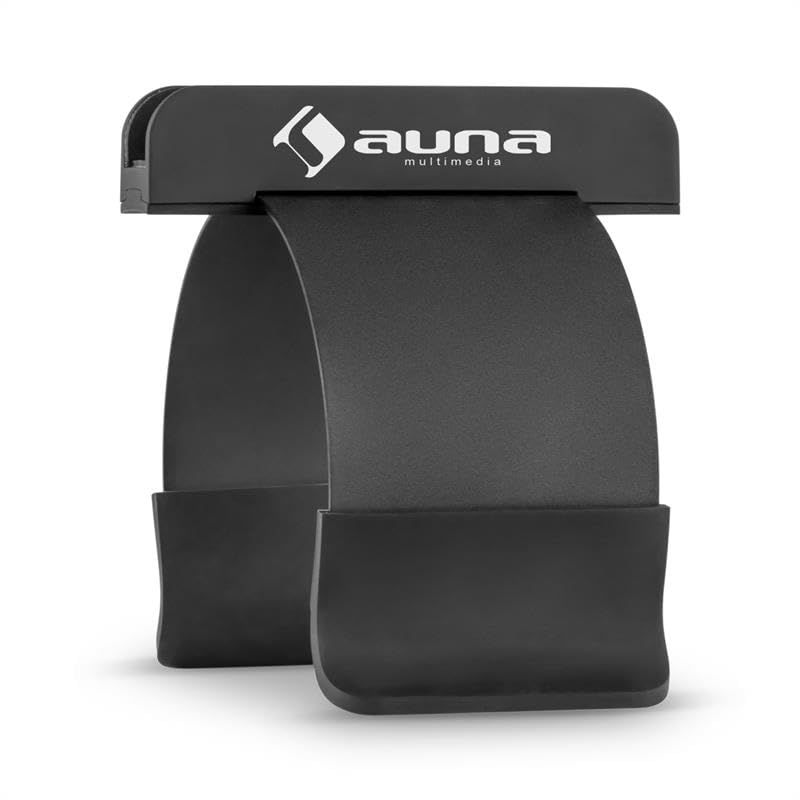
Figure 1: The AUNA SmartHold holder in its compact, folded state, showcasing its sleek black metal design.
ຕັ້ງຄ່າ
- ແກະກ່ອງ: ເອົາສ່ວນປະກອບທັງຫມົດອອກຈາກການຫຸ້ມຫໍ່ຢ່າງລະມັດລະວັງ.
- ປັບ Clamps: The holder features adjustable clamps. Gently pull the clamps apart to accommodate the thickness of your screen or tube speaker. The maximum screen thickness supported is 2 cm.
- ຕິດກັບພື້ນຜິວ: Position the holder on the edge of your laptop screen, fixed screen (up to 2 cm thick), or a compatible tube speaker. Ensure the rubberized pads make full contact with the surface to prevent slipping and scratches.
- ໃສ່ອຸປະກອນ: Gently expand the device grips and place your tablet or smartphone into the holder. Ensure the device is centered and securely held by the grips.
- ປັບມຸມ: The holder is rotatable, allowing you to adjust the viewing angle ສໍາລັບຄວາມສະດວກສະບາຍທີ່ດີທີ່ສຸດ.
ຄໍາແນະນໍາການດໍາເນີນງານ
Once securely mounted, the AUNA SmartHold allows for hands-free use of your tablet or smartphone.
- Viewເນື້ອໃນ: Adjust the device to your preferred viewing angle. The rotatable feature allows for both portrait and landscape orientations.
- ການເຂົ້າເຖິງ: Keep your device visible and accessible while working on your computer or performing other tasks.
- ການໂຍກຍ້າຍ: To remove your device, gently expand the grips and lift the device out. To remove the holder, gently pull it away from the mounting surface.
ບໍາລຸງຮັກສາ
- ທໍາຄວາມສະອາດ: Wipe the holder with a soft, dry cloth. Do not use abrasive cleaners or solvents.
- ການເກັບຮັກສາ: When not in use, store the holder in a clean, dry place. Its compact design allows for easy storage.
- ການກວດກາ: ກວດເບິ່ງເປັນໄລຍະ clamps and rubber pads for any signs of wear or damage. Replace if necessary to ensure continued secure holding.
ການແກ້ໄຂບັນຫາ
| ສະບັບ | ການແກ້ໄຂ |
|---|---|
| Device feels unstable in the holder. | Ensure the device grips are fully extended and securely holding the device. Check that the holder's clamps are firmly attached to the mounting surface. |
| Holder slips on the mounting surface. | Verify that the mounting surface is clean and dry. Ensure the rubberized pads on the holder are making full contact and are not worn out. |
| Difficulty inserting/removing device. | Gently expand the device grips further before inserting or removing your tablet/smartphone. Do not force the device. |
ຂໍ້ມູນຈໍາເພາະ
| ຄຸນສົມບັດ | ລາຍລະອຽດ |
|---|---|
| ຍີ່ຫໍ້ | AUNA |
| ຕົວແບບ | CS6-SmartHold |
| ອຸປະກອນທີ່ເຂົ້າກັນໄດ້ | Tablets, Smartphones |
| ຄຸນນະສົມບັດພິເສດ | ໝຸນໄດ້ |
| ວັດສະດຸ | ໂລຫະ |
| ປະເພດການຕິດຕັ້ງ | Tube holder (also compatible with screens up to 2cm thick) |
| ຂະໜາດສິນຄ້າ (L x W x H) | 12 x 10 x 11 cm |
| ນ້ຳໜັກ | 155 g |
| ສີ | ດຳ |
| ລະດັບຄວາມຕ້ານທານນ້ໍາ | ບໍ່ທົນທານຕໍ່ນ້ໍາ |
ການຮັບປະກັນແລະການສະຫນັບສະຫນູນ
This AUNA SmartHold product comes with a standard manufacturer's warranty. For detailed warranty information, please refer to the warranty card included in your product packaging or visit the official AUNA webເວັບໄຊ.
For technical support, troubleshooting assistance, or spare parts, please contact AUNA customer service through their official channels. Contact information can typically be found on the product packaging or the manufacturer's webເວັບໄຊ.


