
ແນະນຳ
Thank you for choosing the Calypso K5684/6 Digital Watch. This manual provides essential information for the proper setup, operation, and maintenance of your watch. Please read it carefully to ensure optimal performance and longevity of your device.
The Calypso K5684/6 is a sporty and fashionable digital multifunction watch featuring a clear LCD display, 10 ATM (100 meters) water resistance, a durable plastic strap, chronograph, alarm, and dual time zone functions.
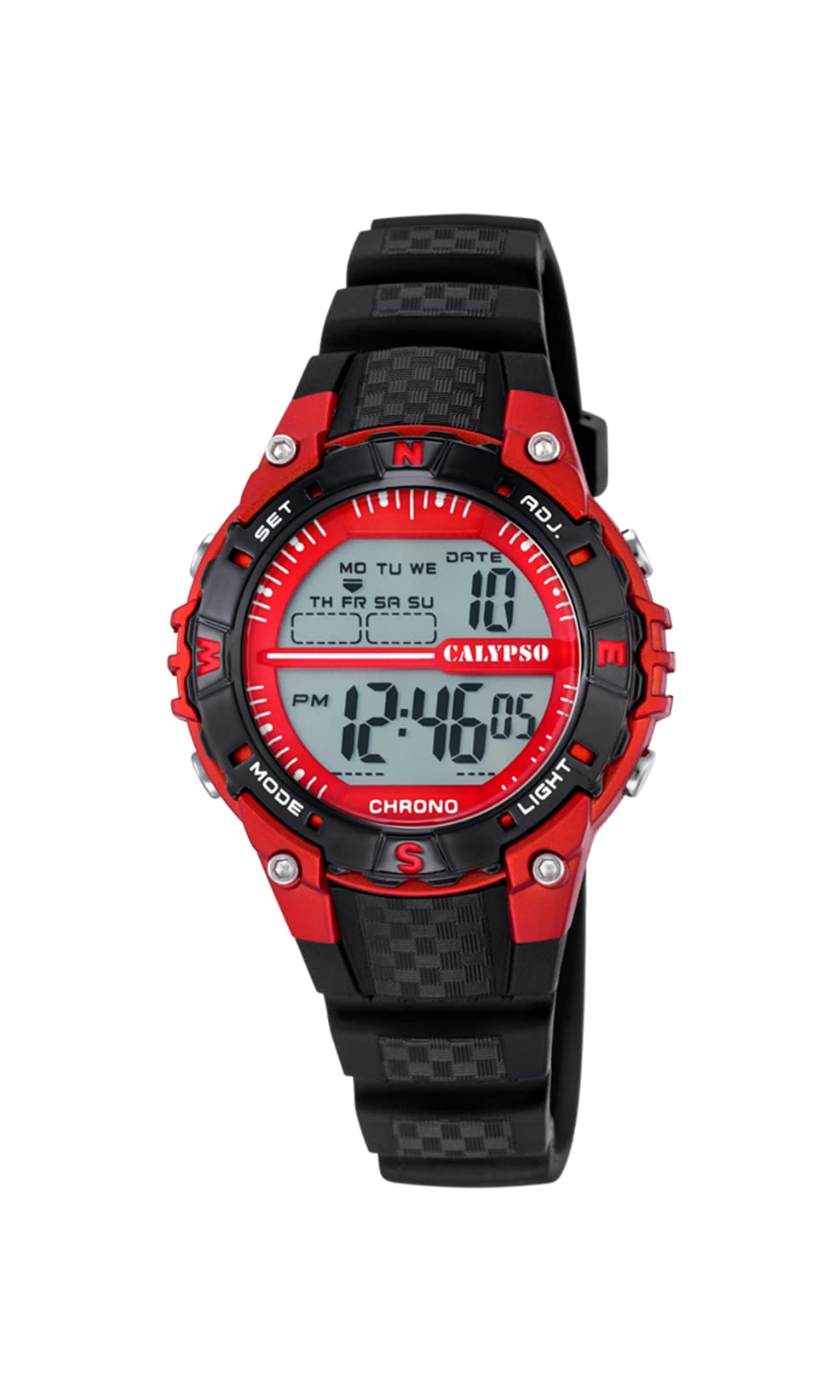
ດ້ານໜ້າ view of the Calypso K5684/6 digital watch, showcasing its LCD display, black plastic case, and strap. The display shows time, date, and mode indicators.
ການຕິດຕັ້ງເບື້ອງຕົ້ນ
ປຸ່ມຟັງຊັນແລ້ວview
Your Calypso K5684/6 watch features four primary control buttons:
- ແບບ: Cycles through different display modes (Time, Alarm, Chronograph, Dual Time).
- ກຳ ນົດ: ໃຊ້ເພື່ອເຂົ້າ ແລະຢືນຢັນການຕັ້ງຄ່າໃນໂຫມດຕ່າງໆ.
- ADJ (ປັບ): Used to adjust values (increment/decrement) during setting. Also functions as Start/Stop for Chronograph.
- ແສງ: ເປີດໃຊ້ backlight ສໍາລັບການເບິ່ງເຫັນໃນສະພາບແສງສະຫວ່າງຫນ້ອຍ.

ໃກ້ຊິດ view of a Calypso digital watch, highlighting the 'MODE', 'SET', 'ADJ', and 'LIGHT' buttons on the sides of the watch case. The display shows 'MON 12:44 8-17 06'.
ຄໍາແນະນໍາການດໍາເນີນງານ
1. ການຕັ້ງເວລາແລະວັນທີ
- ຈາກການສະແດງເວລາປົກກະຕິ, ກົດປຸ່ມ ໂໝດ ກົດປຸ່ມຊ້ຳໆຈົນກ່ວາວິນາທີເລີ່ມກະພິບ. ນີ້ສະແດງໃຫ້ເຫັນວ່າທ່ານຢູ່ໃນຮູບແບບການຕັ້ງຄ່າເວລາ.
- ກົດ SET ປຸ່ມເພື່ອຮອບວຽນຜ່ານການຕັ້ງຄ່າ: ວິນາທີ → ຊົ່ວໂມງ → ນາທີ → ປີ → ເດືອນ → ມື້.
- ໃນຂະນະທີ່ຄ່າກຳລັງກະພິບ, ໃຫ້ໃຊ້ ADJ button to increase or decrease the value. Hold ADJ ສໍາລັບການປັບຕົວໄວຂຶ້ນ.
- ເມື່ອການຕັ້ງຄ່າທັງຫມົດຖືກຕ້ອງ, ກົດປຸ່ມ ໂໝດ ປຸ່ມເພື່ອອອກຈາກໂຫມດການຕັ້ງຄ່າແລະກັບຄືນສູ່ການສະແດງເວລາປົກກະຕິ.
2. ຟັງຊັນປຸກ
- ກົດ ໂໝດ button until the alarm time is displayed (usually indicated by 'AL' or a bell icon).
- ກົດຄ້າງໄວ້ SET ກົດປຸ່ມຈົນກ່ວາໂມງປຸກເລີ່ມກະພິບ.
- ໃຊ້ ADJ ປຸ່ມເພື່ອຕັ້ງໂມງປຸກທີ່ຕ້ອງການ.
- ກົດ SET again to move to the alarm minutes, then use ADJ ເພື່ອກໍານົດນາທີ.
- ກົດ SET ເພື່ອຢືນຢັນ ແລະອອກຈາກການຕັ້ງຄ່າໂມງປຸກ.
- ເພື່ອເປີດ/ປິດການໃຊ້ງານໂມງປຸກ, ໃນໂໝດໂມງປຸກ, ໃຫ້ກົດປຸ່ມ ADJ ປຸ່ມ. ໄອຄອນປຸກຈະປາກົດ/ຫາຍໄປໃນຈໍສະແດງຜົນ.
3. Chronograph (ໂມງຈັບເວລາ)
- ກົດ ໂໝດ button until 'CHRONO' or 'STW' is displayed. The display will show '00:00:00'.
- ກົດ ADJ ປຸ່ມເພື່ອເລີ່ມໂມງຈັບເວລາ.
- ກົດ ADJ ອີກເທື່ອຫນຶ່ງເພື່ອຢຸດ chronograph.
- To reset the chronograph to zero, press the SET button while the chronograph is stopped.
4. Dual Time Zone
- ກົດ ໂໝດ button until 'DT' or 'DUAL TIME' is displayed.
- ກົດຄ້າງໄວ້ SET ກົດປຸ່ມຈົນກ່ວາຊົ່ວໂມງເລີ່ມຕົ້ນທີ່ຈະກະພິບ.
- ໃຊ້ ADJ button to set the desired hour for the second time zone.
- ກົດ SET again to move to the minutes, then use ADJ to set the minutes (minutes are usually synchronized with the main time zone).
- ກົດ SET to confirm and exit the dual time setting.
5. ແສງຫຼັງ
ກົດ ແສງສະຫວ່າງ button to illuminate the display for a few seconds. This feature is useful in dark environments.
ການດູແລແລະບໍາລຸງຮັກສາ
1. ທໍາຄວາມສະອາດ
- Wipe the watch case and strap regularly with a soft, dry cloth to remove dirt and moisture.
- ສໍາລັບຝຸ່ນ stubborn, ໃຊ້ d ເລັກນ້ອຍamp ເຊັດດ້ວຍສະບູອ່ອນໆ, ແລ້ວເຊັດໃຫ້ແຫ້ງທັນທີ.
- ຫຼີກລ່ຽງການໃຊ້ສານເຄມີທຳຄວາມສະອາດ, ຕົວລະລາຍ ຫຼື ວັດສະດຸທີ່ມີສານຂັດ, ເພາະວ່າສິ່ງເຫຼົ່ານີ້ສາມາດທຳລາຍຜິວໜ້າ ແລະ ປະທັບຕາຂອງໂມງໄດ້.
2. ຂໍ້ຄວນລະວັງການຕໍ່ຕ້ານນ້ໍາ
Your Calypso K5684/6 watch is water-resistant up to 10 ATM (100 meters), making it suitable for swimming and snorkeling. However, please observe the following:
- ຢ່າໃຊ້ປຸ່ມຕ່າງໆໃນຂະນະທີ່ໂມງຢູ່ໃນນໍ້າ. This can compromise the water resistance.
- Avoid exposing the watch to hot water, steam, or extreme temperature changes, as this can affect the seals.
- ຫຼັງຈາກການສໍາຜັດກັບນ້ໍາເຄັມ, rinsed ໂມງດ້ວຍນ້ໍາສົດແລະຕາກໃຫ້ແຫ້ງມັນຢ່າງລະອຽດ.
3. ການທົດແທນຫມໍ້ໄຟ
When the display becomes dim or the watch stops functioning, the battery may need replacement. It is recommended to have the battery replaced by a qualified watch technician to ensure the water resistance is maintained.
ການແກ້ໄຂບັນຫາ
| ບັນຫາ | ສາເຫດທີ່ເປັນໄປໄດ້ | ການແກ້ໄຂ |
|---|---|---|
| ຈໍສະແດງຜົນຫວ່າງເປົ່າ ຫຼືມືດ. | ແບັດເຕີຣີເຫຼືອໜ້ອຍ ຫຼືໝົດແລ້ວ. | ປ່ຽນແບັດ. ປຶກສາຜູ້ຊ່ຽວຊານດ້ານໂມງມືອາຊີບ. |
| ປຸ່ມບໍ່ຕອບສະໜອງ. | ໂມງອາດຈະຢູ່ໃນໂໝດລັອກ ຫຼື ແບັດເຕີຣີຕໍ່າ. | Try pressing the MODE button to cycle through modes. If unresponsive, consider battery replacement. |
| ເວລາບໍ່ຖືກຕ້ອງ. | Time was not set correctly or watch was exposed to strong magnetic fields. | ອ້າງອີງໃສ່ພາກສ່ວນ "ເວລາ ແລະວັນທີ" ເພື່ອຣີເຊັດເວລາ. |
| ນ້ໍາພາຍໃນໂມງ. | ການຕໍ່ຕ້ານນ້ໍາຫຼຸດຫນ້ອຍລົງ (ຕົວຢ່າງ, ປຸ່ມກົດພາຍໃຕ້ນ້ໍາ, ປະທັບຕາທີ່ເສຍຫາຍ). | Immediately take the watch to a professional watch repair service to prevent further damage. |
ຂໍ້ມູນຈໍາເພາະຂອງຜະລິດຕະພັນ
| ຄຸນສົມບັດ | ລາຍລະອຽດ |
|---|---|
| ໝາຍເລກຕົວແບບ | K5684/6 |
| ຍີ່ຫໍ້ | ຄາລິບໂຊ |
| ປະເພດການສະແດງ | Digital LCD |
| ວັດສະດຸກໍລະນີ | Polycarbonate with Stainless Steel Back |
| ວັດສະດຸສາຍ | ພາດສະຕິກ |
| ການຕໍ່ຕ້ານນ້ໍາ | 10 ATM (100 ແມັດ) |
| ຟັງຊັນ | Time, Date, Day, Alarm, Chronograph, Dual Time Zone, Backlight |
| ຂະໜາດສິນຄ້າ (L x W x H) | 17.4 x 8.99 x 8.2 cm |
| ນ້ໍາຫນັກລາຍການ | 50 ກຣາມ |
| ປະເທດຕົ້ນກໍາເນີດ | ສະເປນ |
ຂໍ້ມູນການຮັບປະກັນ
Calypso watches typically come with a manufacturer's warranty covering defects in materials and workmanship. The specific terms and duration of your warranty are usually provided with your purchase documentation. Please retain your proof of purchase for any warranty claims.
The warranty does not cover damage resulting from improper use, accidents, unauthorized repairs, or normal wear and tear.
ການຊ່ວຍເຫຼືອລູກຄ້າ
For further assistance, technical support, or service inquiries regarding your Calypso K5684/6 Digital Watch, please contact your retailer or the official Calypso customer service in your region. Contact details can often be found on the Calypso official webສະຖານທີ່ຫຼືໃນອຸປະກອນການຫຸ້ມຫໍ່.


