1. ບົດແນະນຳ
This manual provides detailed instructions for the safe and effective operation of the Meco 2250-HZ Auto Digital Clamp Meter. This device is designed for measuring various electrical parameters, including AC/DC voltage, AC current, frequency, continuity, and diode testing. Please read this manual thoroughly before use and retain it for future reference.
2. ຂໍ້ມູນຄວາມປອດໄພ
Always observe standard safety precautions when working with electrical circuits. Failure to do so may result in injury or damage to the meter. This meter is designed with over-voltage protection up to 200V DC and AC Peak. However, exercise caution.
- ຢ່າພະຍາຍາມວັດແທກ voltages ຫຼື ກະແສໄຟຟ້າເກີນຂອບເຂດສູງສຸດທີ່ລະບຸໄວ້.
- ໃຫ້ແນ່ໃຈວ່າຫົວການທົດສອບຢູ່ໃນສະພາບທີ່ດີແລະຖືກເຊື່ອມຕໍ່ຢ່າງຖືກຕ້ອງກ່ອນທີ່ຈະເຮັດການວັດແທກ.
- Do not operate the meter if it appears damaged or if the battery cover is not securely closed.
- Avoid using the meter in wet environments or in the presence of explosive gases or dust.
- Always disconnect power to the circuit before connecting or disconnecting test leads, especially for current measurements.
3. ຜະລິດຕະພັນເກີນview
The Meco 2250-HZ Auto Digital Clamp Meter features a robust design for reliable performance. Familiarize yourself with the components shown below.
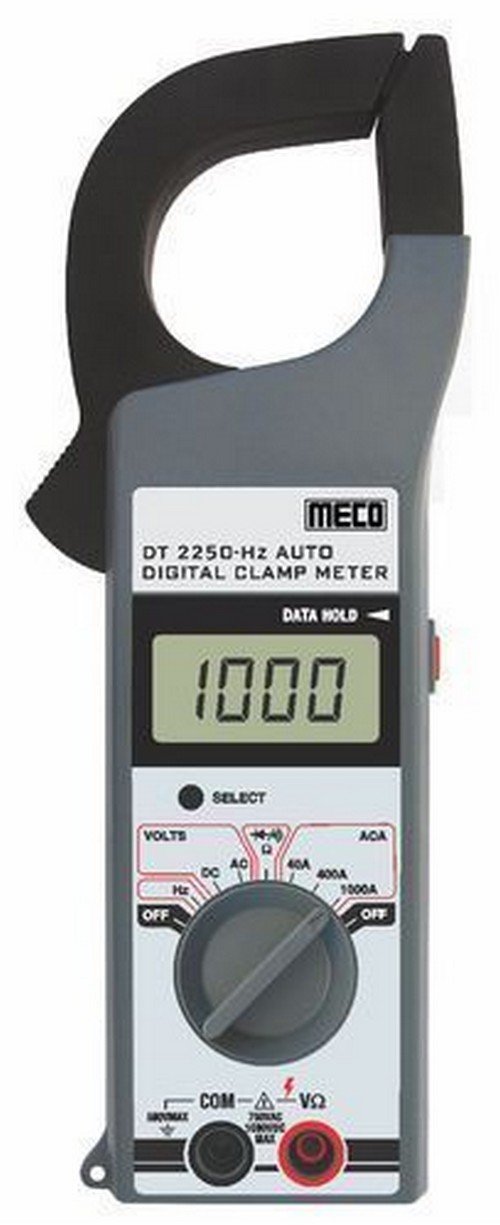
ຮູບທີ 1: ດ້ານໜ້າ view of the Meco 2250-HZ Auto Digital Clamp Meter. This image displays the clamp jaw at the top, the LCD screen showing '1000', the function dial, and the input terminals at the bottom. The 'SELECT' and 'DATA HOLD' buttons are visible next to the display.
ອົງປະກອບທີ່ສໍາຄັນ:
- Clamp ຄາງກະໄຕ: ໃຊ້ສຳລັບການວັດແທກກະແສໄຟຟ້າ AC ທີ່ບໍ່ສຳຜັດ.
- ຈໍ LCD: 3¾ digit liquid crystal display with a maximum reading of 3999. Shows measurement values, polarity, overrange indication (OL or -OL), and low battery indication.
- ຟັງຊັນໂທ: Rotary switch to select measurement functions (OFF, Volts DC/AC, Hz, ACA 40A/400A/1000A).
- ປຸ່ມເລືອກ: Used to switch between DC and AC voltage modes, or other sub-functions within a dial setting.
- DATA HOLD Button: ຢຸດການອ່ານປັດຈຸບັນຢູ່ໜ້າຈໍ. ກົດອີກຄັ້ງເພື່ອປ່ອຍ.
- Input Terminals (COM, VΩ): ສຳລັບການເຊື່ອມຕໍ່ສາຍທົດສອບສຳລັບແຮງດັນtage, resistance, continuity, and diode measurements.
4. ຕັ້ງຄ່າ
4.1 ການຕິດຕັ້ງຫມໍ້ໄຟ
The Meco 2250-HZ Auto Digital Clamp Meter requires batteries for operation. Batteries are not included with the product. To install or replace batteries:
- ໃຫ້ແນ່ໃຈວ່າມິເຕີຖືກປິດ.
- ຊອກຫາຊ່ອງໃສ່ຫມໍ້ໄຟຢູ່ດ້ານຫຼັງຂອງເຄື່ອງວັດແທກ.
- ໃຊ້ screwdriver ເພື່ອເປີດຝາປິດຊ່ອງຫມໍ້ໄຟ.
- ໃສ່ແບັດເຕີຣີທີ່ຕ້ອງການ, ໂດຍສັງເກດຂົ້ວທີ່ຖືກຕ້ອງ (+ ແລະ -).
- ປ່ຽນຝາປິດຊ່ອງໃສ່ໝໍ້ໄຟ ແລະຍຶດມັນດ້ວຍສະກູ.
ຕົວຊີ້ບອກແບັດເຕີຣີອ່ອນຈະປາກົດຢູ່ໜ້າຈໍເມື່ອແບັດເຕີຣີໝົດພະລັງງານtage is low, signaling the need for replacement.
5. ຄໍາແນະນໍາການດໍາເນີນງານ
5.1 ການດໍາເນີນງານທົ່ວໄປ
- Turn the function dial to the desired measurement setting.
- Connect test leads to the appropriate input terminals (COM and VΩ) for voltage, resistance, continuity, or diode tests.
- For current measurements, use the clamp ຄາງກະໄຕອ້ອມຮອບຕົວນຳດຽວ.
- ກົດ ເລືອກ button to toggle between AC/DC modes or other sub-functions if available for the selected range.
- ກົດ ຮັກສາຂໍ້ມູນ ປຸ່ມເພື່ອຢຸດການອ່ານປັດຈຸບັນຢູ່ໃນຈໍສະແດງຜົນ. ກົດອີກຄັ້ງເພື່ອປ່ອຍ.
5.2 AC/DC Voltage ການວັດແທກ
- Set the function dial to the "VOLTS" position.
- Connect the black test lead to the COM terminal and the red test lead to the VΩ terminal.
- ກົດ ເລືອກ button to choose between AC or DC voltage measurement. The display will indicate "AC" or "DC".
- ເຊື່ອມຕໍ່ການທົດສອບນໍາໃນຂະຫນານກັບວົງຈອນຫຼືອົງປະກອບພາຍໃຕ້ການທົດສອບ.
- ອ່ານ voltage ມູນຄ່າຢູ່ໃນຈໍສະແດງຜົນ LCD.
5.3 ການວັດແທກກະແສໄຟຟ້າ AC (Clamp)
- Set the function dial to the desired AC current range (40A, 400A, or 1000A).
- ເປີດ clamp ຄາງກະໄຕໂດຍການກົດປຸ່ມໄກ.
- ລ້ອມຮອບຕົວນຳພຽງອັນດຽວຂອງວົງຈອນພາຍໃນ clamp ຄາງກະໄຕ. ໃຫ້ແນ່ໃຈວ່າຄາງກະໄຕປິດสนิทແລ້ວ.
- ອ່ານຄ່າກະແສໄຟຟ້າ AC ໃນໜ້າຈໍ LCD.
5.4 ການວັດແທກຄວາມຖີ່ (Hz).
- Set the function dial to the "Hz" position.
- Connect the black test lead to the COM terminal and the red test lead to the VΩ terminal.
- Connect the test leads in parallel to the circuit where frequency needs to be measured.
- Read the frequency value in Hertz (Hz) on the LCD display.
5.5 Audible Continuity Check
- Set the function dial to the continuity/diode symbol (often shared with resistance).
- Connect the black test lead to the COM terminal and the red test lead to the VΩ terminal.
- Touch the test probes across the component or circuit to be tested.
- ຖ້າມີຄວາມຕໍ່ເນື່ອງ (ຄວາມຕ້ານທານຕໍ່າ), ແມັດຈະສົ່ງສຽງດັງ.
5.6 ທົດສອບ Diode
- Set the function dial to the continuity/diode symbol.
- Connect the black test lead to the COM terminal and the red test lead to the VΩ terminal.
- Connect the red test lead to the anode of the diode and the black test lead to the cathode. The display will show the forward voltage ຫຼຸດລົງ.
- Reverse the test leads. The display should show "OL" (overload) for a good diode.
6. ບໍາລຸງຮັກສາ
6.1 ການທໍາຄວາມສະອາດ
ເຊັດແມັດຄasing ກັບການໂຄສະນາamp cloth and a mild detergent. Do not use abrasives or solvents. Keep the display clean and dry.
6.2 ການທົດແທນຫມໍ້ໄຟ
Refer to Section 4.1 for battery installation and replacement instructions. Replace batteries promptly when the low battery indicator appears to ensure accurate readings.
7. ການແກ້ໄຂບັນຫາ
| ບັນຫາ | ສາເຫດທີ່ເປັນໄປໄດ້ | ການແກ້ໄຂ |
|---|---|---|
| ເຄື່ອງວັດແທກບໍ່ເປີດ. | ແບັດເຕີຣີຕາຍ ຫຼື ຕິດຕັ້ງບໍ່ຖືກຕ້ອງ. | ກວດສອບຂົ້ວແບັດເຕີຣີ ແລະ ປ່ຽນແບັດເຕີຣີຖ້າຈຳເປັນ. |
| "OL" or "-OL" displayed. | Overrange condition; measurement exceeds meter's range. | Select a higher range or ensure the measured value is within the meter's capabilities. |
| ການອ່ານບໍ່ຖືກຕ້ອງ. | Low battery, poor test lead connection, or incorrect function selection. | Replace batteries, ensure secure connections, verify function dial setting. |
| No audible beep during continuity test. | ວົງຈອນເປີດ ຫຼື ຄວາມຕ້ານທານສູງ. | Verify the circuit is closed and resistance is low enough for continuity. |
8. ຂໍ້ມູນຈໍາເພາະ
| ຄຸນສົມບັດ | ລາຍລະອຽດ |
|---|---|
| ຈໍສະແດງຜົນ | 3¾ digit LCD, max reading 3999 |
| ຂົ້ວໂລກ | Automatic, negative polarity indication |
| Overrange ຕົວຊີ້ບອກ | "OL" or "-OL" displayed |
| ການປັບສູນ | ອັດຕະໂນມັດ |
| ຊີວິດຫມໍ້ໄຟ | 200 ຊົ່ວໂມງປົກກະຕິ |
| ເກີນ Voltage ການປົກປ້ອງ | 200V DC and AC Peak |
| Audible Continuity Check | ແມ່ນແລ້ວ |
| ທົດສອບ Diode | ແມ່ນແລ້ວ |
| ຕົວຊີ້ບອກແບັດເຕີຣີຕໍ່າ | ແມ່ນແລ້ວ |
| ນ້ໍາຫນັກລາຍການ | 600 g (1.32 ປອນ) |
| ຂະໜາດສິນຄ້າ | 21 x 13 x 6 cm |
| ວັດສະດຸ | ພາດສະຕິກ |
| ຜູ້ຜະລິດ | Meco Instruments |
9. ການຮັບປະກັນແລະການສະຫນັບສະຫນູນ
For warranty information or technical support, please contact the retailer or the manufacturer, Meco Instruments, directly. Keep your purchase receipt as proof of purchase.


