1. ບົດແນະນຳ
ຂອບໃຈສໍາລັບການຊື້asing the eKids Li-B17 Millennium Falcon Bluetooth Speaker. This portable wireless speaker allows you to stream audio from your Bluetooth-enabled devices and enjoy hands-free calling. Its unique design, inspired by the iconic Millennium Falcon, includes light effects and plays the Star Wars theme. Please read this manual carefully to ensure proper use and maintenance of your speaker.
2. ຂໍ້ມູນຄວາມປອດໄພ
- ຄຳແນະນຳອາຍຸ: ເຫມາະສໍາລັບອາຍຸ 3 ປີຂຶ້ນໄປ.
- ຫ້າມໃຫ້ອຸປະກອນຖືກອຸນຫະພູມສູງ, ແສງແດດໂດຍກົງ ຫຼື ຄວາມຊຸ່ມ.
- ຢ່າພະຍາຍາມຖອດປະກອບຫຼືດັດແປງຫນ່ວຍງານ. ນີ້ຈະເປັນການຍົກເລີກການຮັບປະກັນ.
- ໃຊ້ພຽງແຕ່ສາຍສາກທີ່ສະໜອງໃຫ້ ຫຼືສາຍທຽບເທົ່າທີ່ໄດ້ຮັບການຮັບຮອງ.
- ຮັກສາຫນ່ວຍບໍລິການຢູ່ຫ່າງຈາກສະຫນາມແມ່ເຫຼັກທີ່ເຂັ້ມແຂງ.
3. ເນື້ອໃນຊຸດ
ໃຫ້ແນ່ໃຈວ່າທຸກລາຍການຢູ່ໃນຊຸດ:
- eKids Li-B17 Millennium Falcon Bluetooth Speaker
- ສາຍສາກ USB

ຮູບທີ 1: eKids Li-B17 Millennium Falcon Bluetooth Speaker on its clear stand, showcasing its detailed design and illuminated blue engine lights.
4. ຄຸນລັກສະນະຂອງຜະລິດຕະພັນ
- Bluetooth Wireless Audio: ຖ່າຍທອດເພງແບບໄຮ້ສາຍຈາກອຸປະກອນທີ່ເຂົ້າກັນໄດ້.
- ຟັງຊັນ Hands-Free: Answer and end calls directly from the speaker.
- ຜົນກະທົບແສງສະຫວ່າງ: Integrated lights illuminate during operation.
- ແບັດເຕີຣີທີ່ສາມາດສາກໄດ້: ແບັດເຕີຣີລິທຽມໃນຕົວສາມາດຫຼິ້ນໄດ້ເຖິງ 6 ຊົ່ວໂມງ.
- Star Wars Theme: Plays the iconic Star Wars main theme.
- AUX Input: Connect non-Bluetooth devices via the auxiliary port.

ຮູບທີ 2: The eKids Li-B17 Millennium Falcon Bluetooth Speaker with text indicating powerful sound performance and illuminated engine lights, alongside a smartphone displaying music playback.
5. ຕັ້ງຄ່າ
5.1 ກຳລັງສາກລຳໂພງ
- Connect the small end of the included USB charging cable to the USB charging port on the speaker.
- ເຊື່ອມຕໍ່ປາຍໃຫຍ່ກວ່າຂອງສາຍສາກ USB ກັບພອດ USB ທີ່ໃຊ້ພະລັງງານ (ເຊັ່ນ: ຄອມພິວເຕີ, ອະແດບເຕີຝາ USB).
- ໄຟຕົວຊີ້ວັດການສາກໄຟຈະສະຫວ່າງ. ເມື່ອສາກເຕັມແລ້ວ, ແສງອາດຈະປ່ຽນສີ ຫຼືປິດລົງ.
- ການສາກໄຟເຕັມໃຫ້ເວລາຫຼິ້ນໄດ້ປະມານ 6 ຊົ່ວໂມງ.
5.2 ການເປີດ/ປິດ
Locate the 3-position switch on the side of the speaker (refer to Figure 3).
- ເພື່ອພະລັງງານ ON in Bluetooth mode, slide the switch to the ສັນຍາລັກ Bluetooth ຕໍາແຫນ່ງ.
- ເພື່ອພະລັງງານ ON in AUX mode, slide the switch to the AUX ຕໍາແຫນ່ງ.
- ເພື່ອພະລັງງານ ປິດ, slide the switch to the ປິດ (ກາງ) ຕໍາແໜ່ງ.
5.3 ການຈັບຄູ່ Bluetooth
- Ensure the speaker is charged and powered ON in Bluetooth mode. The speaker will automatically enter pairing mode if no previously paired device is found.
- ໃນອຸປະກອນທີ່ເປີດໃຊ້ Bluetooth ຂອງທ່ານ (ໂທລະສັບສະຫຼາດ, ແທັບເລັດ, ແລະອື່ນໆ), ເປີດໃຊ້ Bluetooth ແລະຄົ້ນຫາອຸປະກອນທີ່ມີຢູ່.
- ເລືອກ "eKids Li-B17" (or similar name) from the list of devices.
- Once paired, the speaker will indicate a successful connection (e.g., a tone or voice prompt).
- To pair a new device or re-enter pairing mode, press and hold the Bluetooth button on the top of the speaker.
5.4 ການເຊື່ອມຕໍ່ AUX
For devices without Bluetooth, you can use the AUX input:
- Slide the 3-position switch to the AUX ຕໍາແຫນ່ງ.
- Connect one end of a 3.5mm audio cable (not included) to your audio device's headphone jack.
- Connect the other end of the 3.5mm audio cable to the AUX port on the speaker (refer to Figure 3).
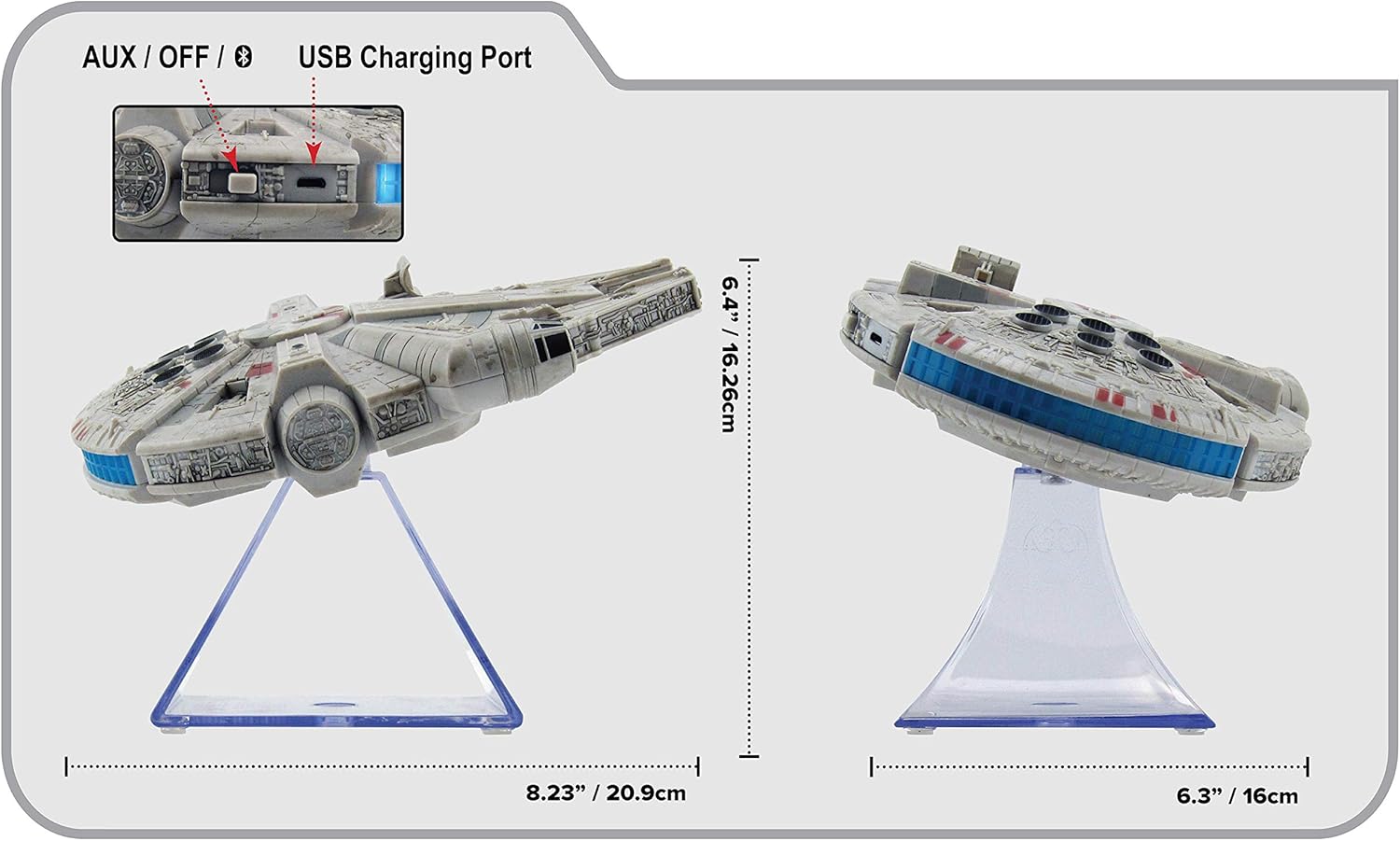
ຮູບທີ 3: ຂ້າງ view of the eKids Li-B17 Millennium Falcon Bluetooth Speaker, highlighting the AUX/OFF/Bluetooth switch, USB charging port, and product dimensions.

ຮູບທີ 4: Image illustrating the eKids Li-B17 Millennium Falcon Bluetooth Speaker's compatibility with multiple devices including mobile phones, tablets, notebooks, smartwatches, game devices, and PCs.
6. ຄໍາແນະນໍາການດໍາເນີນງານ
6.1 ການຫຼິ້ນສຽງ
- Once connected via Bluetooth or AUX, start playing audio from your source device.
- Adjust the volume using the controls on your connected device. The speaker itself does not have volume controls.
6.2 ໂທຟຣີ
ເມື່ອເຊື່ອມຕໍ່ຜ່ານ Bluetooth ກັບສະມາດໂຟນ:
- ຕອບການໂທ: Press the designated call button on the speaker (often integrated with the Bluetooth button or a separate small button near the main blaster area).
- ສິ້ນສຸດການໂທ: Press the call button again.
- ໂທອອກ: Initiate the call from your smartphone; audio will route through the speaker.
6.3 ຜົນກະທົບແສງສະຫວ່າງ
The speaker features integrated blue engine lights that illuminate when the speaker is powered on and in use, enhancing the visual experience.
6.4 Star Wars Theme Playback
Press the large button located on the top of the speaker (the top blaster area) to play the Star Wars main theme.
7. ບໍາລຸງຮັກສາ
- Clean the speaker with a soft, dry cloth. Do not use liquid cleaners or abrasive materials.
- ເກັບຮັກສາລໍາໂພງໄວ້ໃນບ່ອນທີ່ເຢັນ, ແຫ້ງເມື່ອບໍ່ໄດ້ໃຊ້.
- ຫຼີກລ່ຽງການຕົກລຳໂພງ ຫຼື ກະທົບກັບລຳໂພງຢ່າງແຮງ.
8. ການແກ້ໄຂບັນຫາ
| ບັນຫາ | ສາເຫດທີ່ເປັນໄປໄດ້ | ການແກ້ໄຂ |
|---|---|---|
| ລຳໂພງບໍ່ເປີດ. | ແບັດເຕີຣີໝົດ. | ສາກລຳໂພງໂດຍໃຊ້ສາຍ USB ທີ່ໃຫ້ມາ. |
| ບໍ່ສາມາດຈັບຄູ່ຜ່ານ Bluetooth ໄດ້. | Speaker is not in pairing mode or device's Bluetooth is off. | Ensure speaker is in Bluetooth mode and press the Bluetooth button to enter pairing. Turn Bluetooth on your device and search again. |
| ບໍ່ມີສຽງຈາກລຳໂພງ. | ລະດັບສຽງຕ່ຳເກີນໄປ, ໂໝດປ້ອນຂໍ້ມູນບໍ່ຖືກຕ້ອງ, ຫຼື ອຸປະກອນບໍ່ສາມາດຫຼິ້ນໄດ້. | Increase volume on your device. Ensure speaker is in correct mode (Bluetooth/AUX). Check if your device is playing audio. |
| ຄຸນະພາບສຽງບໍ່ດີ. | ອຸປະກອນຢູ່ໄກຈາກລຳໂພງເກີນໄປ, ມີສັນຍານລົບກວນ ຫຼື ແບັດເຕີຣີຕໍ່າ. | Move device closer to speaker (within 30 feet). Avoid obstacles. Charge the speaker. |
9. ຂໍ້ມູນຈໍາເພາະ
| ຄຸນສົມບັດ | ຂໍ້ມູນຈໍາເພາະ |
|---|---|
| ໝາຍເລກຕົວແບບ | Li-B17 |
| ເຕັກໂນໂລຊີການເຊື່ອມຕໍ່ | Bluetooth |
| Range ໄຮ້ສາຍ | ສູງເຖິງ 30 ຟຸດ (ປະມານ 9 ແມັດ) |
| ແຫຼ່ງພະລັງງານ | Lithium-Polymer Battery (rechargeable) |
| ຊີວິດຫມໍ້ໄຟ | ສູງສຸດ 6 ຊົ່ວໂມງ |
| ພະລັງງານອອກຂອງລໍາໂພງສູງສຸດ | 25 ວັດ |
| ຮູບແບບການອອກສຽງ | ສະເຕຣິໂອ |
| ວັດສະດຸ | ພາດສະຕິກ |
| ປະເພດການຕິດຕັ້ງ | ໂຕະ |
| ຂະໜາດ (L x W x H) | 18.29 x 26.42 x 24.13 ຊມ (7.2 x 10.4 x 9.5 ນິ້ວ) |
| ອົງປະກອບລວມ | Millennium Falcon Bluetooth Speaker, USB Charging Cable |
10. ການຮັບປະກັນແລະການສະຫນັບສະຫນູນ
ຜະລິດຕະພັນນີ້ມາພ້ອມກັບ a ການຮັບປະກັນຈໍາກັດ. For specific details regarding warranty coverage, duration, and how to obtain service, please refer to the warranty card included with your purchase or contact eKids customer support.
For technical support or further inquiries, please visit the official eKids webເວັບໄຊ ຫຼືຕິດຕໍ່ພະແນກບໍລິການລູກຄ້າຂອງເຂົາເຈົ້າ.


