1. ບົດແນະນຳ
This manual provides detailed instructions for the installation, operation, and maintenance of your THINKWARE X500D Dashcam with Rear View Camera. The X500D is designed to provide comprehensive front and rear surveillance of your vehicle, capturing Full HD 1080p video with a Sony Exmor image sensor for the front camera and a Full HD 1080p rear camera.
Key features include advanced driver assistance systems (ADAS) such as lane departure, front collision, red light, and speed camera alerts, as well as a built-in GPS tracker for recording time, speed, and location data. For optimal performance and longevity, please read this manual thoroughly before using the device.
2. ຂໍ້ມູນຄວາມປອດໄພ
- ການຕິດຕັ້ງ: ໃຫ້ແນ່ໃຈວ່າກ້ອງ dash ຖືກຕິດຕັ້ງຢູ່ໃນບ່ອນທີ່ບໍ່ຂັດຂວາງຜູ້ຂັບຂີ່ view ຫຼືແຊກແຊງລັກສະນະຄວາມປອດໄພຂອງຍານພາຫະນະ (ເຊັ່ນ: ຖົງລົມນິລະໄພ).
- ແຫຼ່ງພະລັງງານ: Use only the provided cigarette power cable or an official THINKWARE hardwiring cable for power. Using unauthorized power sources may damage the device and void the warranty.
- ອຸນຫະພູມປະຕິບັດການ: The device is designed to operate within a specific temperature range. Avoid exposing the dash cam to extreme temperatures (e.g., direct sunlight for extended periods in hot climates) to prevent damage.
- ກາດ MicroSD: Use only genuine THINKWARE microSD cards or high-endurance cards from reputable brands. Frequent formatting of the microSD card is recommended to maintain optimal recording performance.
- ທໍາຄວາມສະອາດ: Clean the lens and screen with a soft, dry cloth. Do not use harsh chemicals or abrasive materials.
- ການອັບເດດເຟີມແວ: ກວດສອບ ແລະ ຕິດຕັ້ງການອັບເດດເຟີມແວເປັນປະຈຳເພື່ອຮັບປະກັນປະສິດທິພາບທີ່ດີທີ່ສຸດ ແລະ ການເຂົ້າເຖິງຄຸນສົມບັດໃໝ່ໆ.
- ການປະຕິເສດຄວາມຮັບຜິດຊອບ: This device is pre-loaded with firmware and GPS data specific for use within the US only. Proper device operation cannot be guaranteed outside of the US.
3. ເນື້ອໃນຊຸດ
ກວດສອບວ່າລາຍການທັງຫມົດແມ່ນມີຢູ່ໃນຊຸດຂອງທ່ານ:
- Main Dash Cam Unit (THINKWARE X500D)
- ຫລັງ View ກ້ອງຖ່າຍຮູບ
- Mount with Extra 3M Adhesive Tape
- Cigarette Power Cable
- ກາວສາຍເຄເບີ້ນ
- THINKWARE 32GB MicroSD Card with SD Card Adapter
- ຄູ່ມືເລີ່ມຕົ້ນດ່ວນ/ຂໍ້ມູນການຮັບປະກັນ
- ຫລັງ View ສາຍກ້ອງ

Image: The THINKWARE X500D Dashcam main unit, rear camera, 32GB MicroSD card, and SD card adapter, representing the typical package contents.
4. ຜະລິດຕະພັນເກີນview
4.1. Front Dash Cam Unit (X500D)

ຮູບພາບ: ທາງຫນ້າ view of the THINKWARE X500D Dashcam, showing the main lens and the "FHD Recorder" label.

ຮູບພາບ: ດ້ານຫລັງ view of the THINKWARE X500D Dashcam, displaying the LCD screen with live view and control buttons on the left side.
The main unit features a Full HD 1080p camera with a Sony Exmor image sensor, a 2.7-inch LCD touchscreen for live view and settings, and various control buttons. It also includes a built-in GPS module and G-sensor for incident detection.
4.2. ຫລັງ View ກ້ອງຖ່າຍຮູບ

Image: The compact THINKWARE rear view camera, designed for discreet installation on the rear window.
ດ້ານຫລັງ view camera provides Full HD 1080p recording for the rear of your vehicle, connecting to the main dash cam unit via the provided cable.
4.3. ບັດ MicroSD

Image: A THINKWARE branded 32GB MicroSD card alongside its larger SD card adapter.
The included 32GB MicroSD card is specifically designed for THINKWARE Dash Cams, featuring SPOR (Sudden Power Off Recovery) technology to protect recorded data.
5. ການຕິດຕັ້ງແລະການຕິດຕັ້ງ
5.1. ການໃສ່ MicroSD Card
- ກວດໃຫ້ແນ່ໃຈວ່າກ້ອງຕິດປິດ.
- Locate the microSD card slot on the side of the main unit.
- Insert the 32GB MicroSD card into the slot until it clicks into place. Ensure the card is inserted with the correct orientation.
5.2. ການຕິດຕັ້ງກ້ອງວົງຈອນປິດດ້ານໜ້າ
- ທຳຄວາມສະອາດບໍລິເວນກະຈົກໜ້າລົດບ່ອນທີ່ຈະຕິດຕັ້ງກ້ອງວົງຈອນປິດ. ຮັບປະກັນວ່າມັນບໍ່ມີຝຸ່ນ ແລະ ນ້ຳມັນ.
- Attach the mount to the dash cam unit.
- Remove the protective film from the 3M adhesive tape on the mount.
- ກົດປຸ່ມຕິດໃສ່ກະຈົກໃຫ້ແໜ້ນ, ໂດຍສະ ເພາະທາງຫຼັງview ກະຈົກ, ຮັບປະກັນວ່າມັນບໍ່ໄດ້ຂັດຂວາງຂອງທ່ານ view. ກົດຄ້າງໄວ້ຢ່າງໜ້ອຍ 30 ວິນາທີ.
- Adjust the camera angle to ensure the road ahead is clearly visible and centered in the frame.

Image: The THINKWARE X500D Dashcam mounted on a car's windshield, viewed from inside the vehicle, showing the screen and controls.
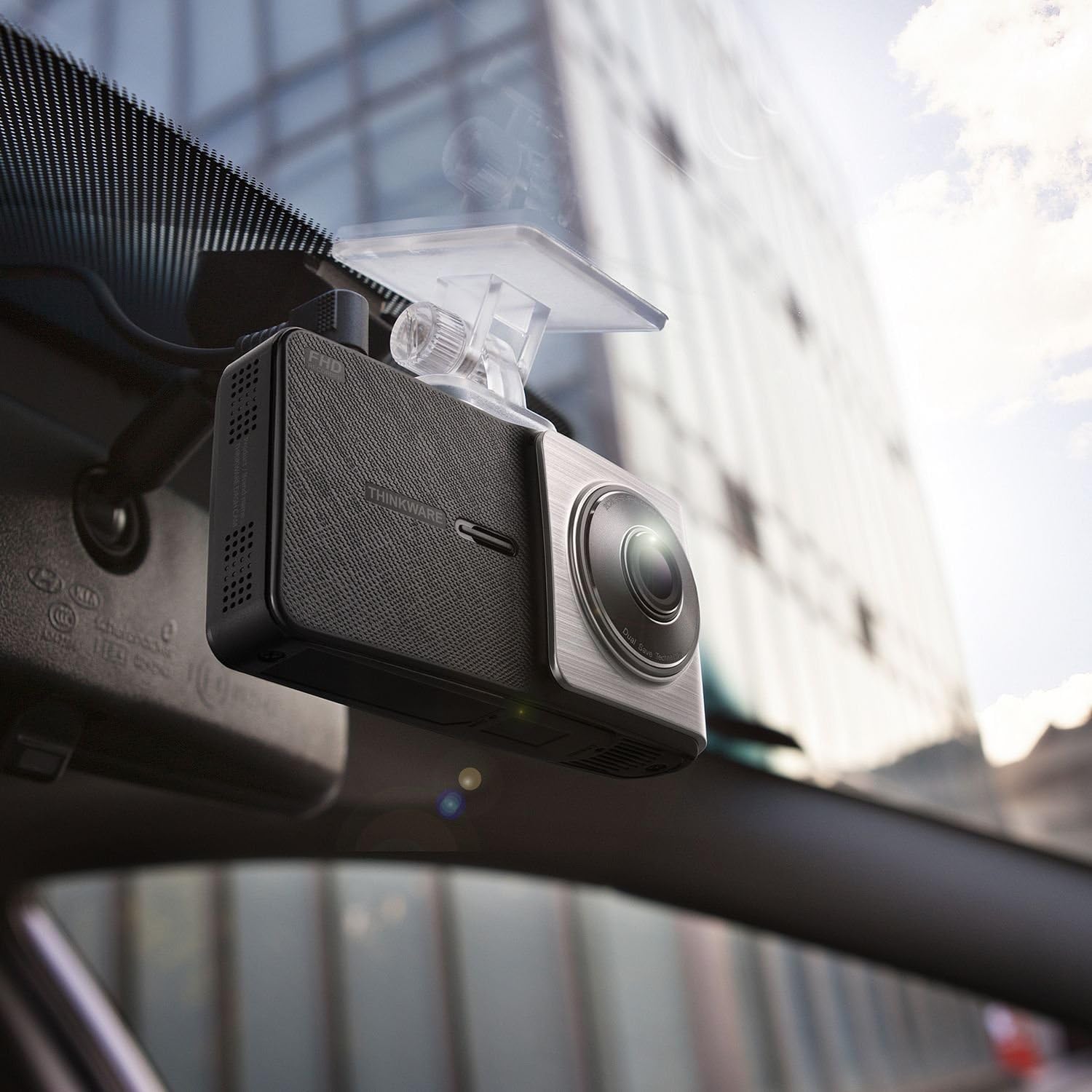
ຮູບພາບ: ເປັນມຸມ view of the THINKWARE X500D Dashcam installed on a car's windshield, showing its compact design and how it blends with the interior.
5.3. Mounting the Rear View ກ້ອງຖ່າຍຮູບ
- Clean the rear windshield area where the rear camera will be mounted.
- Remove the protective film from the adhesive tape on the rear camera mount.
- Firmly press the rear camera onto the rear windshield, ensuring it captures a clear view ຂອງເສັ້ນທາງຫລັງ.
- Connect the rear camera cable to the rear camera and route it neatly along the vehicle's headliner and pillars to the main dash cam unit. Use the provided adhesive cable clips to secure the cable.
- Connect the other end of the rear camera cable to the designated port on the main dash cam unit.
5.4. ການເຊື່ອມຕໍ່ພະລັງງານ
- Connect the cigarette power cable to the power port on the main dash cam unit.
- Plug the other end of the cigarette power cable into your vehicle's 12V power outlet (cigarette lighter socket).
- Upon starting your vehicle, the dash cam will power on automatically and begin recording.
- ທາງເລືອກ: For Parking Surveillance mode, a separate hardwiring cable (sold separately) is required. Refer to the hardwiring kit's instructions for installation.
6. ຄໍາແນະນໍາການດໍາເນີນງານ
6.1. ຮູບແບບການບັນທຶກ
- ບັນທຶກຢ່າງຕໍ່ເນື່ອງ: The dash cam automatically records continuously when the vehicle's ignition is on. Videos are saved in 1-minute segments.
- ບັນທຶກເຫດການ: In the event of an impact or sudden braking, the built-in G-sensor triggers incident recording. These files are saved separately and are protected from being overwritten by continuous recording.
- ການບັນທຶກຄູ່ມື: Press the manual recording button on the device to initiate a manual recording of an event.
- Parking Surveillance Mode: If the dash cam is hardwired, it can record events while the vehicle is parked. This mode includes motion detection and impact detection.
6.2. ການທໍາງານຂອງ GPS
The built-in GPS module records your vehicle's speed, location, and time data, which can be viewed during video playback using the THINKWARE PC Viewer ຊອບແວ.
6.3. ລະບົບຊ່ວຍເຫຼືອຜູ້ຂັບຂີ່ຂັ້ນສູງ (ADAS)
The X500D includes ADAS features to enhance driving safety:
- ລະບົບເຕືອນການອອກເສັ້ນທາງ (LDWS): ແຈ້ງເຕືອນທ່ານ ຖ້າລົດຂອງທ່ານອອກນອກເລນຂອງມັນ.
- Front Collision Warning System (FCWS): Alerts you to potential collisions with the vehicle ahead.
- Red Light Camera Alert: ແຈ້ງໃຫ້ທ່ານຊາບກ່ຽວກັບກ້ອງຖ່າຍຮູບໄຟແດງທີ່ຈະມາເຖິງ.
- ເຕືອນກ້ອງຖ່າຍຮູບຄວາມໄວ: Notifies you of upcoming speed cameras.
These features can be configured or toggled on/off via the dash cam's settings menu.
6.4. Using the LCD Screen and Buttons
The 2.7-inch LCD screen allows for live view, video playback, and access to settings. Navigate through menus using the physical buttons located on the side of the device.
- ປຸ່ມຫນ້າທໍາອິດ: ກັບຄືນຫາເມນູຫຼັກ.
- ປຸ່ມບັນທຶກ: Initiates manual recording.
- ປຸ່ມເມນູ/ການຕັ້ງຄ່າ: Accesses device settings.
- ປຸ່ມຂຶ້ນ/ລົງ: ທ່ອງໄປຫາຕົວເລືອກເມນູ.
- ປຸ່ມຕົກລົງ: ຢືນຢັນການເລືອກ.
7. ບໍາລຸງຮັກສາ
7.1. ການຄຸ້ມຄອງບັດ MicroSD
Regularly format the microSD card (at least once a month) to prevent recording errors and ensure optimal performance. This can be done through the dash cam's settings menu or using the THINKWARE PC Viewer ຊອບແວ.
Note: Formatting the card will delete all recorded files. ສຳຮອງຂໍ້ມູນວິດີໂອທີ່ສຳຄັນກ່ອນການຟໍແມັດ.
7.2. ທຳ ຄວາມສະອາດອຸປະກອນ
Use a soft, dry, lint-free cloth to clean the dash cam's lens and LCD screen. Do not use liquid cleaners or abrasive materials, as they may damage the device.
7.3. ອັບເດດເຟີມແວ
THINKWARE periodically releases firmware updates to improve performance, add features, or fix bugs. Visit the official THINKWARE website to download the latest firmware for your X500D model. Follow the instructions provided with the firmware update package carefully.
8. ການແກ້ໄຂບັນຫາ
| ບັນຫາ | ສາເຫດທີ່ເປັນໄປໄດ້ | ການແກ້ໄຂ |
|---|---|---|
| Dash cam ບໍ່ເປີດ. | No power supply; faulty cable; vehicle's power outlet issue. | Check power cable connection. Ensure vehicle's power outlet is working. Try a different power source if available. |
| ການບັນທຶກຢຸດ ຫຼືຢຸດ. | ຄວາມຜິດພາດຂອງກາດ MicroSD; ກາດເຕັມ; ກາດເຂົ້າກັນບໍ່ໄດ້. | Format the microSD card. Replace the microSD card if the issue persists. Ensure you are using a high-endurance card. |
| ຄຸນນະພາບວິດີໂອບໍ່ດີ. | ເລນເປື້ອນ; ຟິມປ້ອງກັນຍັງຕິດຢູ່; ການຕັ້ງຄ່າບໍ່ຖືກຕ້ອງ. | ເຮັດຄວາມສະອາດເລນ. ເອົາຟິມປ້ອງກັນອອກ. ກວດສອບການຕັ້ງຄ່າຄວາມລະອຽດວິດີໂອໃນເມນູ. |
| ສັນຍານ GPS ບໍ່ໄດ້ມາ. | ຂັດຂວາງ view of sky; device location. | ໃຫ້ແນ່ໃຈວ່າກ້ອງ dash ມີຄວາມຊັດເຈນ view of the sky. Move the vehicle to an open area. GPS acquisition may take a few minutes on first use or after a long period of inactivity. |
| ADAS alerts are inaccurate or not working. | Incorrect calibration; environmental factors (weather, lighting). | Ensure the dash cam is properly calibrated and mounted centrally. ADAS performance can be affected by severe weather or poor lighting conditions. |
9. ຂໍ້ມູນຈໍາເພາະ
| ຄຸນສົມບັດ | ລາຍລະອຽດ |
|---|---|
| ຊື່ຕົວແບບ | X500D |
| ໝາຍເລກຕົວແບບ | TW-X500D |
| ຄວາມລະອຽດການຖ່າຍວິດີໂອ | 1080p (Full HD) Front & Rear |
| ເຊັນເຊີຮູບພາບ | Sony Exmor (Front) |
| ປະເພດການສະແດງ | ຈໍ LCD |
| ຄຸນນະສົມບັດພິເສດ | GPS ໃນຕົວ |
| ເຕັກໂນໂລຊີການເຊື່ອມຕໍ່ | USB |
| ວິທີການຄວບຄຸມ | Touch (via LCD) |
| ນ້ໍາຫນັກລາຍການ | 1.6 ອອນສ໌ (ປະມານ 45 ກຣາມ) |
| ຂະໜາດສິນຄ້າ | 4.1 x 1.1 x 2.2 ນິ້ວ (ປະມານ 10.4 x 2.8 x 5.6 ຊມ) |
| ອົງປະກອບລວມ | Main Dash Cam Unit, Mount, Cigarette Power Cable, Adhesive Cable Clips, 32GB MicroSD Card with SD Adapter, Quick Start Guide/Warranty, Rear View ກ້ອງຫຼັງ, ກ້ອງຫຼັງ View ສາຍກ້ອງ |
10. ການຮັບປະກັນແລະການສະຫນັບສະຫນູນ
10.1. ການຮັບປະກັນຂອງຜູ້ຜະລິດ
The THINKWARE X500D Dashcam comes with a One-year Manufacturer's Limited Warranty. This warranty covers units sold at authorized retailers only. Please note that microSD cards typically have a shorter warranty period, often 6 months.
For specific warranty terms and conditions, please refer to the Quick Start Guide/Warranty information included in your package or visit the official THINKWARE webເວັບໄຊ.
10.2. ການຊ່ວຍເຫຼືອລູກຄ້າ
For technical assistance, troubleshooting, or warranty claims, please contact THINKWARE customer support. Contact information can typically be found on the official THINKWARE webເວັບໄຊຫຼືໃນເອກະສານຜະລິດຕະພັນຂອງທ່ານ.
When contacting support, please have your product model number (TW-X500D) and proof of purchase readily available.


