ແນະນຳ
Thank you for choosing the Technoline WT 745 Radio Controlled Alarm Clock. This digital alarm clock features precise timekeeping, dual alarms with snooze, date and weekday display, and indoor temperature monitoring. Please read this manual carefully to ensure proper setup and operation.
ເນື້ອໃນຊຸດ
- Technoline WT 745 Radio Controlled Alarm Clock
- ຄູ່ມືຜູ້ໃຊ້
Note: 2x AAA batteries are required and not included.
ສິນຄ້າເກີນview
Familiarize yourself with the main components of your WT 745 alarm clock.
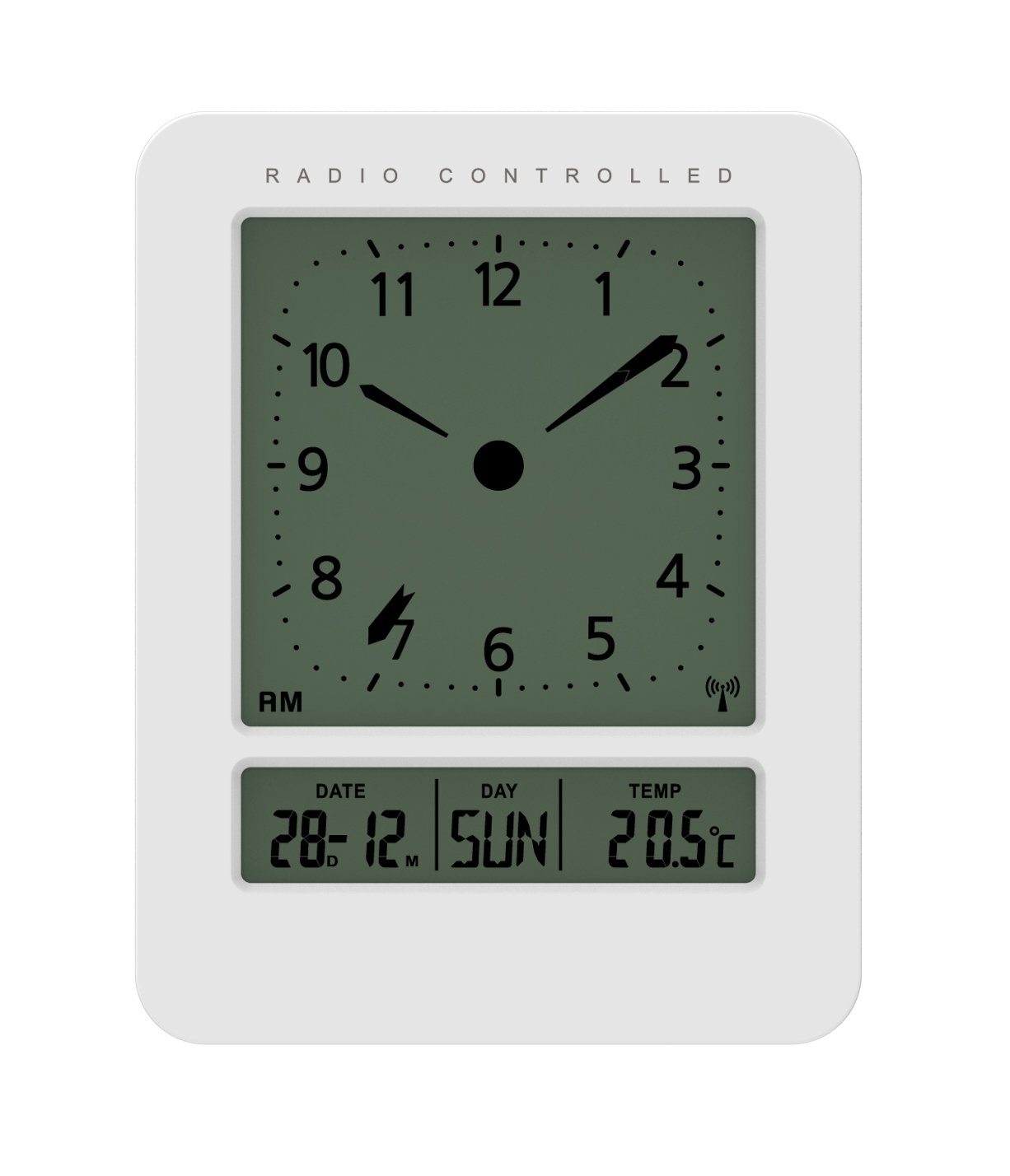
ຮູບພາບ: ດ້ານຫນ້າແລະດ້ານຂ້າງ view of the Technoline WT 745 Radio Controlled Alarm Clock, showing the digital display with time, date, day, and temperature, and the analog clock face. The clock is white with a light grey display.
- Analog Clock Face: Displays current time with hour, minute, and second hands.
- ຈໍດິຈິຕອນ: Shows date, day of the week, and indoor temperature.
- Radio Controlled Indicator: Symbol indicating successful radio signal reception.
- ປຸ່ມຄວບຄຸມ: Buttons for setting time, alarm, and other functions, typically located on the back or side.
- ຊ່ອງໃສ່ຫມໍ້ໄຟ: Located on the back for 2x AAA batteries.
ຕັ້ງຄ່າ
1. ການໃສ່ແບັດເຕີລີ
- Open the battery compartment cover on the back of the alarm clock.
- Insert 2 new AAA batteries, observing the correct polarity (+/-).
- ປິດຝາປິດຊ່ອງໃສ່ຫມໍ້ໄຟຢ່າງປອດໄພ.
Note: The clock will automatically start searching for the radio time signal after battery insertion. This process may take several minutes.
2. Initial Radio Signal Reception
- ວາງໂມງໄວ້ໃກ້ກັບປ່ອງຢ້ຽມເພື່ອໃຫ້ຮັບສັນຍານໄດ້ດີທີ່ສຸດ.
- ຫຼີກເວັ້ນການວາງມັນຢູ່ໃກ້ກັບອຸປະກອນເອເລັກໂຕຣນິກທີ່ອາດຈະເຮັດໃຫ້ເກີດການລົບກວນ.
- Once the signal is received, the time, date, and day will be automatically set. The radio controlled indicator will appear on the display.
If the signal is not received within 10 minutes, try repositioning the clock or manually setting the time (see "Manual Time Setting").
ຄໍາແນະນໍາການດໍາເນີນງານ
ການຕັ້ງຄ່າປຸກ
- ກົດ ຕັ້ງໂມງປຸກ button (location not specified, assume standard placement). The alarm time will flash.
- ໃຊ້ UP or ລົງ ປຸ່ມເພື່ອປັບຊົ່ວໂມງ.
- ກົດ ຕັ້ງໂມງປຸກ ອີກເທື່ອຫນຶ່ງເພື່ອຢືນຢັນຊົ່ວໂມງແລະຍ້າຍໄປນາທີ.
- ໃຊ້ UP or ລົງ ປຸ່ມເພື່ອປັບນາທີ.
- ກົດ ຕັ້ງໂມງປຸກ ເພື່ອຊ່ວຍປະຢັດເວລາປຸກ.
- ເພື່ອເປີດໃຊ້ງານ/ປິດການແຈ້ງເຕືອນ, ໃຫ້ກົດປຸ່ມ ເປີດ / ປິດ ປຸ່ມ. ໄອຄອນປຸກຈະປາກົດ/ຫາຍໄປໃນຈໍສະແດງຜົນ.
The WT 745 supports two independent alarms. Repeat the steps above to set the second alarm.
ຟັງຊັນເລື່ອນ
- ເມື່ອສຽງສັນຍານເຕືອນ, ກົດປຸ່ມ ງອກ button (usually a large button on top). The alarm will pause for approximately 5 minutes and then sound again.
- To stop the alarm completely, press any other button (e.g., ALARM ON/OFF) or let it ring for its full duration.
ການເປີດໃຊ້ໄຟພື້ນຫຼັງ
- ກົດ ແສງສະຫວ່າງ or ງອກ button to temporarily illuminate the display for easy viewຢູ່ໃນສະພາບແສງ ໜ້ອຍ.
Viewing Date, Day, and Temperature
- The digital display continuously shows the current date, day of the week, and indoor temperature. No specific action is required to view ເຫຼົ່ານີ້.
Manual Time Setting (if radio signal is unavailable)
- ກົດຄ້າງໄວ້ ເວລາ ກຳ ນົດ button for a few seconds until the hour digits flash.
- ໃຊ້ UP or ລົງ ປຸ່ມເພື່ອປັບຊົ່ວໂມງ.
- ກົດ ເວລາ ກຳ ນົດ ອີກເທື່ອຫນຶ່ງເພື່ອຢືນຢັນຊົ່ວໂມງແລະຍ້າຍໄປນາທີ.
- ໃຊ້ UP or ລົງ ປຸ່ມເພື່ອປັບນາທີ.
- ສືບຕໍ່ກົດ ເວລາ ກຳ ນົດ to cycle through and adjust year, month, and day as needed.
- ກົດ ເວລາ ກຳ ນົດ one last time to exit manual setting mode.
ບໍາລຸງຮັກສາ
- ທໍາຄວາມສະອາດ: ເຊັດໂມງດ້ວຍຜ້າອ່ອນໆ, ແຫ້ງ. ຢ່າໃຊ້ເຄື່ອງເຮັດຄວາມສະອາດຂັດຫຼືສານລະລາຍ.
- ການປ່ຽນແບັດເຕີຣີ: Replace batteries when the display dims or functions become erratic. Always replace both batteries simultaneously with new ones.
- ການເກັບຮັກສາ: ຖ້າເກັບຮັກສາໂມງໄວ້ເປັນເວລາດົນ, ໃຫ້ຖອດແບັດເຕີຣີອອກເພື່ອປ້ອງກັນການຮົ່ວໄຫຼ.
- ສະພາບແວດລ້ອມ: ຮັກສາໂມງໃຫ້ຫ່າງຈາກແສງແດດໂດຍກົງ, ອຸນຫະພູມທີ່ຮຸນແຮງ, ແລະຄວາມຊຸ່ມຊື່ນສູງ.
ການແກ້ໄຂບັນຫາ
| ບັນຫາ | ສາເຫດທີ່ເປັນໄປໄດ້ | ການແກ້ໄຂ |
|---|---|---|
| ຈໍສະແດງຜົນຫວ່າງເປົ່າ ຫຼືມືດ. | ແບັດເຕີຣີເຫຼືອໜ້ອຍ ຫຼືໃສ່ບໍ່ຖືກຕ້ອງ. | ປ່ຽນແບດເຕີຣີດ້ວຍແບດເຕີຣີ້ AAA ໃໝ່, ຮັບປະກັນການຂົ້ວທີ່ຖືກຕ້ອງ. |
| Clock does not receive radio signal. | Interference, poor location, or signal too weak. | Move the clock closer to a window, away from electronic devices. Try manual time setting. |
| ໂມງປຸກບໍ່ມີສຽງ. | ປຸກບໍ່ໄດ້ເປີດໃຊ້ງານ ຫຼືຕັ້ງບໍ່ຖືກຕ້ອງ. | Ensure the alarm icon is visible on the display. Recheck alarm time settings. |
| ສະແດງເວລາທີ່ບໍ່ຖືກຕ້ອງ. | Radio signal lost or manual time set incorrectly. | Allow the clock to resynchronize with the radio signal. If persistent, manually set the time. |
ຂໍ້ມູນຈໍາເພາະ
- ຕົວແບບ: ວທ 745
- ຍີ່ຫໍ້: ເທັກໂນໂລຍີ
- ຂະໜາດ: 7.1 x 4.5 x 9.2 cm (L x W x H)
- ນ້ຳໜັກ: 150 g
- ວັດສະດຸ: ພາດສະຕິກ
- ປະເພດການສະແດງ: Digital with Analog Clock Face
- ແຫຼ່ງພະລັງງານ: 2 x ຫມໍ້ໄຟ AAA (ບໍ່ລວມ)
- ຄຸນນະສົມບັດພິເສດ: Radio Controlled Time, Dual Alarms, Snooze Function, Date Display, Day of Week Display, Indoor Temperature Display, Backlight.
- ການນຳໃຊ້: ພາຍໃນ
ການຮັບປະກັນແລະການສະຫນັບສະຫນູນ
For warranty information or technical support, please refer to the warranty card included with your product or visit the official Technoline webເວັບໄຊ. ຮັກສາໃບຮັບເງິນການຊື້ຂອງທ່ານໄວ້ເປັນຫຼັກຖານການຊື້.
ທາງການ Webເວັບໄຊ: www.technoline.eu


