1. ບົດແນະນຳ
The Crenova PT100A is a 720P HD WIFI Surveillance IP Camera designed for home security and monitoring. It features Pan-Tilt-Zoom (PTZ) capabilities, night vision, two-way audio, and support for wireless alarm sensors, providing comprehensive surveillance and communication functionalities.
This manual provides detailed instructions for setting up, operating, and maintaining your Crenova PT100A camera to ensure optimal performance and security.
2. ຄຸນນະສົມບັດທີ່ສໍາຄັນ
- One-Key Wi-Fi Configuration: Simple and quick setup via sound.
- ຄວາມລະອຽດ HD: 720P resolution with a 1.0 MP CMOS sensor for clear images and video.
- ວິໄສທັດກາງຄືນ: Ceramic infrared light provides optimal visibility in low-light conditions.
- ການຄວບຄຸມ PTZ: Pan 355 degrees horizontally and tilt 120 degrees vertically for wide area coverage.
- ແຈ້ງເຕືອນຄວາມປອດໄພ: Supports up to 64 wireless alarm sensors, with siren, mobile phone calls, and email photo alerts.
- ສຽງສອງທາງ: Real-time communication with the monitored area.
- ການເກັບຮັກສາທ້ອງຖິ່ນ: Supports up to a 128GB TF card for continuous recording.
3. ເນື້ອໃນຊຸດ
ກະລຸນາກວດສອບວ່າລາຍການທັງໝົດມີຢູ່ໃນຊຸດຂອງທ່ານ:
- 1 x Crenova Smart IP Camera (PT100A)
- 1 x ສາຍ USB
- 1 x Power Adapter
- 1 x Mounting Basket Panel
- 1 x ຄູ່ມືຜູ້ໃຊ້
4. ຜະລິດຕະພັນເກີນview

ຮູບພາບ 4.1: Diagram of the Crenova PT100A IP Camera with its main components labeled. This includes the lens, ceramic lamp, speaker, antenna, network cable interface, TF card slot, reset button, and power interface.
ເຮັດຄວາມຄຸ້ນເຄີຍກັບອົງປະກອບຂອງກ້ອງຖ່າຍຮູບ:
- ເລນ: ຖ່າຍວິດີໂອ ແລະ ຮູບພາບ.
- ເຊລາມິກ Lamp: ສະຫນອງແສງ infrared ສໍາລັບການວິໄສທັດໃນຕອນກາງຄືນ.
- ລໍາໂພງ: Outputs audio for two-way communication and alarm siren.
- ເສົາອາກາດ: ສຳລັບການເຊື່ອມຕໍ່ Wi-Fi.
- PT (Pan/Tilt) Mechanism: Allows remote adjustment of camera angle.
- Network Cable Interface: ສຳລັບການເຊື່ອມຕໍ່ Ethernet ແບບມີສາຍ (ທາງເລືອກ).
- ສະລັອດຕິງບັດ TF: Insert a MicroSD card for local video storage.
- ປຸ່ມຣີເຊັດ: ໃຊ້ເພື່ອຟື້ນຟູການຕັ້ງຄ່າໂຮງງານ.
- ການໂຕ້ຕອບພະລັງງານ: ເຊື່ອມຕໍ່ກັບອະແດບເຕີພະລັງງານ.
5. ຄູ່ມືການຕິດຕັ້ງ
Follow these steps to set up your Crenova PT100A IP Camera:

ຮູບພາບ 5.1: Visual guide for the quick setup process, illustrating connecting power, downloading the app, performing one-key Wi-Fi setup, and adding the camera.
- ເຊື່ອມຕໍ່ພະລັງງານ: Plug the power adapter into the camera's power interface and then into a wall outlet. The camera will power on and initiate its startup sequence.
- ດາວໂຫລດ App ໄດ້: ຊອກຫາ the official Crenova camera application on your smartphone's app store (e.g., Apple App Store for iOS or Google Play Store for Android). Download and install the application.
- ລົງທະບຽນບັນຊີ: ເປີດແອັບ ແລະ ປະຕິບັດຕາມຄຳແນະນຳໃນໜ້າຈໍເພື່ອລົງທະບຽນບັນຊີຜູ້ໃຊ້ໃໝ່.
- One-Key Wi-Fi Setup: Within the app, select the option for 'One-Key Wi-Fi Configuration' or 'SmartLink'. Follow the prompts to connect the camera to your Wi-Fi network. Ensure your smartphone is connected to the same 2.4GHz Wi-Fi network you intend to use for the camera. The app will use sound waves to transmit network information to the camera.
- ເພີ່ມກ້ອງຖ່າຍຮູບ: Once the Wi-Fi setup is complete, the app will guide you to add the camera to your account. You may need to scan a QR code on the camera or manually enter its ID.
- ການຈັດວາງ: Position the camera in your desired monitoring area. The included mounting basket panel can be used for wall or ceiling installation.
6. ຄໍາແນະນໍາການດໍາເນີນງານ
6.1. ໄລຍະໄກ Viewing ແລະການຄວບຄຸມ PTZ
After successful setup, open the app on your smartphone to view the live feed from your camera. Use the on-screen controls to remotely pan (horizontal rotation) and tilt (vertical rotation) the camera lens.

ຮູບພາບ 6.1: Illustration of the camera's Pan-Tilt-Zoom (PTZ) capabilities, demonstrating 355 degrees of horizontal rotation and 120 degrees of vertical rotation for comprehensive area coverage.
- ການຫມຸນແນວນອນ: The camera supports 355 degrees of horizontal movement.
- ການຫມຸນແນວຕັ້ງ: The camera supports 120 degrees of vertical movement.
6.2. Motion Detection and Alarm Alerts
The camera can detect motion and trigger various alarm responses. Configure these settings within the camera app.

ຮູບພາບ 6.2: A smartphone displaying a motion detection alarm notification from the camera, indicating an event has occurred.
- Alarm Sensor Support: The camera can integrate with up to 64 wireless alarm sensors.
- Alarm Methods: When an alarm is triggered, the camera can:
- Emit a loud siren.
- Call up to five pre-configured mobile phone numbers.
- Capture photos and send them via email.
6.3. ສຽງສອງທາງ
Utilize the built-in microphone and speaker for real-time two-way communication.

ຮູບພາບ 6.3: The camera depicted alongside an icon representing two-way audio functionality, with sound waves indicating active communication.
- ແຕະໄອຄອນໄມໂຄຣໂຟນໃນແອັບເພື່ອເວົ້າຜ່ານລຳໂພງຂອງກ້ອງ.
- ໄມໂຄຣໂຟນຂອງກ້ອງຖ່າຍຮູບຈະຮັບສຽງຈາກພື້ນທີ່ຕິດຕາມ.
6.4. ການບັນທຶກວິດີໂອ
The camera supports local video recording to a TF (MicroSD) card.
- Insert a TF card (up to 128GB) into the designated slot on the camera.
- Configure recording settings (e.g., continuous recording, motion-activated recording) within the camera app.
- ຟູtage ສາມາດ reviewed directly from the app.
7. ຂໍ້ມູນຈໍາເພາະ
| ຄຸນສົມບັດ | ຂໍ້ມູນຈໍາເພາະ |
|---|---|
| ຕົວແບບ | PT100A |
| ເຊັນເຊີຮູບພາບ | 1.0 MP HD CMOS Sensor |
| ຄວາມລະອຽດ | 720P (1280 x 720) |
| ການເຊື່ອມຕໍ່ | Wi-Fi (Wireless), Wired Ethernet |
| PTZ Angles | ເລື່ອນ 355°, ອຽງ 120° |
| ວິໄສທັດກາງຄືນ | Ceramic Infrared Light |
| ການເກັບຮັກສາ | Supports up to 128GB TF Card |
| Alarm Sensor Support | Up to 64 wireless channels |
| ແຫຼ່ງພະລັງງານ | Cable eléctrico (Power Cable) |
| ຂະໜາດ (L x W x H) | 20.57 x 15.49 x 13.21 cm (ປະມານ 8.1 x 6.1 x 5.2 ນິ້ວ) |
| ນ້ຳໜັກ | 657.7 g (ປະມານ 1.45 lbs) |
| ການຢັ້ງຢືນ | CE, FCC, ROHS |
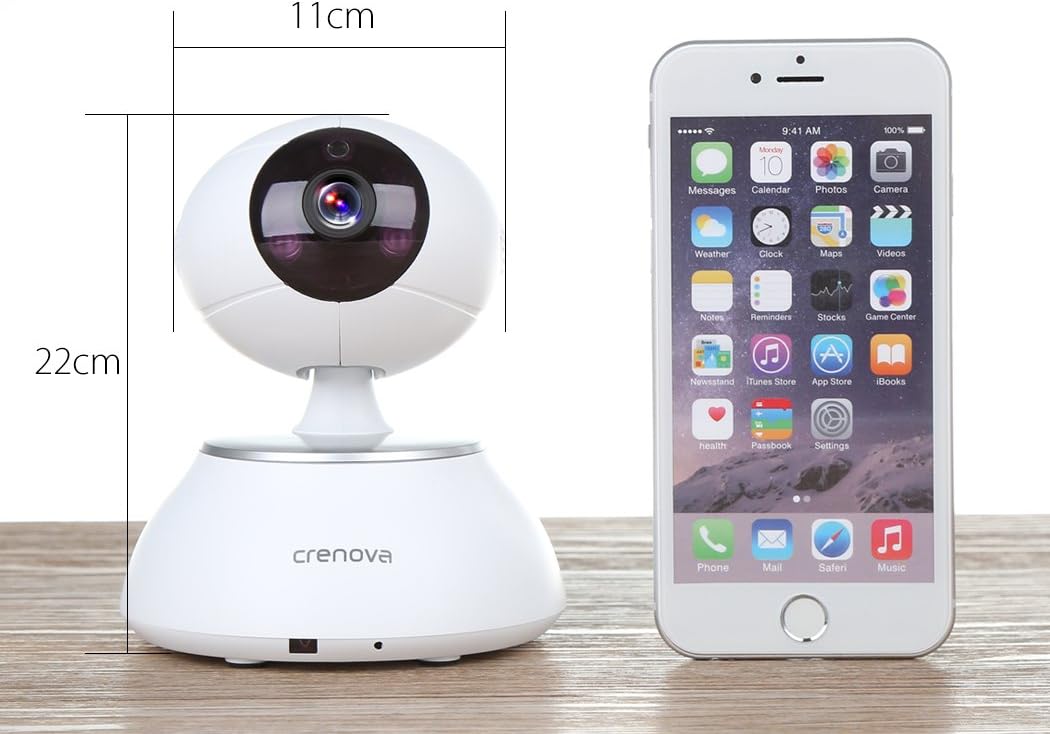
ຮູບພາບ 7.1: The Crenova PT100A IP Camera shown next to a smartphone, with its approximate dimensions indicated as 11cm in width and 22cm in height.
8. ບໍາລຸງຮັກສາ
- ທໍາຄວາມສະອາດ: Use a soft, dry cloth to clean the camera's exterior. Do not use liquid cleaners or aerosols directly on the camera.
- ການດູແລເລນ: Gently wipe the lens with a microfiber cloth designed for optics to avoid scratches.
- ການຈັດວາງ: ໃຫ້ແນ່ໃຈວ່າກ້ອງຖ່າຍຮູບຖືກວາງໄວ້ໃນສະຖານທີ່ທີ່ໝັ້ນຄົງ, ຫ່າງຈາກແສງແດດໂດຍກົງ, ອຸນຫະພູມທີ່ຮຸນແຮງ ແລະ ຄວາມຊຸ່ມຊື່ນສູງ.
- ການອັບເດດເຟີມແວ: Periodically check the camera app for available firmware updates to ensure optimal performance and security.
9. ການແກ້ໄຂບັນຫາ
- ກ້ອງຖ່າຍຮູບບໍ່ໄດ້ເຊື່ອມຕໍ່ກັບ Wi-Fi:
- ໃຫ້ແນ່ໃຈວ່າເຄືອຂ່າຍ Wi-Fi ຂອງທ່ານແມ່ນ 2.4GHz. ກ້ອງຖ່າຍຮູບອາດຈະບໍ່ຮອງຮັບເຄືອຂ່າຍ 5GHz.
- ກວດສອບວ່າລະຫັດຜ່ານ Wi-Fi ຖືກໃສ່ຢ່າງຖືກຕ້ອງໃນແອັບ.
- ຍ້າຍກ້ອງຖ່າຍຮູບໃຫ້ໃກ້ກັບເຣົາເຕີ Wi-Fi ຂອງທ່ານຫຼາຍຂຶ້ນ.
- Reset the camera using the reset button and attempt setup again.
- ຄຸນນະພາບຮູບພາບທີ່ບໍ່ດີ:
- ກວດສອບຄວາມໄວການເຊື່ອມຕໍ່ອິນເຕີເນັດຂອງທ່ານ. ການເຊື່ອມຕໍ່ທີ່ຊ້າສາມາດສົ່ງຜົນກະທົບຕໍ່ຄຸນນະພາບການຖ່າຍທອດສົດໄດ້.
- Clean the camera lens for any smudges or dust.
- Ensure adequate lighting in the monitored area, especially for optimal night vision performance.
- No Alarm Alerts:
- Verify motion detection and alarm settings are enabled in the app.
- Check app notification settings on your smartphone to ensure alerts are not blocked.
- Ensure wireless alarm sensors (if used) are properly paired and functioning.
- ສຽງສອງທາງບໍ່ເຮັດວຽກ:
- Check microphone and speaker permissions for the app on your smartphone.
- ໃຫ້ແນ່ໃຈວ່າລະດັບສຽງຢູ່ໃນໂທລະສັບສະຫຼາດຂອງທ່ານແລະພາຍໃນ app ໄດ້ເປີດຂຶ້ນ.
- ກວດສອບວ່າບໍ່ມີສິ່ງກີດຂວາງທີ່ກີດຂວາງໄມໂຄໂຟນ ຫຼືລຳໂພງຂອງກ້ອງຖ່າຍຮູບ.
10. ການຮັບປະກັນແລະການສະຫນັບສະຫນູນ
For warranty information and technical support, please refer to the documentation included with your purchase or contact Crenova customer service directly. Details for contacting support are typically available on the manufacturer's official webສະຖານທີ່ຫຼືພາຍໃນການຫຸ້ມຫໍ່ຜະລິດຕະພັນ.


