ສິນຄ້າເກີນview
The Brookstone Grill Alert Bluetooth Connected Thermometer is designed to help you achieve perfectly cooked meals by monitoring internal food temperatures and alerting you via a connected smart device. This device features dual probes, allowing you to track two different food items simultaneously.

Image: The Brookstone Grill Alert thermometer unit displaying temperatures, accompanied by two color-coded temperature probes (green and orange).
ຄຸນນະສົມບັດທີ່ສໍາຄັນ:
- App-controlled temperature monitoring via Bluetooth 4.0 or Bluetooth Smart Ready devices up to 150 feet away.
- Pre-programmed ideal cooking temperatures for various meats (chicken, turkey, fish) and customizable doneness settings (rare, medium, etc.) for steak, hamburger, veal, pork, and lamb.
- Customizable target temperature settings.
- Alerts via voice, vibration, or sound notifications.
- Includes two probes for simultaneous monitoring of two different food items.
- Probe wires wrap around handles for tidy storage.
- Magnetic base for secure attachment to grills and optimal viewມຸມ ing.
- Powered by 2 AAA batteries (not included).
ຕັ້ງຄ່າ
1. ການຕິດຕັ້ງຫມໍ້ໄຟ
The Grill Alert thermometer requires 2 AAA batteries for operation. Ensure correct polarity when inserting the batteries.
2. ການດາວໂຫຼດແອັບ ແລະ ການຈັບຄູ່
The Grill Alert App is essential for controlling and monitoring the thermometer. It is compatible with select Bluetooth 4.0 or Bluetooth Smart Ready devices.
- Download the "Grill Alert App" from your device's app store.
- Press and hold the power/pairing button on your Grill Alert thermometer unit.
- Open the Grill Alert App on your smart device and tap the Bluetooth symbol within the app.
- Press the "SCAN" button within the Grill Alert App.
- Tap "Grill Alert" when it appears on your device screen to complete the pairing process.

Image: A hand holding a smartphone displaying the Brookstone Grill Alert application, showing current and target temperatures for two probes.
ຄໍາແນະນໍາການດໍາເນີນງານ
1. Probe Insertion
Carefully insert the metal tip of the temperature probe into the thickest part of the meat, avoiding bones. Connect the probe's cable to the corresponding port on the wireless transmitter unit.
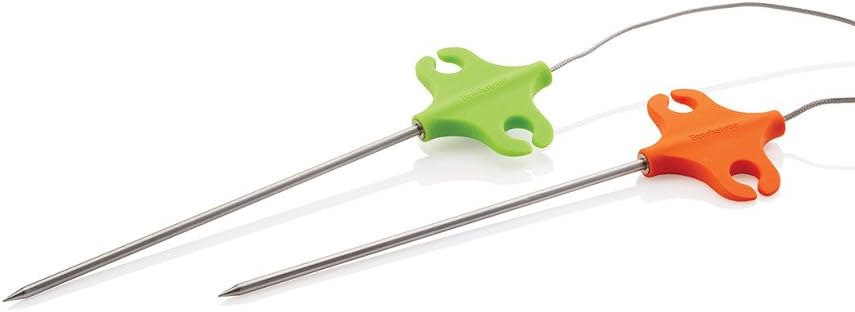
ຮູບພາບ: A close-up view of the two temperature probes, one with a green handle and the other with an orange handle, designed for measuring internal food temperatures.
2. Selecting Food Type and Doneness
Within the Grill Alert App on your Bluetooth-enabled device:
- Select the type of food you are cooking (e.g., chicken, beef, pork).
- Choose your desired level of doneness (e.g., rare, medium, well-done) if applicable for the selected food type.
- Alternatively, you can set a custom target temperature.
3. Monitoring and Alerts
The app will display real-time temperature progress. When the target temperature is reached, the device will alert you via voice, vibration, or sound, as configured in the app settings.
ບໍາລຸງຮັກສາ
ຄໍາແນະນໍາການທໍາຄວາມສະອາດ
After each use, allow the probes to cool. Wipe the probes and the main unit with a damp cloth. Do not immerse the main unit in water. The probes are not dishwasher safe. Ensure all components are dry before storage.
ການເກັບຮັກສາ
Store the thermometer and probes in a clean, dry place. The probe wires can be wrapped around the probe handles for neat storage.
ການແກ້ໄຂບັນຫາ
- ອຸປະກອນບໍ່ໄດ້ຈັບຄູ່:
Ensure Bluetooth is enabled on your smart device. Confirm the Grill Alert thermometer is powered on and within range (up to 150 feet). Restart both the app and the thermometer. Verify your smart device is Bluetooth 4.0 or Bluetooth Smart Ready compatible.
- ການອ່ານອຸນຫະພູມທີ່ບໍ່ຖືກຕ້ອງ:
Ensure the probe is inserted correctly into the thickest part of the meat, avoiding bones. Check that the probe cable is securely connected to the unit. Clean probes thoroughly after each use to prevent residue buildup affecting readings.
- ບໍ່ມີການແຈ້ງເຕືອນ:
Check app notification settings on your smart device and within the Grill Alert App. Ensure the volume is up and that the device is not in silent or do-not-disturb mode. Verify the target temperature has been set correctly.
- ອາຍຸແບັດເຕີຣີສັ້ນ:
Ensure you are using fresh AAA alkaline batteries. Battery life can vary based on usage and environmental conditions.
ຂໍ້ມູນຈໍາເພາະ
| ຄຸນລັກສະນະ | ລາຍລະອຽດ |
|---|---|
| ຍີ່ຫໍ້ | Brookstone |
| ໝາຍເລກຕົວແບບ | 883594048692 |
| ເຕັກໂນໂລຊີການເຊື່ອມຕໍ່ | Bluetooth 4.0 / Bluetooth Smart Ready |
| ຄຸນນະສົມບັດພິເສດ | ການກວດສອບຄູ່ |
| ອົງປະກອບລວມ | 2 probes |
| ແຫຼ່ງພະລັງງານ | ໝໍ້ໄຟ AAA 2 ອັນ (ບໍ່ລວມ) |
| ລະດັບອຸນຫະພູມສູງສຸດ | 572 ອົງສາຟາເຣນຮາຍ (300 ອົງສາເຊນຊຽດ) |
| ຄວາມລະອຽດ | 0.1°C ຫຼື 0.1°F |
| ຂະໜາດສິນຄ້າ | 10.24 x 3.15 x 6.3 ນິ້ວ |
| ນ້ໍາຫນັກລາຍການ | 14.4 ອອນ |
| ຄໍາແນະນໍາການດູແລ | ເຊັດສະອາດ |
| ການນຳໃຊ້ພາຍໃນ/ນອກ | ກາງແຈ້ງ |
ການຮັບປະກັນແລະການສະຫນັບສະຫນູນ
For warranty information and customer support, please refer to the official Brookstone webເວັບໄຊ ຫຼືຕິດຕໍ່ບໍລິການລູກຄ້າຂອງເຂົາເຈົ້າໂດຍກົງ. ຮັກສາໃບຮັບເງິນການຊື້ຂອງທ່ານສໍາລັບການຮ້ອງຂໍການຮັບປະກັນ.
ຜູ້ຜະລິດ: Brookstone
Webເວັບໄຊ: www.brookstone.com (ໝາຍເຫດ: ນີ້ແມ່ນຕົວຍຶດບ່ອນ URL, please refer to official product documentation for exact support links.)