1. ບົດແນະນຳ
The Edifier P180 is a stereo earbud headset designed for clear audio and convenient communication. Featuring an inline microphone and control, it offers a comfortable listening experience for various devices.

Figure 1: Edifier P180 Wired Earbud Headset
2. ສິ່ງທີ່ຢູ່ໃນກ່ອງ
- Edifier P180 Earbud Headset
- ສາຍ
3. ຄຸນນະສົມບັດທີ່ສໍາຄັນ
- Classic Comfort: Ergonomic design for comfortable wear without irritating the ear canal.
- ຄຸນນະພາບສຽງທີ່ດີເລີດ: Equipped with 16mm neodymium magnetic monomers for high-fidelity audio playback.
- Integrated Microphone and Control: 3.5mm stereo earphones with a built-in microphone and remote button for mobile phone communication.
- ການທໍາງານ: Single button control for picking up/hanging up calls and skipping songs (device dependent for iOS/Android).
- ການອອກແບບທົນທານ: Constructed with quality materials for longevity.

Figure 2: Ergonomic design for comfortable fit.
4. ຕັ້ງຄ່າ
- ແກະກ່ອງ: Carefully remove the Edifier P180 headset from its packaging.
- ກວດກາ: Check the earbuds and cable for any visible damage.
- ເຊື່ອມຕໍ່: Insert the 3.5mm audio jack into the headphone port of your compatible device (smartphone, tablet, computer, etc.). Ensure the jack is fully inserted for proper audio and microphone function.
- ຕໍາແໜ່ງ: Place the earbuds comfortably in your ears. The ergonomic design is intended to rest well without causing irritation.
5. ຄໍາແນະນໍາການດໍາເນີນງານ
The Edifier P180 features an inline control button for easy management of calls and music playback.
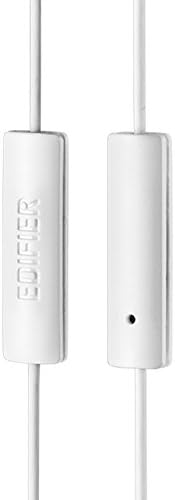
Figure 3: Inline microphone and control button.
- ໂທລະສັບຕອບ / ຕອບຈົບ: Press the control button once to answer an incoming call. Press it again to end an active call.
- ການຫຼິ້ນ/ຢຸດດົນຕີ: Press the control button once to play or pause audio playback.
- ຂ້າມເພງ: Double-press the control button to skip to the next track. Triple-press to go to the previous track (functionality may vary by device and operating system).
- ຜູ້ຊ່ວຍສຽງ: Long-press the control button to activate your device's voice assistant (e.g., Siri, Google Assistant).
ວິດີໂອທີ 1: ຜະລິດຕະພັນຢ່າງເປັນທາງການແລ້ວview of the Edifier P180 Classic Earbud Headsets, demonstrating features and usage.
6. ບໍາລຸງຮັກສາ
- ທໍາຄວາມສະອາດ: ເຊັດຫູຟັງ ແລະ ສາຍຢ່າງເບົາໆດ້ວຍຜ້າອ່ອນໆແຫ້ງ. ຫຼີກລ່ຽງການໃຊ້ສານເຄມີທີ່ຮຸນແຮງ ຫຼື ວັດສະດຸຂັດ.
- ການເກັບຮັກສາ: ເມື່ອບໍ່ໄດ້ໃຊ້, ໃຫ້ເກັບຮັກສາຊຸດຫູຟັງໄວ້ໃນບ່ອນທີ່ສະອາດ, ແຫ້ງ, ຫ່າງຈາກອຸນຫະພູມສູງສຸດ ແລະ ແສງແດດໂດຍກົງ. ຫຼີກເວັ້ນການຂັດສາຍ.
- ຫຼີກເວັ້ນຄວາມຊຸ່ມ: Do not expose the headset to water or excessive moisture, as this can damage the internal components.
7. ການແກ້ໄຂບັນຫາ
- ບໍ່ມີສຽງ:
- ກວດໃຫ້ແນ່ໃຈວ່າສຽບຊ່ອງສຽບ 3.5 ມມ ເຂົ້າໄປໃນຮູສຽບສຽງຂອງອຸປະກອນຂອງທ່ານ.
- ກວດເບິ່ງການຕັ້ງຄ່າລະດັບສຽງຂອງອຸປະກອນຂອງທ່ານ.
- ທົດສອບຫູຟັງເອຍບັດກັບອຸປະກອນອື່ນເພື່ອກວດສອບບັນຫາສະເພາະຂອງອຸປະກອນ.
- ໄມໂຄຣໂຟນບໍ່ເຮັດວຽກ:
- ໃຫ້ແນ່ໃຈວ່າສຽບສຽບ 3.5 ມມ.
- ກວດສອບການຕັ້ງຄ່າການປ້ອນຂໍ້ມູນໄມໂຄຣໂຟນຂອງອຸປະກອນຂອງທ່ານ.
- ທົດສອບໄມໂຄຣໂຟນກັບອຸປະກອນ ຫຼືແອັບພລິເຄຊັນອື່ນ.
- ສຽງເປັນໄລຍະໆ:
- Check the cable for any kinks or damage.
- ໃຫ້ແນ່ໃຈວ່າຊ່ອງສຽບສຽງສະອາດ ແລະ ບໍ່ມີສິ່ງເສດເຫຼືອ.
8. ຂໍ້ມູນຈໍາເພາະ
| ຄຸນສົມບັດ | ຂໍ້ມູນຈໍາເພາະ |
|---|---|
| ໝາຍເລກຕົວແບບ | P180 |
| ການຕອບສະໜອງຄວາມຖີ່ | 20 Hz - 20,000 Hz |
| Jack ຫູຟັງ | Jack ຂະ ໜາດ 3.5 ມມ |
| ເຕັກໂນໂລຊີການເຊື່ອມຕໍ່ | ມີສາຍ |
| ນ້ໍາຫນັກລາຍການ | 1.76 ອອນສ໌ (50 ກຣາມ) |
| ຂະໜາດສິນຄ້າ | 2.01 x 5.59 x 0.91 ນິ້ວ |
| ວັດສະດຸ | ນີໂອດີເມຍ |
| ປະເພດການຄວບຄຸມ | Inline Control Button |
| impedance | 32 ໂອມ |
| ການຄວບຄຸມສິ່ງລົບກວນ | ການແຍກສຽງ |
9. ການຮັບປະກັນແລະການສະ ໜັບ ສະ ໜູນ
The Edifier P180 headset is backed by a ຮັບປະກັນ 1 ປີ. For any support inquiries or warranty claims, please refer to the contact information provided with your purchase or visit the official Edifier webເວັບໄຊ.


