ແນະນຳ
Thank you for choosing the Altec Lansing iMW475 Mini Life Jacket Bluetooth Speaker. This speaker is designed for portability and durability, featuring a rugged, compact, waterproof, dustproof, and shockproof design. It also floats, making it ideal for outdoor and water-related activities. This manual provides essential information for setting up, operating, and maintaining your speaker.
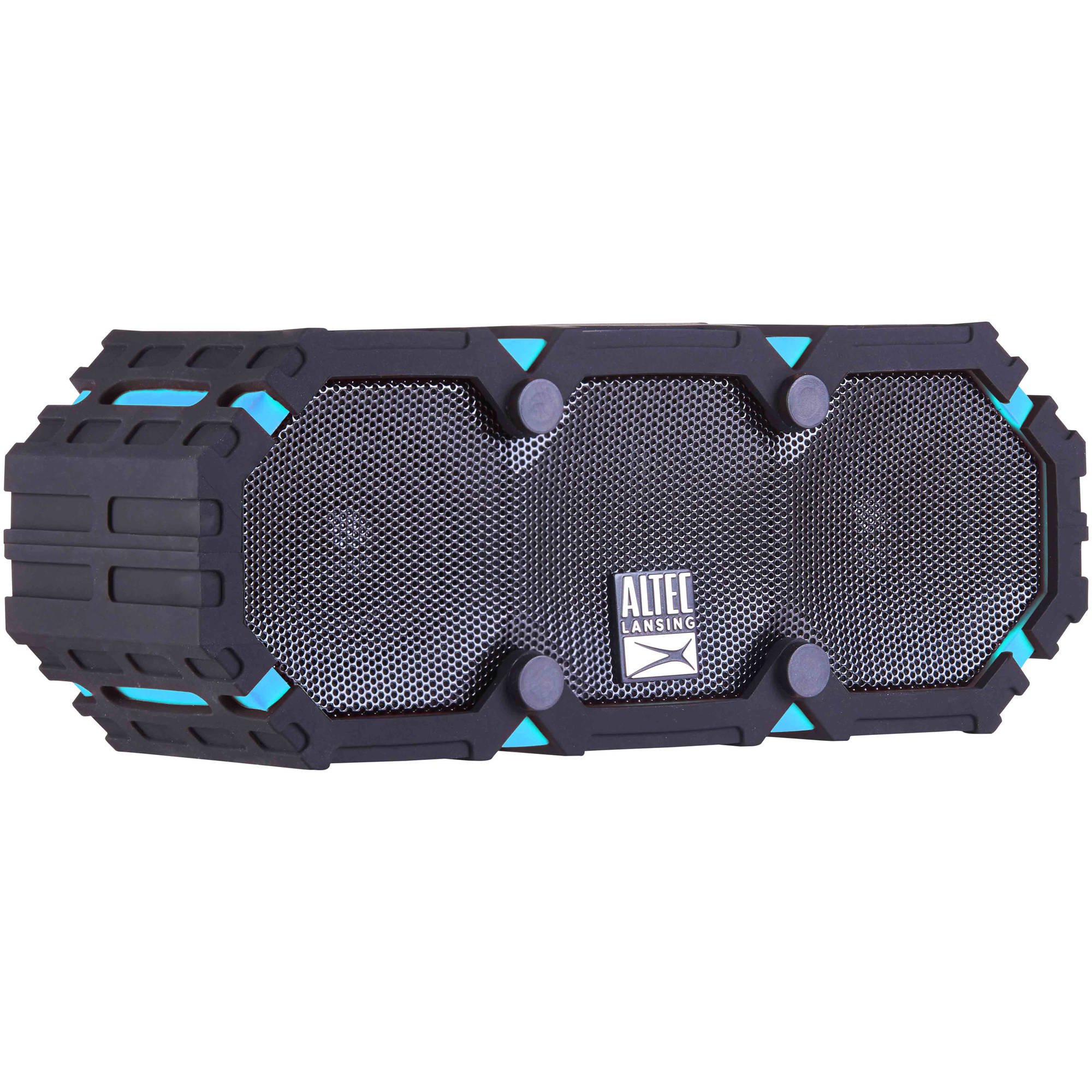
Image: The Altec Lansing iMW475 Mini Life Jacket Bluetooth Speaker, showcasing its compact, rugged design in black and blue.
ເນື້ອໃນຊຸດ
- Altec Lansing iMW475 Mini Life Jacket Bluetooth Speaker
- ວົງເລັບຕິດຕັ້ງ
- ສາຍສາກ USB (Note: Specific cable type not detailed in product data, typically Micro-USB or USB-C)
- Auxiliary Cable (Note: Not explicitly listed but common for such speakers)
- ຄູ່ມືເລີ່ມຕົ້ນດ່ວນ (Not explicitly listed but common)
ກະລຸນາກວດໃຫ້ແນ່ໃຈວ່າທຸກລາຍການມີຢູ່ກ່ອນທີ່ຈະສືບຕໍ່ການຕັ້ງຄ່າ.
ການຄວບຄຸມແລະຕົວຊີ້ວັດ
The speaker features intuitive controls for power, volume, and Bluetooth pairing. Specific button layouts may vary slightly, but common functions include:
- ປຸ່ມເປີດປິດ: ກົດຄ້າງໄວ້ເພື່ອເປີດ ຫຼືປິດລຳໂພງ.
- ປຸ່ມເພີ່ມສຽງຂຶ້ນ/ຕິດຕາມຕໍ່ໄປ: ກົດເພື່ອເພີ່ມລະດັບສຽງ. ກົດຄ້າງໄວ້ເພື່ອຂ້າມໄປຫາເພງຕໍ່ໄປ.
- ປະລິມານລົງ/ປຸ່ມຕິດຕາມກ່ອນໜ້າ: ກົດເພື່ອຫຼຸດລະດັບສຽງ. ກົດຄ້າງໄວ້ເພື່ອໄປຫາເພງກ່ອນໜ້ານີ້.
- ປຸ່ມຫຼິ້ນ/ຢຸດ/ໂທ: Press to play or pause audio. Press to answer or end a phone call. Hold to activate voice assistant (if supported by your device).
- ປຸ່ມຈັບຄູ່ Bluetooth: ກົດຄ້າງໄວ້ເພື່ອເຂົ້າສູ່ໂໝດຈັບຄູ່ Bluetooth.
- ຕົວຊີ້ວັດ LED: Displays power status, charging status, and Bluetooth connection status.
Refer to the quick start guide included with your product for a detailed diagram of button placement.
ຕັ້ງຄ່າ
1. ການສາກໄຟ ລຳ ໂພງ
Before first use, fully charge your Altec Lansing iMW475 speaker. A full charge provides approximately 10 hours of battery life.
- Locate the charging port, usually protected by a waterproof flap.
- ເຊື່ອມຕໍ່ສາຍສາກ USB ທີ່ໃຫ້ມາກັບຊ່ອງສາກໄຟຂອງລຳໂພງ.
- ເຊື່ອມຕໍ່ອີກສົ້ນຂອງສາຍ USB ກັບອະແດັບເຕີໄຟ USB (ບໍ່ລວມ) ຫຼືພອດ USB ຂອງຄອມພິວເຕີ.
- The LED indicator will show the charging status (e.g., solid red while charging, off or green when fully charged).
- Once fully charged, disconnect the cable and ensure the waterproof flap is securely closed.
2. ການຈັບຄູ່ Bluetooth
ເພື່ອເຊື່ອມຕໍ່ລຳໂພງຂອງທ່ານກັບອຸປະກອນທີ່ເປີດໃຊ້ Bluetooth:
- ໃຫ້ແນ່ໃຈວ່າລຳໂພງໄດ້ສາກໄຟແລ້ວ ແລະ ປິດຢູ່.
- ກົດປຸ່ມເປີດ/ປິດຄ້າງໄວ້ເພື່ອເປີດລຳໂພງ. ໄຟ LED ຈະກະພິບ, ຊີ້ບອກວ່າມັນຢູ່ໃນໂໝດຈັບຄູ່.
- ໃນອຸປະກອນມືຖືຂອງທ່ານ (ໂທລະສັບສະຫຼາດ, ແທັບເລັດ, ແລັບທັອບ), ໄປທີ່ການຕັ້ງຄ່າ Bluetooth.
- ຊອກຫາ available devices. You should see "iMW475" or a similar name in the list.
- Select "iMW475" to connect. The LED indicator will turn solid when successfully paired.
- A voice prompt may confirm "You are now connected."
- Once paired, the speaker will automatically connect to the last paired device when turned on, if the device is within range (up to 30 feet or 9.14 meters).
ຄໍາແນະນໍາການດໍາເນີນງານ
ກຳລັງຫຼິ້ນສຽງ
- After successful Bluetooth pairing, open your preferred music application on your connected device.
- Start playing audio. The sound will be routed through your Altec Lansing iMW475 speaker.
- Use the Volume Up/Down buttons on the speaker or your connected device to adjust the audio level.
- ກົດປຸ່ມຫຼິ້ນ/ຢຸດຊົ່ວຄາວເພື່ອຢຸດ ຫຼືສືບຕໍ່ການຫຼິ້ນຄືນ.
- Hold the Volume Up/Down buttons to skip tracks forward or backward.
ໂທຟຣີ
The speaker features an onboard microphone for hands-free communication.
- When a call comes in, the music will pause, and you will hear a ringtone through the speaker.
- Press the Play/Pause/Call button once to answer the incoming call.
- Speak clearly into the speaker's microphone.
- To end the call, press the Play/Pause/Call button once again.
- To reject an incoming call, press and hold the Play/Pause/Call button.
ການນໍາໃຊ້ Auxiliary Input
For devices without Bluetooth, you can connect via the auxiliary input.
- Locate the auxiliary input port, usually protected by a waterproof flap.
- Connect one end of a 3.5mm auxiliary cable (not included) to the speaker's AUX port.
- ເຊື່ອມຕໍ່ປາຍອື່ນກັບຊ່ອງສຽບຫູຟັງຂອງອຸປະກອນສຽງຂອງທ່ານ.
- The speaker will automatically switch to AUX mode, or you may need to press the Mode button (if available).
- ຄວບຄຸມການຫຼິ້ນ ແລະ ລະດັບສຽງຈາກອຸປະກອນສຽງທີ່ເຊື່ອມຕໍ່ຂອງທ່ານ.
ບໍາລຸງຮັກສາ
- ທໍາຄວາມສະອາດ: ເຊັດລໍາໂພງດ້ວຍສຽງອ່ອນ, ງamp ຜ້າ. ຢ່າໃຊ້ເຄື່ອງເຮັດຄວາມສະອາດຂັດຫຼືສານລະລາຍ.
- ການດູແລກັນນ້ໍາ: Ensure all port covers are securely closed before exposing the speaker to water to maintain its waterproof integrity. After exposure to saltwater or chlorinated water, rinse the speaker with fresh water and allow it to air dry completely.
- ການເກັບຮັກສາ: ເກັບຮັກສາລຳໂພງໄວ້ໃນບ່ອນທີ່ເຢັນ, ແຫ້ງ, ຫ່າງຈາກແສງແດດໂດຍກົງ ແລະ ອຸນຫະພູມທີ່ຮ້າຍກາດ.
- ການດູແລຫມໍ້ໄຟ: ເພື່ອຍືດອາຍຸແບັດເຕີລີ, ຫຼີກເວັ້ນການຖອດແບດເຕີລີ່ເຕັມເລື້ອຍໆ. ສາກລຳໂພງເປັນປະຈຳ, ເຖິງແມ່ນວ່າບໍ່ໄດ້ໃຊ້ເປັນເວລາດົນກໍຕາມ.
ການແກ້ໄຂບັນຫາ
| ບັນຫາ | ການແກ້ໄຂ |
|---|---|
| ລຳໂພງບໍ່ເປີດ. | ໃຫ້ແນ່ໃຈວ່າແບັດເຕີຣີໄດ້ສາກແລ້ວ. ເຊື່ອມຕໍ່ລຳໂພງກັບແຫຼ່ງພະລັງງານໂດຍໃຊ້ສາຍສາກໄຟ USB. |
| ບໍ່ມີສຽງຈາກ ລຳ ໂພງ. |
|
| ການຈັບຄູ່ Bluetooth ລົ້ມເຫລວ. |
|
| ຄຸນະພາບສຽງບໍ່ດີ ຫຼືມີການບິດເບືອນ. |
|
ຂໍ້ມູນຈໍາເພາະ
- ຊື່ຕົວແບບ: iMW475 Mini Life Jacket
- ປະເພດລຳໂພງ: ກາງແຈ້ງ
- ຄຸນນະສົມບັດພິເສດ: Waterproof, Dustproof, Shockproof, Floats
- ການເຊື່ອມຕໍ່: Bluetooth
- ລະດັບ Bluetooth: ສູງເຖິງ 30 ຟຸດ (9.14 ແມັດ)
- ຊີວິດຫມໍ້ໄຟ: ສູງສຸດ 10 ຊົ່ວໂມງ
- ແຫຼ່ງພະລັງງານ: Battery and AC (via USB charging)
- ໂModeດອອກສຽງ: ສະເຕຣິໂອ
- ລຳໂພງກຳລັງຜົນຜະລິດສູງສຸດ: 10 ວັດ
- ວິທີການຄວບຄຸມ: ສຽງ, ປຸ່ມ
- ອົງປະກອບລວມ: ວົງເລັບຕິດຕັ້ງ
- ຂະໜາດຜະລິດຕະພັນ: 7 x 3 x 4.5 ນິ້ວ
- ນ້ໍາຫນັກລາຍການ: 1 ປອນ (16 ອອນສ)
- ລະດັບຄວາມຕ້ານທານນ້ໍາ: ກັນນ້ຳ
- UPC: 021331205841
ການຮັບປະກັນແລະການສະຫນັບສະຫນູນ
Altec Lansing products are designed for reliability and performance. For specific warranty information regarding your iMW475 Mini Life Jacket Bluetooth Speaker, please refer to the warranty card included with your purchase or visit the official Altec Lansing webເວັບໄຊ.
For technical support, frequently asked questions, or to register your product, please visit the Altec Lansing support page or contact their customer service directly. Contact details are typically available on the manufacturer's webເວັບໄຊ.
ໝາຍເຫດ: ເງື່ອນໄຂການຮັບປະກັນອາດແຕກຕ່າງກັນໄປຕາມພາກພື້ນ ແລະຜູ້ຂາຍຍ່ອຍ. ຮັກສາຫຼັກຖານການຊື້ຂອງທ່ານສໍາລັບການຮ້ອງຂໍການຮັບປະກັນ.


