1. ບົດແນະນຳ
This manual provides detailed instructions for the setup, operation, maintenance, and troubleshooting of your JOOAN 1080P Wireless Indoor Security Camera, Model 366. This camera is designed for indoor surveillance, offering features such as 1080P video resolution, two-way audio, night vision, and motion detection, making it suitable for monitoring homes, pets, or babies.
Please read this manual thoroughly before using the product to ensure correct installation and optimal performance.
2. ລາຍການບັນຈຸ
ເມື່ອເປີດຊຸດ, ກະລຸນາກວດສອບວ່າທຸກລາຍການທີ່ລະບຸໄວ້ຂ້າງລຸ່ມນີ້ແມ່ນຢູ່ ແລະຢູ່ໃນສະພາບດີ:
- JOOAN WiFi Camera x 1
- Power Plug x 1
- Data Line (USB Cable) x 1
- Install Bracket x 1 (for wall or ceiling mounting)
- Instructions (User Manual) x 1
- Screw Pack x 1 (for bracket installation)

Image: Contents of the JOOAN camera package, including the camera, power adapter, USB cable, mounting bracket, instruction manual, and screw pack.
3. ຄູ່ມືການຕິດຕັ້ງ
3.1 ການເປີດກ້ອງ
- ເຊື່ອມຕໍ່ສາຍ USB ທີ່ໃຫ້ມາເຂົ້າກັບພອດພະລັງງານເຂົ້າຂອງກ້ອງຖ່າຍຮູບ.
- Plug the other end of the USB cable into the power plug adapter.
- Insert the power plug into a standard electrical outlet. The camera will power on and initiate its startup sequence.
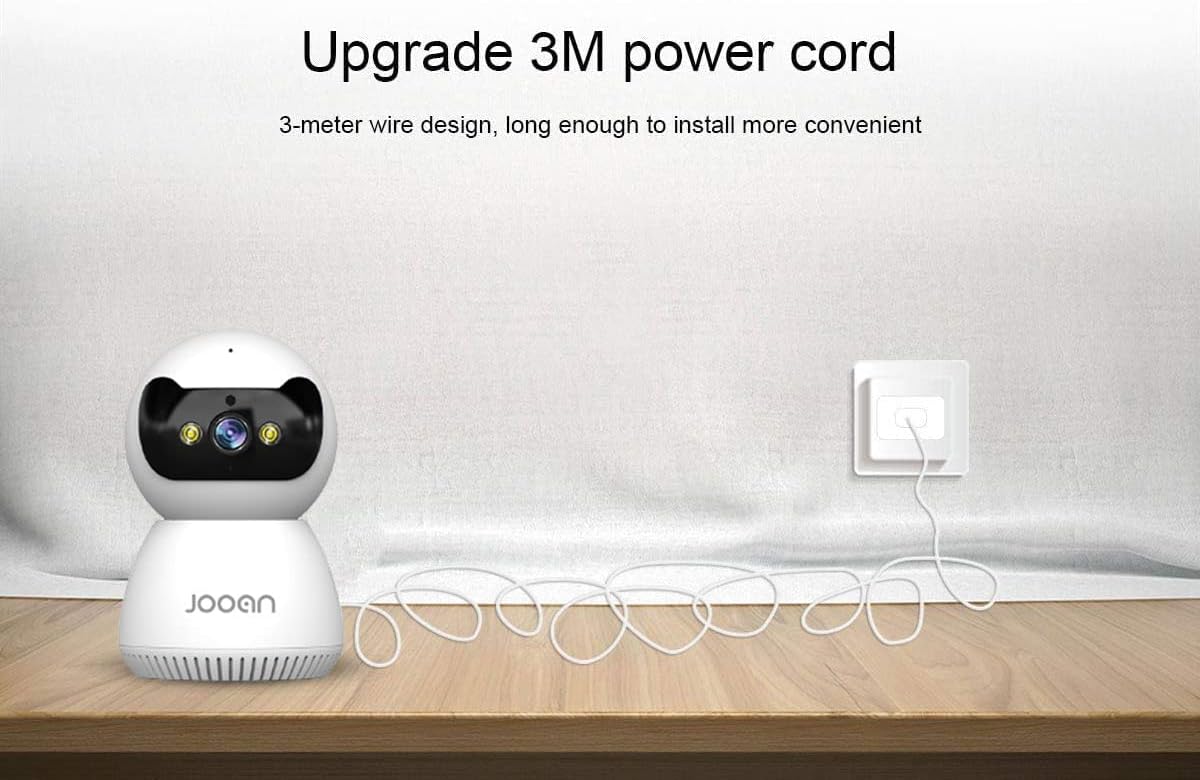
Image: The JOOAN camera connected to its 3-meter power cord and adapter, ready for power connection.
3.2 ດາວໂຫຼດ ແລະ ຕິດຕັ້ງແອັບ
To operate the camera, you need to download the official JOOAN application on your smartphone or tablet.
- Scan the QR code provided in the included instruction manual or search for 'JOOAN' in your device's app store (Google Play Store for Android, Apple App Store for iOS).
- ດາວນ໌ໂຫລດແລະຕິດຕັ້ງຄໍາຮ້ອງສະຫມັກ.
- ລົງທະບຽນບັນຊີໃຫມ່ຫຼືເຂົ້າສູ່ລະບົບຖ້າຫາກວ່າທ່ານມີຢູ່ແລ້ວ.
3.3 ການເຊື່ອມຕໍ່ Wi-Fi
The camera connects to your home Wi-Fi network. ສຳຄັນ: This camera is primarily compatible with 2.4GHz Wi-Fi networks. Connection to 5GHz Wi-Fi networks may not be supported or stable.
- ໃຫ້ແນ່ໃຈວ່າໂທລະສັບສະຫຼາດຂອງທ່ານເຊື່ອມຕໍ່ກັບເຄືອຂ່າຍ Wi-Fi 2.4GHz.
- Open the JOOAN app and follow the on-screen instructions to add a new device.
- ເລືອກເຄືອຂ່າຍ Wi-Fi ຂອງທ່ານ ແລະ ໃສ່ລະຫັດຜ່ານເມື່ອຖືກຖາມ.
- The app will guide you through the pairing process, which may involve scanning a QR code displayed on your phone with the camera or using audio pairing. Ensure your phone's volume is up during audio pairing.
- Once connected, the camera's indicator light will change, and the app will confirm successful pairing.

Image: The JOOAN camera on a pedestal, illustrating its wireless connectivity. While the image mentions 'Dual-Band WiFi 2.4/5G Hz', users should note that compatibility is primarily with 2.4GHz networks.
3.4 ຕິດຕັ້ງກ້ອງ
The camera can be placed on a flat surface or mounted to a wall or ceiling using the provided bracket.
- ການຈັດວາງ Desktop: Simply place the camera on a stable, flat surface in your desired monitoring area.
- ການຕິດຝາ/ເພດານ:
- ເລືອກສະຖານທີ່ທີ່ເຫມາະສົມສໍາລັບການຕິດຕັ້ງ.
- Use the mounting bracket as a template to mark screw holes on the wall or ceiling.
- ເຈາະຮູນັກບິນ ແລະໃສ່ບ່ອນຍຶດຕິດຝາທີ່ໃຫ້ໄວ້ຖ້າຈຳເປັນ.
- Secure the mounting bracket using the screws.
- Attach the camera to the bracket by twisting it until it locks into place.
4. ຄໍາແນະນໍາການດໍາເນີນງານ
4.1 ດໍາລົງຊີວິດ View ແລະການຄວບຄຸມ Pan/Tilt
Once connected, open the JOOAN app to access the live video feed from your camera.
- ດໍາລົງຊີວິດ View: The main screen of the app displays the real-time video feed.
- ເລື່ອນ/ອຽງ: Use the directional controls within the app to remotely rotate the camera horizontally (355° Pan) and vertically (45° Tilt) to adjust the viewມຸມ ing.
- ຊູມດິຈິຕອນ: Pinch to zoom on the live feed to magnify specific areas.
- ຈຸດທີ່ຕັ້ງໄວ້ລ່ວງໜ້າ: Configure up to 6 preset viewມຸມເພື່ອການນຳທາງໄວ.

Image: A JOOAN camera mounted on a ceiling, demonstrating its 355° pan and 45° tilt capabilities, controlled via a smartphone app. Features like 4X digital zoom and preset points are also highlighted.
4.2 ສຽງສອງທາງ
ກ້ອງຖ່າຍຮູບມີໄມໂຄຣໂຟນ ແລະ ລຳໂພງໃນຕົວເຊິ່ງຊ່ວຍໃຫ້ສາມາດສື່ສານສອງທາງໄດ້.
- ແຕະໄອຄອນໄມໂຄຣໂຟນໃນແອັບເພື່ອເວົ້າຜ່ານລຳໂພງຂອງກ້ອງ.
- Listen to audio from the camera's environment through your smartphone.
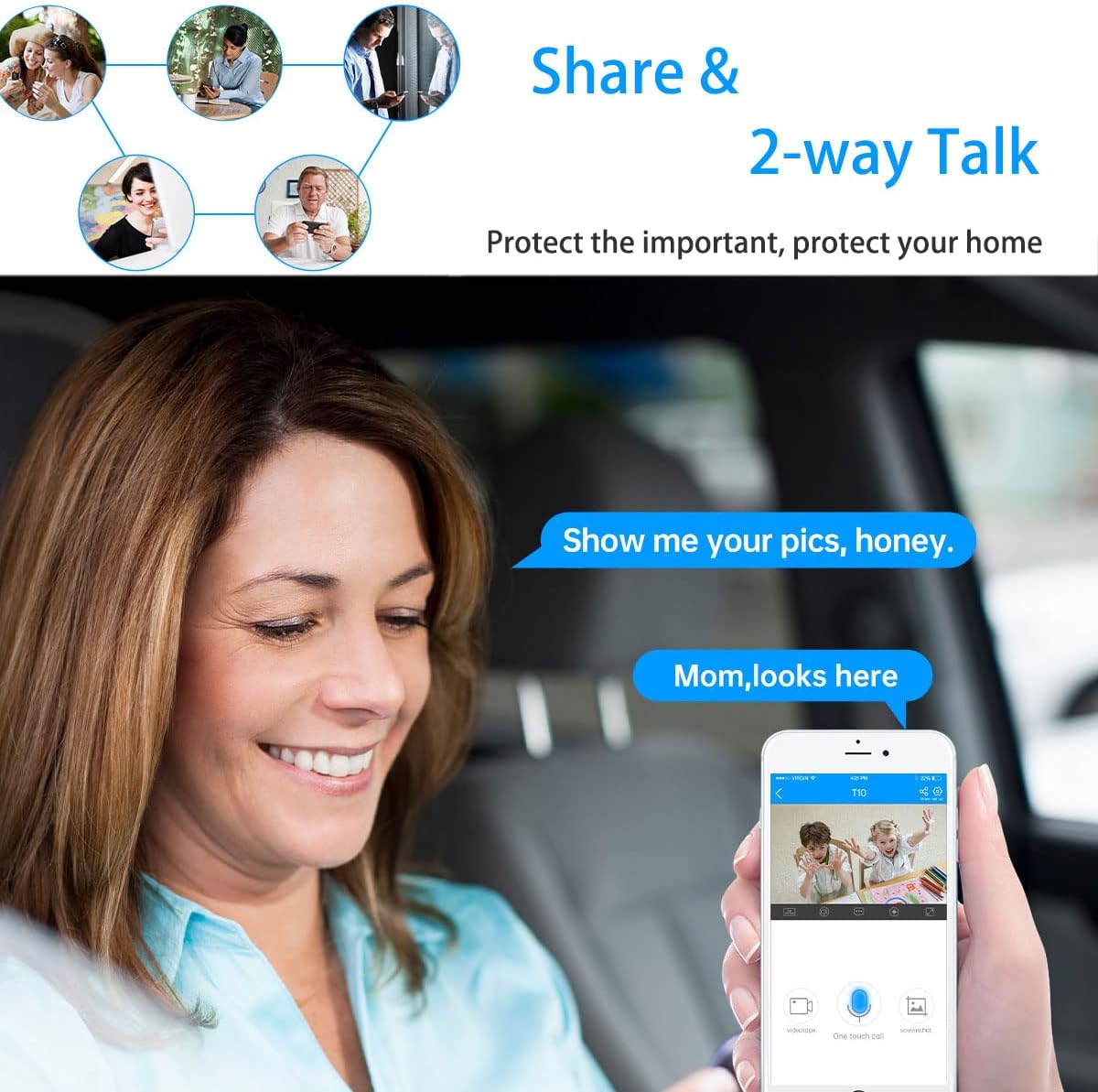
Image: A woman in a car using a smartphone app to engage in two-way communication through the JOOAN camera, demonstrating the 'Share & 2-way Talk' feature.
4.3 ໂໝດວິໄສທັດກາງຄືນ
ກ້ອງຖ່າຍຮູບສະເໜີໂໝດວິໄສທັດກາງຄືນຫຼາຍຮູບແບບເພື່ອການຕິດຕາມກວດກາທີ່ຊັດເຈນໃນສະພາບແສງສະຫວ່າງໜ້ອຍ.
- Infrared (IR) ວິໄສທັດກາງຄືນ: Automatically activates in low light, providing clear black and white video using 8 IR LEDs.
- ວິໄສທັດກາງຄືນສີ: Utilizes 2 white lights to provide color video in low light.
- ວິໄສທັດກາງຄືນອັດສະລິຍະ: Combines IR and white light. Floodlights can turn on automatically upon detection of a moving human shape, providing enhanced visibility and deterrence.
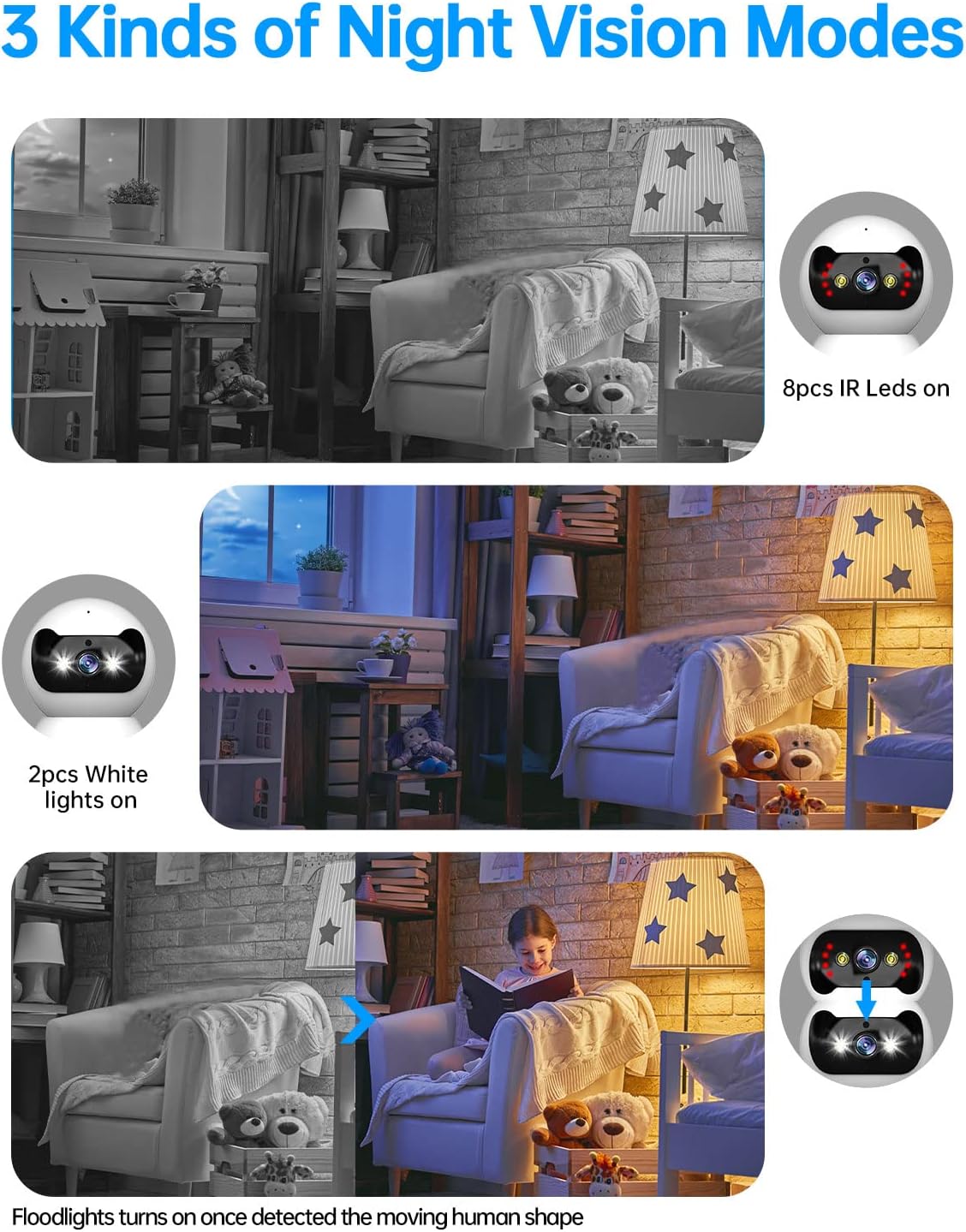
Image: Three panels illustrating the JOOAN camera's night vision capabilities: standard infrared (8 IR LEDs), color night vision (2 white lights), and smart night vision where floodlights activate upon motion detection.
4.4 ກວດຈັບການເຄື່ອນໄຫວ ແລະການແຈ້ງເຕືອນ
The camera can detect motion and send alerts to your smartphone.
- ເປີດໃຊ້ການກວດຈັບການເຄື່ອນໄຫວໃນການຕັ້ງຄ່າແອັບ.
- ປັບລະດັບຄວາມອ່ອນໄຫວເພື່ອຫຼຸດຜ່ອນສັນຍານເຕືອນທີ່ບໍ່ຖືກຕ້ອງ.
- ຮັບການແຈ້ງເຕືອນໃນໂທລະສັບຂອງທ່ານເມື່ອກວດພົບການເຄື່ອນໄຫວ.
- The camera supports automatic tracking, following detected movement within its field of view.

Image: A JOOAN camera mounted on a ceiling, demonstrating its automatic tracking feature by highlighting a person moving through a room with red detection zones.
4.5 ການບັນທຶກແລະການຫຼິ້ນ
The camera supports video recording, typically to a microSD card (not included) or cloud storage (subscription may be required).
- Insert a compatible microSD card into the camera's slot (refer to app for maximum supported capacity).
- Configure recording settings (e.g., continuous recording, motion-triggered recording) in the app.
- ການເຂົ້າເຖິງບັນທຶກ footage through the app's playback feature, typically organized by date and time.
5. ບໍາລຸງຮັກສາ
5.1 ການທໍາຄວາມສະອາດ
To maintain optimal image quality, keep the camera lens clean.
- ໃຫ້ແນ່ໃຈວ່າກ້ອງຖ່າຍຮູບຖືກປິດແລ້ວກ່ອນທຳຄວາມສະອາດ.
- Use a soft, dry, lint-free cloth to gently wipe the lens and camera body.
- Avoid using harsh chemicals, solvents, or abrasive materials, as these can damage the camera's surface or lens.
5.2 ການອັບເດດເຟີມແວ
Periodically check for firmware updates through the JOOAN app. Firmware updates can improve performance, add new features, and enhance security.
- Access the camera settings in the app.
- Look for a 'Firmware Update' or 'About Device' section.
- Follow the on-screen prompts to download and install any available updates. Ensure the camera remains powered during the update process.
5.3 ຣີເຊັດອຸປະກອນ
If you encounter persistent issues or wish to reconfigure the camera, a factory reset may be necessary.
- Locate the reset button on the camera (refer to the product diagram in the app or included manual).
- With the camera powered on, use a pin or a straightened paperclip to press and hold the reset button for approximately 5-10 seconds until you hear a voice prompt or see the indicator light change.
- The camera will restart, and all settings will revert to factory defaults. You will need to re-add the camera to the app.
6. ການແກ້ໄຂບັນຫາ
This section addresses common issues you might encounter with your JOOAN camera.
6.1 ກ້ອງຖ່າຍຮູບບໍ່ໄດ້ເຊື່ອມຕໍ່ກັບ Wi-Fi
- ກວດສອບແຖບຄວາມຖີ່ Wi-Fi: Ensure your router is broadcasting a 2.4GHz Wi-Fi signal and your phone is connected to it during setup. The camera may not support 5GHz networks.
- ລະຫັດຜ່ານ Wi-Fi: ກວດສອບອີກຄັ້ງວ່າລະຫັດຜ່ານ Wi-Fi ທີ່ປ້ອນເຂົ້າໃນແອັບນັ້ນຖືກຕ້ອງ.
- ຄວາມແຮງຂອງສັນຍານ: Place the camera closer to your Wi-Fi router to ensure a strong signal.
- ຕັ້ງຄ່າ Router: Ensure your router's firewall or security settings are not blocking the camera.
- ຣີເຊັດກ້ອງຖ່າຍຮູບ: Perform a factory reset on the camera and attempt the setup process again.
6.2 ຄຸນນະພາບຮູບພາບທີ່ບໍ່ດີ
- ເລນສະອາດ: ຄ່ອຍໆທຳຄວາມສະອາດເລນກ້ອງຖ່າຍຮູບດ້ວຍຜ້າອ່ອນໆແລະແຫ້ງ.
- ຄວາມໄວເຄືອຂ່າຍ: Ensure your internet connection has sufficient upload speed for streaming high-definition video.
- ແສງ: Adjust ambient lighting conditions. For night vision, ensure no obstructions are blocking the IR or white lights.
6.3 Two-Way Audio Issues
- ປະລິມານແອັບ: Check the volume settings on your smartphone and within the JOOAN app.
- ປະລິມານກ້ອງຖ່າຍຮູບ: Ensure the camera's speaker volume is not muted or set too low in the app.
- ແຊກແຊງ: Move the camera away from other electronic devices that might cause audio interference.
6.4 ການກວດຈັບການເຄື່ອນໄຫວບໍ່ເຮັດວຽກ
- Enable Feature: ກວດສອບວ່າການກວດຈັບການເຄື່ອນໄຫວຖືກເປີດໃຊ້ງານຢູ່ໃນການຕັ້ງຄ່າກ້ອງຖ່າຍຮູບພາຍໃນແອັບ.
- ຄວາມອ່ອນໄຫວ: Adjust the motion detection sensitivity. If it's too low, it might miss events.
- ເຂດກວດຫາ: Ensure the area you want to monitor is within the camera's detection zone.
7. ຂໍ້ມູນຈໍາເພາະ
| ຍີ່ຫໍ້ | JOOAN |
| ໝາຍເລກຕົວແບບ | 366 |
| ຄວາມລະອຽດວິດີໂອທີ່ມີປະສິດທິພາບ | 720 Pixels (Note: Product is marketed as 1080P) |
| ເຕັກໂນໂລຊີການເຊື່ອມຕໍ່ | ໄຮ້ສາຍ (Wi-Fi) |
| ເຕັກໂນໂລຊີການສື່ສານໄຮ້ສາຍ | Wi-Fi (Primarily 2.4GHz) |
| ຄຸນນະສົມບັດພິເສດ | HD 720p, Pan/Tilt Visibility, Two-Way Talk, Easy Setup |
| ການນຳໃຊ້ພາຍໃນ/ນອກ | ພາຍໃນ |
| ຂອບເຂດວິໄສທັດກາງຄືນ | 30 ຟຸດ |
| ປະເພດແຫຼ່ງແສງ | ອິນຟາເຣດ |
| ປະເພດ Alert | ການເຄື່ອນໄຫວເທົ່ານັ້ນ |
| ວິທີການຄວບຄຸມ | Remote (via Smartphone/Tablet App) |
| ອຸປະກອນທີ່ເຂົ້າກັນໄດ້ | ເດັສທັອບ, ໂທລະສັບສະຫຼາດ, ແທັບເລັດ |
| ແຫຼ່ງພະລັງງານ | AC/DC |
| ສະບັບtage | 12 ໂວນ |
| ວັດtage | 4.2 ວັດ |
| ຂະໜາດລາຍການ (L x W x H) | 1.77 x 1.85 x 2.05 ນິ້ວ |
| ນ້ໍາຫນັກລາຍການ | 12 ອອນ |
| ສີ | ສີຂາວ |
| ວັດສະດຸ | ແກ້ວ |
| ຮູບແບບການຖ່າຍຮູບວິດີໂອ | MPEG-4 |
8. ຂໍ້ມູນການຮັບປະກັນ
Specific warranty details for the JOOAN 1080P Wireless Indoor Security Camera (Model 366) are typically provided with the product packaging or on the manufacturer's official website. Please refer to these sources for comprehensive information regarding warranty coverage, terms, and conditions.
9. ການຊ່ວຍເຫຼືອລູກຄ້າ
For technical assistance, product inquiries, or further support, please visit the official JOOAN website. You may find FAQs, additional resources, and contact information for their customer service team there.
Webເວັບໄຊ: Visit the JOOAN Store on Amazon (ສຳລັບຂໍ້ມູນຍີ່ຫໍ້ທົ່ວໄປ)


