ສິນຄ້າເກີນview
The Muse M-1280 BT is a versatile Bluetooth tower speaker designed to deliver clear audio with multiple connectivity options. It features A2DP Bluetooth for wireless streaming, a powerful 120W output, a PLL FM radio tuner, and ports for USB and SD card playback. Additionally, it includes a USB charging function and an auxiliary input for wired connections. The speaker is housed in a stylish wooden cabinet and stands approximately 100cm tall, making it a prominent addition to any room.
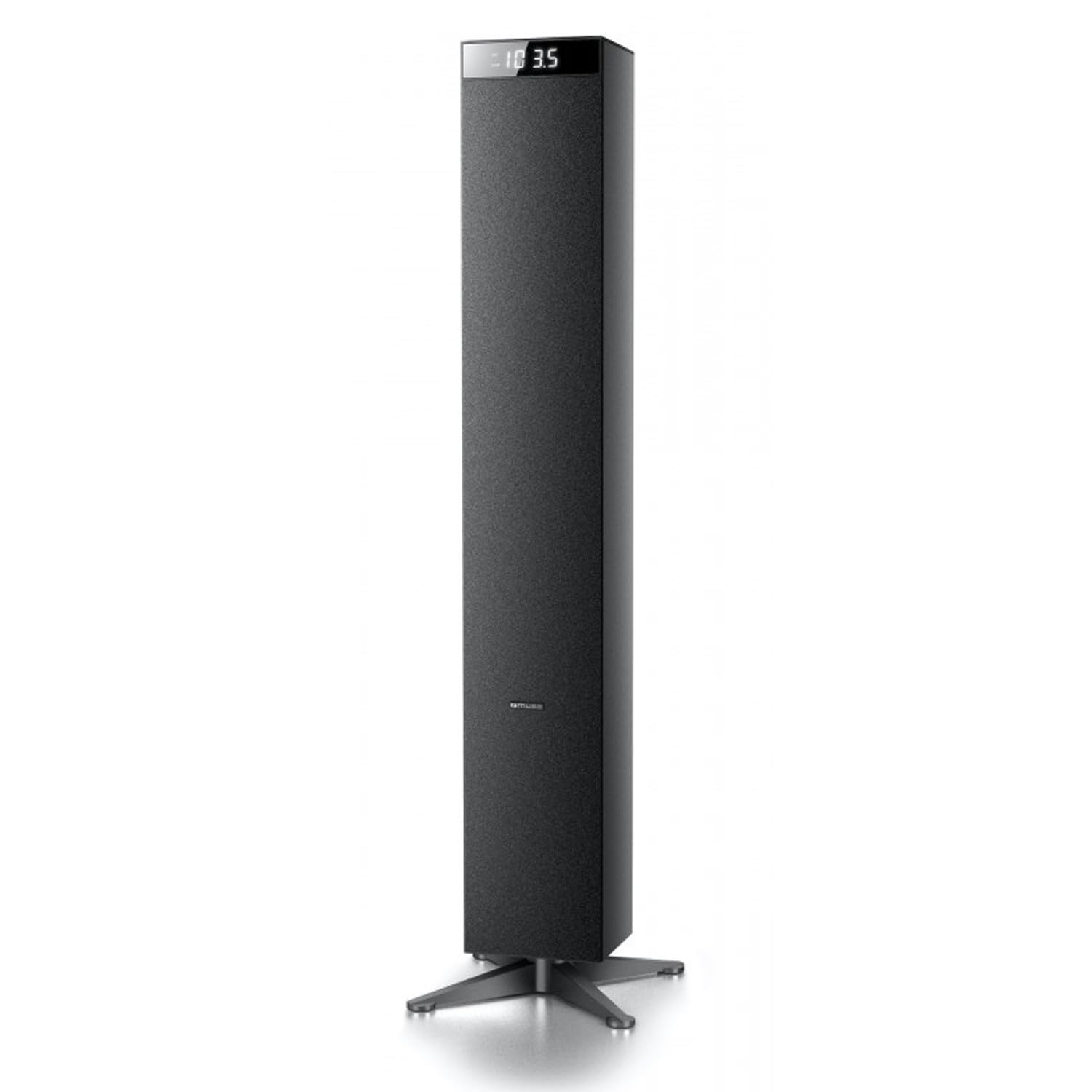
ຮູບພາບ: ທາງຫນ້າ view of the Muse M-1280 BT Bluetooth Tower Speaker, showcasinການອອກແບບສີດຳທີ່ທັນສະໄໝ ແລະ ຈໍສະແດງຜົນປະສົມປະສານ.
ເນື້ອໃນຊຸດ
ກ່ອນການຕິດຕັ້ງ, ກະລຸນາຮັບປະກັນວ່າທຸກລາຍການມີຢູ່ໃນຊຸດ:
- Muse M-1280 BT Bluetooth Tower Speaker
- ການຄວບຄຸມໄລຍະໄກ
- ສາຍເສີມ
- ຄູ່ມືເລີ່ມຕົ້ນດ່ວນ
- ສາຍໄຟ
ຄໍາແນະນໍາການຕິດຕັ້ງ
- ການຫຸ້ມຫໍ່: ເອົາລຳໂພງ ແລະອຸປະກອນເສີມທັງໝົດອອກຈາກເຄື່ອງຫຸ້ມຫໍ່ຢ່າງລະມັດລະວັງ.
- ການຈັດວາງ: Position the M-1280 BT speaker on a stable, flat surface. Ensure it is placed in a location with good ventilation and away from direct sunlight, heat sources, or moisture. The speaker is designed for floor standing.
- ເຊື່ອມຕໍ່ພະລັງງານ: Insert the power cable into the AC IN port on the back of the speaker, then plug the other end into a standard wall outlet.
- ການເປີດເຄື່ອງເບື້ອງຕົ້ນ: Press the Power button on the top panel or the remote control to turn on the speaker. The display will illuminate.

Image: The Muse M-1280 BT speaker positioned in a room, with a detailed view of its top control panel and phone dock.
ຄໍາແນະນໍາການດໍາເນີນງານ
1. ການເລືອກແຫຼ່ງຂໍ້ມູນ
ກົດ ແຫຼ່ງຂໍ້ມູນ button on the top panel or remote control to cycle through available input modes: Bluetooth, FM Radio, USB, SD, and AUX.
2. ແບບ Bluetooth
- ເລືອກ Bluetooth mode using the SOURCE button. The display will show "BT" and flash, indicating it's in pairing mode.
- On your smartphone, tablet, laptop, or PC, enable Bluetooth and search for available devices.
- ເລືອກ "M-1280 BT" from the list of devices. Once paired, the speaker will emit a confirmation sound, and "BT" on the display will stop flashing.
- You can now play audio from your connected device. Use the playback controls on your device or the speaker's top panel/remote (Play/Pause, Next/Previous Track) to manage your music.
3. ໂໝດວິທະຍຸ FM
- ເລືອກ ວິທະຍຸ FM mode using the SOURCE button.
- ເພື່ອສະແກນອັດຕະໂນມັດ ແລະ ບັນທຶກສະຖານີ, ໃຫ້ກົດປຸ່ມຄ້າງໄວ້ ຫຼິ້ນ/ຢຸດຊົ່ວຄາວ button (often labeled as "SCAN" or "AUTO" in radio mode). The speaker will scan for available FM stations and store them.
- ໃຊ້ ຕິດຕາມຕໍ່ໄປ/ກ່ອນໜ້ານີ້ ປຸ່ມເພື່ອນໍາທາງຜ່ານສະຖານີທີ່ບັນທຶກໄວ້.
- For manual tuning, briefly press the ຕິດຕາມຕໍ່ໄປ/ກ່ອນໜ້ານີ້ ປຸ່ມເພື່ອປັບຄວາມຖີ່ເທື່ອລະກ້າວ.
4. ການຫຼິ້ນບັດ USB/SD
- ໃສ່ USB flash drive ເຂົ້າໄປໃນ ພອດ USB or an SD card into the ຊ່ອງໃສ່ບັດ SD.
- ເລືອກ USB or SD mode using the SOURCE button. The speaker will automatically begin playing compatible audio files.
- Use the playback controls (Play/Pause, Next/Previous Track) on the speaker or remote to control playback.
- Note: The speaker supports common audio file formats. Unsupported file types will not play.
5. ເຄື່ອງປ້ອນຂໍ້ມູນ AUX
- Connect one end of the provided Aux-In cable to the AUX ໃນ port on the speaker and the other end to the audio output (e.g., headphone jack) of your external audio device.
- ເລືອກ AUX mode using the SOURCE button.
- Play audio from your external device. Volume can be controlled via the speaker or the external device.
6. ສາຍສາກ USB
The USB port on the speaker can also be used to charge compatible devices. Connect your device's USB charging cable to the speaker's USB port.

Image: Close-up of the Muse M-1280 BT speaker's top panel, highlighting the control buttons, digital display, and integrated dock for mobile devices.
ບໍາລຸງຮັກສາ
- ທໍາຄວາມສະອາດ: Use a soft, dry cloth to clean the speaker's exterior. Do not use liquid cleaners or abrasive materials, as they may damage the finish.
- ການເກັບຮັກສາ: ຖ້າເກັບຮັກສາລໍາໂພງໄວ້ເປັນເວລາດົນ, ໃຫ້ຖອດມັນອອກຈາກພະລັງງານແລະເກັບໄວ້ໃນບ່ອນທີ່ເຢັນ, ແຫ້ງ.
- ການລະບາຍອາກາດ: ໃຫ້ແນ່ໃຈວ່າຊ່ອງລະບາຍອາກາດຂອງລໍາໂພງບໍ່ໄດ້ຖືກປິດກັ້ນເພື່ອປ້ອງກັນຄວາມຮ້ອນເກີນໄປ.
ການແກ້ໄຂບັນຫາ
| ບັນຫາ | ສາເຫດທີ່ເປັນໄປໄດ້ | ການແກ້ໄຂ |
|---|---|---|
| ບໍ່ມີພະລັງງານ | ສາຍໄຟບໍ່ໄດ້ເຊື່ອມຕໍ່; ປລັກສຽບໄຟບໍ່ເຮັດວຽກ | Ensure power cable is securely connected to both the speaker and a working wall outlet. |
| ບໍ່ມີສຽງ | Volume too low; Incorrect source selected; Device not paired (Bluetooth) or connected (AUX) | Increase volume. Select the correct input source. For Bluetooth, ensure device is paired. For AUX, ensure cable is fully inserted. |
| ການຈັບຄູ່ Bluetooth ລົ້ມເຫລວ | ລຳໂພງບໍ່ຢູ່ໃນໂໝດຈັບຄູ່; ອຸປະກອນໄກເກີນໄປ; ແຊກແຊງ | Ensure speaker is in Bluetooth pairing mode (BT flashing). Move device closer to speaker. Avoid strong electromagnetic interference. |
| ການຮັບວິທະຍຸ FM ບໍ່ດີ | ສັນຍານອ່ອນ; ເສົາອາກາດບໍ່ໄດ້ຍືດອອກ | Adjust the position of the speaker. Ensure the FM antenna (if external) is fully extended. |
ຂໍ້ມູນຈໍາເພາະ
- ຊື່ຕົວແບບ: M-1280 BT
- ຍີ່ຫໍ້: MUSE
- ປະເພດລຳໂພງ: ຫໍ
- ເຕັກໂນໂລຍີການເຊື່ອມຕໍ່: Bluetooth (A2DP), USB, SD, AUX
- ພະລັງງານອອກ: 120 ວັດ (ສູງສຸດ)
- ເຄື່ອງຮັບສັນຍານວິທະຍຸ: PLL FM
- ພອດ USB: Yes (for playback and charging)
- SD Card Reader: ແມ່ນແລ້ວ
- ແຫຼ່ງພະລັງງານ: ສາຍໄຟຟ້າ
- ວັດສະດຸ: ໄມ້
- ສີ: ດຳ
- ຂະໜາດ (L x W x H): 20 x 18 x 101.2 ຊມ (7.87 x 7.09 x 39.84 ນິ້ວ)
- ນ້ຳໜັກ: 5.3 ກິໂລກຣາມ (11.68 ປອນ)
- ອົງປະກອບລວມ: Aux-In Cable, Quick Start Guide, Remote Control
- ອຸປະກອນທີ່ເຂົ້າກັນໄດ້: Smartphone, Laptop, PC
ການຮັບປະກັນແລະການສະຫນັບສະຫນູນ
This Muse M-1280 BT speaker comes with a ການຮັບປະກັນຜູ້ຜະລິດ 1 ປີ ຈາກວັນທີ່ຊື້. ກະລຸນາຮັກສາຫຼັກຖານການຊື້ຂອງທ່ານສໍາລັບການຮຽກຮ້ອງການຮັບປະກັນ.
For technical support, service, or warranty inquiries, please refer to the contact information provided in the Quick Start Guide or visit the official Muse website for your region. Do not attempt to repair the device yourself, as this may void the warranty.


