ແນະນຳ
This manual provides detailed instructions for the installation, operation, and maintenance of your VTech CS6919-26 DECT 6.0 Cordless Phone System. This system includes two full-duplex handsets and a base unit, designed for reliable communication. Please read this manual thoroughly to ensure proper use and to take full advantage ຂອງຄຸນສົມບັດທີ່ມີຢູ່ທັງຫມົດ.
ເນື້ອໃນຊຸດ
Before beginning installation, verify that your package contains the following items:
- VTech CS6919-26 Base Unit
- Two (2) Cordless Handsets
- Two (2) Handset Chargers
- Two (2) Power Adapters for Base Unit and Charger
- Two (2) Rechargeable Battery Packs
- ສາຍໂທລະສັບໜຶ່ງ (1) ສາຍ
- ຕົວຍຶດຕິດຝາ (ທາງເລືອກ)
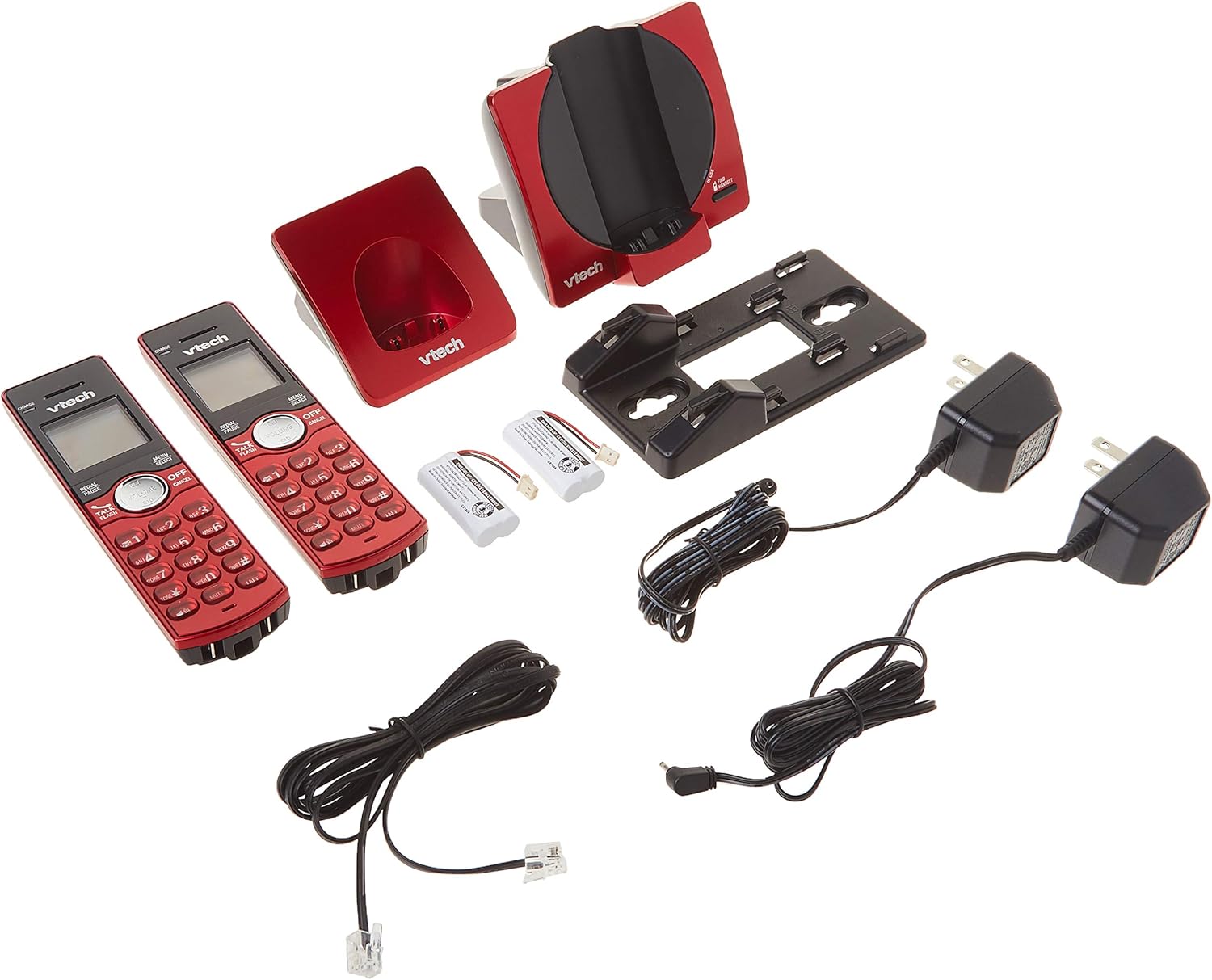
Image: All components of the VTech CS6919-26 Cordless Phone System, including the base unit, two handsets, two chargers, power adapters, battery packs, and telephone line cord.
ຕັ້ງຄ່າ
1. ການຕິດຕັ້ງຫມໍ້ໄຟ
- ເປີດຝາປິດຊ່ອງໃສ່ຫມໍ້ໄຟຢູ່ດ້ານຫຼັງຂອງໂທລະສັບແຕ່ລະລຸ້ນ.
- ສຽບປລັກແບັດເຕີລີ່ໃສ່ຊ່ອງສຽບຢ່າງປອດໄພ.
- Place the battery pack with the label facing up, as indicated.
- ປ່ຽນຝາປິດຊ່ອງໃສ່ຫມໍ້ໄຟ.
2. Base Unit and Charger Connection
- ສຽບປາຍສາຍໂທລະສັບເຂົ້າໃສ່ຊ່ອງສຽບ TEL LINE ຢູ່ດ້ານຫຼັງຂອງໜ່ວຍພື້ນຖານ.
- ສຽບປາຍສາຍໂທລະສັບໃສ່ກັບສຽບຝາໂທລະສັບ.
- ສຽບປາຍນ້ອຍຂອງອະແດບເຕີສາຍໄຟຂອງໜ່ວຍພື້ນຖານໃສ່ຮູສຽບ POWER ຢູ່ດ້ານຫຼັງຂອງໜ່ວຍພື້ນຖານ.
- ສຽບປາຍໃຫຍ່ຂອງອະແດບເຕີພະລັງງານຂອງຫນ່ວຍພື້ນຖານເຂົ້າໄປໃນເຕົ້າສຽບໄຟຟ້າທີ່ບໍ່ໄດ້ຄວບຄຸມໂດຍສະວິດຝາ.
- For each handset charger, plug the small end of its power adapter into the POWER jack on the back of the charger.
- Plug the large end of each charger power adapter into an electrical outlet not controlled by a wall switch.

ຮູບພາບ: ດ້ານຫລັງ view of the VTech CS6919-26 handsets and base unit, illustrating the battery compartments and connection ports for power and telephone line.
3. ການສາກໄຟເບື້ອງຕົ້ນ
Place each handset face forward in its respective base unit or charger. The CHARGE light on the handset will illuminate, indicating proper charging. Allow the handsets to charge for at least 16 hours before initial use to ensure optimal battery performance.

Image: Two VTech CS6919-26 cordless handsets, red in color, resting in their charging cradles. The handsets feature a black display and keypad with red buttons.
4. ທະບຽນໂທລະສັບມືຖື
The handsets included in this package are pre-registered to the base unit. If a handset becomes unregistered or if you purchase additional handsets (up to 5 total), refer to the full user manual for registration procedures.
5. ການຕິດຝາ (ທາງເລືອກ)
The base unit is designed to be table-mountable or wall-mountable. Use the included wall mount bracket and follow the instructions provided in the full user manual for secure wall installation.
ຄໍາແນະນໍາການດໍາເນີນງານ
ໂທອອກ ແລະຮັບສາຍ
- ໂທອອກ: ກົດ ເວົ້າ/ແຟລດ or any dial key, then dial the phone number.
- ເພື່ອຮັບສາຍ: ເມື່ອໂທລະສັບດັງຂຶ້ນ, ກົດ ເວົ້າ/ແຟລດ ຫຼື ປຸ່ມໂທໃດກໍໄດ້.
- ເພື່ອວາງສາຍ: ກົດ ປິດ/ຍົກເລີກ ຫຼືວາງມືຖືໃສ່ເຄື່ອງສາກ.
ລຳໂພງມືຖື Full-Duplex
ເພື່ອເປີດໃຊ້ລຳໂພງໃນລະຫວ່າງການໂທ, ໃຫ້ກົດປຸ່ມ ລໍາໂພງ button. This allows both parties to speak and be heard simultaneously, enhancing conversation clarity.
ໝາຍເລກຜູ້ໂທ/ສາຍລໍຖ້າ
The handset display shows the caller's name and number (if available) for incoming calls. The system stores up to 30 caller ID entries. If you subscribe to call waiting, you will hear a tone when another call comes in while you are on the phone. Press ແຟລດ ເພື່ອປ່ຽນລະຫວ່າງການໂທ.
ປື້ມບັນທຶກໂທລະສັບ
ເກັບຮັກສາຊື່ ແລະຕົວເລກໄດ້ເຖິງ 50 ຢູ່ໃນບັນຊີລາຍການໂທລະສັບເພື່ອໂທຫາດ່ວນ. ເຂົ້າເຖິງປື້ມໂທລະສັບໂດຍການກົດ ເມນູ/ເລືອກ and navigating to the Phonebook option.
Intercom ລະຫວ່າງມືຖື
To initiate an intercom call between two handsets, press INT ຢູ່ໃນໂທລະສັບມືຖືຫນຶ່ງແລະເລືອກເອົາໂທລະສັບມືຖືທີ່ຕ້ອງການທີ່ຈະໂທ.
ການໂທປະຊຸມ
The system supports conferencing between an outside line and up to two cordless handsets. Refer to the full user manual for detailed instructions on setting up a three-way conference call.
Redial and Mute
- ການເປີດເຜີຍ: ກົດ REDIAL/PAUSE ກັບ view 10 ຕົວເລກສຸດທ້າຍ. ກົດ ເວົ້າ/ແຟລດ ເພື່ອໂທຫາເບີທີ່ເລືອກ.
- ປິດສຽງ: ໃນລະຫວ່າງການໂທ, ກົດ ປິດສຽງ/ລຶບ to temporarily silence your microphone. Press it again to unmute.
ການຄວບຄຸມປະລິມານ
Adjust the earpiece or speakerphone volume during a call by pressing the ປະລິມານ buttons on the side of the handset.
ໂໝດງຽບ
Activate Quiet Mode to silence all ringers for a set period. This feature is useful for uninterrupted rest. Access this setting through the handset menu.
ໂທຕັນ
Block unwanted numbers from ringing your phone. You can add numbers to the call block list through the handset menu.
ແບບ ECO
The system features ECO mode power-conserving technology, which automatically adjusts power consumption for optimal battery life and energy efficiency.
ບໍາລຸງຮັກສາ
ທໍາຄວາມສະອາດ
Clean the phone and charger surfaces with a soft, slightly damp ຜ້າ. ຫ້າມໃຊ້ສີດທຳຄວາມສະອາດ ຫຼື ສານເຄມີທີ່ຮຸນແຮງ, ເພາະວ່າພວກມັນອາດຈະທຳລາຍເຄື່ອງສຳ ເລັດຮູບ ຫຼື ອົງປະກອບໄຟຟ້າ.
ການດູແລຫມໍ້ໄຟ
To maintain optimal battery life, fully charge the handsets regularly. If the phone will not be used for an extended period, remove the batteries from the handsets.
ການແກ້ໄຂບັນຫາ
If you experience issues with your phone system, try the following basic troubleshooting steps:
- ບໍ່ມີໂທນໂທ: Ensure the telephone line cord is securely plugged into both the base unit and the wall jack. Check that the base unit power adapter is properly connected to a working electrical outlet.
- ບໍ່ສາມາດໂທ/ຮັບສາຍ: Verify that the handset batteries are charged. Ensure the handset is within range of the base unit. Check if the telephone line is active.
- ຄຸນະພາບສຽງບໍ່ດີ: ຍ້າຍເຂົ້າໄປໃກ້ກັບໜ່ວຍພື້ນຖານ. ກວດເບິ່ງການລົບກວນຈາກອຸປະກອນອີເລັກໂທຣນິກອື່ນໆ (ເຊັ່ນ: ເຣົາເຕີ Wi-Fi, ໄມໂຄເວຟ).
- ມືຖືບໍ່ໄດ້ສາກໄຟ: Ensure the handset is correctly seated in the charger. Check that the charger's power adapter is plugged into a working outlet. Clean the charging contacts on both the handset and charger.
- ຈໍສະແດງຜົນແມ່ນຫວ່າງເປົ່າ: Charge the handset battery. If the issue persists, the battery may need replacement.
For more detailed troubleshooting, refer to the comprehensive user manual or VTech's customer support resources.
ຂໍ້ມູນຈໍາເພາະ
| ໝາຍເລກຕົວແບບ | CS6919-26 |
| ເຕັກໂນໂລຊີ | ເຕັກໂນໂລຊີດິຈິຕອລ DECT 6.0 |
| ລວມມີໂທລະສັບມືຖື | 2 (ຂະຫຍາຍໄດ້ເຖິງ 5) |
| ຂະໜາດ (ຫົວໜ່ວຍພື້ນຖານ) | ປະມານ 4.49 x 7.09 x 5.98 ນິ້ວ |
| ນ້ໍາຫນັກລາຍການ | ປະມານ 1.65 ປອນ |
| ວັດສະດຸ | ພາດສະຕິກ |
| ແຫຼ່ງພະລັງງານ | ໄຟຟ້າສາຍ |
| ປະເພດຫມໍ້ໄຟ | Product Specific Rechargeable Batteries (included) |
| ໜ່ວຍຄວາມຈຳ ID ຜູ້ໂທ | 30 ໂທ |
| ປື້ມບັນທຶກໂທລະສັບ | 50 ຊື່ແລະຕົວເລກ |
ຂໍ້ມູນການຮັບປະກັນ
Specific warranty details for the VTech CS6919-26 Cordless Phone System are typically included with the product packaging or available on the official VTech webເວັບໄຊທ໌. ກະລຸນາອ້າງອີງເຖິງຊັບພະຍາກອນເຫຼົ່ານີ້ສຳລັບຂໍ້ມູນກ່ຽວກັບການຄຸ້ມຄອງການຮັບປະກັນ, ຂໍ້ກຳນົດ ແລະ ເງື່ອນໄຂຕ່າງໆ.
ສະຫນັບສະຫນູນ
For further assistance, technical support, or to access additional resources such as FAQs and detailed user guides, please visit the official VTech support website or contact their customer service department. Contact information can usually be found in the product packaging or on the VTech webເວັບໄຊ.


