1. ບົດແນະນຳ
This manual provides detailed instructions for the Sharp EL1750V EL-1750V Two-Color Printing Calculator. This device is designed for efficient financial and general calculations, featuring a two-color printing mechanism for clear record-keeping. It includes functions such as automatic tax keys, a change calculation feature, and a large display for enhanced usability.
ຄຸນນະສົມບັດທີ່ສໍາຄັນປະກອບມີ:
- Two-color printing (positive numbers in black, negative in red) at 2.2 lines per second.
- 12-digit LCD display for large calculations.
- Built-in antimicrobial protection.
- Change calculation feature.
- Automatic Tax Keys (TAX+, TAX-).
- Rounding and Decimal Switches.
- Grand Total (GT) function.
- 4-key memory.
- Cost, Sell, Margin (CSM) keys.
2. ຜະລິດຕະພັນເກີນview
Familiarize yourself with the components and key features of your Sharp EL1750V calculator.

ຮູບ 1: ດ້ານຫນ້າ view of the Sharp EL1750V calculator, showing the display, keypad, and paper roll.

ຮູບ 2: ເກີນview of key functions including Automatic Tax Keys, Rounding Switch, Decimal Switch, Grand Total Function, 4 Key Memory, Backspace Key, and Percent Key.
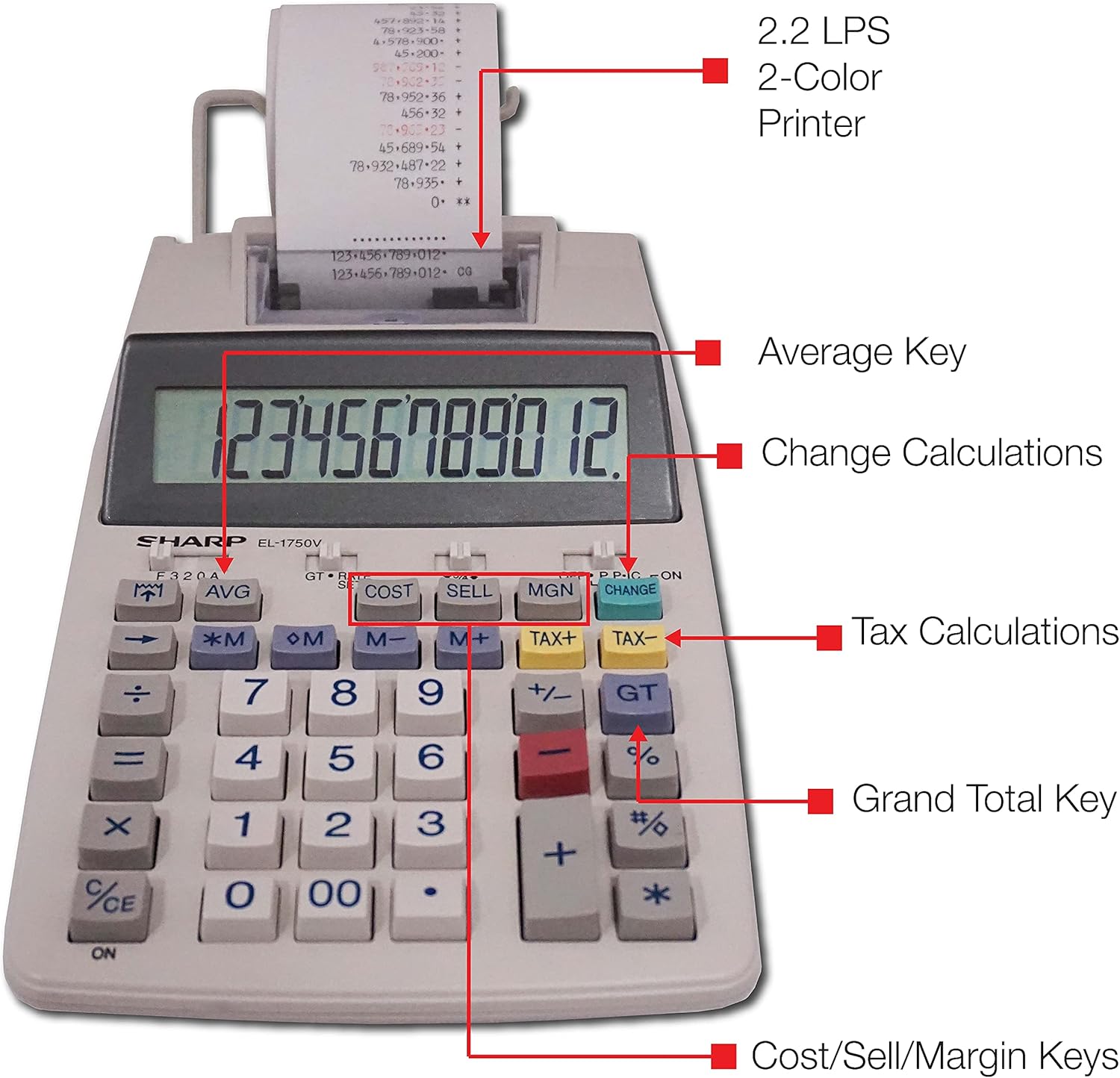
ຮູບທີ 3: ລາຍລະອຽດ view highlighting the 2.2 LPS 2-Color Printer, Average Key, Change Calculations, Tax Calculations, Grand Total Key, and Cost/Sell/Margin Keys.

Figure 4: Dimensions of the Sharp EL1750V calculator, showing a width of 5.9 inches, depth of 9.1 inches, and height of 2 inches, with a 0.75 inch 12-digit LCD display.
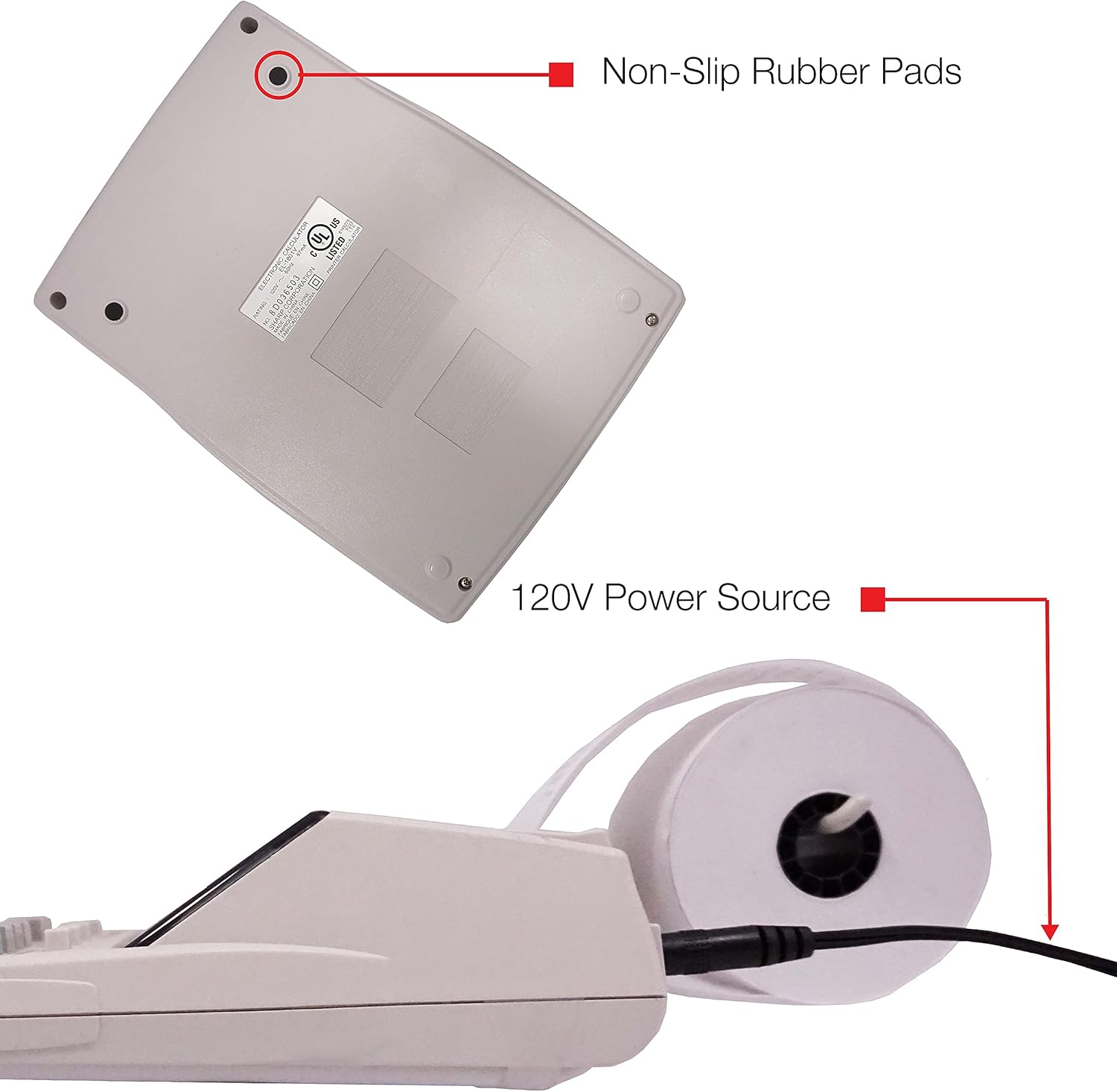
ຮູບທີ 5: ດ້ານລຸ່ມ view of the calculator, illustrating the non-slip rubber pads and the 120V power source input.
3. ຕັ້ງຄ່າ
3.1 ແຫຼ່ງພະລັງງານ
The Sharp EL1750V can be powered by an AC adapter (120V) or batteries. Ensure the correct power source is connected before operation.
- ຜູ້ດັດແປງ AC: Connect the provided AC adapter to the power input port on the side of the calculator (refer to Figure 5) and plug it into a standard 120V electrical outlet.
- ແບັດເຕີຣີ: If using batteries, open the battery compartment (typically on the underside) and insert the required batteries, observing correct polarity.
3.2 ການຕິດຕັ້ງມ້ວນເຈ້ຍ
- Lift the printer cover to expose the paper roll compartment.
- ໃສ່ມ້ວນເຈ້ຍໃໝ່ເຂົ້າໄປໃນຊ່ອງ, ໂດຍຮັບປະກັນວ່າເຈ້ຍປ້ອນຈາກດ້ານລຸ່ມຂອງມ້ວນເຈ້ຍ.
- ປ້ອນຂອບດ້ານເທິງຂອງເຈ້ຍເຂົ້າໄປໃນຊ່ອງໃສ່ກົນໄກຂອງເຄື່ອງພິມຈົນກ່ວາມັນອອກມາຈາກດ້ານເທິງ.
- ປິດຝາເຄື່ອງພິມ.
- Press the paper feed key (often marked with an arrow pointing up) to advance the paper and ensure it is properly aligned.
4. ຄໍາແນະນໍາການດໍາເນີນງານ
4.1 ການຄິດໄລ່ພື້ນຖານ
ປະຕິບັດການດຳເນີນງານຄະນິດສາດມາດຕະຖານ:
- ເພີ່ມ (+): ໃສ່ຕົວເລກທໍາອິດ, ກົດ +, ໃສ່ຕົວເລກທີສອງ, ກົດ =.
- ການຫັກລົບ (-): ໃສ່ຕົວເລກທໍາອິດ, ກົດ -, ໃສ່ຕົວເລກທີສອງ, ກົດ =.
- ຄູນ (x): ໃສ່ຕົວເລກທໍາອິດ, ກົດ x, ໃສ່ຕົວເລກທີສອງ, ກົດ =.
- ພະແນກ (÷): ໃສ່ຕົວເລກທໍາອິດ, ກົດ ÷, ໃສ່ຕົວເລກທີສອງ, ກົດ =.
- ແຈ້ງເຂົ້າ (CE/C): ລຶບລ້າງໝາຍເລກສຸດທ້າຍທີ່ປ້ອນເຂົ້າ.
- ທັງໝົດທີ່ຊັດເຈນ (AC): ລຶບລ້າງລາຍການ ແລະ ການຄິດໄລ່ທັງໝົດ.
4.2 ໜ້າທີ່ພິເສດ
- ການຄິດໄລ່ພາສີ (TAX+, TAX-):
- Set the tax rate using the appropriate function (refer to the calculator's specific tax rate setting procedure, usually involving a dedicated key or mode).
- ໃສ່ຈຳນວນເງິນ, ຈາກນັ້ນກົດ TAX+ ເພື່ອເພີ່ມພາສີ ຫຼື ພາສີ- ຫັກພາສີ.
- ການຄິດໄລ່ການປ່ຽນແປງ (ປ່ຽນ):
- Enter the total amount of the sale.
- ກົດ ປ່ຽນແປງ ກະແຈ.
- ໃສ່ຈໍານວນທີ່ໄດ້ຮັບຈາກລູກຄ້າ.
- ກົດ = to display the change due.
- Grand Total (GT): ກົດ GT to recall the grand total of all previous calculations.
- Memory Functions (M+, M-, RM/CM):
- M+: Adds the displayed value to memory.
- M-: Subtracts the displayed value from memory.
- RM/CM: Recalls memory content (first press) or clears memory (second press).
- ຄ່າໃຊ້ຈ່າຍ, ຂາຍ, ຂອບໃບ (ຕົ້ນທຶນ, ຂາຍ, MGN): These keys are used for profit margin calculations.
- Enter two of the three values (Cost, Selling Price, Margin Percentage) and press the key for the unknown value to calculate it.
- Rounding and Decimal Switches: Adjust these switches (typically located above the keypad) to control the number of decimal places and rounding method for calculations.
5. ບໍາລຸງຮັກສາ
5.1 ການທໍາຄວາມສະອາດ
To maintain the calculator's performance and appearance:
- ເຊັດດ້ານນອກດ້ວຍຜ້າອ່ອນ, ແຫ້ງ.
- ສໍາລັບຝຸ່ນ stubborn, ເລັກນ້ອຍ dampໃສ່ຜ້າດ້ວຍນ້ໍາຫຼືຢາເຮັດຄວາມສະອາດອ່ອນໆ, ບໍ່ມີສານຂັດ.
- Do not use strong solvents or abrasive cleaners, as these can damage the surface or display.
- Avoid spraying liquids directly onto the calculator.
5.2 ການທົດແທນມ້ວນເຈ້ຍ
Replace the paper roll when it runs out or the print becomes faint. Refer to Section 3.2 for installation instructions.
5.3 Ink Roller Replacement
When the print becomes faint or incomplete, the ink roller needs to be replaced. Consult your calculator's specific instructions for ink roller replacement, as the procedure may vary slightly.
6. ການແກ້ໄຂບັນຫາ
| ບັນຫາ | ສາເຫດທີ່ເປັນໄປໄດ້ | ການແກ້ໄຂ |
|---|---|---|
| ເຄື່ອງຄິດເລກບໍ່ເປີດ. | No power, AC adapter not connected, or batteries depleted/incorrectly installed. | Ensure AC adapter is securely plugged in. If using batteries, check battery installation and replace if necessary. |
| ບໍ່ມີຕົວພິມ ຫຼື ຕົວພິມຈາງໆ. | Paper roll empty or incorrectly installed; ink roller needs replacement. | Replace paper roll (Section 3.2). Replace ink roller (Section 5.3). |
| Display shows "E" or error message. | Calculation overflow, division by zero, or incorrect operation sequence. | ກົດ AC to clear the error. Re-enter the calculation carefully. |
| ເຈ້ຍຕິດ. | Paper roll not installed correctly or paper is creased. | Open printer cover, remove jammed paper, and re-install paper roll correctly (Section 3.2). |
7. ຂໍ້ມູນຈໍາເພາະ
- ຕົວແບບ: Sharp EL1750V
- ຈໍສະແດງຜົນ: LCD 12 ຕົວເລກ
- ຄວາມໄວການພິມ: 2.2 ແຖວຕໍ່ວິນາທີ
- Printing Colors: 2 (Black for positive, Red for negative)
- ແຫຼ່ງພະລັງງານ: AC Adapter (120V) or Battery Powered
- ຂະໜາດ (ປະມານ): 5.9 ໃນ (W) x 9.1 in (D) x 2 in (H)
- ນ້ຳໜັກ (ປະມານ): 0.16 ounces (Note: This weight seems unusually low for a printing calculator, likely an error in source data. User should refer to product packaging for accurate weight.)
- ວັດສະດຸ: ພາດສະຕິກ
- ຄຸນນະສົມບັດພິເສດ: Antimicrobial protection, Change calculation, Tax functions, Cost/Sell/Margin functions, Grand Total, 4-key memory.
8. ການຮັບປະກັນແລະການສະຫນັບສະຫນູນ
ສໍາລັບຂໍ້ມູນການຮັບປະກັນ ແລະການຊ່ວຍເຫຼືອດ້ານວິຊາການ, ກະລຸນາເບິ່ງເອກະສານທີ່ລວມຢູ່ໃນການຊື້ຂອງທ່ານ ຫຼືເຂົ້າໄປທີ່ Sharp ຢ່າງເປັນທາງການ webເວັບໄຊ. ຮັກສາໃບຮັບເງິນການຊື້ຂອງທ່ານໄວ້ເປັນຫຼັກຖານການຊື້ສໍາລັບການຮ້ອງຂໍການຮັບປະກັນ.
ຜູ້ຜະລິດ: ແຫຼມ
Webເວັບໄຊ: www.sharpusa.com


