1. ບົດແນະນຳ
This user manual provides detailed instructions for the setup, operation, and maintenance of your VIZIO S2120w-E0 2.0 Sound Stand. Designed to enhance your home audio experience, this sound stand delivers powerful sound in a compact form factor. Please read this manual thoroughly before using the product to ensure proper installation and optimal performance.
2. ເນື້ອໃນຊຸດ
ກວດສອບວ່າລາຍການທັງຫມົດທີ່ລະບຸໄວ້ຂ້າງລຸ່ມນີ້ແມ່ນລວມຢູ່ໃນຊຸດຂອງທ່ານ:
- VIZIO S2120w-E0 2.0 Sound Stand
- ຣີໂມດຄວບຄຸມ (ມີແບັດ AAA 2 ອັນ)
- ສາຍໄຟ
- ສາຍເຄເບີນສຽງແບບ Optical
- RCA ເປັນ 3.5mm ສາຍສຽງ
- ຄູ່ມືເລີ່ມຕົ້ນດ່ວນ
Note: The provided cables facilitate a simple, one-cable setup for most televisions.
3. ຜະລິດຕະພັນເກີນview
The VIZIO S2120w-E0 Sound Stand is designed to sit directly under your television, providing enhanced audio without requiring additional space. It features integrated speakers and controls for a streamlined home theater experience.
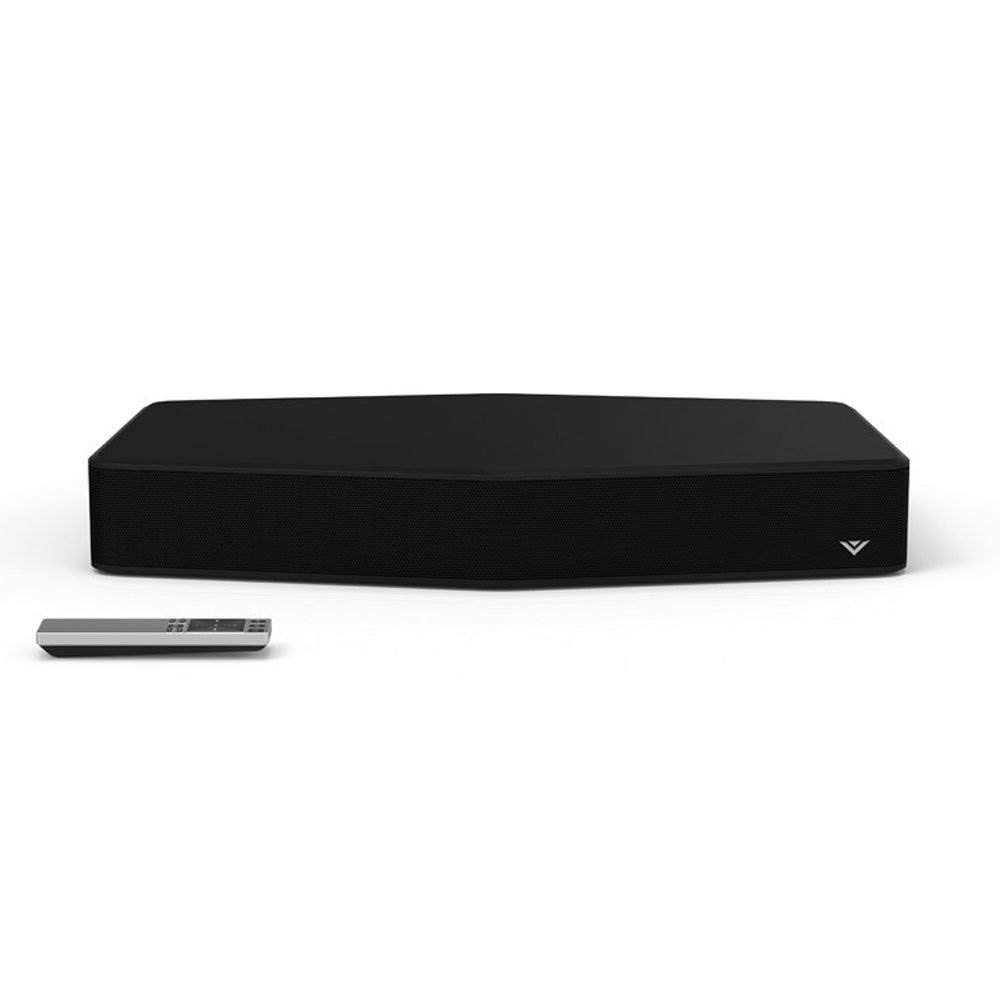
Figure 3.1: VIZIO S2120w-E0 2.0 Sound Stand with its remote control. The sound stand is black with a subtle VIZIO logo on the front right, and the remote is silver and black.

ຮູບ 3.2: ຂ້າງ view of the VIZIO S2120w-E0 Sound Stand, highlighting the control buttons located on the right side. These buttons include Power, Input, Bluetooth, Volume Up, Volume Down, and Mute.
ຕົວຊີ້ວັດກະດານດ້ານຫນ້າ
The front panel of the sound stand features a series of LED lights that indicate the current input, volume level, and active audio modes. These indicators are crucial for understanding the unit's status and adjusting settings.
ການເຊື່ອມຕໍ່ແຜງດ້ານຫລັງ
The rear panel houses various input ports for connecting your television and other audio sources, along with the power input. Refer to the ຕັ້ງຄ່າ section for detailed connection instructions.
4. ຕັ້ງຄ່າ
4.1 ການຈັດວາງທາງດ້ານຮ່າງກາຍ
Place the VIZIO S2120w-E0 Sound Stand on a stable, flat surface directly beneath your television. This unit is designed to support TVs up to 55 inches and weighing up to 60 lbs. Ensure there is adequate ventilation around the unit.
4.2 ການເຊື່ອມຕໍ່ກັບໂທລະພາບຂອງທ່ານ
Before connecting, ensure your TV's sound is set to a low volume or muted. The sound stand offers multiple connection options. Choose the best available option for your television:
- ສຽງດິຈິຕອນທາງແສງ (ແນະນຳ):
Connect one end of the included optical cable to the ທາງເລືອກອອກ port on your TV and the other end to the ທາງເລືອກໃນ port on the sound stand. This connection provides the best audio quality and supports Dolby Digital decoding.
- RCA to 3.5mm Audio:
If your TV has RCA audio output jacks (red and white), connect the RCA ends of the included cable to your TV's OUDIO ອອກ ports. Connect the 3.5mm end to the AUX ໃນ port on the sound stand.
- 3.5mm to 3.5mm Audio:
If your TV has a 3.5mm audio output jack (headphone jack), connect a 3.5mm to 3.5mm audio cable (not included) from your TV's output to the AUX ໃນ port on the sound stand.
After connecting, you may need to adjust your TV's audio output settings to "External Speakers" or "PCM" for optical connections.
4.3 ການເຊື່ອມຕໍ່ພະລັງງານ
ເຊື່ອມຕໍ່ສາຍໄຟກັບ ພະລັງງານ input on the rear of the sound stand, then plug the other end into a working electrical outlet.
5. ຄໍາແນະນໍາການດໍາເນີນງານ
The VIZIO S2120w-E0 can be controlled using the included remote control or the buttons on the side of the unit.
5.1 ເປີດ/ປິດ
ກົດ ພະລັງງານ button on the remote or the side of the sound stand to turn the unit on or off. The LED indicators on the front will illuminate when the unit is powered on.
5.2 ການຄັດເລືອກການປ້ອນຂໍ້ມູນ
ກົດ ປ້ອນຂໍ້ມູນ button on the remote or the side of the sound stand to cycle through available audio inputs (Optical, AUX, Bluetooth). The front panel LEDs will indicate the currently selected input. Allow a few seconds for the sound to engage after changing inputs.
5.3 ການຄວບຄຸມປະລິມານ
ໃຊ້ ເພີ່ມສຽງ (+) ແລະ ຫຼຸດສຽງ (-) buttons on the remote or the side of the unit to adjust the sound level. Press the ປິດສຽງ ປຸ່ມເພື່ອປິດສຽງຊົ່ວຄາວ.
5.4 ການຈັບຄູ່ Bluetooth
ເພື່ອຖ່າຍທອດສຽງແບບໄຮ້ສາຍຈາກໂທລະສັບສະຫຼາດ ຫຼື ແທັບເລັດ:
- ກົດ BLUETOOTH button on the remote or the side of the sound stand. The Bluetooth LED indicator will begin to flash.
- On your mobile device, enable Bluetooth and search for new devices. Select "VIZIO S2120w-E0" from the list.
- Once paired, the Bluetooth LED indicator on the sound stand will glow solid. You can now play audio from your device through the sound stand.
5.5 ໂໝດສຽງ ແລະ ການປັບປຸງ
The sound stand features several audio technologies to optimize your listening experience:
- DTS TruVolume: This feature helps maintain consistent volume levels, preventing sudden jumps in loudness during commercials or scene changes. Press the TVOL button on the remote to activate/deactivate.
- DTS Studio Sound: Enhances audio fidelity and provides a wider sound stage.
- Bass/Treble ຄວບຄຸມ: ໃຊ້ ເບສ ແລະ ຄວບຄຸມ buttons on the remote, followed by the arrow keys, to adjust these levels. Adjusting the bass too high may result in distorted sound.
- DTS TruSurround: Provides a virtual surround sound experience. Experiment with this setting to determine if it enhances your specific content. Some users find it can muddy the sound depending on the room acoustics.
6. ບໍາລຸງຮັກສາ
To ensure the longevity and optimal performance of your VIZIO S2120w-E0 Sound Stand:
- ທໍາຄວາມສະອາດ: Gently wipe the unit with a soft, dry, lint-free cloth. Do not use liquid cleaners or abrasive materials, as they may damage the finish.
- ການລະບາຍອາກາດ: Ensure that the ventilation openings are not blocked. Do not place the unit on soft surfaces that may obstruct airflow.
- ພະລັງງານ: Disconnect the power cable from the electrical outlet if the unit will not be used for an extended period.
7. ການແກ້ໄຂບັນຫາ
If you encounter issues with your sound stand, refer to the following common problems and solutions:
| ບັນຫາ | ການແກ້ໄຂທີ່ເປັນໄປໄດ້ |
|---|---|
| ບໍ່ມີພະລັງງານ |
|
| ບໍ່ມີສຽງ |
|
| ສຽງບິດເບືອນ |
|
| ການຄວບຄຸມໄລຍະໄກບໍ່ເຮັດວຽກ |
|
| ບັນຫາການຈັບຄູ່ Bluetooth |
|
8. ຂໍ້ມູນຈໍາເພາະ
| ຄຸນສົມບັດ | ລາຍລະອຽດ |
|---|---|
| ໝາຍເລກຕົວແບບ | S2120w-E0 |
| ຍີ່ຫໍ້ | VIZIO |
| ປະເພດລຳໂພງ | Soundbar (Sound Stand) |
| ຊ່ອງທາງສຽງ | 2.0 ຊ່ອງ |
| ລະດັບຄວາມກົດດັນສຽງ | ເຖິງ 95 dB |
| ການບິດເບືອນປະສົມກົມກຽວ | ໜ້ອຍກວ່າ 1% |
| ການເຊື່ອມຕໍ່ | Bluetooth, Optical Digital, RCA, 3.5mm Aux |
| ການຖອດລະຫັດສຽງ | Dolby Digital, DTS TruVolume, DTS Studio Sound |
| ຂະໜາດສິນຄ້າ | 21 x 15.5 x 3 ນິ້ວ (ກວ້າງ x ສູງ) |
| ນ້ໍາຫນັກລາຍການ | 7.26 ປອນ |
| ສີ | ດຳ |
| ສະຫນັບສະຫນູນໂທລະພາບ | Up to 55 inches, up to 60 lbs |
| ໝໍ້ໄຟ (ຣີໂໝດ) | ໝໍ້ໄຟ AAA 2 ອັນ (ລວມ) |
9. ການຮັບປະກັນແລະການສະຫນັບສະຫນູນ
For warranty information and technical support, please refer to the documentation included with your product at the time of purchase or visit the official VIZIO support website. VIZIO provides customer support and resources to assist with any questions or issues you may encounter.
VIZIO ສະຫນັບສະຫນູນ Webເວັບໄຊ: www.vizio.com/support


