1. ບົດແນະນຳ
This manual provides detailed instructions for the VIZIO SB2920-C6 29-inch 2.0 Channel Sound Bar. This sound bar is designed to enhance your audio experience for television, music, and home theater content. It features two full-range stereo speakers and DTS audio technologies for improved sound quality. The compact and streamlined design allows for versatile placement options.
2. ສິ່ງທີ່ຢູ່ໃນກ່ອງ
ກວດສອບວ່າມີອົງປະກອບທັງຫມົດກ່ອນທີ່ຈະສືບຕໍ່ການຕັ້ງຄ່າ.
- VIZIO SB2920-C6 29-Inch 2.0 Channel Sound Bar
- ການຄວບຄຸມໄລຍະໄກ
- 2 x ຫມໍ້ໄຟ AAA (ສໍາລັບໄລຍະໄກ)
- ສາຍເຄເບີນສຽງແບບ Optical
- Digital Coaxial Cable
- ສາຍ Stereo RCA
- ສາຍໄຟ
3. ຜະລິດຕະພັນເກີນview
3.1 ແນວ ໜ້າ View

ຮູບ 1: ດ້ານຫນ້າ view of the VIZIO SB2920-C6 Sound Bar, showcasing ການອອກແບບ sleek, ສີດໍາຂອງຕົນ.
3.2 ການຄວບຄຸມແຜງເທິງ

Figure 2: Close-up of the top panel, showing buttons for Power, Input, Bluetooth Pairing, Volume Down, and Volume Up.
3.3 ການເຊື່ອມຕໍ່ແຜງດ້ານຫລັງ

ຮູບ 3: ດ້ານຫລັງເຕັມ view of the sound bar, illustrating all available input and output ports.

Figure 4: Close-up of the rear panel showing AUX (1) and AUX (2) input ports.
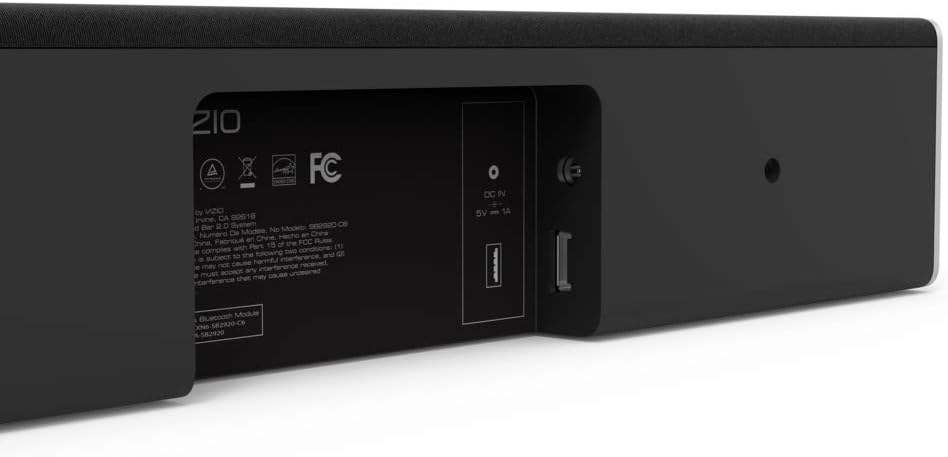
Figure 5: Close-up of the rear panel showing DIGITAL (Coaxial), OPTICAL, and SUB OUT ports.
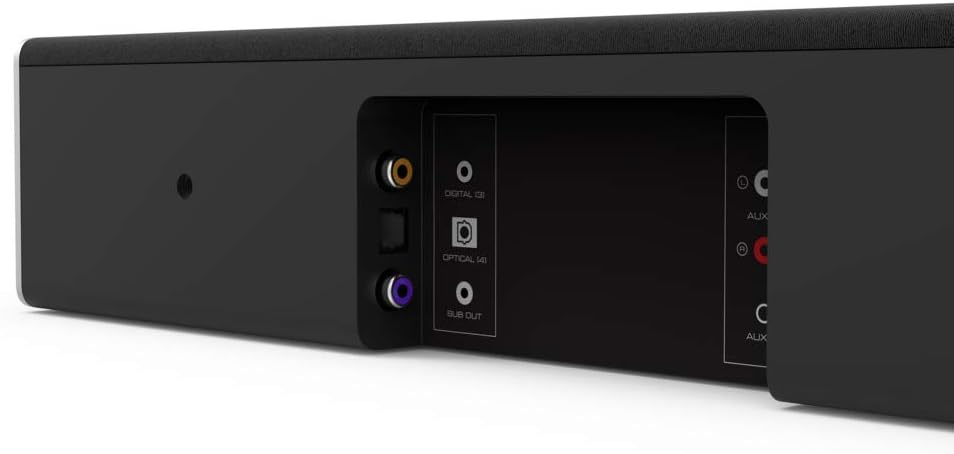
Figure 6: Close-up of the rear panel showing DC IN (power) and USB (Service Only) ports.
3.4 ຂະໜາດ

Figure 7: Diagram illustrating the dimensions of the VIZIO SB2920-C6 Sound Bar: 3 inches Depth x 29 inches Width x 3 inches Height.
4. ຕັ້ງຄ່າ
Follow these steps to set up your VIZIO SB2920-C6 Sound Bar.
4.1 ການຈັດວາງ
- Place the sound bar on a flat surface below your TV or mount it on a wall. Ensure it is centered with your TV for optimal sound distribution.
- Keep the sound bar clear of obstructions that could block the sound.
4.2 ການເຊື່ອມຕໍ່ກັບໂທລະພາບຂອງທ່ານ
ເລືອກຫນຶ່ງໃນວິທີການເຊື່ອມຕໍ່ຕໍ່ໄປນີ້:
- Optical Cable (Recommended for best audio quality):
Connect one end of the optical cable to the OPTICAL port on the sound bar (Figure 5) and the other end to the Optical Digital Audio Out port on your TV. - Digital Coaxial Cable:
Connect one end of the digital coaxial cable to the DIGITAL port on the sound bar (Figure 5) and the other end to the Coaxial Digital Audio Out port on your TV. - RCA Stereo Cables:
Connect the red and white RCA cables to the AUX (1) ports on the sound bar (Figure 4) and the corresponding red and white Audio Out ports on your TV.
4.3 ການເຊື່ອມຕໍ່ພະລັງງານ
Connect the power cable to the DC IN port on the sound bar (Figure 6) and then plug the other end into a wall outlet.
4.4 ຄູ່ມືວິດີໂອຕິດຕັ້ງ
Video 1: Official VIZIO guide on how to set up your VIZIO Sound Bar, demonstrating connection and initial configuration.
5. ຄໍາແນະນໍາການດໍາເນີນງານ
5.1 ເປີດ/ປິດ
- ກົດ ພະລັງງານ button on the sound bar (Figure 2) or the remote control to turn the unit on or off.
5.2 ການປັບລະດັບສຽງ
- ໃຊ້ ປະລິມານຂຶ້ນ (+) ແລະ ບໍລິມາດລົງ (-) buttons on the sound bar (Figure 2) or the remote control to adjust the sound level.
5.3 ການເລືອກແຫຼ່ງປ້ອນຂໍ້ມູນ
- ກົດ ປ້ອນຂໍ້ມູນ button on the sound bar (Figure 2) or the remote control to cycle through available input sources (Optical, Digital, AUX 1, AUX 2, Bluetooth).
5.4 ການຈັບຄູ່ Bluetooth
- ກົດຄ້າງໄວ້ Bluetooth button on the sound bar (Figure 2) or the remote control for 3 seconds to enter pairing mode. The LED indicators on the sound bar will flash.
- On your mobile device, search for the VIZIO sound bar in the Bluetooth settings and select it to pair.
5.5 ການປັບປຸງສຽງ
- The remote control includes buttons for ເບສ, EQ, ແລະ ສຽງດັງ to customize your audio experience.
- DTS technologies such as DTS Studio Sound, DTS TruVolume, and DTS TruSurround are integrated to optimize sound quality. Refer to the full user manual for detailed adjustments.
6. ບໍາລຸງຮັກສາ
To ensure the longevity and optimal performance of your VIZIO SB2920-C6 Sound Bar, follow these maintenance guidelines:
- ທໍາຄວາມສະອາດ: Use a soft, dry cloth to clean the surface of the sound bar. Avoid using liquid cleaners or abrasive materials, as they may damage the finish.
- ການລະບາຍອາກາດ: Ensure that the sound bar's vents are not blocked to prevent overheating.
- ການເກັບຮັກສາ: ຖ້າເກັບຮັກສາແຖບສຽງໄວ້ເປັນເວລາດົນ, ໃຫ້ຖອດສາຍໄຟອອກຈາກແຫຼ່ງຈ່າຍໄຟ ແລະ ເກັບຮັກສາໄວ້ໃນບ່ອນທີ່ເຢັນ ແລະ ແຫ້ງ.
7. ການແກ້ໄຂບັນຫາ
ຖ້າເຈົ້າພົບບັນຫາກັບແຖບສຽງຂອງເຈົ້າ, ໃຫ້ອ້າງອີງເຖິງວິທີແກ້ໄຂທົ່ວໄປຕໍ່ໄປນີ້:
| ບັນຫາ | ການແກ້ໄຂທີ່ເປັນໄປໄດ້ |
|---|---|
| ບໍ່ມີສຽງຈາກແຖບສຽງ |
|
| ສຽງຕັດອອກເປັນໄລຍະໆ |
|
| ອຸປະກອນ Bluetooth ບໍ່ສາມາດຈັບຄູ່ໄດ້ |
|
| ຄຸນະພາບສຽງບໍ່ດີ |
|
8. ຂໍ້ມູນຈໍາເພາະ
| ຄຸນສົມບັດ | ລາຍລະອຽດ |
|---|---|
| ຊື່ຕົວແບບ | SB2920-C6 |
| ປະເພດລຳໂພງ | ແຖບສຽງ |
| ການຕັ້ງຄ່າຊ່ອງສຽງອ້ອມຮອບ | 2.0 |
| ເຕັກໂນໂລຊີການເຊື່ອມຕໍ່ | Bluetooth |
| ເຕັກໂນໂລຊີການສື່ສານໄຮ້ສາຍ | Bluetooth |
| ຮູບແບບການອອກສຽງ | ສະເຕຣິໂອ, ອ້ອມຮອບ |
| ຄຸນນະສົມບັດພິເສດ | Bass Boost, Wireless |
| ອຸປະກອນທີ່ເຂົ້າກັນໄດ້ | Personal Computer, Phones, Smartphone, Tablet, Television |
| ວິທີການຄວບຄຸມ | ໄລຍະໄກ |
| ສີ | ດຳ |
| ຂະໜາດສິນຄ້າ (ກວ້າງ x ຍາວ x ສູງ) | 3" x 29" x 3" |
| ນ້ໍາຫນັກລາຍການ | 4.5 ປອນ |
| ປະເພດການຕິດຕັ້ງ | ຕິດຝາ |
| ຕ້ອງໃຊ້ແບັດເຕີຣີ | 2 AAA (ລວມ) |
9. ການຮັບປະກັນແລະການສະຫນັບສະຫນູນ
The VIZIO SB2920-C6 Sound Bar typically comes with a 12-month limited warranty. For specific warranty details, registration, and technical support, please refer to the official VIZIO website or contact VIZIO customer service directly. Keep your purchase receipt for warranty claims.
ສະຫນັບສະຫນູນອອນໄລນ໌: ຢ້ຽມຢາມ www.vizio.com/support
ບໍລິການລູກຄ້າ: Refer to your product packaging or the VIZIO support webເວັບໄຊສໍາລັບຂໍ້ມູນຕິດຕໍ່ໃນປະຈຸບັນ.