ແນະນຳ
The Electro-Harmonix Super Pulsar is an advanced stereo tap tremolo pedal offering extensive control over modulation waveforms, rhythmic patterns, and signal routing. This manual provides detailed instructions for setup, operation, and maintenance to help you unlock its full potential.
ເນື້ອໃນຊຸດ
- Electro-Harmonix Super Pulsar Stereo Tap Tremolo Pedal
- 9.6VDC-200mA Power Adapter
- ຄູ່ມືຜູ້ໃຊ້

Image: The Electro-Harmonix Super Pulsar pedal box, indicating the product packaging.
ສິນຄ້າເກີນview
The Super Pulsar features a comprehensive control panel and versatile input/output options.

Image: The Electro-Harmonix Super Pulsar pedal connected with input and output cables, showcasing its front panel controls and jacks.
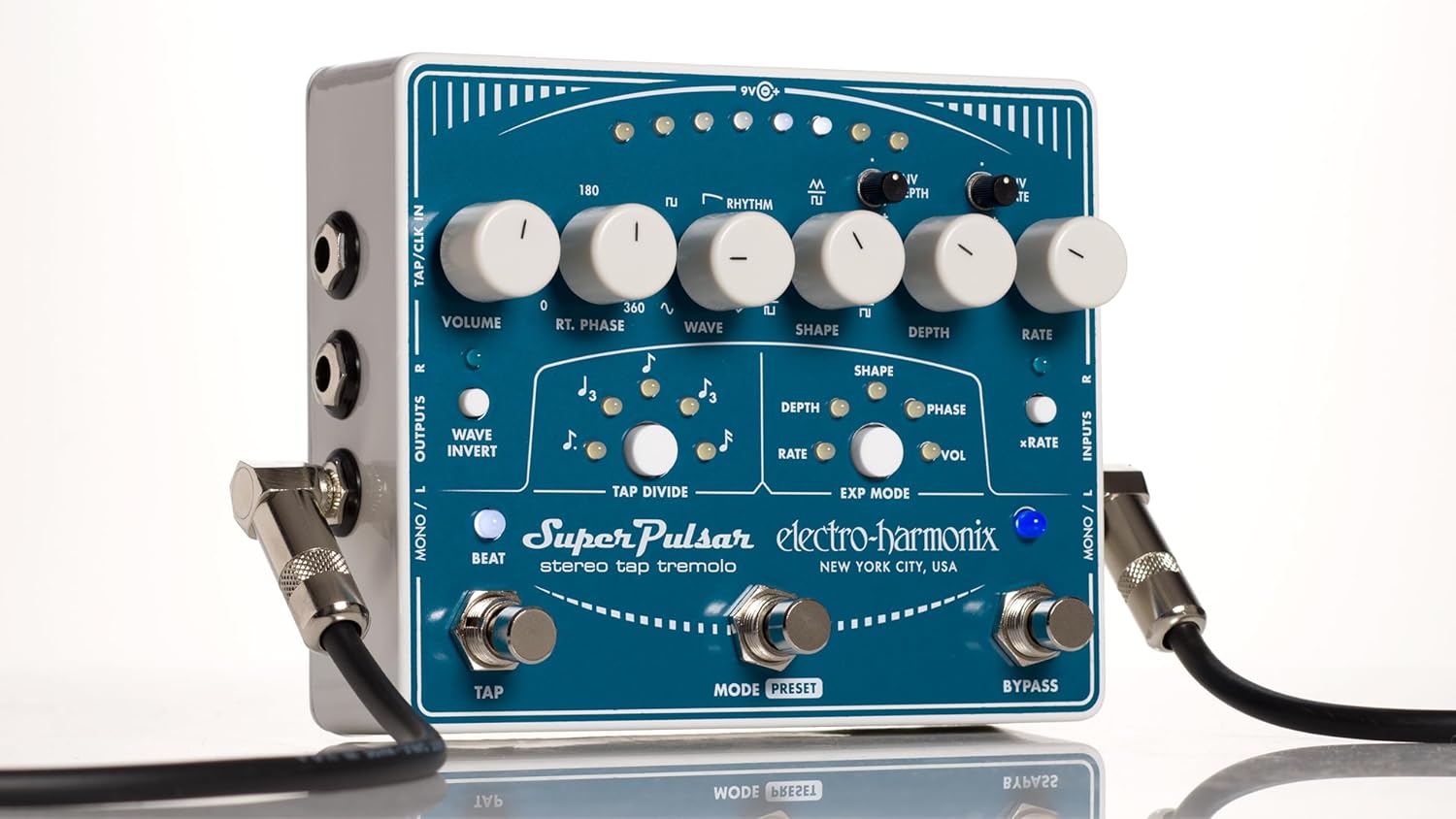
ຮູບພາບ: ລາຍລະອຽດເທິງລົງລຸ່ມ view of the Electro-Harmonix Super Pulsar pedal, highlighting all knobs, switches, and LED indicators.
ຕັ້ງຄ່າ
ການເຊື່ອມຕໍ່ພະລັງງານ
Connect the included 9.6VDC-200mA power adapter to the 9V jack on the pedal. Ensure the power source matches the pedal's requirements.
ການເຊື່ອມຕໍ່ສຽງ
- Mono Input/Output: For standard mono operation, connect your instrument to the MONO/L INPUT and your amplifier to the MONO/L OUTPUT.
- ຜົນຜະລິດສະເຕີລິໂອ: For stereo effects, connect your instrument to the MONO/L INPUT and connect two amplifiers or channels to the MONO/L OUTPUT and R OUTPUT.
- ອິນພຸດ/ອອກສະເຕີລິໂອ: For full stereo processing, connect your stereo source to the MONO/L INPUT and R INPUT, and connect to your stereo amplifier setup via the MONO/L OUTPUT and R OUTPUT.
External Control (Optional)
The pedal supports external tap tempo and clock synchronization via the TAP/CLK IN jack. An expression pedal can be connected to the EXP jack for real-time control over various parameters.
ຄໍາແນະນໍາການດໍາເນີນງານ
ການຄວບຄຸມview
- ປຸ່ມລະດັບສຽງ: Adjusts the overall output level of the tremolo effect.
- RT. PHASE Knob: Controls the phase relationship between the left and right channels in stereo modes, from 0 to 360 degrees.
- WAVE Knob: Selects the modulation waveform (sine, triangle, pulse) or rhythmic patterns.
- SHAPE Knob: Modifies the shape of the selected waveform.
- ປຸ່ມ DEPTH: Adjusts the intensity or depth of the tremolo effect.
- RATE Knob: Sets the speed of the tremolo modulation.
- ENV DEPTH Mini-Knob: Controls the sensitivity of the envelope follower for depth modulation.
- ENV RATE Mini-Knob: Controls the sensitivity of the envelope follower for rate modulation.
- WAVE INVERT Switch: Inverts the tremolo waveform.
- BEAT Switch: Toggles the beat indicator LED.
- TAP DIVIDE Buttons: Select rhythmic subdivisions for tap tempo.
- EXP MODE Switches: Assigns the expression pedal to control SHAPE, DEPTH, RATE, PHASE, or VOL.
- xRATE Switch: Engages a high-speed mode for ring modulation effects.
ຟັງຊັນສະວິດຕີນ
- TAP ສະຫຼັບຕີນ: Tap twice or more to set the tremolo rate.
- MODE/PRESET Footswitch: Toggles between modes or cycles through saved presets.
- ສະວິດຕີນ BYPASS: Engages or bypasses the tremolo effect.
ຄຸນນະສົມບັດແລະຮູບແບບທີ່ສໍາຄັນ
Adjustable Modulation Waveforms
The WAVE knob allows selection of classic sine, triangle, and pulse waveforms. Additionally, nine rhythmic patterns can be selected and customized.
Tap Tempo and Tap Divide
Synchronize the tremolo rate with your music using the TAP footswitch. The TAP DIVIDE buttons allow for precise rhythmic subdivisions.
Stereo Phase Adjustment
The RT. PHASE knob enables fine-tuning of the right channel's phase relative to the left, creating dynamic stereo movement.
Envelope Follower Modulation
The ENV DEPTH and ENV RATE controls allow the tremolo's depth and rate to respond dynamically to your playing dynamics.
ການເກັບຮັກສາໄວ້ລ່ວງຫນ້າແລະ Recall
Save and recall up to eight customized preset programs for instant access to your favorite tremolo settings.
ການຄວບຄຸມ Pedal ການສະແດງອອກ
Connect an expression pedal to control parameters like Rate, Depth, Shape, Phase, or Volume in real-time for expressive performance.
Ring Modulation (xRATE)
Engage the xRATE switch to push the tremolo into extreme speeds, creating unique ring modulation effects.
Video: Demonstrates the various features and sounds of the Electro-Harmonix Super Pulsar Stereo Tap Tremolo pedal, including waveform adjustments, tap tempo, and expression pedal control.
Reverse Tremolo
By manipulating the WAVE and SHAPE controls, you can achieve a reverse tremolo effect, creating unique swells and backward-sounding textures.
Rhythmic Tremolo
The RHYTHM knob allows you to create complex rhythmic tremolo patterns with up to 16 steps, adding intricate movement to your sound.
ຂໍ້ມູນຈໍາເພາະ
- ນ້ໍາຫນັກລາຍການ: 2.2 ປອນ
- ຂະໜາດຜະລິດຕະພັນ: 5.75"L x 4.75"W x 2.5"H
- ແຫຼ່ງພະລັງງານ: ໄຟຟ້າມີສາຍ (9V)
- ຮູບແບບສັນຍານ: ອະນາລັອກ
- ການໂຕ້ຕອບຮາດແວ: ສຽງ 1/4 ນິ້ວ
- ຮູບແບບ: Stereo Tap Tremolo
- ໝາຍເລກຕົວແບບ: SUPERPULSAR
- ASIN: B00SJDUN5M
ບໍາລຸງຮັກສາ
- ທໍາຄວາມສະອາດ: ໃຊ້ຜ້າອ່ອນໆ, ແຫ້ງເພື່ອເຮັດຄວາມສະອາດ pedal. ຫຼີກລ້ຽງການເຮັດຄວາມສະອາດຂັດຫຼືສານລະລາຍ.
- ການເກັບຮັກສາ: ເກັບຮັກສາ pedal ໃນບ່ອນທີ່ເຢັນ, ແຫ້ງ, ຫ່າງຈາກແສງແດດໂດຍກົງແລະອຸນຫະພູມທີ່ສຸດ.
- ພະລັງງານ: Always use the specified power adapter to prevent damage.
ການແກ້ໄຂບັນຫາ
- ບໍ່ມີສຽງ: Check all cable connections, power supply, and ensure the pedal is not in bypass mode. Verify instrument and amplifier volume levels.
- ສຽງອ່ອນ ຫຼື ສຽງບິດເບືອນ: Ensure proper input levels. Check for faulty cables or power supply.
- Tremolo Not Engaging: Verify the BYPASS footswitch is engaged. Check DEPTH and RATE knob settings.
- LEDs Not Lighting: ຢືນຢັນວ່າແຫຼ່ງຈ່າຍໄຟໄດ້ເຊື່ອມຕໍ່ ແລະ ເຮັດວຽກໄດ້.
ການຮັບປະກັນແລະການສະຫນັບສະຫນູນ
For warranty information and technical support, please visit the official Electro-Harmonix webເວັບໄຊ ຫຼືຕິດຕໍ່ບໍລິການລູກຄ້າຂອງເຂົາເຈົ້າ.
Electro-Harmonix Official Webເວັບໄຊ


